
You are viewing a potentially older version of this package. View Latest Version
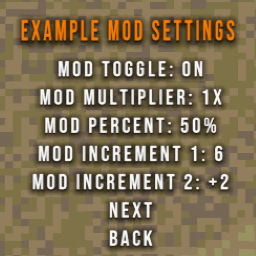
Mod Settings Extender gives CloverPit modders a plug-in framework for adding adjustable mod settings into a newly created "Mods" menu inside the game's settings.
This will not show the MODS settings menu until at least one mod uses it!
ModSettingsExtender (copy the DLL or add the project).public class ExampleMod : BaseUnityPlugin
{
private ConfigEntry<bool> toggleDisplay = null!;
private ConfigEntry<int> luckModifier = null!;
private ConfigEntry<float> tripleSixChance = null!;
private ConfigEntry<float> coinMultiplier = null!;
private ConfigEntry<string> difficultyMode = null!;
private void Awake()
{
toggleDisplay = Config.Bind("General", "Toggle Display", true, "Turns the mod on/off");
luckModifier = Config.Bind("General", "Luck Modifier", 0, "Adds base luck (0-15).");
tripleSixChance = Config.Bind("General", "Triple 666 Chance", 1.5f, "Percent chance for Triple 666 to occur.");
coinMultiplier = Config.Bind("General", "Coin Multiplier", 1f, "Applies a coin multiplier between 0.5x and 4x.");
difficultyMode = Config.Bind("General", "Difficulty Mode", "Harder", "Cycle through difficulty presets.");
ModSettingsRegistry.RegisterPage("Example Mod", page =>
{
page.OnOff("Toggle Display", toggleDisplay);
page.Int("Luck Modifier", luckModifier, min: 0, max: 15, step: 1);
page.Percent("Triple 666 Chance", tripleSixChance, minPercent: 0f, maxPercent: 30f, step: 0.5f);
page.Multiplier("Coin Multiplier", coinMultiplier, minMultiplier: 0.5f, maxMultiplier: 4f, step: 0.5f);
page.Cycle("Difficulty Mode", difficultyMode, "Harder", "Better", "Faster", "Stronger");
});
}
}
OnOff(label, entry) — Boolean toggle with "On" / "Off" suffixes.Int(label, entry, min?, max?, step?) — Integer stepper; left/right click adjusts.Percent(label, entry, step?, min?, max?) — Formats the value as <value>%.Multiplier(label, entry, minMultiplier, maxMultiplier, step, ...) — Float stepper rendered as <value>x; pass an options list if you prefer discrete presets.Cycle(label, entry, values...) — Loops through custom string or enum options.AddToggle(...) / AddIntStepper(...) — Lower-level hooks for custom labels, wrap, and callbacks.AddItem(labelFunc, onSelect, onAdjust) — Full-control entry for bespoke menu behavior.All config files created through BepInEx end up in the BepInEx/config directory.