TimbnChestLabels
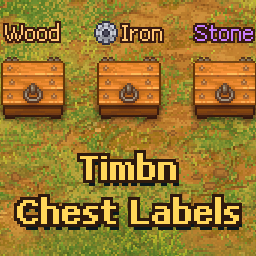
Name your chests. The name floats over the chest in the same style as grave quality, so you can tell your chests apart at a glance.Timbn Chest Labels
Name your chests. The name floats over the chest in the same style as grave quality, so you can tell your chests apart at a glance.
How It Works
- Walk up to a chest. Next to
Openyou'll see a second key,Label(the Work key, F by default). - Press it and type a name, then press OK or Enter.
- The name now shows over that chest whenever you're nearby.
- Press
Labelagain to change the name. Save it empty to remove it.
Good To Know
-
You can color a name with a color tag, such as
<color=#c77dff>Relics</color> -
You can put one of the game's icons in a name with a sprite tag, such as
<sprite name="gear">Iron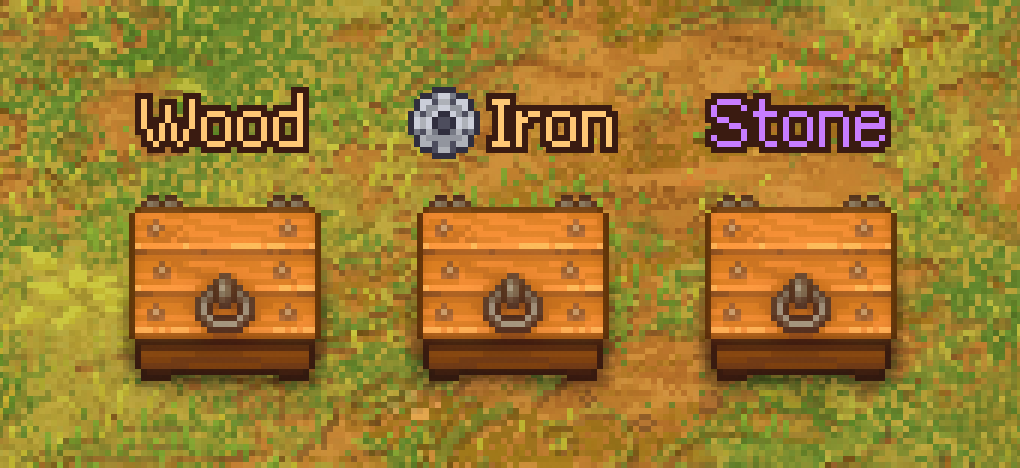
-
Names are saved with your game and come back when you load.
-
Taking a chest apart loses its name.
-
If you uninstall the mod, your chests stay as they are, just without names.
Every icon name
alchemy_flask, barracks, brz, brz-m, cell_time, city_quality, corpse, craft_status_not_enough_items, craft_status_not_enough_space, craft_status_wait, cross, day_envy, day_gluttony, day_lust, day_pride, day_sloth, day_wrath, energy, energy_1, energy_2, energy_3, envy, equip_icon_armor, equip_icon_arrow, equip_icon_sword, faith, fire, gear, gld, gld-m, gluttony, greed, happiness, happiness_cross, hint_inspiration, hint_minus, hint_plus, hp, icon_axe_not_equipped, icon_coins_bubble, icon_fishing_bubble, icon_fishingrod_not_equipped, icon_ghost, icon_hammer_not_equipped, icon_lock, icon_order_repeatable, icon_order_repeatable-done, icon_pickaxe_not_equipped, icon_pray_bubble, icon_shovel_not_equipped, icon_skull_1, icon_smile01, icon_smile02, icon_smile03, icon_speech_bubble, icon_star, icon_stop, icon_sword, icon_sword_not_equipped, icon_time, icon_view_bubble, icon-cell-green, icon-flag_secondary-blue-timer, icon-gear-disabled, icon-quality-bronze, icon-quality-gold, icon-quality-silver, insanity, insanity_1, insanity_2, insanity_3, inspiration_bar_point-blue, inspiration_bar_point-green, inspiration_bar_point-orange, inspiration_bar_point-red, inspiration_bar_point-yellow, inspiration_point-blue, inspiration_point-green, inspiration_point-orange, inspiration_point-red, inspiration_point-yellow, item_icon-hand, lust, max_energy, max_insanity, no_energy, no_insanity, organ_hrt, organ_mis_hrt, panic, pride, quality_icon-solver, r_chinese, r_japanese, r_korean, reputation-citizens, rskull, rskull-zombie_window, rskull-zombie_window-active_prk, rskull-zombie_window-inactive_perk, rune_b, rune_g, rune_r, science, skull, skull-zombie_window, sloth, slv, slv-m, squad_equip_icon-arrow, squad_equip_icon-no_equip, squad_equip_icon-spear, squad_equip_icon-sword, talent_blue, talent_blue_not_enough, talent_blue-inactive, talent_green, talent_green_not_enough, talent_green-inactive, talent_orange, talent_orange_not_enough, talent_orange-inactive, talent_red, talent_red_not_enough, talent_red-inactive, talent_yellow, talent_yellow_not_enough, talent_yellow-inactive, talent-no_talent, tech_blue, tech_green, tech_red, techpoint_icon-blue-s, techpoint_icon-green-s, techpoint_icon-red-s, village_REP, wr, wr_red, wrath, wrskull, wskull, zb-columbarium, zb-flower_beds, zb-grava_decor, zb-lanterns, zb-sculptures, zb-seats, zombie
Requirements
- BepInExPack
- Timbn Core 2.1.0 or newer
Troubleshooting
If a game update changes something a Timbn mod relies on, that mod stays off instead of running half broken, and BepInEx/LogOutput.log says which part failed. Include the startup line from that log when reporting a problem.