AdvancedBIOCOM
Holographic ammo readout next to your weapon, plus a booster-aware bio tracker charge indicator. Hot-reloadable config, works with EWC and EMP.Advanced BIOCOM
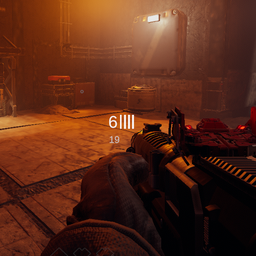
Adds a holographic projection next to your weapon that shows ammunition information: the current magazine, a segmented ammo bar and the reserve count. It behaves like a small piece of equipment attached to the gun rather than a corner HUD widget.
It also shows the bio tracker charge: a line-art icon under the ammo readout that fills up while the tracker recharges, so you always know when the next scan is ready.
Everything is configurable through a plain text file, and the file is hot-reloadable — edit and save while the game is running, changes apply within a second.
Features
- Ammo readout — magazine count, segmented bar, reserve count, drawn next to the weapon.
- Low ammo warning — turns red when the magazine drops to or below a configurable percentage (25% by default).
- Bio tracker charge — a line-art icon under the ammo readout, filling left to right while the tracker recharges (red), solid white when ready.
- Optional charge bar — a small vertical bar with a
READYlabel near the tool readout, for a quick glance. - Follows the gun — the widget is projected from a point on the weapon and scales with distance and FOV.
- Aim-down-sights mode — while scoped, the widget glides to a fixed screen position (bottom-left by default) so it never covers the sight.
- Smooth transitions — position and scale are interpolated, so drawing and aiming do not snap.
- Hides with the HUD — opening the map, the ESC menu or the end screen hides it, via the game's own HUD visibility call.
- Emp aware — detects the EMP mod's suppression state (see compatibility below).
- Hot reload —
BepInEx\config\AdvancedBIOCOM.cfgis re-read while the game runs.
Configuration
BepInEx\config\AdvancedBIOCOM.cfg, ten sections:
| Section | What it controls |
|---|---|
1-General |
master switch, hide in menus, FOV scaling, hot reload |
2-Content |
show clip / reserve / bars, number of bars |
3-Size |
overall size multiplier, font sizes, bar width/height/gap |
4-Position |
weapon-local offset (hip fire) and screen pixel offset |
5-Style |
colours, low-ammo percentage, opacity, outline |
6-Scaling |
reference distance/FOV, min/max scale, smoothing speed |
7-ADS |
ADS detection FOV, viewport anchor (X/Y), extra scale |
8-EMP |
EMP detection, IgnoreEMP to keep the widget visible during EMP |
9-Debug |
verbose logging |
10-BioBar |
vertical charge bar near the tool readout: toggle, thickness, length, offsets, colours, opacity, HideWhenReady |
10-BioIcon |
icon under the ammo readout: toggle, scale, offset, colours, opacity, HideWhenReady |
Every option has a Chinese + English comment.
Bio tracker indicators
Both indicators are independent — you can disable either one, or run both:
[10-BioBar]
BarEnabled = true      # vertical bar + READY label
Thickness = 8          # bar thickness in pixels
Length = 34            # bar length in pixels
OffsetX = 215          # distance from the right screen edge
OffsetY = 186          # distance from the top screen edge
Opacity = 0.65
HideWhenReady = false

[10-BioIcon]
IconEnabled = true     # icon under the ammo readout
IconScale = 1.0
IconOffsetY = 70       # downward offset from the ammo readout
Opacity = 0.65
HideWhenReady = false
Both hide while you are holding the bio tracker itself (its own screen already shows a charge bar).
Compatibility
- Vanilla weapons — reads ammo through the vanilla
BulletWeapon/PlayerAmmoStorageAPIs. - Extra Weapon Customization (EWC) — supported; custom magazine sizes are read from the weapon itself.
- EMP (EOSExt_EMP) — supported. The widget hides while the player HUD is EMP-suppressed by default;
set
IgnoreEMP = trueto keep it visible during EMP. - Bio tracker — reads the tracker's own recharge fields; no patches, no network traffic.
- Third-party map weapons — works with most modded guns added by custom maps, since they use the same
inventory item pipeline. Weapons that do not derive from
BulletWeaponare ignored. - Other UI mods — the widget lives on its own overlay canvas and does not modify the game's HUD objects.
Installation
- Install BepInEx-BepInExPack_GTFO with your mod manager.
- Install this package.
- Start the game with Play Modded.
Notes
- Some weapon types (pistols, and custom pistols from modded maps) sit at a slightly different spot
because the anchor offset is expressed in weapon-local space. Adjust
[4-Position] OffsetX/Y/Zor[7-ADS] ViewportX/Yin the config; hot reload makes tuning quick. - If the bio bar overlaps the tool readout on your resolution, tune
[10-BioBar] OffsetX/OffsetY. - The config file is created on first launch.
Questions
DC: astlibar x2