
WispHornet
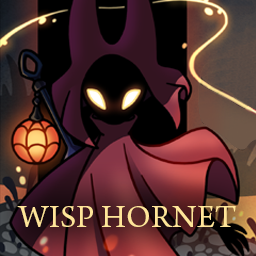
A sprite pack that replaces Hornet sprites with Wisp Hornet! A variant of Hornet in the Wisp Ticket style.
Wisp Hornet
Wisp Hornet skin mod for Hollow Knight: Silksong.
Features
- Completed almost all sprites for a regular playthrough
- Bell Beast Travel animations, using CustomizerCinematic
Installation
- Install BepInEx5 and extract it to the game root folder. Run the game and exit.
- Install Silksong Customizer and extract it to Hollow Knight Silksong\BepInEx\plugins. Run the game and exit.
- Install CustomizerT2D file from Cute Hornet mode page and extract it to Hollow Knight Silksong\BepInEx\plugins.
- Install CustomizerCinematic file from Cute Hornet mode page and extract it to Hollow Knight Silksong\BepInEx\plugins.
- Install this mod and extract it to Hollow Knight Silksong\Hollow Knight Silksong_Data\Mods\Customizer. It's better to keep only one skin folder at the same time here. If you prefer to have multiple folders make sure only one of them have an active.txt file.
Credits
Made by GreenAnanas. That's me!.