
SimpleDeathCounter
A tiny on-screen death counter that just works, with a little animation when you die, with a config that updates in real time without having to restart the game to take effectSimple Death Counter (BepInEx) — v0.2.0
A tiny on-screen death counter that just works, with a little animation when you die, with a config that updates in real time without having to restart the game to take effect
✨ Features
- Live counter — renders
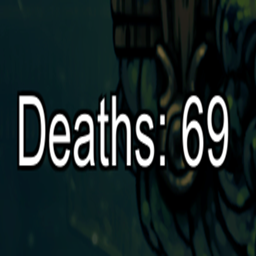
Deaths: Nwhile you play. - Counter animation — brief animation when you die (toggleable).
- Smart sizing — auto-scales with screen height or use a fixed font size.
- Configurable position — move the counter with
PosX/PosY(negative Y = from bottom). - Hot-reload config — saving the
.cfgupdates in-game instantly.
📦 Requirements
- BepInEx 5 (Mono) installed for your game.
🛠️ Installation
With a Mod Manager (r2modman / Thunderstore Mod Manager)
- Install BepInEx 5 for the game.
- Add/enable Simple Death Counter in your profile.
- Launch the game.
Manual Install
-
Install BepInEx 5.
-
Copy
SimpleDeathCounter.dllto:<GameFolder>\BepInEx\plugins\ -
Run the game once to generate the config.
⚙️ Configuration
File:
<GameFolder>\BepInEx\config\Nordbo.SimpleDeathCounter.cfg
Hot-reload: Save the file while the game is running—changes apply immediately.
Keys:
[UI]
PosX = 24                ; pixels from the left
PosY = -72               ; pixels (negative = distance from bottom)
FontSize = 26            ; used when AutoFontSize = false
AutoFontSize = true      ; if true, ~3% of screen height
EnableDeathAnimation = true

[Data]
DeathCount = 0           ; current total (you can edit/reset)
Tips
- Want a fixed size? Set
AutoFontSize = falseand adjustFontSize. - Move the counter up from the bottom by using a negative
PosY(e.g.,-72).
🧪 Usage
- The overlay shows
Deaths: 1234. - Each death increments the count and triggers a short pop animation (if enabled).
🔁 Reset / Edit the Count
-
Open the config and set:
[Data] DeathCount = 0 -
Save the file—overlay updates instantly.
❌ Uninstall
Delete:
<GameFolder>\BepInEx\plugins\SimpleDeathCounter.dll
(Optional) Remove the config:
<GameFolder>\BepInEx\config\Nordbo.SimpleDeathCounter.cfg
📝 Notes
- Only deaths while the mod is active are counted (no retroactive counts).
- If you run into issues, check
BepInEx\LogOutput.logand share logs when reporting.