ShowDamage&HealthBar MOD | 伤害显示&敌人血条模组
Video Tutorial | 视频教程 (Only Chinese)
B站视频教程: https://www.bilibili.com/video/BV1kNaizqEFD
Description | 简介
English: A mod that displays enemy health bars and damage numbers when attacking enemies in the game. All features are fully configurable to suit your preferences.
中文: 在攻击敌人后显示血条以及玩家对其造成的伤害数字的模组。所有功能都可以根据您的喜好进行配置。
Features | 功能
English
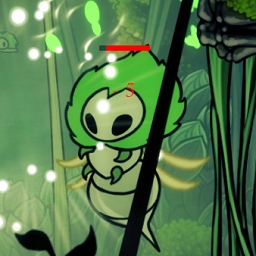
- Enemy Health Bar: Display health bars based on enemy health percentage after attacking. Health bars maintain fixed orientation (left to right) regardless of enemy facing direction
- Damage Text Display: Show damage numbers briefly when dealing damage to enemies
- Health Numbers Display: Show "Current HP/Max HP" text above health bars with customizable font size and color
- Fully Configurable: All features can be customized through configuration files
中文
- 敌人血条: 攻击敌人后,显示基于敌人生命值百分比的血条,血条不受敌人翻转方向影响,始终保持固定方向(从左向右)
- 伤害文本显示: 攻击敌人后,短暂地显示本次伤害值文本
- 血量数值显示: 血条上方可显示"当前血量/最大血量"的数值文本,支持自定义字体大小和颜色
- 完全可配置: 一切都是可以配置的
Screenshots | 截图
 Preview of the mod in action | 模组效果预览
 BOSS feature | BOSS血条功能
Configuration | 可配置项
Display Settings | 显示设置
- ShowHealthBar | 显示血条 -
Boolean (默认: true) - Enable/disable health bar display | 启用/禁用血条显示
- ShowDamageText | 显示伤害文本 -
Boolean (默认: true) - Enable/disable damage text display | 启用/禁用伤害文本显示
Damage Text Settings | 伤害文本设置
- DamageTextDuration | 伤害文本持续时间 -
Float (默认: 2.0) - Duration in seconds for damage text display | 伤害文本显示持续时间(秒)
- DamageTextFontSize | 伤害文本字体大小 -
Integer (默认: 24) - Font size for damage text | 伤害文本的字体大小
- DamageTextColor | 伤害文本颜色 -
String (默认: "#FF0000") - Color for damage text (hex format) | 伤害文本颜色(十六进制格式)
Health Bar Settings | 血条设置
- HealthBarFillColor | 血条填充颜色 -
String (默认: "#FF0000") - Color for health bar fill (hex format) | 血条填充颜色(十六进制格式)
- HealthBarScale | 血条大小倍数 -
Float (默认: 1.0) - Scale multiplier for health bar size | 血条大小倍数(如0.5为缩小一半,2.0为放大一倍)
Health Numbers Settings | 血量数值设置
- ShowHealthBarNumbers | 显示血量数值 -
Boolean (默认: true) - Enable/disable health numbers display above health bars | 启用/禁用血条上方的血量数值显示
- HealthBarNumbersFontSize | 血量数值字体大小 -
Integer (默认: 12) - Font size for health numbers text | 血量数值文本的字体大小(受HealthBarScale影响)
- HealthBarNumbersColor | 血量数值颜色 -
String (默认: "#FFFFFF") - Color for health numbers text (hex format) | 血量数值文本颜色(十六进制格式)
- NumbersInsideBar | 数值文本显示在血条内部 -
Boolean (默认: false) - Whether to display health numbers inside the health bar | 是否将血量数值显示在血条内部而不是上方
- NumbersVerticalOffset | 数值文本垂直偏移 -
Float (默认: 0.3) - Vertical offset of health numbers relative to health bar | 血量数值文本相对于血条的上下偏移值(正值向上,负值向下)
BOSS Health Bar Settings | BOSS血条设置
- BossHealthThreshold | BOSS血量阈值 -
Float (默认: 200.0) - Health threshold to activate BOSS health bar | 激活BOSS血条的血量阈值
- BossHealthBarFillColor | BOSS血条填充颜色 -
String (默认: "#FF4500") - Color for BOSS health bar fill (hex format) | BOSS血条填充颜色(十六进制格式)
- BossHealthBarBottomPosition | BOSS血条显示在底部 -
Boolean (默认: false) - Whether to display BOSS health bar at bottom of screen | 是否将BOSS血条显示在屏幕底部(false=顶部)
- BossHealthBarTextColor | BOSS血条文本颜色 -
String (默认: "#FFFFFF") - Color for BOSS health bar text (hex format) | BOSS血条文本颜色(十六进制格式)
Configuration File Location | 配置文件位置
Path | 路径: BepInEx/config/Xiaohai.Silksong_HealthBar.cfg
The configuration file will be automatically generated after the first run. You can modify the settings and restart the game to apply changes.
配置文件将在首次运行后自动生成。您可以修改设置并重启游戏以应用更改。
Installation | 安装方法
English
- Install BepInEx if you haven't already
- Download the latest release from Thunderstore
- Extract the mod files to your
BepInEx/plugins folder
- Launch the game and enjoy!
中文
- 如果尚未安装,请先安装 BepInEx
- 从 Thunderstore 下载最新版本
- 将模组文件解压到
BepInEx/plugins 文件夹
- 启动游戏并享受!
Author | 作者
Name | 姓名: Xiaohai 小海
Email | 邮箱: [email protected]
Bilibili | B站: https://space.bilibili.com/2055787437
Changelog | 更新日志
Version 1.0.4
- Major Fix: Completely fixed health bar remnant issues! Health bars will be hidden when enemy health ≤ 0 / when enemy collider is inactive / when enemy hasn't taken damage for N seconds. Triple protection mechanism ensures 99% of remnant issues are resolved!
- New Feature: Added unique BOSS health bar that activates when enemy health exceeds threshold. Customizable bar color, position (top or bottom of screen), font color, and activation HP threshold
- New Feature: Added NumbersInsideBar and NumbersVerticalOffset configuration options for flexible positioning of health number text on regular enemy health bars
- Enhancement: Refactored default configuration (white health bar and black font) to better match game aesthetics
- 重大修复: 彻底修复血条残留问题!当敌人生命值小于等于0时/当敌人碰撞体未激活时/当敌人N秒内未受击时,都会隐藏血条显示!三重机制保险,99%的残留问题都会解决!
- 新功能: 新增独特BOSS血条,当敌人血量超过阈值时,即可激活BOSS血条。可以自定义血条颜色,位置(屏幕上方或者下方),以及字体颜色和激活HP阈值
- 新功能: 新增NumbersInsideBar和NumbersVerticalOffset配置项,可以自由设置普通敌人血条数值文字的位置
- 改进: 重构了配置项的默认配置(白色血条和黑色字体),使其更符合游戏风格
Version 1.0.3
- New Feature: Health bars are no longer affected by enemy flip direction, always facing up and in a fixed direction (left to right)
- New Feature: Added configurable "Current HP/Max HP" text display above health bars (ShowHealthBarNumbers)
- New Feature: Added customizable font size for health numbers (HealthBarNumbersFontSize)
- New Feature: Added customizable color for health numbers (HealthBarNumbersColor)
- Enhancement: Dynamic Canvas sizing to prevent text display issues with large fonts
- Bug Fix: Real-time enemy max health updates to prevent issues with boss phase transitions
- Bug Fix: Health bars are properly destroyed when enemy health reaches 0 but enemy is not destroyed (fixes summoned creature health bar remnants)
- Note: Boss phase fixes are not fully tested. If issues persist, please provide save files to [email protected]
- 新功能: 血条不再受敌人的翻转方向影响,始终朝上并且是固定方向的(从左向右)
- 新功能: 添加了可配置的"当前血量/最大血量"文本显示功能 (ShowHealthBarNumbers)
- 新功能: 添加了血量数值字体大小自定义功能 (HealthBarNumbersFontSize)
- 新功能: 添加了血量数值颜色自定义功能 (HealthBarNumbersColor)
- 改进: 动态Canvas大小设置,防止字体太大时不显示的问题
- 修复: 实时更新敌人最大血量,防止类似转阶段的情况敌人生命值暴增后导致的可能出现的BUG
- 修复: 当敌人生命值为0时,如果该敌人没有被销毁,生命条也会被销毁(尝试修复召唤物血量残留)
- 注意: 关于BOSS阶段修复功能未经完全测试,如有问题请提供存档文件至邮箱 [email protected]
Version 1.0.2
- New Feature: Added configurable health bar fill color (HealthBarFillColor)
- New Feature: Added configurable health bar scale multiplier (HealthBarScale)
- Enhancement: Health bar appearance can now be customized through configuration
- 新功能: 添加了可配置的血条填充颜色 (HealthBarFillColor)
- 新功能: 添加了可配置的血条大小倍数 (HealthBarScale)
- 改进: 血条外观现在可以通过配置文件自定义
Version 1.0.1
- Bug Fix: Fixed the bug where the maximum font size could only be set to 50. The issue was caused by the Canvas size being too small.
- Initial Release: Basic enemy health bar and damage text display functionality
- 修复: 修复了最大字体大小只能设置为50的bug。这个问题是由于Canvas大小设置得过小导致的。
- 初始版本: 基本的敌人血条和伤害文本显示功能
Future Plans | 更新计划
English
Currently, only core functionality has been implemented. Future updates will include UI styling and beautification to better match the game's aesthetic.
中文
暂时只做了核心功能,以后会进行UI的风格化和美化,使其更符合游戏的风格。
License | 许可协议
本MOD基于 知识共享署名 4.0 国际许可协议 (CC BY 4.0) 发布。
您可以自由地:
- 共享 — 在任何媒介以任何形式复制、发行本作品
- 演绎 — 修改、转换或以本作品为基础进行创作,包括商业性使用
惟须遵守下列条件:
- 署名 — 您必须给出适当的署名(@小海 Xiaohai)。
以下行为必须标记作者署名:
- 在视频平台进行介绍推广
- 其他模组平台引用
- 对MOD进行二次开发和引用
- 任何商业用途或修改
- 本说明的主要用途是敬告某些平台,不要再偷我MOD但是说是自己的了!这样只会打击模组开发者的热情!
打赏
如果您喜欢这个MOD,可以考虑打赏支持开发者继续创作更多优质内容!
微信

支付宝