

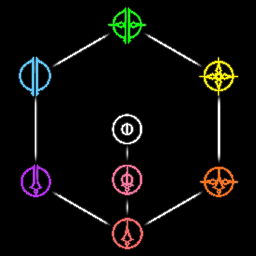
Extra Tool Colors
Adds combo tool colors and tool color transmog.Extra Tool Colors
A mod for Silksong that adds new combo tool types to the game.
Features
- 4 new tool types
- Green: Blue + Yellow
- Orange: Yellow + Red
- Purple: Blue + Red
- Pink: Red + Skill
- Tool type transmogrification
- Use F1 to open the bepinex configuration manager and adjust the game's tool types
- Tool types are refreshed when you open your inventory, but won't be automatically unequipped if they are in an invalid slot
Limitations
- Tools that are red, pink, or white (skill) cannot be set to any type other than those 3. This is to prevent some buggy behavior due to the non-attack slots in a crest having binds for attack tools for some reason.
Planned Features
- 3 new tool types
- Light Blue: Blue + skill
- Light Yellow: Yellow + skill
- Rainbow: All base types
- Switch from configuration manager to Mod Menu Mod for settings
- Add per save settings
- Transmog Randomization
- Crest slot transmog
- Modded Tool and Crest Transmog Integration
Modded Tools
This section is intended for developers of mods that add custom tools.
If you want to add a pink tool, you need to first decide if it should have limited uses (like red tools) or unlimited uses (meaning that it would consume silk like a skill).
For a limited use skill, set its default type to red (1). For an unlimited use skill, set its default type to skill (0).
Then, apply the following postfix, replacing the string with the internal ID of your custom tool:
[HarmonyPostfix]
[HarmonyPatch(typeof(ExtraToolColors.ExtraToolColors), nameof(ExtraToolColors.ExtraToolColors.GetChangedTools))]
public static void GetChangedToolsPostfix(ref Dictionary<string, ToolItemType> __result)
{
    string toolName = "INSERT_INTERNAL_TOOL_NAME_HERE";
    if (__result.ContainsKey(toolName))
        __result[toolName] = ExtraToolColors.ExtraToolColors.Pink;
    else
        __result.Add(toolName, ExtraToolColors.ExtraToolColors.Pink);
}