

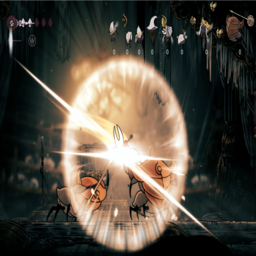
NonStopHallsGauntlet
Fight in a never ending High Halls gauntletNonStopHallsGauntlet
DISCLAIMER:
- The mod can unlock all the crests and tools. It will alter your completion percents and achievements.
- The mod doesn't take care of the save states. Be careful about that!
- This mod sets up a never ending High Halls gauntlet
- Challenge yourself and beat your own enemy kill score that is displayed live during the fight
- Mod Placement: BepInEx/plugins/ModFolder
Press F1 to set the fighting conditions.
- Press right shift key to teleport next to the gauntlet, enter in the arena and the fight will begin.
- All the player and enemy settings are applied when the battle starts.
- Enemies will keep spawning randomly and there will be endless waves, until Hornet dies!
The mod enables:
- Dash
- Wall Jump
- Double Jump
- Drifter's Cloak
- Harpoon Dash
- All Silk Skill abilities
- Silk Hearts
- Nail upgrades
- Possibility to unlock all the tools
- Possibility to unlock all the crests
Red Tools: A mechanism that spawns equipped red tools
- Red tools equipped on the current crest will spawn in the fight
- If more than one red tools are equipped, all of them will spawn
- Tools will stop spawning if you are at their max limit on the crest
- If not picked up by Hornet, tool will disappear after some time (adjustable)
All tools and crests: Press Left Shift Key to unlock all of the crests and tools if not available.
Visuals:
- Enemy images are displayed in the top-right corner during combat
- Live kill count shown below enemy images
- Image positions can be adjusted in the config menu
- When Hornet dies, a screenshot of the death condition with killed enemies count will be saved inside the plugins/mod folder
UPDATES:
- Removed folder name specification.
Comments and suggestions: Please report any bug or suggestions on the Hollow Knight SilSong modding channel
Enemy images with their kill count
