

RollingGiant
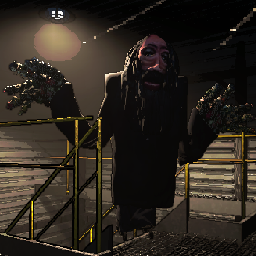
Adds the Rolling Giant as a new enemy type. Sounds are included. V81+Rolling Giant
Note: This is a build created for v81. Reach outs have been made to both modders for the original project and the v73 project. I am happy to deprecate my project/continue the project as/if needed.
Made by Andrew Burke
Adds the Rolling Giant as a new enemy type into Lethal Company. Sounds are included.
Features:
- Adds the Rolling Giant as a new enemy
- Adds a custom scrap poster for the Rolling Giant
- Rolling Giants can be scanned to read their own unique bestiary entry
- Multiple AI behaviours to choose from
- Can change the scale of the Rolling Giant between two values
- Can change the Rolling Giant's movement speed, wait durations, move durations, and more
- Rolling Giants have the option to rotate to face the player if they have been still for some time
- Can change the AI type of all Rolling Giants on the fly:
- A hot key to reload the entire config file
- Hotkeys to cycle between AI types
Installation
Put the /BepInEx/ folder inside your /steamapps/common/Lethal Company/ folder after installing all the dependencies.
Config
Generated after launching the game for the first time.
General
GiantScaleInsideMin- The minimum scale of the Rolling Giant's model inside- This changes how small the Giant can be
GiantScaleInsideMax- The maximum scale of the Rolling Giant's model inside- This changes how big the Giant can be
GiantScaleOutsideMin- The minimum scale of the Rolling Giant's model outside- This changes how small the Giant can be
GiantScaleOutsideMax- The maximum scale of the Rolling Giant's model outside- This changes how big the Giant can be
Spawn Conditions
These do not update when reloading the config in-game!
SpawnIn- Levels that the Rolling Giant can spawn in, separated by their chances of spawning- Vanilla caps at 100, but you can go farther.
- This chance is also a weight, not a percentage
- Higher chance = higher chance to get picked
- The names are what you see in the terminal
Vow:45,March:45,Rend:54,Dine:65,Offense:45,Titan:65
SpawnInOutsideChance- The chance for the Rolling Giant to spawn outside in the levels fromSpawnInSpawnInAny- If the Rolling Giant can spawn on any levelSpawnInAnyChance- The chance for the Rolling Giant to spawn in any levelSpawnInAnyOutsideChance- The chance for the Rolling Giant to spawn outside in any levelCanSpawnInside- If the Rolling Giant should spawn inside the dungeonCanSpawnOutside- If the Rolling Giant should spawn outsideDisableOutsideAtNight- If the Rolling Giant will turn off if it is outside at night.MaxPerLevel- The maximum amount of Rolling Giant's that can spawn in a levelSpawnPosterIn- Where the Rolling Giant poster scrap can spawn, separated by their chances of spawning- Vanilla caps at 100, but you can go farther.
- This chance is also a weight, not a percentage
- Higher chance = higher chance to get picked
- The names are what you see in the terminal
Vow:12,March:12,Rend:12,Dine:12,Offense:12,Titan:12
AI
AiType- Type of AI the Rolling Giant uses- Putting multiple will randomly choose between them each time you land on a moon
- Coilhead - Move when the player is not looking at it
- InverseCoilhead - Move when the player is looking at it
- RandomlyMoveWhileLooking - Randomly move while the player is looking at it
WaitTimeMin- The minimum duration in seconds that the Rolling Giant waits before moving againWaitTimeMax- The maximum duration in seconds that the Rolling Giant waits before moving againRandomMoveTimeMin- The minimum duration in seconds that the Rolling Giant moves toward the playerRandomMoveTimeMax- The maximum duration in seconds that the Rolling Giant moves toward the player
- LookingTooLongKeepsAgro - If the player looks at it for too long it doesn't stop chasing
LookTimeBeforeAgro- How long the player can look at the Rolling Giant before it starts chasing.
- FollowOnceAgro - Once the player is noticed, the Rolling Giant will follow the player constantly
- OnceSeenAgroAfterTimer - Once the player sees the Rolling Giant, it will agro after a timer
WaitTimeMin- The minimum duration in seconds that the Rolling Giant waits before chasing the playerWaitTimeMax- The minimum duration in seconds that the Rolling Giant waits before chasing the player
- All - Will select all of the ai types
AiTypeChangeOnHourInterval- If the AI type should change every X hours. Set to 0 to disableMoveSpeed- Speed of the Rolling Giant's movement in m/s²MoveAcceleration- How long it takes the Rolling Giant to get to its movement speed in secondsMoveDeceleration- How long it takes the Rolling Giant to stop moving in secondsRotateToLookAtPlayer- If the Rolling Giant should rotate to face the player if it has been still for some timeDelayBeforeLookingAtPlayer- The delay before the Rolling Giant looks at the playerLookAtPlayerDuration- The duration the Rolling Giant takes to look at the player
Host
These do not update when reloading the config in-game!
GotoPreviousAiTypeKey- The key to go to the previous AI type- This uses Unity's New Input System's key-bind names
- Defaults to
Keypad 7
GotoNextAiTypeKey- The key to go to the next AI type- This uses Unity's New Input System's key-bind names
- Defaults to
Keypad 8
ReloadConfigKey- The key to reload the config. Does not update spawn conditions- This uses Unity's New Input System's key-bind names
- Defaults to
Keypad 9
Building the project
Removing the local plugin package step
Remove the PreBuild step in the csproj, and replace the PostBuild step with
<Target Name="PostBuild" AfterTargets="PostBuildEvent">
<Exec Command="cd $(NetcodePatcherDir)
NetcodePatcher.dll $(TargetDir) deps/
xcopy /y /d "$(TargetDir)$(TargetName).dll" "$(GameDir)\BepInEx\plugins\RollingGiant\"
" />
</Target>
Also remove:
<ItemGroup>
  <Folder Include="plugin\BepInEx\plugins\RollingGiant\" />
</ItemGroup>
Initial steps
- Open the .csproj
- Change
<GameDir>to where your game is installed - Change
<NetcodePatcherDir>to where you have the Unity Netcode Patcher extracted
Can also remove the enter netcode patcher step if you want to use the nuget version instead, but I haven't updated to that yet, so I haven't looked into it
- Build
When built, it will patch the dll and then copy the dll to the game's plugin folder.
If you don't want the auto-copying to the game directory, then remove this from the PostBuild step:
xcopy /y /d "$(TargetDir)$(TargetName).dll" "$(GameDir)\BepInEx\plugins\RollingGiant\"

Acknowledgments
Ayyobeefor a bunch of online testing and suggestions.Krampusfor the help with the new Rolling Giant model.@Headcrapsfor the original Rolling Giant model!
