HoneeItemIcons
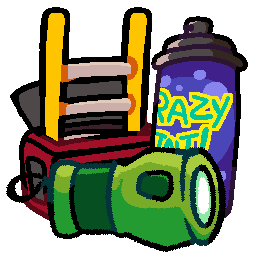
An addon for RuntimeIcons that uses custom-drawn item icons by Honee! Includes items from Vanilla, TerrasScrap, SigurdsScrap, and more.
This mod uses RuntimeIcons' overrides system to replace the inventory icons of items with new ones drawn by Honee!

Currently supported modded items:


Also compatible with my other addon, RuntimeIcons_BetterRotations, which I do recommend using as well if your modpack has additional scrap mods that aren't listed above. Honee's icons take priority for applicable items if you have both mods installed.
A message from Honee:
"Hey, so I like, made these for fun and enjoy making other stuffs too.
If you want to commission thingies or ask sum, you can contact me on discord @thehonee or check out my ko-fi page"
Configuration
If you'd like to change which icons show up, you'll need to navigate to the RuntimeIcons config file, located in LethalConfig's menu (will require restart afterwards), or locally at [YourProfile]/BepInEx/config/com.github.lethalcompanymodding.runtimeicons.cfg.
- Change
List BehaviourtoWhiteList - Copy-paste one of the following strings of item paths into the
Item Listtext field:

Only keep items that had special icons in vanilla:
Vanilla/Walkie-talkie, Vanilla/Flashlight, Vanilla/Shovel, Vanilla/Lockpicker, Vanilla/Pro-flashlight, Vanilla/Stun grenade, Vanilla/Boombox, Vanilla/TZP-Inhalant, Vanilla/Zap gun, Vanilla/Jetpack, Vanilla/Extension ladder, Vanilla/Radar-booster, Vanilla/Spray paint, Vanilla/Weed killer, Vanilla/Belt bag, Unknown/clipboard, Vanilla/Key, Vanilla/Shotgun, Vanilla/Gift, Unknown/Maneater, Vanilla/Mapper, Vanilla/Binoculars

Keep all items that have a custom icon made:
(For essentially disabling runtime-generated icons for modded scrap)
NOTE: This list doesn't include TerrasScrap, SigurdsScrap, or Generic_Interiors items yet because the string would be WAY too long. I might update it once RuntimeIcons gets DawnLib support though.
Vanilla/Walkie-talkie, Vanilla/Flashlight, Vanilla/Shovel, Vanilla/Lockpicker, Vanilla/Pro-flashlight, Vanilla/Stun grenade, Vanilla/Boombox, Vanilla/TZP-Inhalant, Vanilla/Zap gun, Vanilla/Jetpack, Vanilla/Extension ladder, Vanilla/Radar-booster, Vanilla/Spray paint, Vanilla/Weed killer, Vanilla/Belt bag, Unknown/clipboard, Vanilla/Key, Vanilla/Shotgun, Unknown/Sticky note, Vanilla/Gift, Vanilla/Ammo, Vanilla/Kitchen knife, Unknown/Body, Unknown/Maneater, Vanilla/Airhorn, Vanilla/Apparatus, Unknown/Apparatus, Vanilla/Hive, Vanilla/Big bolt, Vanilla/Big screw, Vanilla/Bone, Vanilla/Bottles, Vanilla/Bell, Vanilla/Candy, Vanilla/Cash register, Vanilla/Chemical jug, Vanilla/Clock, Vanilla/Clown horn, Vanilla/Mug, Vanilla/Comedy, Vanilla/Control pad, Vanilla/Cookie mold pan, Vanilla/Homemade flashbang, Vanilla/Dust pan, Vanilla/Ear, Vanilla/Easter egg, Vanilla/Egg, Vanilla/Egg beater, Vanilla/Fancy lamp, Vanilla/Flask, Vanilla/Foot, Vanilla/Garbage lid, Vanilla/Gold bar, Vanilla/Golden cup, Vanilla/Golden goblet, Vanilla/Brush, Vanilla/Hairdryer, Vanilla/Hand, Vanilla/Heart, Vanilla/Jar of pickles, Vanilla/Knee, Vanilla/Large axle, Vanilla/Laser pointer, Vanilla/Magic 7 ball, Vanilla/Magnifying glass, Vanilla/Old phone, Vanilla/Painting, Vanilla/Perfume bottle, Vanilla/Pill bottle, Vanilla/Plastic cup, Vanilla/Plastic fish, Vanilla/Remote, Vanilla/Ribcage, Vanilla/Toy robot, Vanilla/Rubber ducky, Vanilla/Red soda, Vanilla/Steering wheel, Vanilla/Stop sign, Vanilla/Metal sheet, Vanilla/Tea kettle, Vanilla/Teeth, Vanilla/Toilet paper, Vanilla/Toothpaste, Vanilla/Toy cube, Vanilla/Toy train, Vanilla/Tragedy, Vanilla/V-type engine, Vanilla/Ring, Vanilla/Whoopie cushion, Vanilla/Yield sign, Vanilla/Zed dog, Vanilla/Soccer ball, LethalLib/LCEliteFlashlight/Elite-flashlight, Vanilla/Mapper, Vanilla/Binoculars

Maneater icon
Currently, due to the way this "item" works, RuntimeIcons can't automatically replace its icon. It is still possible to see in-game, but requires a couple extra steps.
NOTE: After doing this, the icon will remain replaced until the game closes. You can switch save files or lobbies and still see it, but after closing & re-opening the game it'll be reset.


