
Game Settings
This Outward mod allows you to change the way game works.
| Date uploaded | 2 months ago |
| Version | 1.0.1 |
| Download link | GymMed-Game_Settings-1.0.1.zip |
| Downloads | 563 |
| Dependency string | GymMed-Game_Settings-1.0.1 |
This mod requires the following mods to function


GymMed-Mods_Communicator
Outward Mods Communicator enables seamless communication between mods through shared events and configuration syncing. It also lets users override any changes made by other mods, giving them full control over their settings.
Preferred version: 1.1.0README
Outward Game Settings


This Outward mod allows you to change the way game works.
Available Settings
Require Enchantment Recipe To Enchant
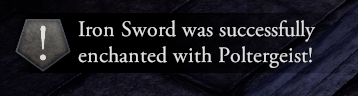
Attempting to enchant an item without the required enchantment recipe in your inventory (pocket or backpack) will display an error and cancel the process. Config setting: RequireRecipeToAllowEnchant.

Consume Enchantment on Use
Successfully enchanting an item consumes the enchantment recipe from your inventory. Recommended to use together with Enchanting Requires Enchantment setting. Config setting: UseRecipeOnEnchanting
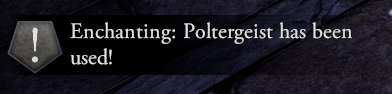
Enchanting Success Chance
Enchanting an item can fail based on a configurable success rate. Config setting: EnchantingSuccessChance
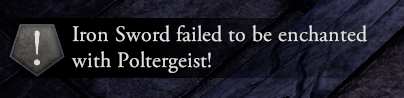
Play Audio on Enchanting Completion
Plays custom sound effects when the EnchantmentTable.DoneEnchanting event occurs. Success and failure each trigger different audio clips. Enabled with config setting: PlayAudioOnEnchantingDone
How to change settings?
Currently all settings can be changed in BepInEx\config\gymmed.outward_game_settings.cfg. If you are mod pack creator you can use outward mods communicator to change values and rebalance gameplay.
How to set up
To manually set up, do the following
- Create the directory:
Outward\BepInEx\plugins\OutwardGameSettings\. - Extract the archive into any directory(recommend empty).
- Move the contents of the plugins\ directory from the archive into the
BepInEx\plugins\OutwardGameSettings\directory you created. - It should look like
Outward\BepInEx\plugins\OutwardGameSettings\OutwardGameSettings.dllLaunch the game.
If you liked the mod leave a star on GitHub it's free
CHANGELOG
Changelog
Release 1.1.0 Version
Added
- Added pictures and video for readme
- Added skill learn on kill
- Added additional seasons
- Added events and their state serilization
- Added AI Effects
- Added Sideloader classes
- Added enemy wave manager
- Added war, ambush, wanderer event scenarios
- Added skills to AI
- Added dynamic debugger
- Added many more settings...
Release 1.0.1 Version
Fixed
- Updated version of Outward.ModsCommunicator dependency
- Fixed logging prefix with double square brackets [[]]
- Changed data passed variables for events by making sure it's less misinterpretable (updated to match mod pack template)
- Changed enchantment notification messages by making them feel less robust?
- Updated pictures with new text
Release 1.0.0 Version
Added
- Added Outward.ModsCommunicator dependency
- Registered events:
EnchantmentMenu@TryEnchant,EnchantmentTable@DoneEnchanting_Fail,EnchantmentTable@DoneEnchanting_Fail - Published events for other mods to listen
Fixed
- Fixed enchantment notification messages by providing greater detail
Release 0.0.1 Version
- Initial release.
