
You are viewing a potentially older version of this package. View Latest Version



Softcore Mode was made for sessions where you're sprawled on the couch with a friend, drinks in hand, arguing about who forgot to check the map while one of you is getting mauled by a Shell Horror. You still want that jolt of panic on defeat — the "oh no, is this it?" moment — but you also have maybe three hours a week to play, and the thought of redoing all that progress is what kills the fun. This mode keeps the tension and the blame-game ("you were supposed to save the backup!") without demanding you start from scratch. Play risky, laugh about it, load your save.
Each defeat triggers a random roll against the DeathChance config value. If the roll hits, the character dies permanently — all local saves are deleted and the vanilla hardcore death screens play (loading screen, death context, return to main menu). If the roll misses, the character respawns through the normal defeat scenario.
The permanent death counter increments with each death. In split-screen, a single roll determines death for all softcore characters.
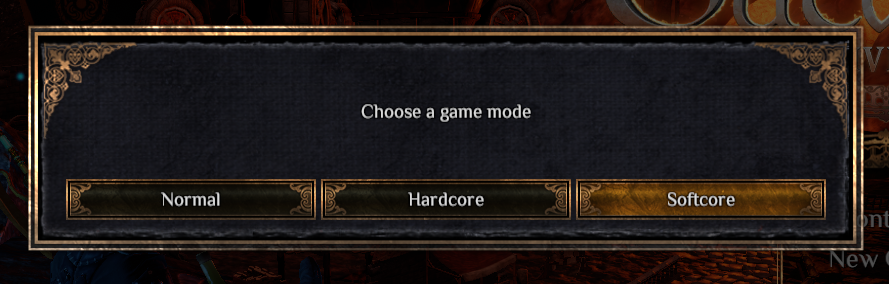
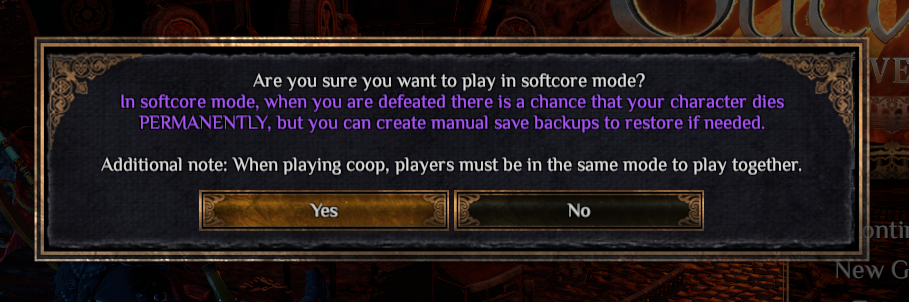
DefeatScenariosManager.ActivateDefeatScenarioIsSoftcoreCharacter(uid) check (reads metadata XML). This correctly handles split-screen where both players are softcore.DefeatHardcoreDeath() method via AccessTools.Method reflection, reusing the entire vanilla death UI sequence (loading screen → hardcore death context screens → return to main menu). The Prefix returns false to skip the original method. The vanilla 20% hardcore roll inside the original method never executes._scenario.SupportHardcore = false before letting the original method run. This causes the vanilla 20% hardcore check on line 204 of DefeatScenariosManager to short-circuit, guaranteeing survival. The original value is saved and restored in the Postfix.BepInEx/config/gymmed.Mods_Communicator/Softcore_Mode/Characters/{UID}.xml — stores PermanentDeathCount element incremented on each death.DeathChance (int, 20-100, default 20) in gymmed.softcore_mode.cfg.The button appears alongside the normal Save button for softcore characters. Clicking it triggers a save followed by a full copy of the save instance directory to a protected backup folder. A configurable cooldown (default 24 in-game hours) prevents spam — the button displays the remaining time when inactive. Oldest backups are automatically pruned when the configurable limit (default 10) is exceeded.
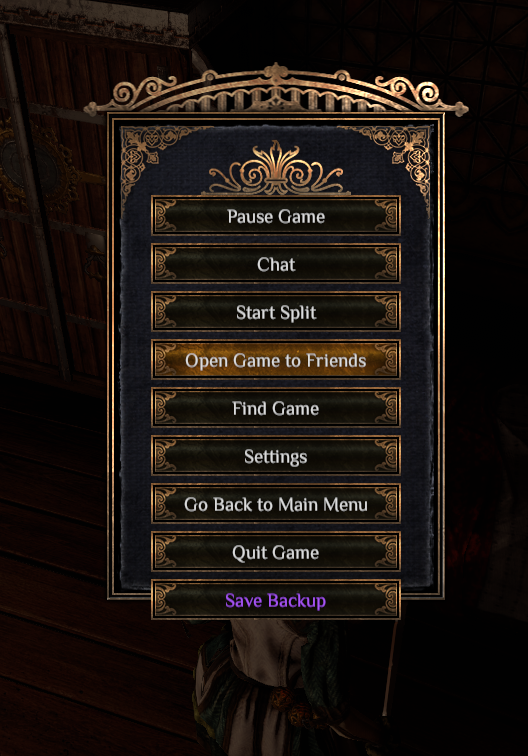
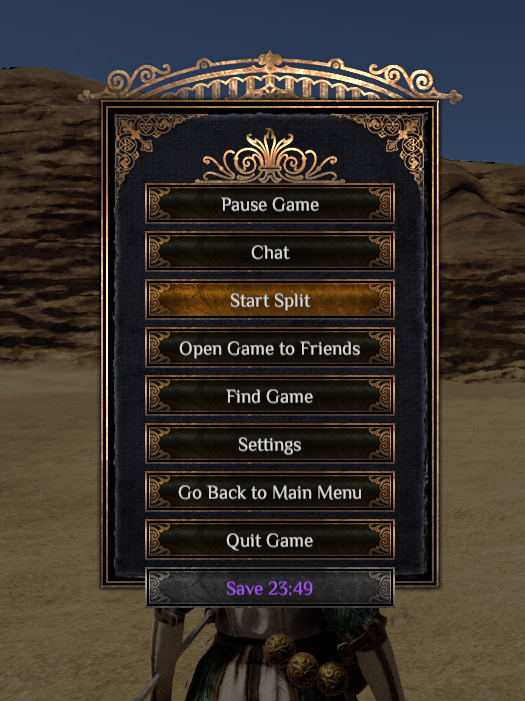
PauseMenu.Show — clones the btnSave GameObject from m_hideOnPauseButtons, renames it btnSaveSoftcore, destroys UILocalize components, sets text color to purple (#A855F7), and registers a click listener.PendingManualBackupUIDs → adds each eligible local softcore player's UID → disables button → calls SaveManager.Instance.Save(). Harmony Postfix on SaveInstance.Save intercepts the completed save for any UID in the pending set and calls SoftcoreSaveManager.CreateBackup()..defedc, .deenvc, and Manifest.txt files from Save_{uid}/{instanceTimestamp}/ to BepInEx/config/gymmed.Mods_Communicator/Softcore_Mode/Backups/{uid}/{instanceTimestamp}/.PauseMenu.Update calls RefreshSoftcoreSaveButton() every 0.5 seconds, which reads GetRemainingCooldownTime(uid) and formats it as D:HH:MM or HH:MM.SaveCooldownHours (float, default 24.0), MaxBackups (int, default 10) in gymmed.softcore_mode.cfg.When you reach the character select screen, the mod scans all backup directories. Any backed-up character whose UID is missing from the active save list is restored. The restore copies all save instance directories from the backup back into the game's save folder, then registers the character in the save system so it appears in the selection list. Restored save instances display a purple "Backup" label to distinguish them from original saves.
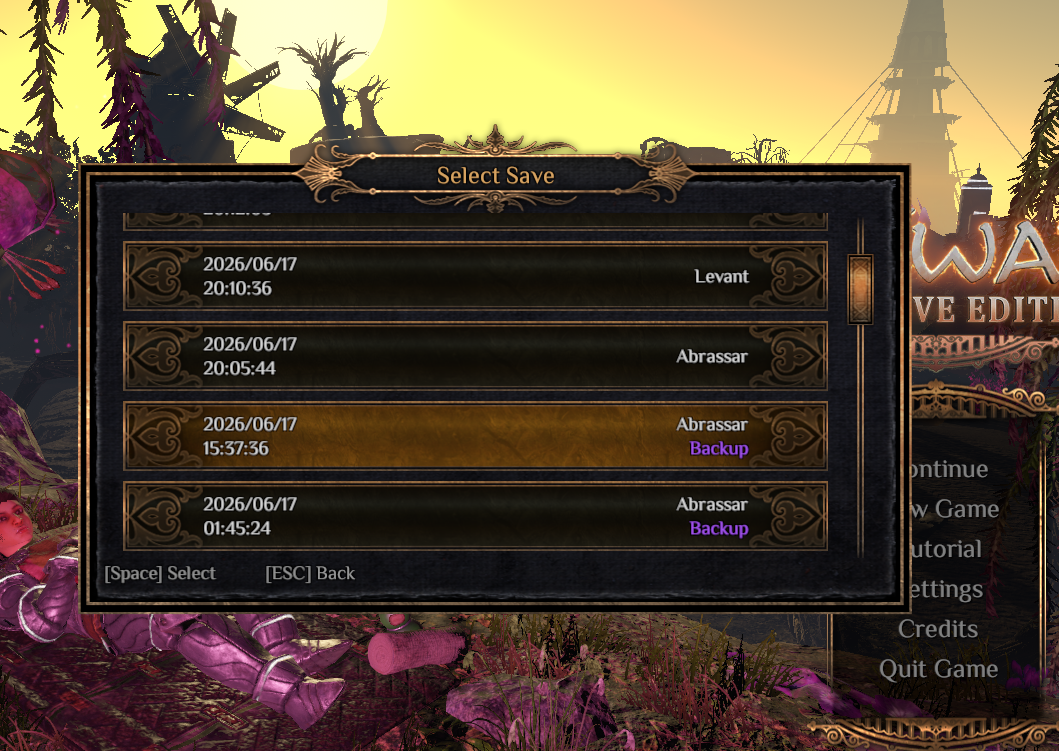
SoftcoreSaveManager.RestoreOrphanedBackups() is called from two Harmony Postfix patches: CharacterSelectionPanel.OnEnable (whenever the character select panel is shown) and SaveManager.RetrieveCharacterSaves (when saves are refreshed).SaveManager.Instance.CharacterSaves. Restores any UID present in backups but absent from active saves.Save_{uid}/{backup.Name}/ only if the destination doesn't already exist → sets IsRestored=true in metadata XML → writes a .restored marker file → registers the character via reflection by calling CharacterSaveInstanceHolder.PrepareCharacterSaveInstanceHolder(uid, saveDir) and adding the result to SaveManager's private m_charSaves dictionary → refreshes all open character selection panels.BepInEx/config/gymmed.Mods_Communicator/Softcore_Mode/{UID}.restored — an empty file used on the character's next load to defer cooldown initialization until game time is valid.On the character select screen, softcore characters display a purple "Softcore" label (or "Softcore N" where N is the permanent death count) in place of the hardcore skull icon. In the save instance list (shown when selecting which save to load), any slot that was restored from a backup gets a purple "Backup" badge. These visual cues help you identify softcore characters and distinguish restored saves from originals at a glance.
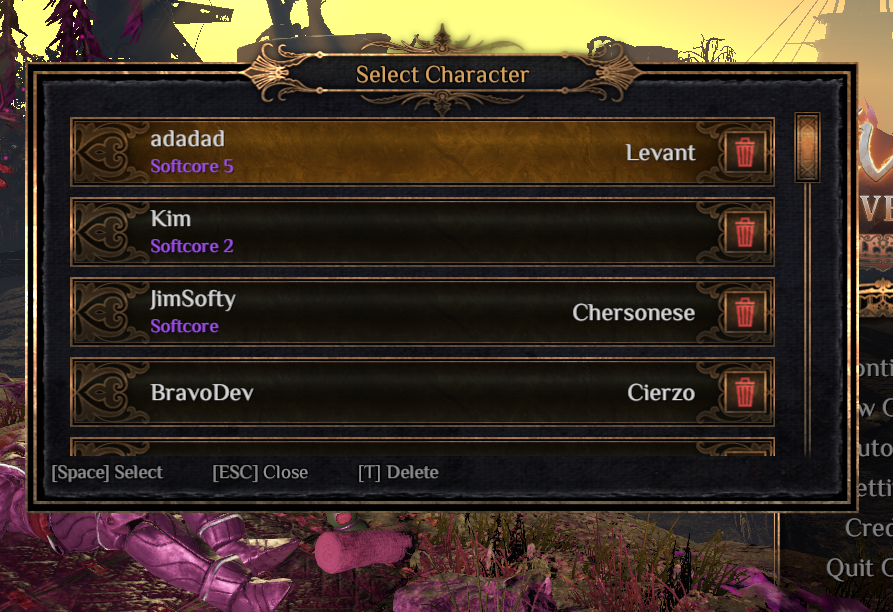
CharacterSaveSlot.SetSave — clones the hardcore flag GameObject, renames it to "lblSoftcore", destroys UILocalize components, sets the text to "Softcore" or "Softcore N" (where N is GetPermanentDeathCount(uid)), sets the color to purple #A855F7, and hides the original hardcore icon.CharacterSaveInstanceDisplay.SetSaveInstance — checks IsRestoredBackupInstance(uid, instancePath) (tests if the instance directory exists under the backups path). If true, it saves the original lblAreaName RectTransform layout, repositions it to top-right, creates a lblSaveSoftcore clone from the lblTime template, positions it at bottom-right, and sets its text to "Backup" in purple. If false, it restores the original layout and hides the label.BepInEx/config/gymmed.Mods_Communicator/Softcore_Mode/Backups/{uid}/{instancePath}/ — if this directory exists, the instance is a backup.In split-screen, each player's softcore status is tracked independently via per-character metadata files. Both players can select softcore mode during character creation. Each character's death behavior follows their own mode. When either player clicks the "Save Backup" button in the pause menu, both players' saves are backed up at once. Each character tracks its own backup cooldown independently. The character selection panel correctly shows softcore characters as selectable regardless of their difficulty mode.
PendingSoftcoreCount (set to 1 for single-player, 2 for split-screen by Patch_MainScreen_DifficultySelection) to ensure every new softcore character gets metadata XML written by Patch_SaveManager_ConfirmAddNewSave.IsSoftcoreCharacter(uid) instead of the global IsCurrentGameSoftcore flag. All softcore characters share a single death roll.CharacterSelectionPanel.RefreshCharacterList forces softcore save slots to be interactable = true on non-primary player panels (PlayerID > 0), even when slot.HarcoreMode disagrees with CharacterManager.Instance.HardcoreMode. This prevents the vanilla filter from greying out softcore characters.HardcoreDeathTriggered is set, all local saves are deleted (same as vanilla hardcore).The backup cooldown uses in-game time (tracked by the game's clock), not real-world time, so it only counts time spent playing with the save loaded. The cooldown defaults to 24 in-game hours and can be set to 0 to disable it entirely. For characters restored from backup, the cooldown initialization is deferred until the game time becomes valid (after scene loading completes). The backup limit (default 10) automatically removes the oldest backup instances when exceeded.
LastBackupGameTime field in metadata XML at BepInEx/config/gymmed.Mods_Communicator/Softcore_Mode/Characters/{UID}.xml. Uses EnvironmentConditions.GameTimeF (in-game float time).CanBackupNow(uid) returns true if (currentGameTime - lastBackupTime) >= SaveCooldownHours or if cooldown is 0 (disabled).Patch_Character_LoadPlayerSave), the UID is added to PendingCooldownUIDs. In OutwardSoftcoreMode.Update(), once EnvironmentConditions.GameTimeF > 0f, the cooldown is initialized and the restored marker is cleared.EnforceBackupLimit(uid) sorts backup directories by name descending, deletes the oldest ones exceeding MaxBackups. Each backup is a full timestamp directory under BepInEx/config/gymmed.Mods_Communicator/Softcore_Mode/Backups/{uid}/.SaveCooldownHours (float, 0-any, default 24), MaxBackups (int, 1-any, default 10).All settings are in BepInEx/config/gymmed.softcore_mode.cfg and can be edited with any text editor or through r2modman's config editor.
| Setting | Type | Default | Description |
|---|---|---|---|
DeathChance |
int (20–100) | 20 | Permanent death chance on defeat (%) |
MaxBackups |
int | 10 | Max backup instances kept per character. Oldest are auto-deleted when limit is exceeded |
SaveCooldownHours |
float | 24.0 | Minimum in-game hours between manual backups. Set to 0 to disable cooldown |
All mod data is stored under BepInEx/config/gymmed.Mods_Communicator/Softcore_Mode/. The config file itself is at BepInEx/config/gymmed.softcore_mode.cfg.
| Data | Path |
|---|---|
| Character metadata (softcore flag, name, death count) | Softcore_Mode/Characters/{UID}.xml |
| Backup instances (full save copies) | Softcore_Mode/Backups/{UID}/{instanceTimestamp}/ |
| Backup instance game time | Softcore_Mode/Backups/{UID}/{instanceTimestamp}/SoftcoreSaveData.xml |
| Restored marker (empty file) | Softcore_Mode/{UID}.restored |
To manually set up, do the following
Game\BepInEx\plugins\OutwardSoftcoreMode\.BepInEx\plugins\OutwardSoftcoreMode\ directory you created.Game\BepInEx\plugins\OutwardSoftcoreMode\OutwardSoftcoreMode.dll.