
Pickup Notification Adjustment
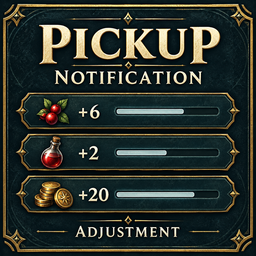
Cleaner pickup notifications above the bottom-right hotbar, with icons, combined item quantities and a queue for large loot hauls. Configurable for Outward Definitive Edition.Pickup Notification Adjustment
Makes pickup notifications look cleaner and easier to read in Outward Definitive Edition, with a compact list at the bottom right of the screen, close to the hotbar.
- Shows item names, icons and quantities.
- Combines matching pickups into one notice.
- Picking up a backpack shows the bag itself. Stash deposits stay out of the pickup list.
- Shows up to six entries at a time. Extra items wait their turn instead of disappearing from a large loot haul.
Settings
Press Fn + F5 in game with Outward Config Manager installed, then find Pickup Notification Adjustment. You can change the position, text size, number of visible entries and how long they stay on screen. Vertical offset moves the list down with a negative number or up with a positive number.
Discord support
Join the Valforge Discord for help, bug reports, and suggestions.