You are viewing a potentially older version of this package. View Latest Version
Debug Teleport Names
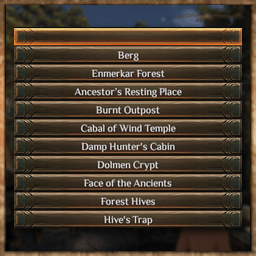
Uses wiki names for debug menu area teleport. Includes all dungeons.Features
Uses wiki names for debug menu area teleport. Includes all dungeons.
Opening the debug menu
You need to be in Debug mode.
Type /toggleDebug on in the chat, then press F2 for the Character Cheats panel. Area Switch is in its top
right corner: one button per region, which opens that region's list.
Settings
Via Outward Configuration Manager (F5),
or BepInEx\config\tchernobill.debugteleportnames.cfg:
Sort by name (on): sort each region's dungeons alphabetically. Off: the game's build order. The town and the region
stay first either way.
Show scene name (off): also show the internal scene name and spawn point, e.g. Ghost Pass (Chersonese_Dungeon3).
Compatibility
- Only the debug menu is touched; saves and normal play are not affected.
- Areas the game does not ship are not listed (The Wail, Dark Ziggurat's exterior...), nor Sulfuric Ruins, which has a name in the game files but no entrance.