Runic Inscriptions
Carve the game's rune alphabet.Runic Inscriptions
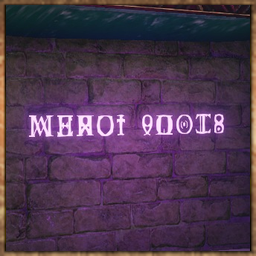
Carve the rune alphabet of Aurai anywhere: on a wall, a rock, the floor, or floating in the air.
The runes are the game's own: the alphabet of the dungeon walls, the puzzles and Rune Magic (A-Z, 0-9 and ?, the chart of the wiki), read from the game's texture and drawn sharp at any size, with a material made like the game's rune walls.
How to
Two modes, switched with Tab (configurable):
1. The window (F6 opens it): write and style. Free cursor; the game waits as in its own menus.
- Text: type it (letters, digits,
?, spaces and line breaks; accents are dropped, so French works), or click the runes of the rune keyboard. A preview shows it in runes, and a glowing ghost shows it in the world where you were looking. - All the options below, changed with the mouse.
- Right click on an inscription in the world: select it. The window then edits it live (text, colour, size...); Move puts it elsewhere, Delete erases it.
- Place in the world (Tab) goes to the second mode. Esc or F6: close.
2. Placing: the window hides, a crosshair appears (above the character, so it never hides what you aim at); you walk and look around as usual, and the ghost follows the crosshair.
- Left click: carve it there. The character turns to it and traces it; the runes kindle. You stay in this mode to carve again.
- Mouse wheel: turn it. Shift + wheel: size. Ctrl + wheel: distance (in the air).
- Middle click on an inscription: back to the window, editing that one. Del: erase the one under the crosshair.
- Right click, Esc or Tab: back to the window. F6: close.
Ctrl + Z erases the last inscription carved, in both modes.
Options
| Option | |
|---|---|
| Rune height, spacing, line spacing | size of a rune in metres, gaps in rune heights |
| Stroke | thin to bold (0.5 = as the game draws them) |
| Align, Vertical | left / centre / right; columns read from top to bottom |
| Presets | Arcane (the game's violet rune walls), Fire, Frost, Light, Decay, Blood, Chalk, Carved |
| Red, Green, Blue | any colour |
| Glow | brightness of the runes (0 = painted or carved, not lit) |
| Paint | how much of the colour shows in daylight (0 = dark carving) |
| Pulse | slow breathing of the glow, with its speed |
| Cast light | a real light around the runes, with range and strength |
| On a surface / In the air | carved on what the mouse points at, or floating at a distance, facing you |
| Follow the relief | each rune bends onto rough rock instead of staying a flat plate |
| Off the surface | how far the runes stand out of the surface |
| Visible from behind | also seen (mirrored) from the back |
Saving
Each character keeps its inscriptions, place by place, in
BepInEx\config\RunicInscriptions\<character UID>.txt, written at each change (reloading a save does not erase them).
Configuration
BepInEx\config\tchernobill.runicinscriptions.cfg: window key (F6), place key (Tab), crosshair height, back to the window after each carving, window scale,
reach (30 m), the carving gesture, and whether the inscriptions brought by other mods are shown.
For modders: ship pre-written inscriptions with your mod
Carve your runes in game, export them, and put the file in your mod: every player of your mod finds them in place, the same for every character, already written.
1. Carve. Play any character (a test save is best) and carve everything you want, in as many places as you want.
2. Export. In the window (F6), Export all to a file (for a mod) writes all this character's inscriptions,
every place, to BepInEx\config\RunicInscriptions\Exports\<character>_<date>.runes.
3. Ship it. Put the .runes file anywhere in your mod's package (it ends up under BepInEx\plugins\<your mod>\),
and add Runic Inscriptions to the dependencies of your manifest.json:
"dependencies": [ "BepInEx-BepInExPack_Outward-5.4.8", "Tchernobill-Runic_Inscriptions-1.0.0" ]
That's all, no code: at startup Runic Inscriptions loads every *.runes file under BepInEx\plugins and shows each
inscription in its place. A mod made only of .runes files (a "rune pack") is fine.
Players see them in every save and for every character; they cannot select, move nor erase them, and can hide them all with the option Show Inscriptions From Mods. The window says how many there are around.
Editing your pack later. Keep the character you carved with: its own inscriptions take the place of the pack's
copies (same Id), so with your pack installed you do not see everything twice, and you can edit, re-export and
replace the file.
The .runes format
Plain UTF-8 text, made to be read, diffed, versioned and hand-edited if needed (no Unity, no tool):
# Runic Inscriptions 1.0.0
[inscription]
Id = 3f9a0c1b2d4e
Scene = Emercar
Text = OUTWARD
Position = 574.7; 51.6; 696.5
Rotation = 0; 0.7071068; 0; 0.7071068
OnSurface = true
Style.Size = 0.35
Style.Color = 0.82; 0.2; 1; 1
Style.Brightness = 4.3
...
- One
[inscription]block per inscription;#lines are comments. Numbers use a dot; positions, rotations (quaternion x; y; z; w) and colours (r; g; b; a) are separated by;. In texts,\nis a line break. Sceneis the scene name of the level (Emercar,CierzoNewTerrain,ChersoneseNewTerrain...);Textuses the letters A-Z, digits 0-9,?and spaces.- Missing keys keep their default value and unknown keys are ignored, so files keep working across versions.
Idmust be unique: the first pack that brings an id wins (a pack installed twice shows once). If you copy blocks by hand, change theirId.- Positions are in world space: an inscription is drawn where it was carved, so carve on scenery that never moves (a wall, a rock), not on a door or a movable object. On a surface, the runes are bent onto it when the level loads.
From code (optional)
For a pack embedded in your dll or built at runtime, reference RunicInscriptions.dll and call, best from your
plugin's Awake with [BepInDependency("tchernobill.runicinscriptions")]:
using RunicInscriptions;
RunicInscriptionsAPI.AddPackResource(typeof(MyPlugin).Assembly, "MyMod.temple.runes"); // an EmbeddedResource
RunicInscriptionsAPI.AddPackFile(path);                // a .runes file outside BepInEx\plugins
RunicInscriptionsAPI.AddPack("MyMod/generated", text); // the text itself
Each returns how many inscriptions it brought. RunicInscriptionsAPI.LoadedPacks lists the loaded packs;
RunicInscriptionsAPI.ExportCharacter() exports the local character like the button.
Compatibility
- Purely visual: no item, no skill, nothing in the game's saves.
- Inscriptions from mods are local too: each player who has the mod sees them on their own.
- Inscriptions are local: in multiplayer, the other players do not see them.
- Keyboard and mouse only for the window.