
BetterPlayerDistance
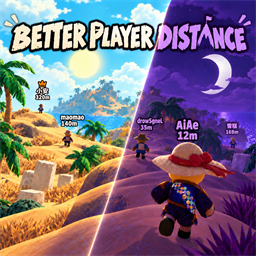
定位你的队友,昏迷了也跑不掉!完全贴近原版的风格,自定义选项丰富,几乎没有性能损失。 | Find your teammates—even the downed ones can't hide! Vanilla-style visuals, rich customization, and virtually no performance impact.BetterPlayerDistance
English
Teammate tracking for PEAK, with a vanilla look that makes finding your group and helping downed players easier.
This mod is built by top-tier AI (opus, fable) and goes through repeated testing and verification before release to keep it reliable. If an unexpected issue still slips through, I'm sorry — come nudge me on [email protected] 😕
Features
- Find your team: see names, distances and host crowns, even through obstacles. When close-range distance is disabled, only the distance yields while vanilla would show the name; looking away keeps the distance available.
- Help downed teammates: check status and countdowns, with edge indicators for downed or dead teammates outside your view. Death markers remain for 10 seconds.
- Make it yours: adjust text size, height, opacity and outlines; choose icons, kaomoji or text for status markers. Font settings use 0 for the base size, positive values to enlarge and negative values to shrink.
- Day and night: optionally pair with TimeTheme for day/night colors. The mod works without it too.
- Play nice with other mods: Compatibility Mode keeps the vanilla nameplate visible and hands over to it up close, for mods that draw on it (e.g. Overhead Stamina).
Controls
AlwaysOn by default. Press C to hide or show labels. Hold and timed Toggle modes are also available.
Show Distance Up Close is off by default. Distance is hidden only while vanilla would currently show the nearby name; enable it to keep distance visible at all times.
Compatibility Mode is off by default. Turn it on if another mod draws on the vanilla nameplate: vanilla shows the name up close, this mod takes over everywhere else with a 0.1s cross-fade, and Name Font Size applies to both.
Installation & Settings
- Install BepInExPack.
- Place
BetterPlayerDistance.dllinBepInEx/plugins/, then launch the game. - Customize appearance and display behavior in your in-game mod settings.
Config: BepInEx/config/com.AiAe.betterplayerdistance.cfg
Feedback & bug reports: [email protected]
中文
为 PEAK 提供贴近原版风格的队友定位:看清位置、掌握状态,让寻找队友和昏迷救援更直观。
模组由顶级AI(opus,fable)制作,发布前会多次测试校验,来确保其可靠性。如果还是有意料外的问题我很抱歉,可以到 QQ 群:1104320838 来鞭策我😕
功能
- **队友定位:**显示名称、距离和房主皇冠,隔着障碍也能查看队友标签。关闭贴近距离后,仅在原版此刻应显示名称时让出距离;转开视角仍可查看距离。
- **昏迷救援:**查看状态与倒计时,昏迷或死亡队友在视野外时会有边缘指向;死亡位置标记保留 10 秒。
- **外观自定义:**调整字号、高度、透明度和描边,为状态提示选择图标、颜文字或文字。字号设为 0 跟随基础大小,正数放大、负数缩小。
- **昼夜配色:**可选搭配 TimeTheme,让标签跟随昼夜变色;不安装也能正常使用。
- **兼容其他模组:**兼容模式保留原版头顶名称,近处交还给原版显示,供依赖原版名牌的模组使用(例如头顶耐力)。
使用
**默认常显,按 C 隐藏或显示整块标签。**也支持按住显示(Hold)和定时切换(Toggle)。
「贴近是否显示距离」默认关闭。 只有游戏原版此刻应显示近处名称时才隐藏距离;转开视角等其他情况下仍显示距离,开启后则全程显示距离。
「兼容模式」默认关闭。 有其他模组依赖原版头顶名称时打开:近处由原版显示名称,其余情况由本模组接上,两边 0.1 秒交叉渐变;「名字字号」同时作用于两边。
安装与设置
- 安装 BepInExPack。
- 将
BetterPlayerDistance.dll放入BepInEx/plugins/,然后启动游戏。 - 在游戏内模组设置中调整外观和显示方式。
配置文件:BepInEx/config/com.AiAe.betterplayerdistance.cfg
反馈 Bug 或建议:QQ 群 1104320838。