
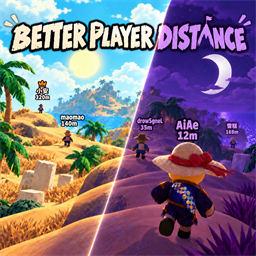
BetterPlayerDistance
定位你的队友,昏迷了也跑不掉!完全贴近原版的风格,自定义选项丰富,几乎没有性能损失。 | Find your teammates—even the downed ones can't hide! Vanilla-style visuals, rich customization, and virtually no performance impact.Changelog
v1.1.5
中文
修复
- 修复玩家身份信息尚未就绪时,语音图标更新可能导致其他队友的名字错位、远处名称消失的问题。单个名牌异常不再中断其他玩家的刷新,数据恢复后自动重试。
- 原版名牌槽位被重新分配时重新匹配所属角色,避免继续读取其他玩家的名称、位置和图标。
English
Fixed
- Fixed voice-icon updates with incomplete player identity data interrupting other teammates' nameplates, leaving stale positions or hiding distant names. Individual nameplate errors are isolated and retried automatically.
- Revalidate reused vanilla name slots against their character so labels do not keep reading another player's name, position or icons.
v1.1.4
中文
修复
- 距离显示改用原版营火的游戏米,先乘游戏的
CharacterStats.unitsToMeters再取整;不再把 Unity 单位直接标成米。 - 最大显示距离的默认值与可调范围同步换算;旧配置首次升级时自动备份并迁移一次,保留原来的实际显示范围,不新增单位开关。
- 原版名称的近处显隐、视角判断、锚点与排版不变。
English
Fixed
- Distance labels now use the same game metres as campfires, converting with
CharacterStats.unitsToMetersbefore rounding instead of labelling Unity units as metres. - Converted the default and allowed range of Max Display Distance. Legacy cfg values are backed up and migrated once, preserving the physical visibility range without adding a unit toggle.
- Vanilla near-name visibility, angle checks, anchors and layout are unchanged.
v1.1.3
中文
修复
- 修复默认档(替换原版)下玩家说话时名字旁不显示喇叭图标的问题。喇叭图标与名字、皇冠同在原版名牌的 CanvasGroup 里,压住 alpha 后一起消失而本模组此前未补画;现在按原版同一套规则补画在名字左侧(说话时随音量分档、对方音量拉零时显示静音标、安静约 1 秒后回到安静态),有房主皇冠时自动排到皇冠左边,颜色随 TimeTheme 同步。任何距离下图标状态都正确(原版远距离会冻结在最后一帧,本实现按远端语音数据实时计算)。
English
Fixed
- Fixed the voice/speaker icon missing next to player names in the default (Replace) mode. The icon shares the vanilla nameplate's CanvasGroup, so suppressing its alpha hid it too and the mod never redrew it; it is now drawn left of the name using the vanilla rules (amplitude-based frames while talking, muted icon for zeroed-out players, idle sprite after ~1s of silence), shifts left of the host crown when present, and follows TimeTheme tinting. Icon state stays correct at any distance (vanilla freezes the sprite once out of range; this computes it live from remote voice data).
v1.1.2
中文
修复
- 修复装了 PEAKER 且人数超过原版名牌槽位数时,中途加入玩家的原版头顶名字颜色卡死的问题(夜里加入的白天仍是紫色、白天加入的夜里仍是白色)。TimeTheme 只在开局时收一次染色表,管不到 PEAKER 克隆出的新槽位;现在把原版预置槽位的实时颜色逐帧同步给其余槽位,克隆体与所有人一起走完昼夜过渡。仅在装有 TimeTheme 时启用,不影响未装该模组的环境。
- 修复兼容模式 + 非零「名字字号」下,克隆槽位玩家的原版名牌与本模组标签字号额外偏小、名字与距离行距过窄的问题。克隆槽位拷到的模板字号本身已含偏移,此前被当成原始值再偏移一次;现在所有槽位共用首次捕获的 prefab 基准字号(含皇冠缩放与自动缩放标记)。
- 修复玩家名含换行符时,本模组标签被撑成三行、名字与距离错位的问题;显示名统一压平为单行。
English
Fixed
- Fixed late joiners' vanilla overhead names being stuck in the wrong day/night color when PEAKER is installed and name slots run out (night clones stayed purple by day, day clones stayed white at night). TimeTheme only collects its tint table once at run start and never sees the slots PEAKER clones mid-run; the mod now mirrors the preset slot's live color onto the other slots every frame so clones follow the same 0.25s theme transition. Only active while TimeTheme is installed; no effect otherwise.
- Fixed cloned-slot players getting an extra-small vanilla nameplate and label (with a tighter name–distance gap) in Compatibility Mode with a non-zero Name Font Size. A clone copies the template's already-offset font size, which was then treated as its original size and offset a second time; all slots now share the prefab baseline font size (plus crown scale and auto-sizing flag) captured once.
- Fixed labels stretching to three lines when a player name contains a newline; display names are flattened to a single line.
v1.1.1
中文
新增
- 新增「兼容模式」(默认关闭):不再隐藏游戏原版的头顶名称。原版按自己的距离与视角规则显示名称时,本模组的名称与距离标签整块让位;原版隐藏时本模组接上,两边 0.1 秒交叉渐变。供依赖原版头顶名称的模组使用(例如头顶耐力 Overhead Stamina)。
- 兼容模式下「名字字号」会同步套到原版名称与房主皇冠上,切换时大小一致;字号为 0 时不改动原版名牌。
修复
- 修复夜间个别玩家(中途加入、重连或较晚进关)的名称仍显示为白天颜色的问题。字色改读原版预置的名字槽位,不再受 PEAKER 追加槽位未被 TimeTheme 染色的影响。
English
Added
- Added Compatibility Mode (off by default). The vanilla overhead name is no longer hidden: while vanilla shows a name by its own distance and angle rules, this mod's label yields entirely; when vanilla hides it, this mod takes over with a 0.1s cross-fade. For mods that depend on the vanilla nameplate (e.g. Overhead Stamina).
- In Compatibility Mode, Name Font Size is also applied to the vanilla name and host crown so both stay the same size. A value of 0 leaves the vanilla nameplate untouched.
Fixed
- Fixed some players' names (late joiners, reconnects) staying in the daytime color at night. The text color now reads the vanilla preset name slot instead of per-player slots cloned by PEAKER, which TimeTheme never recolors.
v1.1.0
中文
新增
- 新增「贴近是否显示距离」设置:近处显示原版名称时可隐藏距离,转开视角或处于远处时仍会显示距离。
- 新增名称与距离字号、标签高度、行距、透明度、描边及阴影等外观设置。
- 新增 TimeTheme 昼夜配色支持,并可选择夜间描边颜色。
更改
- 隐藏原版名称显示,现在模组的名称&距离标签已完全仿照原版样式,调整字号时会同步保持位置与比例。
- 默认改为常显模式;按 C 可隐藏或恢复整块标签,同时保留按住显示和定时显示模式。
- 死亡标记固定在死亡位置并保留 10 秒;返回机场后昼夜颜色也会正确恢复。
- 改善持续显示多人标签和昏迷状态时的流畅度。
移除
- 移除旧的「最小显示距离」,统一由「贴近是否显示距离」控制近处距离。
- 移除单独的名称与房主皇冠显示开关,名称始终显示,房主皇冠自动识别。
- 移除死亡标记持续时间设置,统一固定为 10 秒。
English
Added
- Added Show Distance Up Close. Distance can be hidden while the vanilla name would appear nearby, while remaining visible when looking away or viewing distant players.
- Added appearance settings for name and distance size, label height, line spacing, opacity, outlines, and shadows.
- Added TimeTheme day/night color support with selectable night outline colors.
Changed
- The original nameplate is now hidden and replaced by the mod's combined name-and-distance label, which fully matches the vanilla style and stays aligned and proportioned when resized.
- Always On is now the default mode. Press C to hide or restore the entire label; Hold and timed Toggle modes remain available.
- Death markers now remain at the death location for 10 seconds, and day/night colors restore correctly after returning to the airport.
- Improved smoothness while continuously displaying player labels and downed status information.
Removed
- Removed the old minimum-distance setting. Close-range distance is now controlled by Show Distance Up Close.
- Removed separate name and host-crown visibility settings. Names remain visible, while host crowns are detected automatically.
- Removed the configurable death-marker duration; it is now fixed at 10 seconds.
v1.0.5
中文
- 修复远处凭空多出一个
Bot Character距离标签的问题。本体把机器人角色的物体名从Bot改成了Bot Character,模组原先靠名字字符串过滤机器人,改名后过滤失效,机器人被当成队友挂上了标签。现在改用角色自身的isBot标记判断,不再受本体改名影响。 - 同样原因修复昏迷/死亡标记:机器人不再参与昏迷指向与屏幕边缘指示器。
- 顺带修掉一个潜在误伤:旧的名字匹配是「包含 Bot」,昵称里带 bot 的真人玩家(例如
Robot)会被误判成机器人而不显示标记,现在不会了。
English
- Fixed a phantom
Bot Characterdistance label appearing in the distance. The base game renamed the bot character's GameObject fromBottoBot Character; the mod filtered bots by that name string, so the filter silently stopped matching and bots got labelled like teammates. Bot detection now uses the character's ownisBotflag and no longer depends on the base game's naming. - Same fix applied to downed/dead markers: bots no longer appear in the downed pointer or screen-edge indicators.
- Also fixed a latent false positive: the old check was a substring match on "Bot", so real players whose nickname contained
bot(e.g.Robot) were treated as bots and got no markers. They now display correctly.
v1.0.0 → v1.0.4
中文
- 修复昏迷/死亡标记在被背负、死亡或切换旁观视角后显示异常的问题;死亡标记现在会固定在实际死亡位置,不再跳到鬼魂位置。
- 新增“死亡标记持续时间”设置,默认 10 秒,可调整为 0–60 秒。
- 优化昏迷进度和剩余时间显示,能够正确反映主动放弃、无人存活加速以及被背负暂停等状态。
- 修复网络延迟、丢包或松开 E 后进度条先超过实际进度、随后回弹或倒退的问题。
- 增加玩家颜色文字描边,并完善中英文状态文字、设置说明和调试功能。
现在这个模组功能已经基本齐全,我想以后应该不会再有大规模更新了,如果出现问题,请加群鞭策群主:1104320838 与
BetterReviveOrTeleport的通信格式保持不变,兼容性不受影响。
English
- Fixed downed/dead markers behaving incorrectly while being carried, after death, or when switching to spectator cameras. Dead markers now remain at the actual death location instead of moving to the ghost.
- Added a configurable Dead Marker Duration setting. The default is 10 seconds, with a range of 0–60 seconds.
- Improved downed progress and remaining-time display to correctly handle giving up, accelerated countdowns when nobody is alive, and freezing while being carried.
- Fixed progress overshooting, jumping back, or moving backwards after releasing E, during packet loss, or under network latency.
- Added optional player-colored text outlines and improved bilingual status text, settings descriptions, and debugging tools.
Currently, the functions of this module are basically complete. I believe there won't be any major updates in the future. If you encounter any problems, please contact [email protected]. The communication format with
BetterReviveOrTeleportremains unchanged, so compatibility is preserved.
v0.1.20
中文
- 为昏迷/死亡玩家添加更清晰的边缘指示器与状态标记
- 昏迷/死亡状态可自由选择 图标、颜文字或纯文字 显示
- 新增多款昏迷与死亡颜文字样式
- 图标支持玩家颜色描边,并可调整描边粗细
- 边缘指示器可显示 名称、百分比或名称+百分比
- 优化屏幕边缘文字显示、测试假人名称与图标对齐
English
- Added clearer edge indicators and status markers for downed/dead players
- Downed/dead status can now use icons, kaomoji, or plain text
- Added several new downed/dead kaomoji styles
- Icons now support player-colored outlines with adjustable ring width
- Edge indicators can show name, percent, or name + percent
- Improved edge text placement, test dummy names, and icon alignment
v0.1.17
English
- New "Downed Pointer" feature: a countdown label (face icon + percent/seconds) above downed players, and a screen-edge indicator for off-screen downed/dead players
- Performance: no more per-frame scene scans; UI objects are created lazily and per-frame allocations removed
中文
- 新增「昏迷指向」功能:昏迷玩家头顶显示倒计时标签(表情图标 + 百分比/秒数),屏幕外昏迷/死亡玩家在屏幕边缘显示指示器
- 性能优化:不再每帧全场景扫描角色;UI 对象按需延迟创建,并消除每帧 GC 分配
v0.1.16
English
- AlwaysOn mode now responds to the hotkey (C): press to hide labels, press again to restore — no longer completely ignores the key
- Config description updated: hotkey now explicitly works in all three modes
中文
- 常显 (AlwaysOn) 模式现在支持按快捷键 (C) 手动隐藏 / 再次按下恢复——不再完全忽略按键
- 配置描述更新:快捷键在三种模式下均可使用
v0.1.15
English
- Full bilingualization: every section / key / description now uses "中文 (English)"; debug-console GUI uses "中文 / English"
- Sections renamed bilingually:
1. 基础 (Basic)/2. 界面 (UI)/3. 调试 (Debug) - Old-config compatibility: every key was renamed and old entries become orphans — the easiest fix is to delete the old cfg and let the game regenerate it
- Enum values (Hold / Toggle / AlwaysOn) are unchanged; TriggerMode is rewritten with its default under the new key — just re-select your preferred mode
中文
- 全面双语化:所有 section / key / description 改为「中文 (English)」格式;调试控制台 GUI 改为「中文 / English」格式
- 三栏命名同步双语:
1. 基础 (Basic)/2. 界面 (UI)/3. 调试 (Debug) - 旧 cfg 兼容:本次 key 名全部改名,旧条目将变孤立值,建议删除旧版 cfg 让游戏重新生成
- 枚举值(Hold / Toggle / AlwaysOn)保持原名,显示模式 TriggerMode 配置在新 key 中仍按默认值设定(重新改一下就行)
v0.1.14
English
- Added "AlwaysOn" display mode: ignores the hotkey and always shows every in-game player; joiners/leavers are auto-managed
- Reorganized config into three sections (
1. 基础/2. UI/3. 调试) for easier browsing in BepInEx Configuration Manager - Debug console displays the active mode name (Hold / Toggle / AlwaysOn)
中文
- 新增「常显 (AlwaysOn)」显示模式:忽略按键,全程显示当前在场玩家;新加入 / 中途离开自动维护标签
- 配置选项重整为三栏:
1. 基础/2. UI/3. 调试,便于在 BepInEx Configuration Manager 中分类查找 - 调试控制台显示当前模式名(Hold / Toggle / AlwaysOn)
v0.1.13
English
- Fixed labels not vanishing instantly during rapid camera turns (appeared as ghosts)
中文
- 修复快速转镜头标签没有立刻消失的问题(看着像残影)
v0.1.6
English
- Added colored-name support
中文
- 增加了对彩色名的支持
v0.1.5
English
- Beta release
中文
- Beta 版本发布