

BetterPlayerDistance
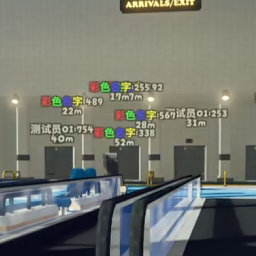
A bilingual player-label mod for PEAK with Hold / Toggle / AlwaysOn modes and tunable fonts, distances and opacity. 一款视角效果更好的,具有更多可自定义选项的能够快速定位你的队友的模组。BetterPlayerDistance.zh
A bilingual BepInEx mod for PEAK — a visually improved teammate locator with extensive customization options, including support for downed teammates. support English / 中文(介绍在下面) .
English
A polished BepInEx mod for PEAK that helps you quickly locate teammates, including downed players, with improved visual presentation and extensive customization options.
📋 Features
-
Three display modes
- Hold — press and hold the hotkey to show labels; they remain visible briefly after release
- Toggle — press once to show labels, then press again or wait for the timer to hide them
- AlwaysOn (v0.1.14+) — displays all players currently in the game by default; press the hotkey to hide or show labels manually; players who join or leave are handled automatically
-
Downed Pointer (v0.1.17+) — displays a countdown label above downed players, including an icon and percentage/seconds; downed or dead teammates outside the screen are shown with an edge indicator
-
Downed/Dead display styles (v0.1.19+) — choose between icons, kaomoji, or plain text; icon outline color and width can be adjusted; edge indicator text can show the name, percentage, or both
-
Player-colored icon and text outlines (v1.0.0+)
-
Dedicated rendering layer: labels are not blocked by walls or objects
-
Freely adjustable display duration, font size, minimum/maximum display distance, and overall opacity
-
Debug mode includes a console opened with Insert, allowing you to spawn fake players and preview fonts
-
Toggle mode supports durations from 10 to 9999 seconds; if a label gets stuck, quickly press C twice to reset it
⚠️ Compatibility
No known compatibility issues. However, running other player-location mods at the same time is not recommended.
⚙️ Installation
- Install BepInEx.
- Place
BetterPlayerDistance.dllinto theBepInEx/plugins/folder. - Launch the game once to generate the configuration file.
🔧 Configuration
The configuration file is located at:
BepInEx/config/com.AiAe.betterplayerdistance.cfg
⚠️ Upgrade Note
When upgrading from a 0.n.n version to a 1.n version, it is recommended to delete:
*\PEAK\BepInEx\config\com.AiAe.betterplayerdistance.cfgThe game will generate a new configuration file on the next launch.
📞 Contact
Feedback & bug reports: [email protected]
中文
一款视角效果更好的,具有更多可自定义选项的能够快速定位你的队友(包括昏迷)的模组。
📋 功能
-
三种显示模式
- 按住 (Hold) — 按住快捷键显示,松手后保持一小段时间再关闭
- 切换 (Toggle) — 按一下显示,再按一下或倒计时结束后关闭
- 常显 (AlwaysOn) (v0.1.14+) — 默认全程显示当前在场所有玩家;按快捷键可手动隐藏 / 再次按下恢复;新加入 / 中途离开自动加上或移除标签
-
昏迷玩家指向 (v0.1.17+) — 昏迷玩家头顶显示倒计时标签(表情图标 + 百分比/秒数),屏幕外昏迷/死亡队友在屏幕边缘显示指示器
-
昏迷/死亡显示样式 (v0.1.19+) — 图标 / 颜文字 / 纯文字任选;图标外围着色描边可调粗细;边缘指示器文字可选名称 / 百分比 / 名称+百分比
-
图标/文字描边跟随玩家肤色 (v1.0.0+)
-
独立渲染层:标签不会被墙壁或物体遮挡
-
显示时长、字体大小、最大 / 最小显示距离、整体透明度均可自由调整
-
Debug 模式内置 Insert 键呼出的调试控制台(生成假人、预览字体)
-
Toggle 模式时长支持 10~9999 秒;若遇标签卡住可快速按两次 C 重置
⚠️ 兼容性提示
目前没遇到兼容性问题,但不建议同时启用其他显示玩家位置的模组。
⚙️ 安装说明
- 确保你已经安装了 BepInEx。
- 将
BetterPlayerDistance.dll文件放入游戏的BepInEx/plugins/文件夹中。 - 运行一次游戏以生成配置文件。
🔧 配置
配置文件位于:
BepInEx/config/com.AiAe.betterplayerdistance.cfg
⚠️ 更新提示
从 0.n.n 版本更新到 1.n 版本时,建议删除:
*\PEAK\BepInEx\config\com.AiAe.betterplayerdistance.cfg游戏会在下次启动时重新生成配置文件。
📞 联系作者
反馈 Bug 或建议QQ群:1104320838