


CubeX
A modern in-game menu for PEAK with player tools, visuals, host controls, and quality-of-life features.

Cube-X
A modern in-game menu for PEAK, loadable through BepInEx, with two polished interfaces — a classic drill-down list menu and a click-style window GUI — plus a full protection suite, Steam-aware player tools, host controls, visual tools, quality-of-life features, and performance-focused rendering options.
Overview
Cube-X is designed as a full-featured PEAK menu with a clean interface, organized submenus, cached UI data where practical, and game-aware actions that prefer existing in-game behavior over fragile shortcuts.
The menu currently includes feature classes and actions across the main pages, covering player controls, protections, lobby tools, friends, achievements, visuals, world interaction, spawning, inventory management, search utilities, Discord access, notifications, keybinds, and menu settings.
Since 2.0.0, every feature can be driven from either of two interchangeable front-ends, switchable at any time from Settings > Appearance > Click GUI.
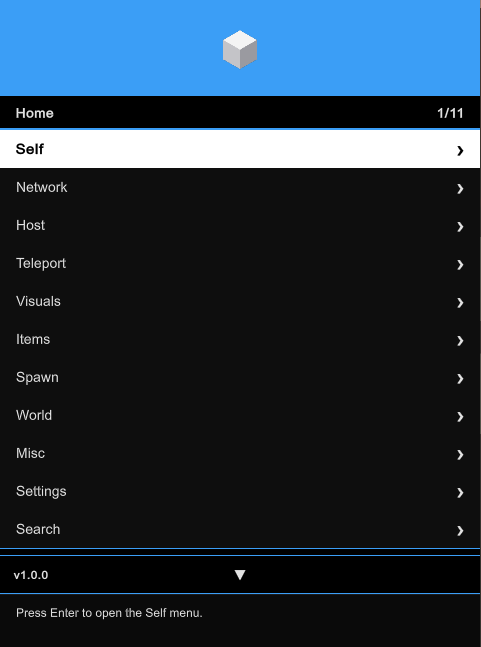
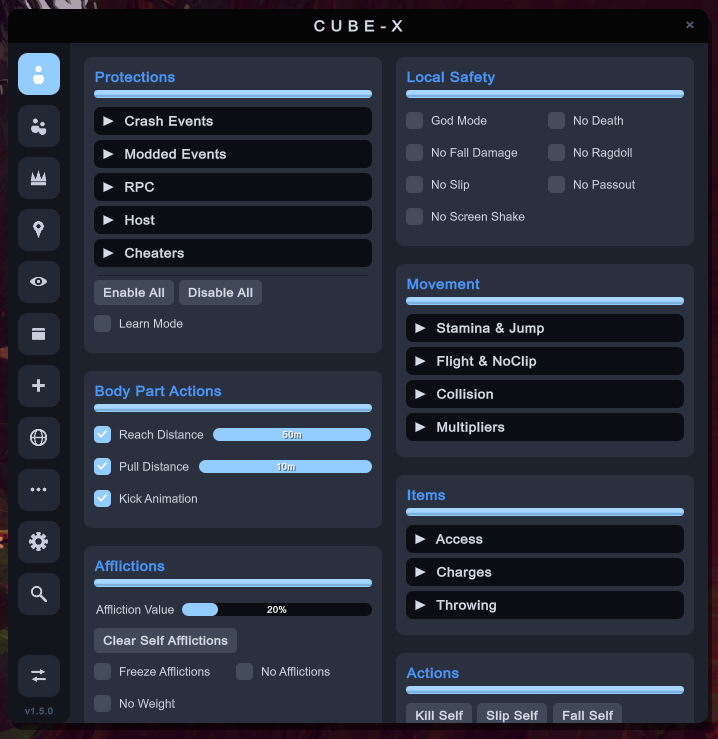
Classic drill-down list menu (left) and the new Click GUI window interface (right) — both drive the exact same features.
Interface
Classic List Menu
A compact GTA-style drill-down menu built for quick keyboard/controller navigation during gameplay.
| UI Area | What It Does |
|---|---|
| Header | Menu identity. Can drag menu position. |
| Breadcrumbs | Shows where you are inside nested submenus. |
| Feature Rows | Toggle actions, buttons, numbers, colors, text values, and nested pages. |
| Right Panel | Shows selected-player context, Steam avatars, tags, status, and profile details where available. |
| Footer | Shows navigation hints, current selection state, and keybind information. |
| Notifications | Uses a clean rectangular notification style with title, description, accent strip, and dismiss timer bar. |
| Color Picker | Applies selected colors only after the picker is accepted or closed. |
| Keybinds | Lets features be bound, listed, and removed individually from the settings menu. |
Click GUI
A click-style window interface introduced in 2.0.0.
| UI Area | What It Does |
|---|---|
| Sidebar Tabs | One icon tab per menu page for instant switching. |
| Group Boxes | Two-column category panels with checkboxes, sliders, and buttons. |
| Expandable Submenus | Nested feature groups expand in place inside their panel. |
| Draggable Window | Drag the header to reposition the whole window. |
| Input Capture | Gameplay controls are blocked while the window is open or while typing. |
| Shared State | Uses the same features, config, keybinds, and saved state as the classic menu. |
Default navigation is keyboard-first in the classic menu and mouse-first in the Click GUI; both can be customized from the settings pages.
Protections
Cube-X ships a full protection suite under Self > Protections, organized into five categories. Each protection watches a specific class of hostile or abusive network traffic.
| Category | Protection | Scope | Detects / Blocks |
|---|---|---|---|
| Crash Events | Kill My Scout | Local Block | Death, kill, and zombify RPCs targeting your scout from a non-owner sender. |
| Crash Events | Destroy My Objects | Local Block | Destroy and ownership-transfer events targeting your player objects. |
| Crash Events | Destroy Others | Local Block + Host Kick | Destroy or player-wipe events targeting another scout. As host, the attacker is kicked when Kick is on. |
| Crash Events | Attack Others | Host/Master Block + Host Kick | Kill, zombify, or pass-out RPCs sent to another scout by a non-owner. Detected and blocked only when you are host. |
| Crash Events | Event Spam | Local Block | High-rate Photon events that can destabilize, lag, or crash the session. |
| Crash Events | Spam Timeout | Opt-in Local Block (30s, per player) | Disabled by default. When enabled, players who trigger 30 or more full spam detections in a short window are blocked locally for 30 seconds per sender. |
| Modded Events | Item Injection | Local Block | Unauthorized item spawns or inventory syncs targeting your hand or slots. |
| Modded Events | Explosive Spam | Local Block | Repeated Dynamite, Beehive/Bee Swarm, Blowdart Hits, from network spawns, explosion RPC spam, bee-swarm RPC spam, blowdart-hit RPC spam. |
| Modded Events | Suspicious Prefab | Local Block | Non-vanilla network prefab instantiation from remote clients. |
| RPC | Forced Actions | Local Block | Forced falls, pass-outs, teleports, slips, and other control RPCs targeting your scout. |
| RPC | Inventory Manipulation | Local Block | Remote inventory, slot, held-item, and pickup RPCs targeting your scout. |
| RPC | RPC Spam | Local Block | Excessive repeated RPCs from the same sender in a short window. |
| Host | Fake Host Authority | Host/Master Block + Host Kick | Non-master clients sending expedition, world-state, fog, or end-game control RPCs. |
| Host | Ascent Change | Local Block + Host Re-sync + Host Kick | Ascent difficulty changes from a player who is not the current host. As host, the correct ascent is re-synced to everyone after a blocked attempt. |
| Cheaters | Known Cheaters | Detect + Blacklist + Host Kick | Known mod-client-tagged players. Add to Blacklist auto-blacklists them; Kick auto-kicks as host. |
| Cheaters | Identity Spoof | Detect + Blacklist + Host Kick | Players sharing another scout's Photon user ID (confirmed) or display name (possible). |
Per-Protection Controls
Every protection entry has six independent switches:
| Control | Behavior |
|---|---|
| Notify | Shows an in-game notification when the protection triggers. |
| Block | Blocks the hostile event within the labeled scope. |
| Log | Writes the event to the Cube-X protection log. |
| Announce in Chat | Announces the detection in the in-game text chat. |
| Add to Blacklist | Adds the offender to your local blacklist. |
| Host Kick | Kicks the offender when you are the host/master client. |
Suite Controls
| Control | Behavior |
|---|---|
| Enable All / Disable All | Toggles the entire protection suite in one click. |
| Learn Mode | Observes and logs without blocking, useful for tuning. |
| Protection Log | Written to %APPDATA%\CubeX\Peak\Log.txt. |
| Kick Notice | Host-side protection kicks replace the native leave notice with "{Name} has been kicked! Reason: {reason}". |
Scope labels are honest by design: Local Block protects your client, while host/master entries state the confirmed authority path instead of claiming global blocking the network flow can't prove. Extensive false-positive guards cover room joins, late-join inventory sync, revive relays, legitimate item replication, end-game flow, and physics/rescue RPCs.
Feature Map
| Page | Highlights |
|---|---|
| Self | Local safety (god mode, no death, no fall damage, no ragdoll, no slip, no passout, no screen shake), the full protection suite, movement (stamina & jump, flight & noclip, collision, multipliers), body part actions (reach/pull distance, kick animation), item access/charges/throwing helpers, afflictions with per-affliction controls, entity control (Scoutmaster, zombie), aura farm, and self-focused actions. |
| Network | Live player list, selected-player tools, spectate with Picture-in-Picture, recent players, blacklist, Steam friends with lobby details, player notes, invite options, profile links, player tags, lobby info side panel, join/leave/rejoin and copy-join-link tools, voice tools, text chat, and achievement management. |
| Friends | Loads Steam friends into a dedicated submenu with online/offline tags, joinable-lobby details (player count, region, biome, level), and invite-focused actions. |
| Host | Live Ascent difficulty control applied mid-expedition through PEAK's own ascent RPC, PEAK Map Picker (daily/random/full cached catalog with biome summaries), Terrain Customizer with per-segment biome filters, More Scouts room limits, Steam lobby locking, master/client authority tools, room version utilities, kiosk tools, campfire actions, and join handling. |
| Visuals | Player ESP with per-type colors, profile cards, pings, camera options, FOV and zoom tools, third-person options, HUD tools, watermark, world tags, movement effects, dead-scout collider optimization, remote ragdoll velocity clamping, and visual quality controls. |
| World | World interaction tools, time-related options, object utilities, luggage helpers, and environment actions. |
| Teleport | Teleport to spawn, players, pings, look position, custom coordinates, quick targets, or any active campfire detected in the current scene. |
| Performance | Frame pacing, rendering quality, world-entity, remote-character, wind-simulation, and ESP cost controls in one top-level page. |
| Spawn | Spawn-focused tools for items and game objects, backed by the JSON spawn item cache. |
| Inventory | Inventory helpers, item access, slot tools including backpack assignment and contents, cook-level controls, and item-focused quality-of-life actions. |
| Search | Quick lookup tools for finding features, players, objects, or menu entries faster. |
| Misc | Discord community access, notifications, utility actions, and general helpers. |
| Settings | Click GUI interface toggle, menu styling, controls, keybind management, notification preferences, persistent configuration with save/load confirmation, and a Replay Tutorial option for the first-time onboarding. |
Player Tags
Cube-X adds readable tags to player entries so status and context are easier to scan.
| Tag | Meaning |
|---|---|
| Friend | Player is recognized from the Steam friends list. |
| Blacklisted | Player exists in the local blacklist list. |
| Recent | Player was recently seen. |
| Online / Offline | Steam or game-aware presence state where available. |
| Name Spoof | Player joined the current room with a Steam name that does not match the in-game nickname. |
| {modname} | Player is using a known third-party mod/mod menu. |
| Modder | Player triggered a protected illegal network action and is not labeled as a known mod client. |
Name spoof detection is intended to apply only to players observed inside the current game or room, avoiding false positives from stale recent-player or blacklist data.
Achievements
The achievements page includes individual achievement controls and bulk actions.
| Action | Description |
|---|---|
| Unlock All | Unlocks achievements through the game-aware achievement flow. |
| Lock All | Resets achievement state where supported. |
| Individual Entries | Lets achievements be managed one by one from the achievements submenu. |
| Accent Achievements | Includes the accent achievement range where supported by the game. |
Keybinds
Cube-X supports feature-level keybinds.
| Control | Behavior |
|---|---|
| Open Menu | Opens or closes the menu (either interface). |
| Set Feature Keybind | Assigns a keybind to the hovered feature. |
| Keybind List | Shows every assigned keybind as its own option. |
| Remove Selected Keybind | Removes one selected keybind without clearing the entire list. |
| Notify Keybind Toggles | Optional notification when a keybind toggles a feature. |
Default controls:
| Input | Action |
|---|---|
Insert |
Open or close the menu. |
Arrow Up / Arrow Down |
Move selection. |
Enter |
Activate selected option. |
Backspace / Escape |
Go back. |
Arrow Left / Arrow Right |
Adjust values. |
Shift + Enter |
Edit compatible numeric/text values. |
F8 |
Assign a keybind to the hovered feature. |
D-pad Right + RB |
Open or close the menu with a controller. |
D-pad |
Move selection; left/right adjusts compatible values. |
A |
Activate selected option. |
B |
Go back, or close the menu from Home. |
Mouse |
Full navigation inside the Click GUI. |
Notifications
Notifications use a modern scale-aware layout, redesigned in 2.0.0:
| Element | Purpose |
|---|---|
| Main Rect | Holds the notification content with adaptive width and border. |
| Accent Strip | One colored strip on the left side. |
| Timer Bar | Thin bar showing time until auto-dismiss. |
| Title | Short event name. |
| Description | Clear action result or status message. |
| Animations | Smooth fade in/out with a brief flash on arrival; up to 15 stored notifications. |
Notification behavior can be adjusted from the notification submenu, including keybind toggle notifications.
Performance Focus
Cube-X includes menu and game-facing performance work intended to reduce unnecessary frame cost.
| Area | Approach |
|---|---|
| Menu Rows | Organized and cached where practical to avoid rebuilding expensive UI state unnecessarily. |
| Player Data | Steam avatars, tags, and player metadata are reused instead of being repeatedly fetched every frame. |
| ESP | Rendering is scoped to useful targets and avoids unnecessary object rendering where possible. |
| Visual Effects | Heavy visual options can be disabled or tuned from Home > Performance. |
| Notifications | Lightweight drawing style with minimal layout complexity. |
| Feature Pages | Large menus are split into focused submenus to reduce clutter and scanning cost. |
| Ragdoll Physics | Optional remote ragdoll velocity clamp prevents extreme physics spikes (70+ m/s) from destabilizing frame rate. |
| Runtime Safety | Configurable state guards skip incomplete update frames, while exact no-op filters avoid redundant body-part physics writes. |
| Character Queries | Uses PEAK 2.4's native squared range checks; cached renderer hierarchies and optional two-bone skinning lower crowded-scene rendering cost. |
| Spawn Cache | JSON-backed spawn item cache avoids rebuilding the item list every menu visit. |
Some actions still depend on live game state and must refresh while playing, especially player lists, lobby state, online state, ESP targets, and world objects.
Discord Community & Website
Cube-X includes a first-time prompt asking whether the user wants to join the Discord community server for Cube-X.
The link is also available in:
Misc > Discord Community > Join Discord
Community link:
https://discord.gg/cHmp58MqPf
Website link:
https://cube-x-website.vercel.app
Notes
Cube-X is built for PEAK modding and testing workflows. Game updates may change internal behavior, player data, achievements, networking, or object layouts, so some features may need updates after PEAK patches.
Use responsibly and preferably in private, modded, or trusted lobbies.
Cube-X is not affiliated with PEAK, Landfall, Aggro Crab, Steam, Photon, BepInEx, or any related official project/Mods.
Developed only by: Mister9982