

ClimbInfoTracker
Track your every climbing record.ClimbInfoTracker
Track the local player's PEAK climb history.
Features
- Records climbs as in progress, summited, failed, or abandoned.
- Persists in-progress climbs periodically, so an interrupted session is kept as an abandoned record instead of being lost.
- Stores the start date and time, duration, current height, ascent, player count, level, current biome, run mode, network mode, and Photon room name.
- Displays the game's confirmed run ID for multiplayer climbs. A Photon room can host multiple climbs, so the run ID distinguishes each climb within the same room.
- Records other instantiated players seen during a multiplayer climb, including their game platform family, platform account ID, and latest observed display name. The recorded player count represents the peak number of instantiated players present at the same time.
- Supports normal runs, custom runs, and custom mini runs. Each record shows its ascent level, including custom runs.
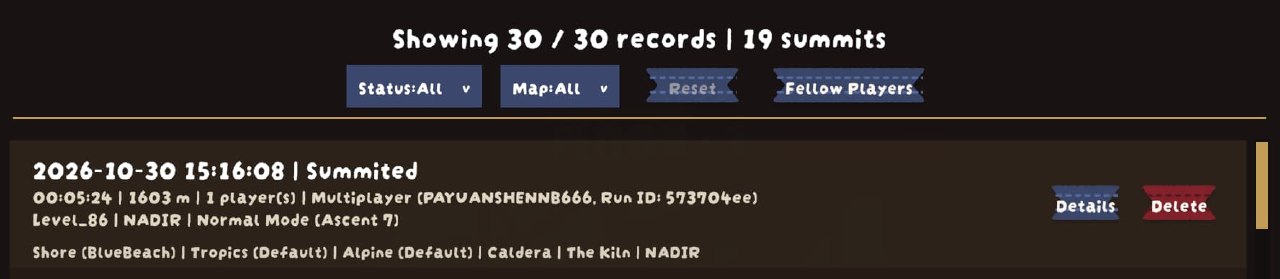
- Stores the generated map's complete biome sequence, including biome variants and the Mesa tomb state when available. Long routes are summarized in the record row without truncating the biome data stored in history.
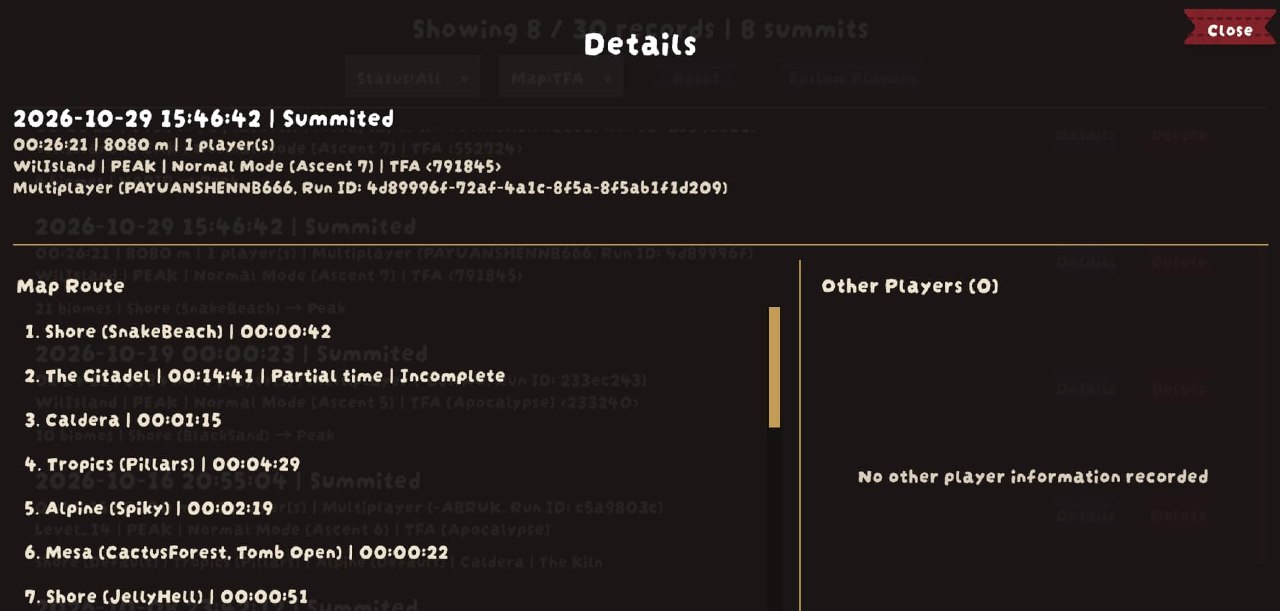
- Shows per-stage cumulative times in route details, including time spent at Peak. Partial observations and unfinished stages are marked.
- Records the generated map seed when the climb uses a PLL custom map.
- Supports True Final Ascent 3.0 runs, including reordered, repeated, and custom Builder biomes, with the synchronized map seed, complete stage route, current biome, native biome variants, and Mesa tomb state. TFA routes use a first-and-last stage summary in the record row and a full route in details.
- Marks climbs where TFA Apocalypse mode was observed active, including runs without TFA's long route. These records appear in the TFA filter and offer details.
- Adds a
Climb Recordspage to the pause menu. Records use a compact four-line layout, have a visible scrollbar, and can be deleted individually. Multiplayer details show the complete map route and recorded players in separate columns. - Restores the scroll position and selected record action when returning within the same scene. Changing scenes resets browsing to the top.
- Filters records by outcome and map source, with selections kept until the game restarts.
- Opens matching local climb records from a fellow player's entry in details, with a record count and a way to return to the previous filters and position.
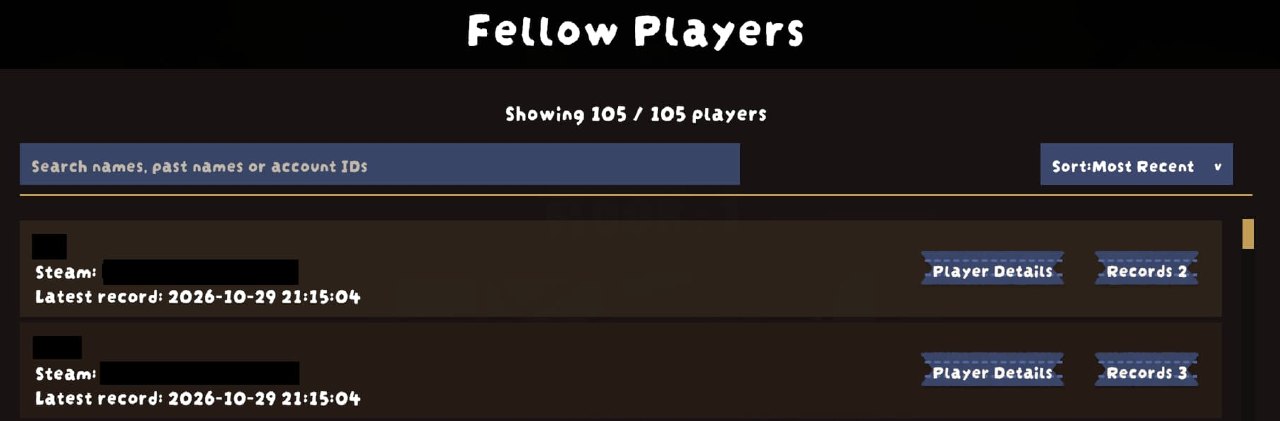
- Provides a separate fellow-player directory with name, past-name and account-ID search, plus sorting by latest associated record or record count.
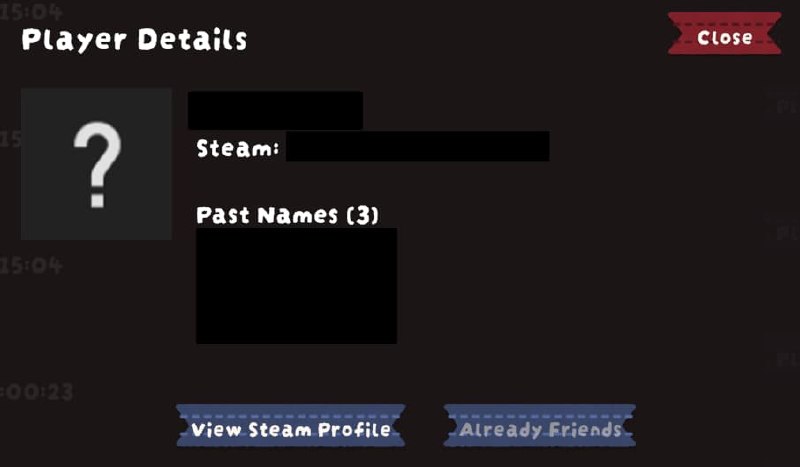
- Opens player details from the directory or an active player query, with Steam avatars, profile links, and friend actions for Steam accounts.
- Deletes matched completed records after confirmation, while keeping the in-progress climb. Records are kept if saving the deletion fails.
- Provides English and Simplified Chinese text. Other game languages fall back to English while game-provided biome names continue to use the game's localization.
Route Split Times
Climb details show each route stage's cumulative time alongside its biome and variant. All observed intervals belonging to the same route stage are added together, without visit counts. Repeated biomes at different positions in PLL or TFA routes remain separate. The record-list route summary stays compact and does not show split times.
Times use the game's run clock. A valid progression campfire ends the current split and immediately starts the next, so resting and transition time belongs to the following stage. Cooking, automatic lighting, synchronization of an already-lit fire, and unrelated campfires do not create splits.
Network clock corrections update the current split without counting the corrected interval twice. The recorded total follows the synchronized game clock, including the final stop synchronization when received. If the clock is unavailable while leaving the game, the last valid time is kept. Confirmed normal starts keep the first stage timed from zero even if the route becomes available later. Hosts recognize a fresh non-Quicksave start locally, without depending solely on receiving a zero-time sync. This does not backfill late joins or disconnected time.
Reaching the actual summit ends the preceding biome and starts the Peak stay. If TFA has a final campfire before the summit, the remaining climb still belongs to the preceding biome and is added to its cumulative time. Normal boarding completes the Peak stay. Warping to Void ends the Peak stay and starts Void timing. Completing the local player's end-portal interaction ends the Void/Nadir split.
Same-stage item warps keep timing continuously. Confirmed warps to another logical stage switch timing at the warp boundary without adding a partial-time warning. Temporarily unavailable route information does not interrupt a known stage; when a transition cannot be attributed reliably, the affected time is marked partial.
Details show Timing for the active stage, Partial time for observations that
started late or have missing or uncertain coverage, and Incomplete for the
current stage when a climb fails or is abandoned. An earlier interruption does
not override a later completed split. -- means no time
was recorded, not zero seconds. Older records without split data keep their
original route display; existing partial-time flags are not recalculated.
The popup takes a snapshot when opened rather than
refreshing continuously.
Only progression observed by this client is recorded. Mid-run joins begin with a partial current stage; earlier times cannot be reconstructed. Same-run restores retain compatible saved splits but do not fill in disconnected or offline time. Skipped or unidentifiable stages remain unknown, and observed timing stops on failure or abandonment. Split totals therefore need not equal the run's total duration. No extra per-player timing data is exchanged over the network.
TFA Biome Scaling
Route details preserve confirmed TFA Builder scaling for each stage, such as
Shore (Snake Beach, Height 200%) or Caldera (Length 200%). Scaling appears
after the variant and before the Mesa tomb state. These are TFA scaling tiers,
not exact geometric measurements or uniform scaling of every object.
The default 100% tier is hidden. Unknown values and older records do not imply 100%; custom biomes and automatically added terminal stages do not inherit another stage's scaling. Stored scaling remains readable without TFA installed. The record-list summary and current-biome label stay unchanged.
History Filters
The status and map dropdowns each select one option, or All, directly on the
history page without opening a separate dialog. A record must match both selections.
Changing a filter returns the list to the top; closing
the page or changing scenes keeps the filter selections for this game session.
Map sources are Vanilla / Other, PLL, TFA, and TerrainRandomiser, based
on the information saved in each record rather than currently installed mods.
TFA includes both TFA long-route climbs and climbs with a recorded Apocalypse
marker. The Apocalypse marker takes priority for filtering even when the actual
map uses PLL or TerrainRandomiser; its route and map-mod data remain available.
Vanilla / Other includes custom runs without these map-mod markers and older
records with no map-mod information; it does not prove a map was official.
Delete matched shows the number of matching completed records. Its confirmation
keeps that candidate list fixed and does not include new matches added afterwards.
In-progress records are never included in bulk deletion. Deletion cannot be
undone in the interface; individual record deletion remains unchanged.
Fellow Player Queries
Each fellow player with a valid saved identity has a Records N button in climb
details. The count includes every retained local record containing that identity,
including the current record and in-progress climbs. Repeated entries in one
record count only once. Matching uses the normalized platform and account ID,
not the name: changing names does not split an account, and identical names do
not combine different accounts. An identity can be queried while its name is
still pending; legacy Steam and Windows labels use the existing identity rules.
Opening a query temporarily sets status and map to All and starts at the top.
You can then narrow the result with those dropdowns; records must match the
player identity and both selections. The query banner shows the saved name,
platform, and full account ID. Opening and closing a result's details stays in
the query. Selecting another fellow player replaces the target without creating
a nested query.
For queries opened from climb details, Exit Query, the history page's back
button, or Esc returns to the original filters, browsing position, and source
record's details button. Queries opened from the fellow-player directory return
to that directory instead, preserving its search, sort order, position, and
selected player. Esc closes an
expanded dropdown first. Closing and reopening the pause menu within the same
scene keeps the query; changing scenes exits it, restores the original filters,
and returns browsing to the top. Reset clears only the status and map selections
and starts at the top, keeping the queried player and the original return context.
Changing either dropdown also keeps the player query active. When both selections
are already All, there is nothing to reset and the button is disabled.
Single-record and bulk deletion remain available in query results. Bulk deletion confirms the queried player's identity, selected filters, and completed-record count before deleting the fixed candidate list. It deletes climb records, not just names from a player list; in-progress records remain protected.
Queries only cover retained local records with saved participant identities. Older records without a player list, disabled identity collection, or deleted records cannot establish that you have never played together. A participant's presence in a record does not establish a shared summit result or time spent online together. Listing, searching, and querying records use local history only; opening a Steam player's details can request their name and avatar from Steam.
Fellow Player Directory
Open Fellow Players from the history toolbar when no player query is active.
The separate page lists all valid saved player identities across retained local
records, including in-progress climbs, independently of the history page's
status and map filters. Each entry shows the saved name, full platform account
ID, latest associated record's start time, and a Records N button using the
same matching rules as climb details.
Search matches names, saved past names, or account IDs, without case sensitivity. When only a past name matches, the entry identifies the matching past name. The displayed name comes from the most recently started associated record with a valid saved name, not a fresh platform lookup; unnamed recent records do not hide an older available name. The latest-record timestamp is the climb's start time, not the time the other player joined or was last seen.
The default sort is Most Recent; Record Count sorts by the number of retained
associated climbs. Search and sorting return the list to the top and remain set
for the game session. Entering the page refreshes the directory; typing searches
its current summary without scanning history again. Returning from a query
refreshes counts and names, so deleting the last associated record also removes
that player from the directory. No separate player database is stored.
The directory's back button or Esc returns to the history position and filters
from before opening it. Esc first closes a sort dropdown or ends text editing.
Within a scene, player-list browsing position is retained; scene changes clear
old positions and return contexts while retaining search and sort preferences.
Reset in a query keeps the target player and the return path to the directory;
use Exit Query, back, or Esc to leave the query.
Player Details
Use Player Details beside a player's Records N button or beside Exit Query
in an active query. The popup shows the name, platform, and full account ID.
Closing it or pressing Esc returns to the same browsing position and button,
without changing the player query, history filters, directory search, or sorting.
For Steam accounts, the popup requests the name and avatar only for that player. It first shows the recorded name, then prefers a valid name returned by Steam. Steam's returned information may be cached. Missing avatars or unavailable Steam data do not prevent viewing recorded information. Other platforms show basic details without Steam actions.
The Past Names section lists distinct names saved for the same account across
all retained local climb records, with the most recently recorded names first.
It excludes the displayed primary name and is hidden when no other names are
available. Long names and the full list can be read by scrolling the popup body.
This works for non-Steam accounts too; it is not Steam's complete name history.
Deleting climb records can remove names from this list.
View Steam Profile opens the account in the Steam Overlay. Add Steam Friend
opens Steam's own confirmation, rather than sending a request automatically.
Already-friend, pending outgoing invite, blocked, and unavailable relationships
disable adding; incoming invitations offer Steam's accept-invitation confirmation.
If Steam or its overlay is unavailable, the popup explains why its actions are
disabled. It does not open an external browser. Returning from the Steam Overlay
keeps the player popup open and refreshes the friend-action state.
Names and avatars fetched for the popup do not update saved climb records or the directory's search data. Avatar textures are kept only while the popup is open and are not written to disk. There is no avatar preload for the whole list, Steam Web API key, or separate player-profile database.
TerrainRandomiser Integration
TerrainRandomiser is optional. When it is installed and random terrain is enabled for a run, ClimbInfoTracker records the terrain seed and a compressed snapshot of the map settings with that climb.
- The record displays the terrain seed when one was captured.
Exportwrites that record's original map settings toApplication.persistentDataPath/TerrainRandomiser/as a formatted JSON file. The file name uses the record's start time and is overwritten if it already exists.Loadis available only at the Airport. It loads the selected record's map settings into TerrainRandomiser for the next run.- The
ExportandLoadbuttons appear only when TerrainRandomiser is loaded and the selected record contains a saved map-settings snapshot.
True Final Ascent Integration
True Final Ascent (TFA) is optional. This version targets TFA 3.0's stage interface; older TFA versions without that interface are not supported. Existing history from older versions remains readable. When TFA is active, ClimbInfoTracker uses TFA's synchronized seed and stage chain rather than treating each physical map segment as a single biome. Caldera, The Kiln, Gloom, and The Citadel appear as separate stages, with names localized by the game. Builder routes retain their actual order and repeated stages, even when stages share a physical segment.
The complete route, native biome variants, and Mesa tomb states are captured once TFA finishes building the map, including stages hidden until the player reaches them. Variant selection is read within each stage's terrain, independently of whether the whole stage is visible. Details that cannot be read remain unknown; unknown variants are left blank, not recorded as defaults. Confirmed details are not scanned again. Resuming the same climb preserves confirmed details when its seed and stage route match. Peak is included only when a real Peak progress point or stage exists. Explicit Builder Nadir stages are part of the complete route, including intermediate and repeated occurrences. The original hidden Void is a separate destination and is added only after entering it.
Custom biomes are recorded by their own ID, with snapshots of available English and Simplified Chinese names. These names remain readable after leaving the run or removing the biome mod. Simplified Chinese uses the saved Chinese name, then English, then the ID; other languages use English, then the ID. Custom biomes do not inherit the replaced native biome's variant or Mesa tomb state. Their names are shown consistently in the current-biome field, route summary, and details.
TFA long-route generation takes priority over TerrainRandomiser and PLL collection while active, so their seeds and saved map settings are not attached to a TFA climb. If the installed TFA version exposes an unsupported stage interface, a warning is logged and unconfirmed TFA seed and route data are not recorded. Previously captured data is retained. Older records are not inferred to be TFA runs.
Apocalypse mode is recorded independently of TFA's long-route generation. It requires a locally installed, compatible TFA version and uses TFA's own active state, including its daily-challenge exclusion and room/local settings. During formal gameplay, the existing one-second capture and snapshot paths can pick up delayed synchronization. Once Apocalypse has been observed active in a climb, the marker is kept, including when resuming that same climb. It means the mode was observed active at some point, not necessarily that it stayed active throughout. Airport settings do not update the previous climb, and old records are not backfilled.
Apocalypse records show TFA (Apocalypse), with the TFA route seed when available,
and provide a details button even for offline vanilla runs. Apocalypse alone does
not replace the actual map's route, seed, or TerrainRandomiser settings. Vanilla
and TerrainRandomiser rows still show the full route, while PLL and TFA long
routes keep their first-and-last summaries.
Configuration
ClimbInfoTracker uses the following BepInEx configuration entries:
| Section | Key | Default | Description |
|---|---|---|---|
General |
Enable Tracker |
true |
Enables recording new climb history. |
General |
AutoSaveInterval |
60 |
Seconds between in-progress snapshots. Set to 0 to save only when a climb starts and ends. |
Privacy |
RecordPlayerIdentities |
true |
Records other players' platform names and account IDs in multiplayer climb history. Disabling it does not remove identity data already stored. |
TerrainRandomiser |
UseActualMapSettings |
true |
When loading a saved TerrainRandomiser record, disables random biome and variant selection for overridden biomes so the settings reproduce the generated map. This does not change exported files or the stored record snapshot. |
Data
History is stored in:
Application.persistentDataPath/ClimbInfoTracker/ClimbInfoTracker.json
On Windows with PEAK's default Unity company and product path, this is usually:
C:/Users/<YourUsername>/AppData/LocalLow/LandCrab/PEAK/ClimbInfoTracker/ClimbInfoTracker.json
Saving writes a temporary file in the same directory before replacing the main
file. ClimbInfoTracker.json.bak keeps the previous successfully saved history;
the first save does not create a backup. Starting the plugin normally reads
history without rewriting the files or rotating the backup.
If the main file is missing or contains invalid history JSON, a valid .bak
is restored automatically. Damaged files are preserved as
<original file name>.load-failed.<UTC timestamp> before replacement, with a
numeric suffix if that archive name already exists. If neither file is valid,
new history can be saved only after the damaged originals have been archived.
File permission or other read errors do not cause existing files to be
overwritten. Failed saves keep the in-memory history for the next normal save;
leftover .tmp files are not loaded as history.
When player identity recording is enabled, multiplayer records store display names and platform account IDs as plain text in this local JSON file. ClimbInfoTracker does not upload this data.
The stored Platform field uses the game's platform family. Steam players are
stored as Windows with their SteamID64, while climb details display Steam
for Windows identities with a valid public individual SteamID. Steam availability
affects nickname lookup, not the stored identity. Older Steam entries with
valid SteamIDs are normalized to Windows, and duplicate identities are merged
when history is loaded, preserving their first position and preferring valid
legacy Steam display names. Normalized history is written on the next normal save.
Valid account identities are retained even when a display name is not yet
available. Identities require a recognized game platform family and a non-zero
unsigned numeric account ID, saved as a string. Collection, history normalization,
and merging use the same identity rules. Missing names remain empty in JSON and
appear as Name pending in details.
The existing one-second participant scan fills in names while those players are
present in the active climb, without clearing a previously recorded valid name.
Unavailable Steam names are requested by SteamID without downloading avatars;
Steam players do not fall back to Photon nicknames.
Run IDs from older history schemas are hidden because those versions did not record whether the value came from the game's authoritative run synchronization.
TerrainRandomiser exports, when used, are stored in:
Application.persistentDataPath/TerrainRandomiser/MapSettings_yyyy-MM-dd_HH-mm-ss.json