
PEAK Quick Resume
Autosaves on lighting a campfire. Press F7 to browse and load any saved campfire from anywhereAutomatically saves when you light a campfire. Press F7 to browse your campfires and jump straight back to any of them.
Press F7 anywhere and a save picker opens listing all your checkpoints for the current mode. Choose one with the arrow keys, press Enter and it will:
- Start a fresh run of that save's difficulty, then
- Automatically load that checkpoint. So you're back at that campfire with your items and progress.
The newest save is preselected, so pressing F7 and then Enter will load your latest checkpoint.
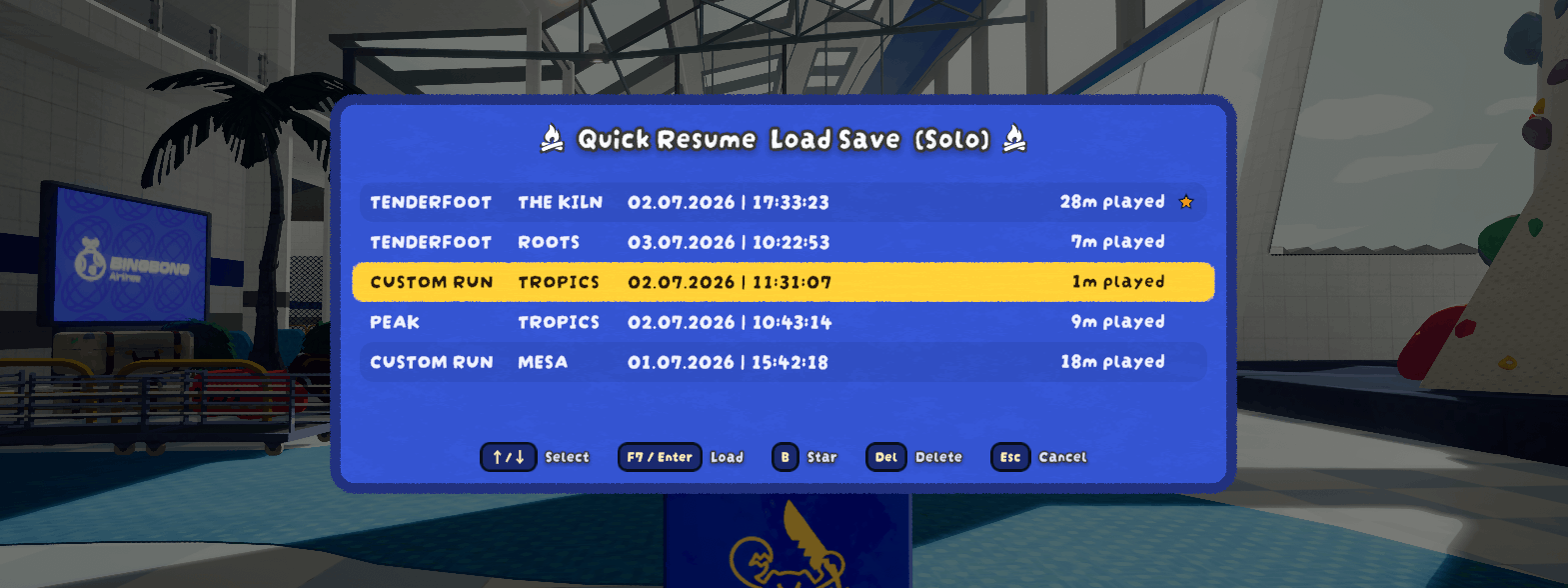
Works after you die, from the Airport, or mid-run (so no need to die first). Full co-op support: the host presses F7 and everyone is brought along and restored.
The mod also adds a few optional Quality of Life pause menu buttons (more details at the bottom of this README).
How to use
- Play as normal. Lighting a campfire saves automatically. Each save is added to your history.
- Press F7 to open the save picker.
- Use ↑/↓ to highlight a checkpoint, then press Enter to load it.
- Press Del to delete the highlighted save (press it twice to confirm).
- Press B to star the highlighted save (press B again to unstar it). Starred saves are moved to the top and can't be deleted until unstarred again.
- Press F7 or Esc to close the menu.
In co-op, only the host can use F7 and everyone is restored together.
What will be saved/restored?
- Everything within 30m of the campfire when lit will be saved, and restored upon loading the save (excluding most deployables that won't be of help anyways). This includes: all players and their inventories as well as all their status effects/states, everything on trees/bushes or the ground, the state/items of luggage and the Ancient Statue, the in-game time and day, and the playtime. Note: A temporary (held) 4th item, bonus stamina / petrify and physical status effects cannot be restored for clients without this mod.
- The whole island/map with all its biomes and levels/seeds will be saved exactly as is. Which means you are even able to replay islands multiple weeks after they've already been rotated, but when the game rotates the whole map pool your saves will load incorrect islands (more details under Notes).
- Achievement progress is saved and restored when you load a checkpoint. This only applies per-player to whoever has PEAK Quick Resume installed themselves. A co-op player without it keeps the vanilla behavior for their own achievements, which may falsely unlock some Steam achievements, but also not restore the progress/state of other achievements.
Notes
- Host-only in co-op. For the most part it works fine if only the host has PEAK Quick Resume installed, but it's recommended that everyone has it installed for compatibility reasons (see above).
- When the game updates (version number increases), the map pool is (probably) also rotated which will make all your save files load incorrect islands (which may rarely cause everyone to fall through the map). This normally happens once every ~6 weeks.
- Custom runs are resumed with your current custom settings (the checkpoint file doesn't store the run's original settings).
- Translations were done by AI, so if something is off in your language you are free to contact me (see below).
Feedback & bug reports
Found a bug or have a suggestion? Please fill out this form or send me an email at [email protected].
Configuration
Config file: BepInEx/config/OnlyCook.PEAKQuickResume.cfg.
View config information
If you have PEAKLib.ModConfig installed, every setting below is also editable in the game's settings under Mod Settings → PEAK Quick Resume, no need to touch the config file by hand.
- resume-key: the key to open and close the picker (default F7). Rebindable directly in ModConfig's menu.
- resume-key-loads-instead-of-closing: if enabled, pressing the resume key while the picker is open loads the highlighted save instead of closing the picker (so pressing it twice loads your latest checkpoint), and only Esc closes the menu. Off by default.
- help-key: the key to open the help menu (default F4).
- allow-mid-game: allow resuming while still alive (default on).
- panel-opacity: how see-through the picker's background panel is (0 = fully see-through; 1 = fully opaque, default).
- minimal-picker-ui: show save picker (and help screen) in a UI without effects or animations, opens faster.
- Pause-Menu: disable/re-enable any of the 3 added QoL pause menu buttons, and optionally enable
move-rebind-controls-to-settingsto move the 'Rebind Controls' button away from the pause menu. - Timing: advanced settle/timeout values; raise
coop-airport-settleif a client occasionally gets left behind on a slow connection. - Teleport: advanced settings for the restore itself (inventory/afflictions/campfire/... reset/time of day toggles, retry timing). Can be used to stop something from restoring.
- Network: advanced co-op networking settings, currently just the readiness-check toggle used before a co-op load starts.
- Teleport-Mitigation: detects and helps recover from occasional teleport glitching after a load (brief up/down snapping, or rarely falling through the world). Everything here is on by default and rarely needs touching; thresholds and delays are all individually configurable if you want to tune them.
- Debug: verbose logging of every step of the resume sequence, on by default. Please keep this on when reporting issues.
Your saved checkpoints live in BepInEx/plugins/QuickResume/Archive/ (split into Offline/ and Coop/), back this up if you don't want to lose your saves. Note: the host saves for all clients, therefore holds all saves.
Credit where it's due
This mod started as an automation layer on top of PEAK Checkpoint Save by dominik0207, and its save file format is still based directly on that mod's own. As of version 2.0.0, Quick Resume has its own independent save/load/teleport implementation and no longer requires PEAK Checkpoint Save to be installed. Huge thanks to dominik0207, this mod wouldn't exist without their original work.
Miscellaneous Pause Menu Buttons
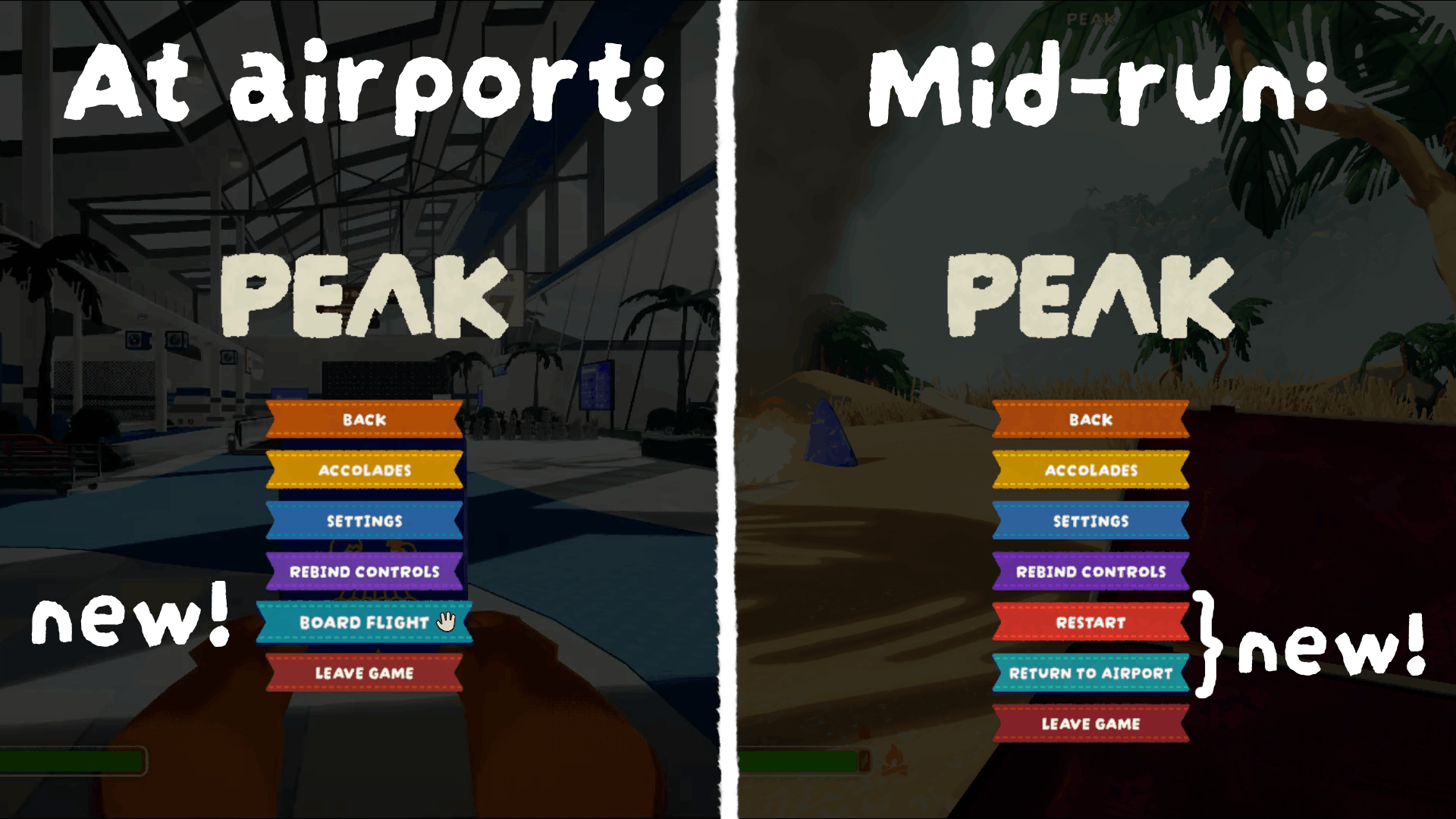
- Board Flight (at the Airport): Opens the gate kiosk directly without having to walk over.
- Restart and Return to Airport (mid-run, host-only): Both buttons do the advertised action and apply it to all clients.
You can disable/hide any of these buttons through 'Mod Settings' (on the PEAK Quick Resume tab, under Pause-Menu)
If you have too many pause menu buttons because of this, you can enable the
move-rebind-controls-to-settingssetting (also underPause-Menu). This will move the 'Rebind Controls' button from the pause menu to the 'Settings' page, below the 'Back' (or if applicable 'Mod Settings') button.