You are viewing a potentially older version of this package. View Latest Version

PeglinBalatroScore
A Balatro-style pegs x damage score for every shot, with flames that grow as you close in on the act boss's HP and a bomb chest that pays out every bomb.Edited · Nov 4, 2026
PeglinBalatroScore
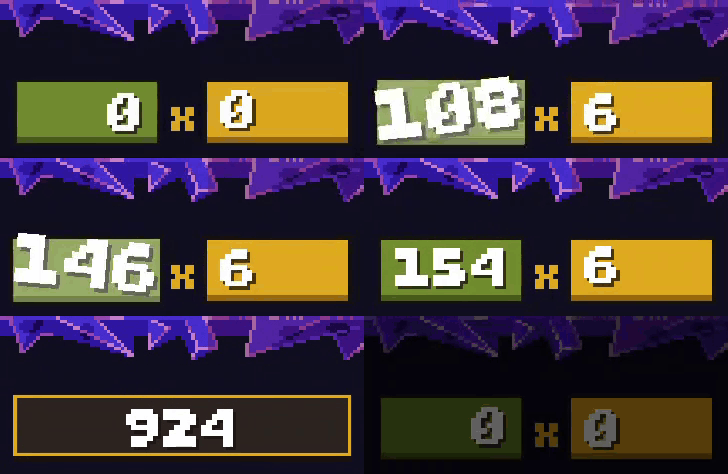
Watch every shot add up, Balatro style. A pegs × damage score sits above the enemy scroll in battle, counts up as your orb bounces, and catches fire when the shot gets big. A see-through bomb chest behind Peglin catches each bomb as it is lit and blows apart with the last one, showing the bombs' total damage.
Features
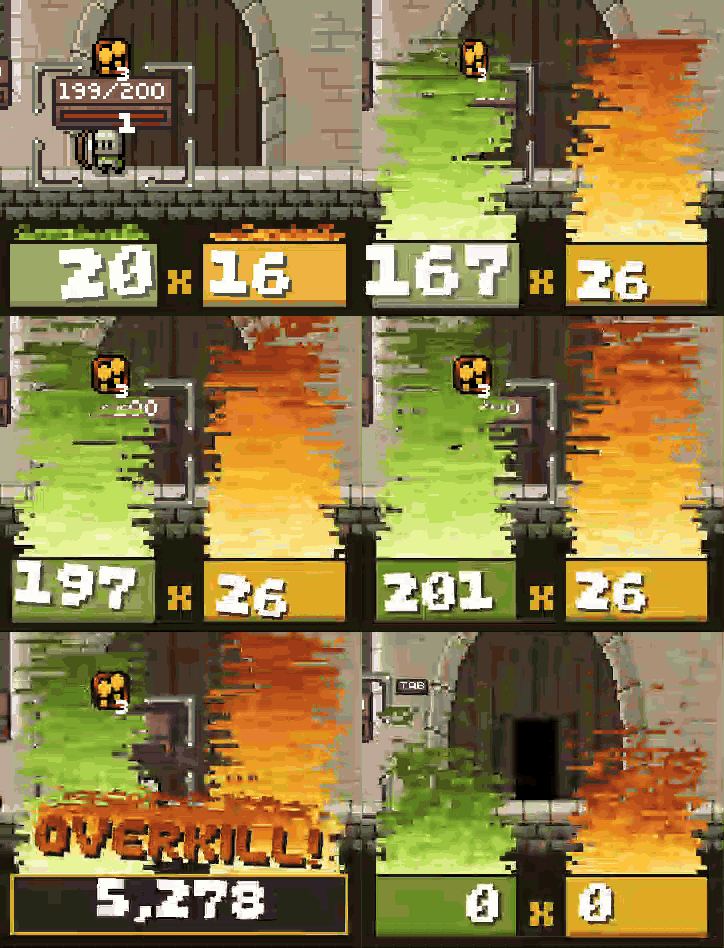
- Pegs × damage, live. The green box is what the pegs you've hit are worth (relics that make a hit worth more count). The yellow box is your orb's damage per peg, jumping to its crit damage when you trigger a crit. Every increase lands with a jolt.
- The real total. When the balls stop, the boxes give way to the damage the game actually deals, bonuses and multipliers included, for 3 seconds (real time, so game speed doesn't cut it short), then it fades out. Fire again and you're straight back to
0 × 0. - Flames. The closer a shot gets to the act boss's max HP, the bigger the fire, and it bursts when you pass it. Shields in front of a boss, like the Mole's tree, don't count towards the target.
- OVERKILL! A burning stamp when a shot beats the boss's max HP, or a green OVERHEAL! when a heal goes past yours.
- Bomb chest. A see-through chest behind Peglin catches a bomb the moment each one is lit, while your orb is still bouncing. It's sized for 10 bombs; extra ones heap up and spill over the sides. The instant Peglin's last thrown bomb explodes, the chest goes off with it: every bomb inside explodes, the chest blows apart into planks, and the bombs' total damage (each bomb's damage after relics, added up) bursts out of it, then shatters.
- Fonts. The score and the bomb chest's total draw in the game's own font, whatever font PeglinFonts is using, hotkey changes included.
- Hover for help. Mouse over the score for a plain explanation and your last shot's damage or healing.
- Fits the game's UI. Tooltips draw over the score, and in boss fights the boss health bar and enemy scroll slide down to make room.
Installation
With a mod manager (recommended)
- Install r2modman or the Thunderstore Mod Manager.
- Search for PeglinBalatroScore and install it.
- Launch Peglin.
Manually
- Install BepInExPack_Peglin.
- Download
PeglinBalatroScore.dllfrom the release or Thunderstore. - Put it in
Peglin/BepInEx/plugins/. - Start Peglin once to create the config file.
Built for Peglin v2.0.12. Works alongside PeglinRelicRerolls, PeglinMaxSpeed and PeglinFonts; the score follows whatever font PeglinFonts is using, including hotkey changes.
Settings
In BepInEx/config/PeglinBalatroScore.cfg (start the game once to create it):
| Setting | Default | What it does |
|---|---|---|
ShowScore |
true | Show the score in battles |
ResultSeconds |
3 | How long the final total stays up, in real seconds |
ShowFlames |
true | Flames behind the score |
ShakeNumbers |
true | Numbers shake as the score heats up |
ShowOverkill |
true | OVERKILL / OVERHEAL stamp |
Scale, OffsetX, OffsetY |
1, 0, 0 | Size and position nudges |
ShowBombChest |
true | The bomb chest behind Peglin |
ChestScale |
1 | Size of the chest, relative to Peglin |
EnableLogging |
true | Boss HP target and layout notes in BepInEx/LogOutput.log |
Some of my other mods
- PeglinFonts — change the font of all text in Peglin, other mods' text included. 13 fonts in Options.
- PeglinMaxSpeed — play at up to 6× speed without physics bugs.
- PeglinQuickRestart — hold a button to restart your run with the same setup.
- PeglinRelicRerolls — reroll relic rewards and shop relics.