

REPORaceSpectator
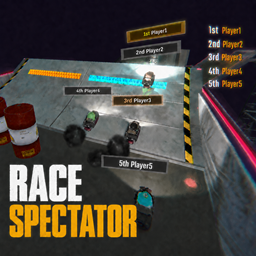
Improves Arena Race spectating with clearer rankings, player labels, visibility tweaks, and Quick Race Start. / Arena Race観戦を見やすくし、順位表示・頭上ラベル・視認性調整・Quick Race Startを追加します。REPO Race Spectator
English
REPO Race Spectator is a client-side mod that improves the Arena Race spectator experience in R.E.P.O.
In vanilla Arena Race spectating, it can be difficult to track player positions, rankings, and distance. This mod focuses on improving visibility while spectating, making it easier to follow the race.
Features
Improved ranking display
Improves the ranking display during Arena Race.
This makes it easier to see each player's current placement while spectating.
Track Piece display in the ranking list
Adds the current Track Piece number to the Arena Race ranking list while spectating.
Example:
1st P12 Player1
2nd P11 Player2
3rd P10 Player3
This helps you quickly understand how far the leading players have progressed through the race without adding a separate UI panel.
This display is only applied while spectating.
Player name labels
Displays world-space labels above players while spectating Arena Race.
Example:
1st Player1
2nd Player2
3rd Player3
The ranking text is color-coded by placement, and player names are displayed in white.
Better spectator visibility
Adjusts the spectator view to make Arena Race easier to watch.
- Reduces the effect of fog
- Makes distant players and track pieces easier to see
- Hides some unnecessary UI elements while spectating
- Allows manual brightness adjustment
Brightness can be adjusted with Alt + Mouse Wheel.
These changes make it easier to follow player positions and track conditions during the race.
Quick Race Start
Quick Race Start lets the host or singleplayer quickly switch to Arena Race.
By default, this can be triggered with the F9 key.
Unlike the visual-only features, this feature changes the current level to Arena Race and reloads the scene. It is useful when you want to quickly start Arena Race or restart it during testing.
Quick Race Start only works for the host or in singleplayer.
Config
The config file allows you to adjust label display and spectator visibility settings.
Only the main settings are explained here.
DefaultMode
Sets the default world label display mode.
| Value | Description |
|---|---|
Off |
Disables world labels |
Top3 |
Shows labels only for the top 3 players |
All |
Shows labels for all players |
ToggleKey
Key used to switch the world label display mode.
Cycles through Off, Top3, and All.
ShowPieceInPlacementList
Adds the current Track Piece number to the vanilla Arena Race placement list while spectating.
When enabled, the ranking list will include the player's current piece number.
Example:
1st P12 Player1
2nd P11 Player2
3rd P10 Player3
This setting only affects the placement list during spectating.
HeightOffset
Adjusts the height of the label above each player.
Higher values move the label upward.
MinScale / MaxScale
Controls the world-space size of player labels.
Labels close to the camera use a size close to MinScale, while distant labels approach MaxScale.
With the normal SpectateCamera, the camera usually stays close to the target, so the effect may be hard to notice. This setting is more noticeable when using FreeCam or when viewing players far away from the current spectator target.
MinScaleDistance / MaxScaleDistance
Controls the distance range used for label scaling.
Lowering MaxScaleDistance makes labels become larger at shorter distances.
Increasing MaxScaleDistance makes the scaling feel more natural for FreeCam or long-distance views.
HideBehindCamera
Hides labels for players behind the camera.
Keeping this enabled is recommended for normal use.
Notes
Most features are client-side visual improvements.
However, Quick Race Start is host-only or singleplayer-only. This feature changes the current level to Arena Race and reloads the scene, so normal clients cannot use it by themselves.
The label distance scaling settings are especially useful for FreeCam or long-distance spectator views.
Compatibility
Some UI or camera mods may overlap with this mod's display changes.
When used with FreeCam mods, this mod can also help when watching the entire race from a distance.
It works especially well with AdvancedFreeCam, allowing you to view the whole Arena Race from above while still checking rankings and player labels.
AdvancedFreeCam is not required. Other FreeCam mods can also be used as long as they allow you to move the camera away from the normal spectator view.
Future plans
This mod is intended to improve the Arena Race spectator experience.
The current version focuses on ranking display, player labels, and visibility improvements, but future updates may add more spectator-related improvements.
Planned improvements may also include system-side fixes for Arena Race starts, such as players stacking on each other at Race Start or spawn positions being too far forward and preventing players from joining the race smoothly.
日本語
REPO Race Spectator は、R.E.P.O. の Arena Race 観戦を見やすくするためのクライアントサイドMODです。
バニラのArena Race観戦では、プレイヤーの位置、順位、距離感を把握しづらい場面があります。このMODでは、観戦中の視認性を中心に改善し、Raceの状況を追いやすくします。
主な機能
順位表示の改善
Arena Race中の順位表示を見やすくします。
観戦中でも現在の順位を確認しやすくし、誰が何位にいるのかを把握しやすくします。
順位リストへのTrack Piece表示
観戦中のArena Race順位リストに、各プレイヤーの現在Track Piece番号を追加表示します。
表示例:
1st P12 Player1
2nd P11 Player2
3rd P10 Player3
別のUIパネルを増やさずに、先頭集団がどこまで進んでいるかを確認しやすくします。
この表示は観戦中のみ適用されます。
プレイヤー名ラベルの表示
Race観戦中、各プレイヤーの頭上に順位と名前のラベルを表示します。
表示例:
1st Player1
2nd Player2
3rd Player3
順位部分は順位ごとに色分けされ、名前部分は白色で表示されます。
観戦画面の視認性改善
Arena Race観戦中に、画面を見やすくするための調整を行います。
- Fogの影響を軽減
- 遠くのプレイヤーやコースを確認しやすくする調整
- 観戦時に邪魔になりやすい一部UIの非表示
- 明るさの手動調整
明るさは Alt + Mouse Wheel で調整できます。
これにより、Race中のプレイヤー位置やコース状況を追いやすくなります。
Quick Race Start
ホストまたはシングルプレイ時に、Arena Raceへ素早く移動するための機能です。
初期設定では F9 キーで実行できます。
通常の表示改善とは異なり、この機能は現在のステージをArena Raceへ変更してシーンを再読み込みします。Arena Raceをすぐに開始したい場合や、テスト中にRaceを気軽にリスタートしたい場合に使用できます。
そのため、Quick Race Start はホストまたはシングルプレイ専用です。
Config
Configファイルから、ラベル表示や観戦画面の調整を変更できます。
ここでは主な設定のみ説明します。
DefaultMode
起動時の頭上ラベル表示モードを設定します。
| 値 | 内容 |
|---|---|
Off |
頭上ラベルを表示しません |
Top3 |
上位3人のみ頭上ラベルを表示します |
All |
全プレイヤーの頭上ラベルを表示します |
ToggleKey
頭上ラベルの表示モードを切り替えるキーです。
Off、Top3、All を順番に切り替えます。
ShowPieceInPlacementList
観戦中のArena Race順位リストに、現在のTrack Piece番号を追加表示します。
有効にすると、順位表示にプレイヤーの現在Piece番号が含まれます。
表示例:
1st P12 Player1
2nd P11 Player2
3rd P10 Player3
この設定は観戦中の順位リストにのみ適用されます。
HeightOffset
プレイヤー頭上に表示されるラベルの高さを調整します。
値を大きくすると、ラベルがより高い位置に表示されます。
MinScale / MaxScale
プレイヤー頭上ラベルの表示サイズを設定します。
カメラに近いラベルは MinScale に近いサイズになり、遠いラベルほど MaxScale に近づきます。
通常のSpectateCameraではカメラ距離が近いため、変化が分かりにくい場合があります。FreeCamなどで離れた位置から見る場合や、観戦対象から離れたプレイヤーを見る場合に効果が分かりやすくなります。
MinScaleDistance / MaxScaleDistance
ラベルサイズが変化し始める距離と、最大サイズに到達する距離を設定します。
MaxScaleDistance を小さくすると、近い距離でもラベルが大きくなりやすくなります。
MaxScaleDistance を大きくすると、FreeCamなど遠距離視点向けの自然なスケーリングになります。
HideBehindCamera
カメラの後ろにいるプレイヤーのラベルを非表示にします。
通常は有効のままがおすすめです。
注意事項
ほとんどの機能はクライアントサイドの表示改善です。
ただし、Quick Race Start だけはホストまたはシングルプレイ専用です。この機能は現在のステージをArena Raceに変更してシーンを再読み込みするため、通常のクライアント単体では使用できません。
また、ラベルの距離スケール設定は、通常のSpectateCameraよりもFreeCamや遠距離視点で効果が分かりやすい項目です。
互換性
他のUI変更MODやカメラ変更MODと併用する場合、一部表示が重なる可能性があります。
FreeCam系MODと併用する場合、遠距離からRace全体を見やすくする用途でも使用できます。
特に AdvancedFreeCam と組み合わせると、Arena Race全体を俯瞰しながら順位表示や頭上ラベルを確認しやすくなります。
AdvancedFreeCam は必須ではありません。他のFreeCam系MODでも、カメラを離して観戦できる環境であれば同様に活用できます。
今後について
このMODは、Arena Raceの観戦体験を改善することを目的としています。
現在は順位表示、頭上ラベル、視認性調整が中心ですが、今後はRace観戦中の追加改善も行う予定です。
また、Race Start時にプレイヤー同士が重なってスタックする問題や、スポーン位置が前過ぎてすぐにレースへ参加できない問題など、Arena Race開始時のシステム面の改善も導入予定です。