
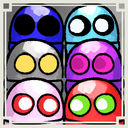
EyesColorCustom
【Client MOD】Quick hotkeys: Ctrl+4-0 for eye color, Shift+4-0 for pupil size, with animated HUD and auto reapply across level transitions.Ctrl+4~0で目の色 Shift+4~0で瞳孔サイズを変更
By REPO_JP
| Last updated | 2 weeks ago |
| Total downloads | 14586 |
| Total rating | 6 |
| Categories | Mods Client-side Cosmetics |
| Dependency string | REPO_JP-EyesColorCustom-1.1.1 |
| Dependants | 0 other packages depend on this package |
This mod requires the following mods to function

BepInEx-BepInExPack
BepInEx pack for Mono Unity games. Preconfigured and ready to use.
Preferred version: 5.4.2304README


EyesColorCustom
- Quick hotkeys: Ctrl+4-0 for eye color, Shift+4-0 for pupil size (this is the main feature)
Overview
-
What this mod does
- Lets you change eye color with Ctrl + number keys (4..0) instantly
- Lets you change pupil size with Shift + number keys (4..0) instantly
- Shows an animated HUD so you can confirm what is active
- Keeps your settings across level transitions by auto reapplying after scene/level change
-
Who it is for
- Players who want the fastest possible eye/pupil customization without opening menus
-
What changes after installation
- You can set eye color and pupil size in seconds using only Ctrl/Shift + 4..0
- Your selected settings persist across level transitions (best effort)
Features
-
Quick hotkeys (recommended workflow)
- Eye color presets (Ctrl + 4..0)
- Ctrl+4 = Off
- Ctrl+5 = Red
- Ctrl+6 = Green
- Ctrl+7 = Love
- Ctrl+8 = CeilingEye (yellow)
- Ctrl+9 = Inverted (black)
- Ctrl+0 = Default
- Eye color blinking (Ctrl + multi-press)
- Press multiple digits in the same frame (example: Ctrl+5 and Ctrl+7 together)
- The mod blinks between the selected colors
- Blink speed is configurable via
2_Runtime.BlinkIntervalSeconds
- Pupil size (Shift + 4..0)
- Shift+4 = minimum (0.25)
- Shift+9 = maximum (3.0)
- Shift+0 = Default
- Eye color presets (Ctrl + 4..0)
-
Animated HUD
- Fade-in -> Hold -> Fade-out
- If you change settings again before fade-out, the hold is extended (no repeated fade-in)
- Configurable via:
3_UI.HudHoldSeconds3_UI.HudFadeInSeconds3_UI.HudFadeOutSeconds
-
Settings UI
- F6 toggles the settings UI (
3_UI.UiToggleKey) /eyeuitoggles the settings UI- The UI includes a blink interval slider and status display
- F6 toggles the settings UI (
-
Auto reapply after level/scene change
- Reapplies immediately after
SceneManager.sceneLoadedandSceneManager.activeSceneChanged - Continuous apply loop keeps overrides alive
- Loop interval configurable via
2_Runtime.ApplyIntervalSeconds
- Reapplies immediately after
-
Input conflict avoidance
- Suppresses expression hotkeys while Ctrl or Shift is held
- Disables hotkeys while typing (
SemiFunc.NoTextInputsActive())
Configuration
-
0_General.Enabled- Default:
true - Meaning: enable/disable the plugin
- Default:
-
1_Defaults.DefaultEyeColor- Default:
Off - Meaning: default eye color when reset to Default
- Default:
-
1_Defaults.DefaultPupilMultiplier- Default:
1.0 - Range:
0.25..3.0 - Meaning: default pupil size when reset to Default
- Default:
-
2_Runtime.ApplyIntervalSeconds- Default:
0.20 - Range:
0.05..2.0 - Meaning: apply loop interval
- Default:
-
2_Runtime.BlinkIntervalSeconds- Default:
0.20 - Range:
0.05..5.0 - Meaning: blink interval for multi-color selection
- Default:
-
3_UI.UiToggleKey- Default:
F6 - Meaning: toggle settings UI
- Default:
-
3_UI.HudHoldSeconds- Default:
5.0 - Range:
0.0..10.0 - Meaning: HUD hold time before fade-out
- Default:
-
3_UI.HudFadeInSeconds- Default:
0.18 - Range:
0.0..2.0 - Meaning: HUD fade-in duration
- Default:
-
3_UI.HudFadeOutSeconds- Default:
0.22 - Range:
0.0..2.0 - Meaning: HUD fade-out duration
- Default:
Usage
-
Minimal steps
- Install the mod (host not required)
- Launch the game once to generate the config
- In-game hotkeys
- Ctrl+4..9 set eye color, Ctrl+0 default
- Shift+4..9 set pupil size, Shift+0 default
- Optional
- Press F6 to open the UI
- Type
/eyeuito toggle the UI
-
Notes
- Ctrl+Shift together is ignored to avoid ambiguity
- PageUp/PageDown and Backspace provide optional cycling/reset while a modifier is held
Contact
EyesColorCustom
- 一番重要な操作
- Ctrl+4-0で目色を即変更
- Shift+4-0で瞳孔サイズを即変更
概要
-
このMODが何をするか
- Ctrl+数字(4..0)で目色プリセットを即切替
- Shift+数字(4..0)で瞳孔サイズを即切替
- アニメーションHUDで現在状態を表示
- レベル移動後に自動再適用して維持
-
どんな人向けか
- メニューを開かず最速で目と瞳孔を調整したい人向け
-
導入で何が変わるか
- Ctrl/Shift+4..0だけで数秒で設定できる
- レベル移動後も設定が維持される(ベストエフォート)
特徴
-
最速ホットキー操作
- 目色プリセット(Ctrl+4..0)
- Ctrl+4 Off
- Ctrl+5 Red
- Ctrl+6 Green
- Ctrl+7 Love
- Ctrl+8 CeilingEye(黄色)
- Ctrl+9 Inverted(黒)
- Ctrl+0 Default
- 目色点滅(Ctrl+同フレーム複数押し)
- 同一フレームで複数数字を押すと選択色を点滅
- 点滅速度
2_Runtime.BlinkIntervalSeconds
- 瞳孔サイズ(Shift+4..0)
- Shift+4 最小 0.25
- Shift+9 最大 3.0
- Shift+0 Default
- 目色プリセット(Ctrl+4..0)
-
アニメHUD
- フェードイン → ホールド → フェードアウト
- フェードアウト前の再操作はフェードイン省略でホールド延長
- 設定
3_UI.HudHoldSeconds3_UI.HudFadeInSeconds3_UI.HudFadeOutSeconds
-
設定UI
- F6でUI切替(
3_UI.UiToggleKey) /eyeuiでUI切替- 点滅間隔スライダーと状態表示
- F6でUI切替(
-
レベル移動後の自動再適用
sceneLoadedとactiveSceneChangedで即再適用- 適用ループで上書きを維持
- ループ間隔
2_Runtime.ApplyIntervalSeconds
-
競合回避
- Ctrl/Shift中は表情ホットキーを抑止
- 入力中は無効化(
SemiFunc.NoTextInputsActive())
設定
0_General.Enabled既定 true1_Defaults.DefaultEyeColor既定 Off1_Defaults.DefaultPupilMultiplier既定 1.0 範囲 0.25..3.02_Runtime.ApplyIntervalSeconds既定 0.20 範囲 0.05..2.02_Runtime.BlinkIntervalSeconds既定 0.20 範囲 0.05..5.03_UI.UiToggleKey既定 F63_UI.HudHoldSeconds既定 5.0 範囲 0.0..10.03_UI.HudFadeInSeconds既定 0.18 範囲 0.0..2.03_UI.HudFadeOutSeconds既定 0.22 範囲 0.0..2.0
使い方
-
最短手順
- MOD導入(ホスト不要)
- 1回起動して設定ファイル生成
- ゲーム内操作
- Ctrl+4..9で目色 Ctrl+0でDefault
- Shift+4..9で瞳孔 Shift+0でDefault
- 任意
- F6でUI表示
/eyeuiでUI切替
-
注意点
- Ctrl+Shift同時押しは無効(曖昧回避)
- PageUp/PageDownとBackspaceで任意サイクルとリセット(修飾キー中)
