

ShowEnemyHealth
Adds health & damage UI indicators for enemies.R.E.P.O. - Enemy Health & Damage UI Mod
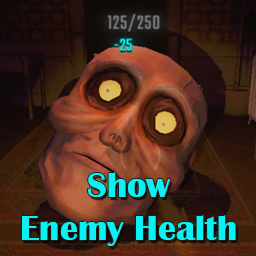
Adds configurable UI to display enemy health, and damage indicators. The health display will remain above an enemy for a configurable amount of time, or until the enemy dies/respawns.
I've tried to fit the look of the UI elements in with the game as much as possible.
NOTE: There's a bug in vanilla R.E.P.O. that means enemy health values aren't correctly synced across clients when damage from valuables (propane tanks, flamethrowers etc) is applied to enemies. This mod includes a "fix" for that, which can be turned off in the config.
If your game's host does not have this mod, you may see an incorrect health value in this case.
Installation
- Download & install BepInEx.
- Download the latest release of this mod.
- Place
REPO_ShowEnemyHealth.dllin yourBepInEx/pluginsdirectory.
Alternatively, the mod is available via the Thunderstore Mod Manager.
Screenshots


Configuration
All options can be configured in-game using the REPOConfig mod, or manually by:
- Launch the game with mod installed at least once.
- Edit the
REPO_ShowEnemyHealth.cfgfile within yourBepInEx/configdirectory.
Example Configuration
## Settings file was created by plugin ShowEnemyHealth v1.0.2
## Plugin GUID: REPO_ShowEnemyHealth

[General]

# Setting type: Boolean
# Default value: true
ShowEnemyHealth = true

## Max seconds to show enemy health
# Setting type: Single
# Default value: 120
# Acceptable value range: From 1 to 600
HealthShowTimer = 120

## Enemy health font size
# Setting type: Single
# Default value: 15
# Acceptable value range: From 10 to 50
HealthFontSize = 15

## Enemy health font color
# Setting type: String
# Default value: grey
# Acceptable values: black, blue, cyan, green, grey, magenta, orange, red, white, yellow
HealthFontColor = grey

# Setting type: Boolean
# Default value: true
ShowEnemyDamage = true

## Damage font size
# Setting type: Single
# Default value: 25
# Acceptable value range: From 10 to 50
DamageFontSize = 25

## Damage font highlight color
# Setting type: String
# Default value: red
# Acceptable values: black, blue, cyan, green, grey, magenta, orange, red, white, yellow
DamageFontHighlightColor = red

## Damage font primary color
# Setting type: String
# Default value: orange
# Acceptable values: black, blue, cyan, green, grey, magenta, orange, red, white, yellow
DamageFontColor = orange

## Sync enemy health across all clients
# Setting type: Boolean
# Default value: true
AttemptMultiplayerHealthSync = true