
TeamMemberMonitoringList
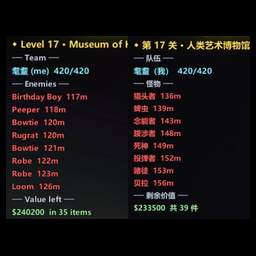
屏幕左上角常驻显示关卡进度与队伍血量的极简 HUD,中英双语(可在配置菜单切换)。Minimal always-on HUD showing level progress and team health. Bilingual: switch language inside the config menu.队员监控列表 / Team Member Monitoring List
屏幕左上角一块常驻信息条:当前第几关、队伍里每个人还活着没、剩多少血、离你多远,还能看附近怪物和本关剩余价值。全透明底、文字带黑描边,亮场景也看得清,不挡视线。
显示内容
- 关卡行:
◆ 第 N 关 / M · 关卡名(商店关会标出来) - 队伍行:每人一行 —— 名字、血量、距离;自己那行高亮,死了变灰红
- 怪物行(红字):怪物名 + 离你几米。活着的排前面,死了的显示
† 复活 Ns倒计时。最多显示 12 只,多出来的用「… 还有 N 只」收尾 - 剩余价值(绿字):本关地上还没撤走的物品总价 + 件数
怪物名和关卡名都跟语言走。中文界面用游戏内自带汉化的译名(大头、老奶、赌徒、领结客;人类艺术博物馆、海德曼庄园……),English 界面显示原名(Headman、Loom、Gambit、Bowtie;Museum of Human Art、Headman Manor……)。译名直接读游戏自己的本地化表,不写死在插件里。
操作
| 按键 | 作用 |
|---|---|
F2 |
显示 / 隐藏 |
Ctrl + 方向键 |
移动位置(10 像素) |
Ctrl + Shift + 方向键 |
微调(1 像素) |
语言 / 配置
配置菜单第一项就是语言,可选「中文」或「English」。切换后配置菜单会就地重建成对应语言,游戏内的 HUD 文字也跟着变,不用重启。
其余参数(位置 / 缩放 / 字号 / 背景不透明度 / 显示哪几项)全在 BepInEx/config/com.yanyan.hud.cfg,改完直接生效。
位置默认 X=10、Y=200,也就是左上角靠边一点的地方。
安装
- 装好 BepInEx 5(x64)
- 把
TeamMemberMonitoringList.dll丢进BepInEx/plugins/ - 重启游戏
只有你自己需要装,联机时别人看不见,不影响同步。
Team Member Monitoring List
A minimal always-on readout in the top-left corner: which level you're on, who's still alive, their health and distance, plus nearby enemies and the value still sitting on the level. Fully transparent background, black-outlined text — readable in bright scenes, and it stays out of the way.
What it shows
- Level line:
◆ Level N / M · level name(the shop level is labelled) - Team lines: one per player — name, health, distance. Your own line is highlighted; dead players fade to grey-red
- Enemy lines (red): enemy name + distance in metres. Living ones first; dead ones show a
† respawn Nscountdown. Up to 12 are listed, the rest are folded into… +N more - Value left (green): total price and item count of everything still on the level
Enemy names and level names both follow the language setting. Chinese uses the game's own localized names (大头 / 老奶 / 赌徒 / 领结客, 人类艺术博物馆 / 海德曼庄园 …), English uses the originals (Headman / Loom / Gambit / Bowtie, Museum of Human Art / Headman Manor …). The translations are read straight from the game's own localization tables — nothing is hardcoded in the plugin.
Controls
| Key | Action |
|---|---|
F2 |
Show / hide |
Ctrl + Arrow keys |
Move (10 px) |
Ctrl + Shift + Arrow keys |
Fine-tune (1 px) |
Language / Config
The first entry in the config menu is the language, Chinese or English. Switching rebuilds the config menu in place and the in-game HUD text follows immediately — no restart needed.
Everything else (position / scale / font size / background opacity / which sections to show) lives in BepInEx/config/com.yanyan.hud.cfg and applies instantly.
Default position is X=10, Y=200 — just off the top-left corner.
Install
- Install BepInEx 5 (x64)
- Drop
TeamMemberMonitoringList.dllintoBepInEx/plugins/ - Restart the game
Only you need this installed. Other players can't see it and it doesn't affect sync.