
You are viewing a potentially older version of this package. View Latest Version

A simple mod manager written in Bash for Linux users.
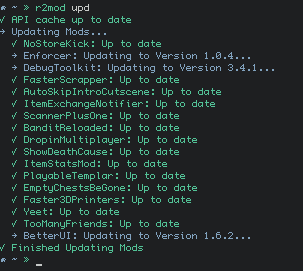
In order to get mods working you will need to set up your Proton prefix to properly load BepInEx:
The following programs should also be installed:
sudo pacman -S curl gawk jq p7zip sed
sudo dnf install curl gawk jq p7zip sed
sudo apt-get install curl gawk jq p7zip-full sed
Extract the zip and run sudo make install inside its directory.
It is heavily recommended to run r2mod setup to create a new install.
Some empty folders will be placed in the BepInEx/plugins dir, do not remove them.
They are used to track updates for certain mods.
Accepts shorthand for command names.
r2mod ch(eck): Check for Script Updates
r2mod dis(able): Disable All Mods
r2mod ed(it) ConfigName: Edit Mod Configs
r2mod en(able): Enable All Mods
r2mod exp(ort) ProfileName: Export r2modman mod profile
r2mod imp(port) ProfileCode: Install r2modman mod profile
r2mod ins(tall) Thunderstore-Dependency-String: Install New Mod
r2mod li(st): List Installed Mods
r2mod ref(resh): Force Refresh Package Cache
r2mod set(up): Install a Fresh BepInEx Setup
r2mod un(install) Thunderstore-Dependency-String: Uninstall Mod
r2mod upd(ate): Update All Exisiting Mods
r2mod ver(sion): Print Version
Use r2mod install ontrigger-ItemStatsMod-2.0.0 to install a mod.
If the version number is left out, the most recent version will be installed.
r2mod install ontrigger-ItemStatsMod
Multiple mods can also be installed
r2mod install ontrigger-ItemStatsMod MagnusMagnuson-BiggerBazaar
Use r2mod uninstall ontrigger-ItemStatsMod-2.0.0 to install a mod.
If the version number is left out, any version of that mod will be uninstalled.
r2mod uninstall ontrigger-ItemStatsMod
Multiple mods can also be uninstalled
r2mod uninstall ontrigger-ItemStatsMod MagnusMagnuson-BiggerBazaar
$EDITOR environment variable is used to determine which editor to use.
r2mod edit will open all BepInEx config files in your editor
r2mod edit name will open all matching configs (case insensitive, incomplete names are fine)
Mods can be prevented from being updated by appending -HOLD to their folder names.
All Files, Old Versions, and Backups can be found in /tmp/r2mod
