

RTAutoSprintEx
RTAutoSprint fixed and enhanced with more features. Sprint automatically, but only when you would be allowed to do so in the first place.RT AutoSprint Extended 2 | Game ver. 1.2.3.1
For custom survivor/skill support, see RTAutoSprintAddon.
Latest changes
2.1.2
- Fixed for patch 1.2.3.1
Description
Removes the need to manually sprint, instead always sprint when the base game would allow you to. Hold sprint to walk and cancel skills like flamethrower.
To supplement that, the sprinting crosshair and speedlines are removed, and the FOV and FOV sprint expanding can be edited.
Kudos to Relocity and Thrawnarch for creating the original mod, and Rein, Harb, ThinkInvisible, Twiner son of Twine, and Aaron (among others) from the modding Discord for help.
Features, Changes and Options.
- Automatically sprints whenever the game would allow you to - including while charging Artificer or Engineer main attacks.
- Show the correct crosshair while sprinting instead of the useless chevron.
- Modify the the FOV,
sprinting FOV change, and speedline effect in the config.
Mod compatibility and "API":
For custom survivor/skill support, see RTAutoSprintAddon.
How to implement RTAutoSprintEx support for your mod:
Add a soft dependency for com.johnedwa.RTAutoSprintEx, then use SendMessage to send the EntityStates you want RTAutoSprintEx to look out for.
RT_SprintDisableMessage blocks AutoSprinting from activating when the player is in that EntityState.
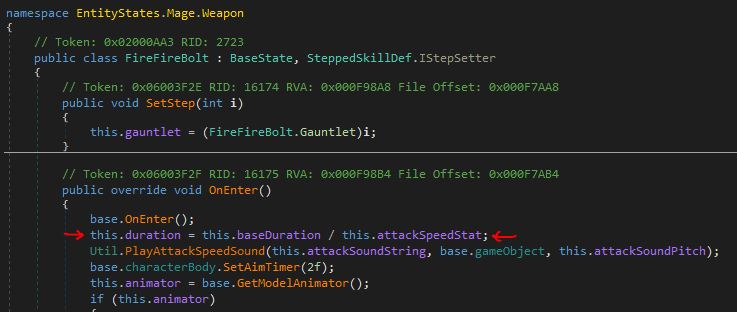
RT_AnimationDelayMessage looks for a field called duration to use as a delay - useful for keeping wind-down animations from being immediately cancelled. As an example, here it is in EntityStates.Mage.Weapon.FireFireBolt
[BepInDependency("com.johnedwa.RTAutoSprintEx", BepInDependency.DependencyFlags.SoftDependency)]

...

if (BepInEx.Bootstrap.Chainloader.PluginInfos.ContainsKey("com.johnedwa.RTAutoSprintEx")) {
    SendMessage("RT_SprintDisableMessage", "EntityStates.Mage.Weapon.Flamethrower");
    SendMessage("RT_AnimationDelayMessage", "EntityStates.Mage.Weapon.FireFireBolt");
}
Configuration
Movement
HoldSprintToWalk: [true]/false: True: Holding sprint makes you walk | False: tapping sprint toggles autosprinting on and off.
Visual
FOVValue [60], 1-180: Sets a custom (vertical) FOV. 60V is roughly 90H.SprintFOVMultiplier: [1.3], 0.1-2.0: Sets the sprinting FOV multiplier. Set to 1 to disable.DisableSprintingCrosshair: [true]/false: Disables the useless special sprinting chevron crosshair.DisableSpeedlines: true/[false]: Disables the speedlines effect shown when sprinting.
Misc
DisabledAutoSprinting: true/[false]: Disables the autosprinting part of the mod.DisableVisualChanges: true/[false]: Disables the FOV/visual modification side of the mod.
Known Issues / ToDo
- Disabling FOV change while sprinting not implemented. Anyone knows where it's done, do tell.
Changelog
Full changelog can be found in CHANGELOG.MD.
Contact
Open an issue at the Github repo or find me on the RoR2 modding discord (JohnEdwa#7903).