


SkulInsight QoL
Codex with boss moves, gear pages and your build; run history and records; optional online daily runs (opt-in leaderboard); real damage in descriptions, boss HP numbers, a combat log that explains every hit, save slots. 11 languages.SkulInsight QoL
See the real numbers behind Skul: The Hero Slayer. Damage numbers that tell you where damage came from, item and skull descriptions with your actual damage, a combat log that explains every hit, and a preview of what picking up an item would do to your build.
A quality-of-life mod: it changes nothing about the game's balance. It only shows information the game already uses internally (and, if you use them, keeps several save slots side by side). Every feature can be switched off in the game: pause (Esc) → SkulInsight QoL.
Version 0.12.2: crash reports (whose code an error was in, a stuck black screen, an unexpected end); the game's skill details open beside an item's box instead of covering its numbers.
Version 0.12.0: the Codex becomes a full reference (boxed pages, skill boxes, every number with its formula), short descriptions with every number on Shift, a damage table per item in the combat log, and save slots. The game shows what's new once after the update; every detail is in the changelog. Please report bugs and ideas (see Feedback).
Features
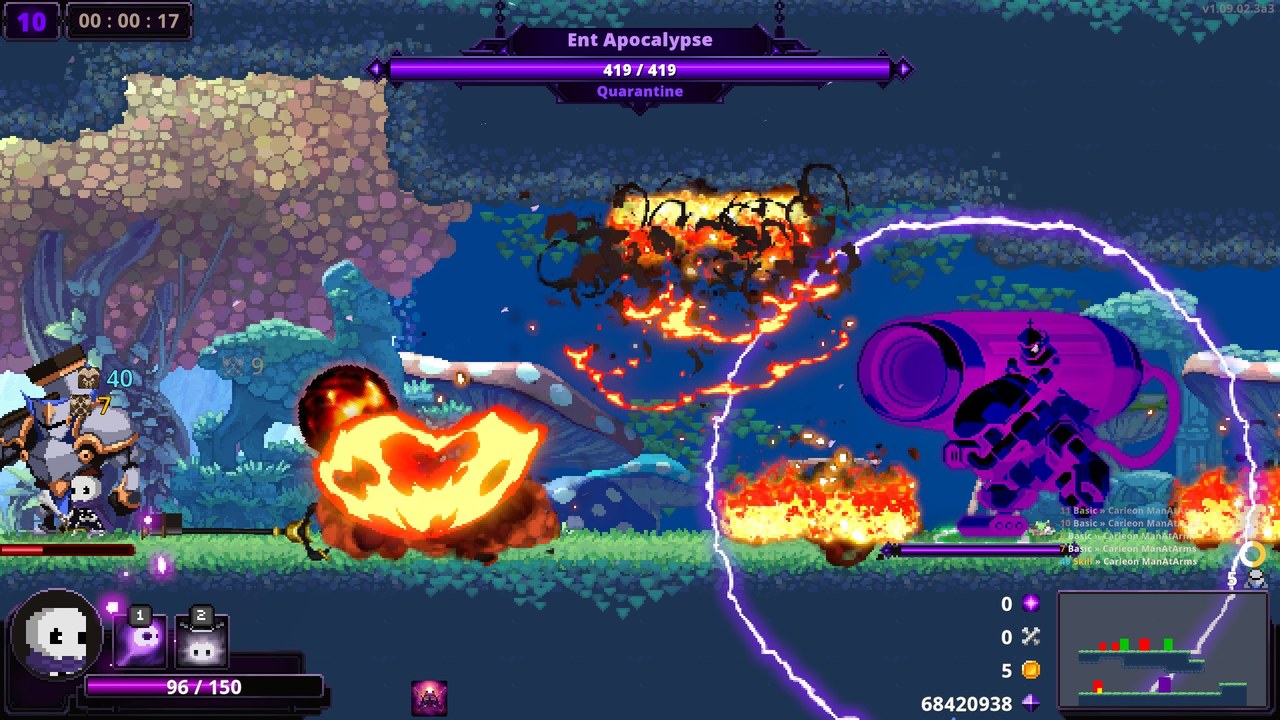
Damage numbers with their source
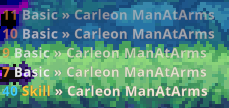
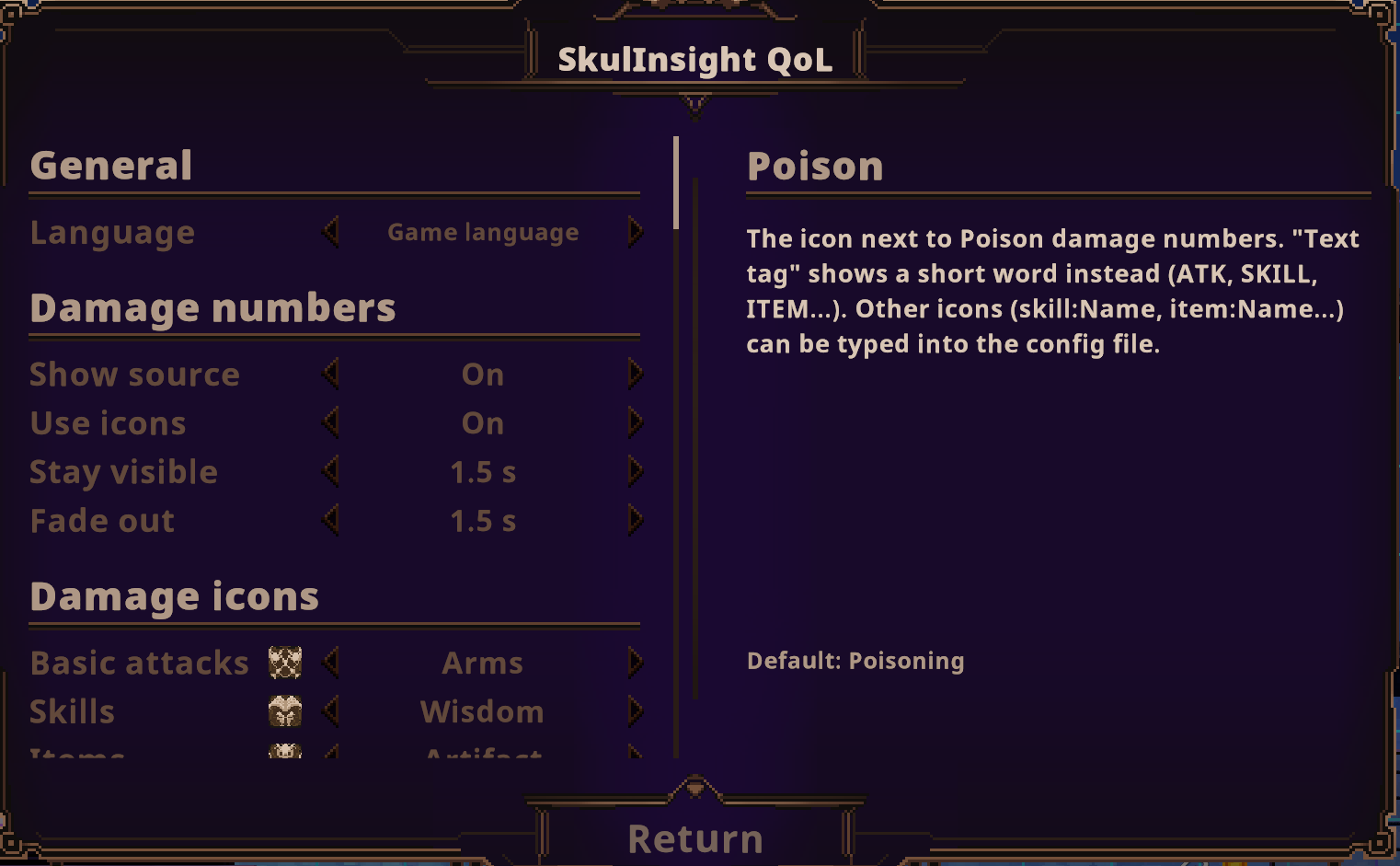
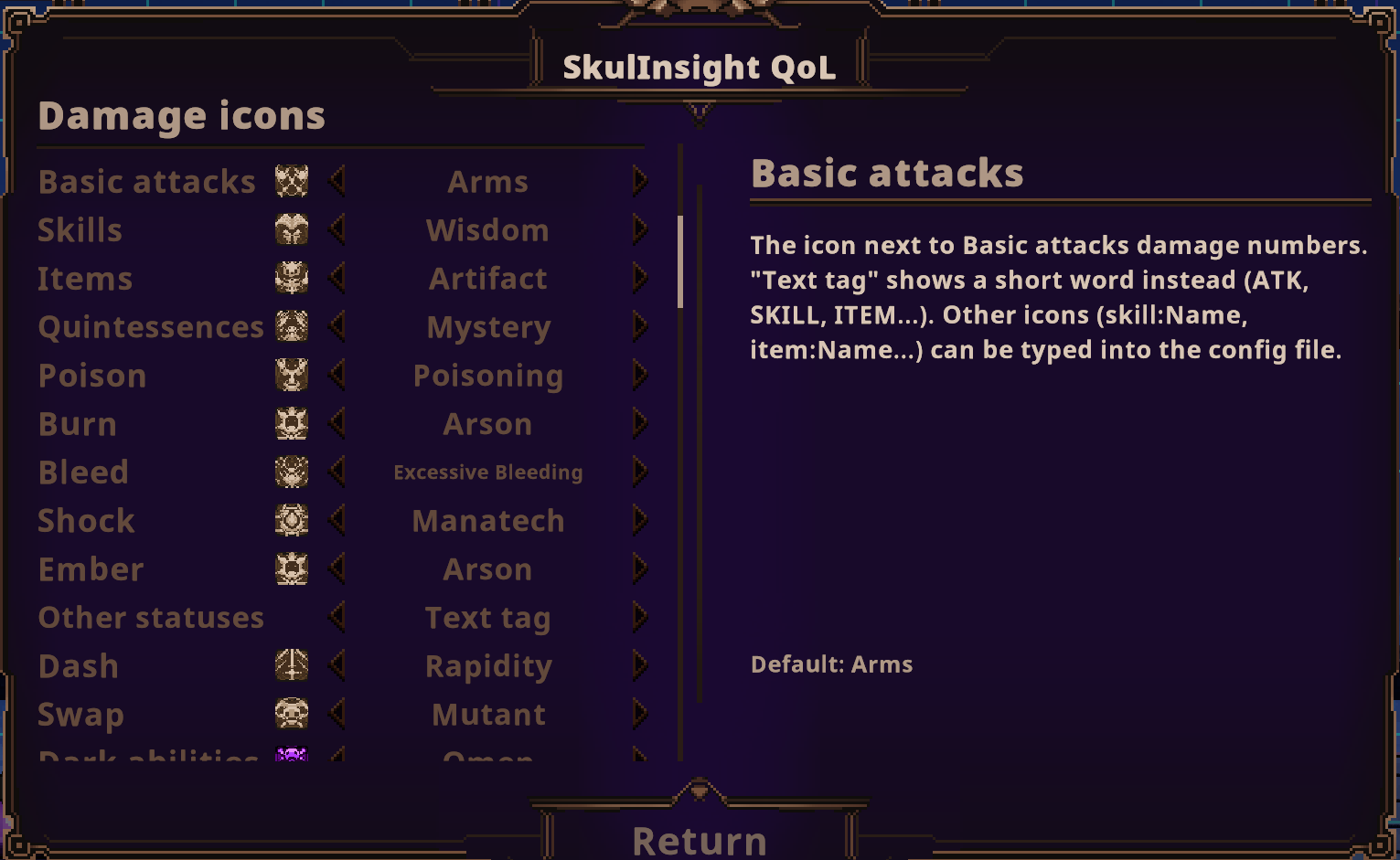
- Every damage number shows where it came from: an icon or a colour-coded tag.
- Basic attack, skill, item, essence, dash, swap, dark ability
- Poison, burn, bleed and other statuses
- Numbers stay on screen a little longer and fade out smoothly (both configurable).

HP numbers on big health bars
Bosses, dark elites, veterans and the adventurer party show current / max HP (and shields) on their health bars.

Real numbers in every description (League-of-Legends style)
Descriptions of skulls, skills, swaps, items, essences and inscriptions show the damage with your current
stats. Hold Shift (or the game's own details key) to see the numbers: the game's boxes stay short and show "Hold Shift for damage numbers"
(setting Descriptions/HoldToShow). On items on the ground, the game's skill and inscription details open beside the
box so they don't cover the numbers. In the boxes each attack is one compact line, e.g. Basic attack: 10–12 · 22–24 · 36–42 Magic, with "All numbers: Codex (K)"; the Codex shows every hit with its calculation, e.g. 60–94 Physical (7–11 skull dmg x 530% x 160% phys. atk) (setting "Compact numbers"; off: the formula in the boxes too). On Arsenal
pages, hold Shift to see what a piece of gear would do with your run's stats.
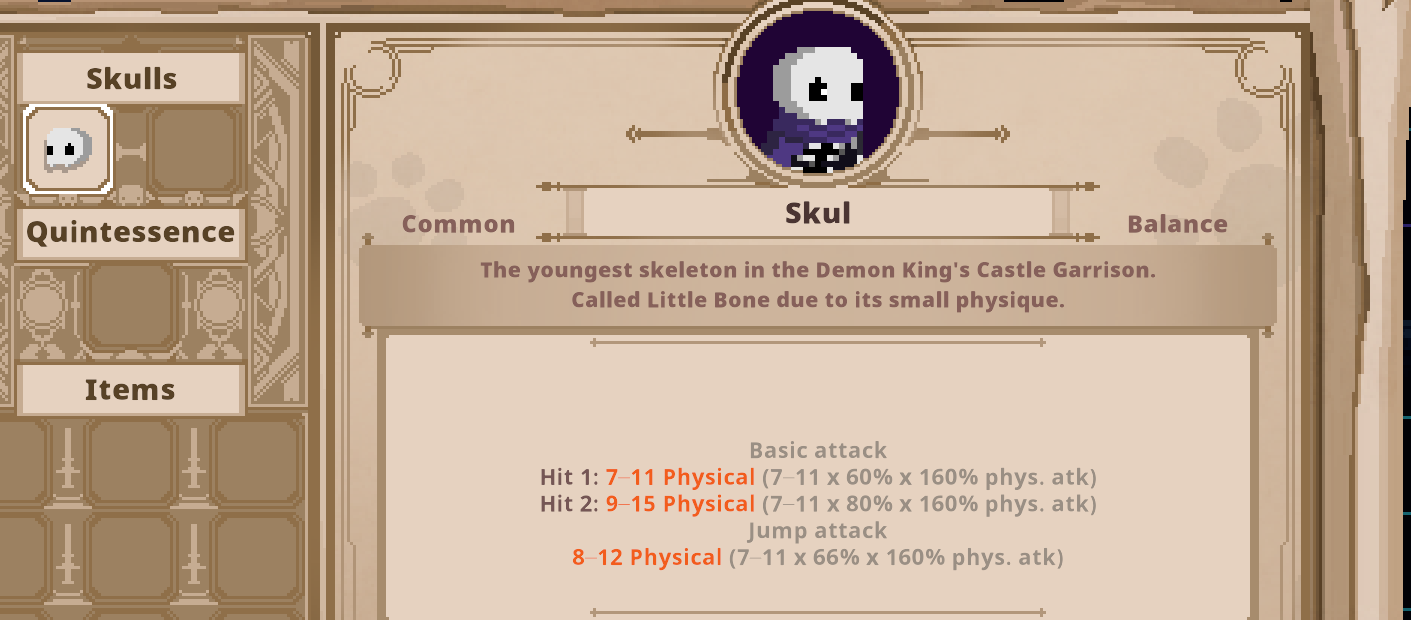
- Skulls: every hit of the basic combo, jump and dash attacks, charge levels (uncharged / charged / charge N) and passives.
- Items and essences:
- their damage and when it triggers ("On dash, 7 s cooldown")
- summons and spirits
- items that transform into another item
- Inscriptions:
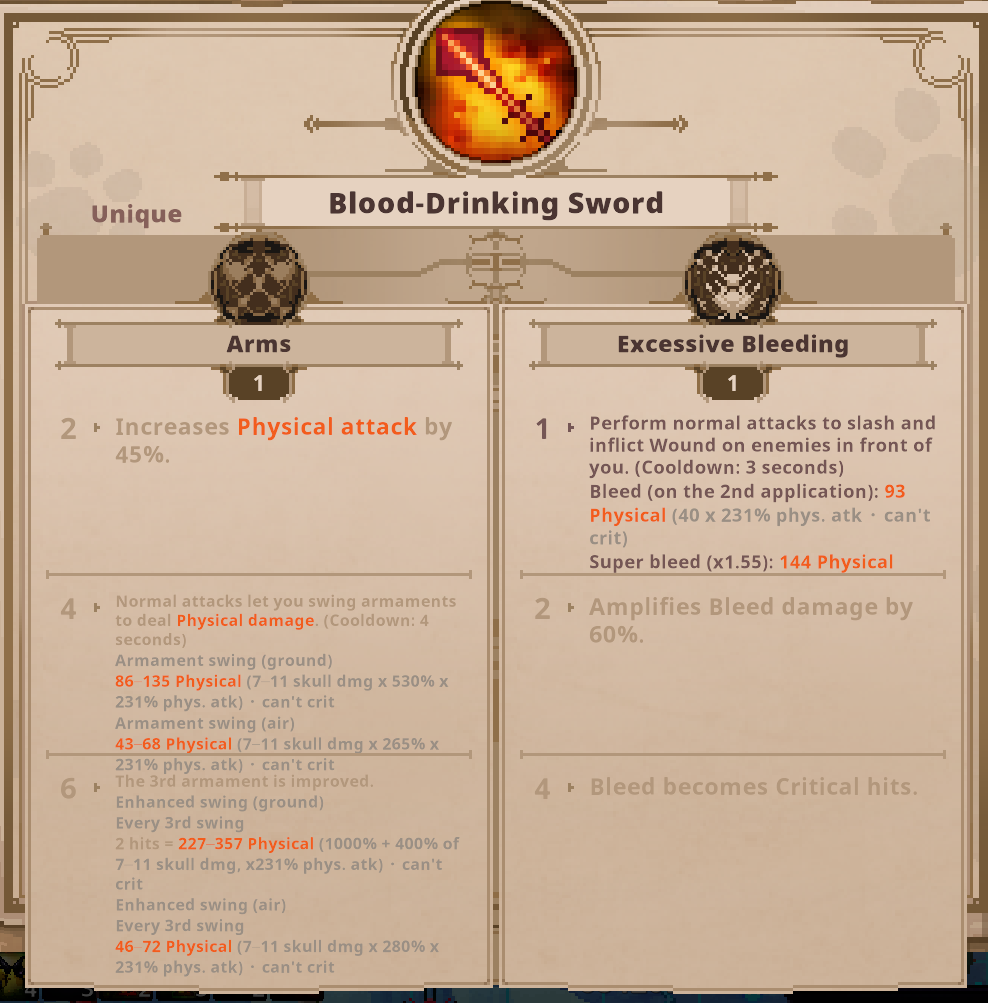
- the damage each step unlocks (Arms armaments, Brawl shockwaves, Artifact meteors, Oberon's attacks, ...)
- status numbers (poison ticks, burn, bleed including severe bleed and crits, freeze and stun durations)
- the tuned (upgraded) versions, including the witch's "Tuned" box
- Explains mechanics the game only hints at, e.g. how Strike's "deadlier strikes" really multiply crit damage.
A skull's basic combo and jump attack, each hit with its real numbers:
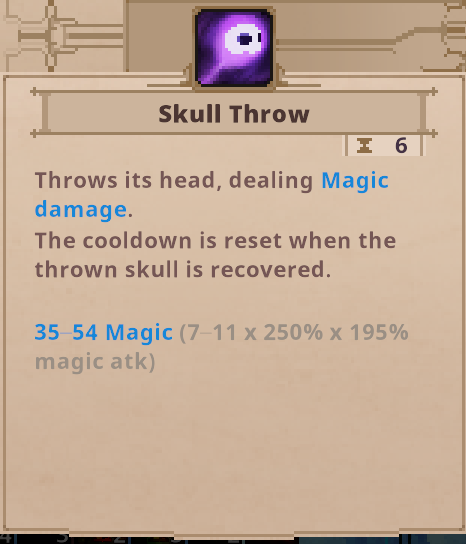
Every skill shows its damage:
Even inscription damage is calculated, step by step (here Arms armaments and Excessive Bleeding's bleed):
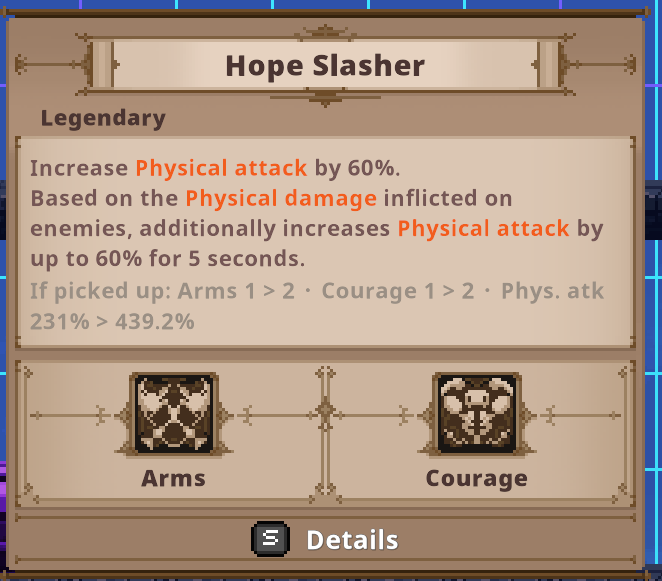
Pickup and swap preview
- Items on the ground and in shops show their numbers as if you had already picked them up. The item's stats and every inscription step it would activate are included.
- The popup says what changes:
If picked up: Arms 1 > 2 · Courage 1 > 2 · Phys. atk 191% > 355.2% - With a full inventory, the swap menu shows the numbers after swapping the selected item.
This makes planning a build much easier: you see what an item would do right at the item, without switching to the stat sheet and back.
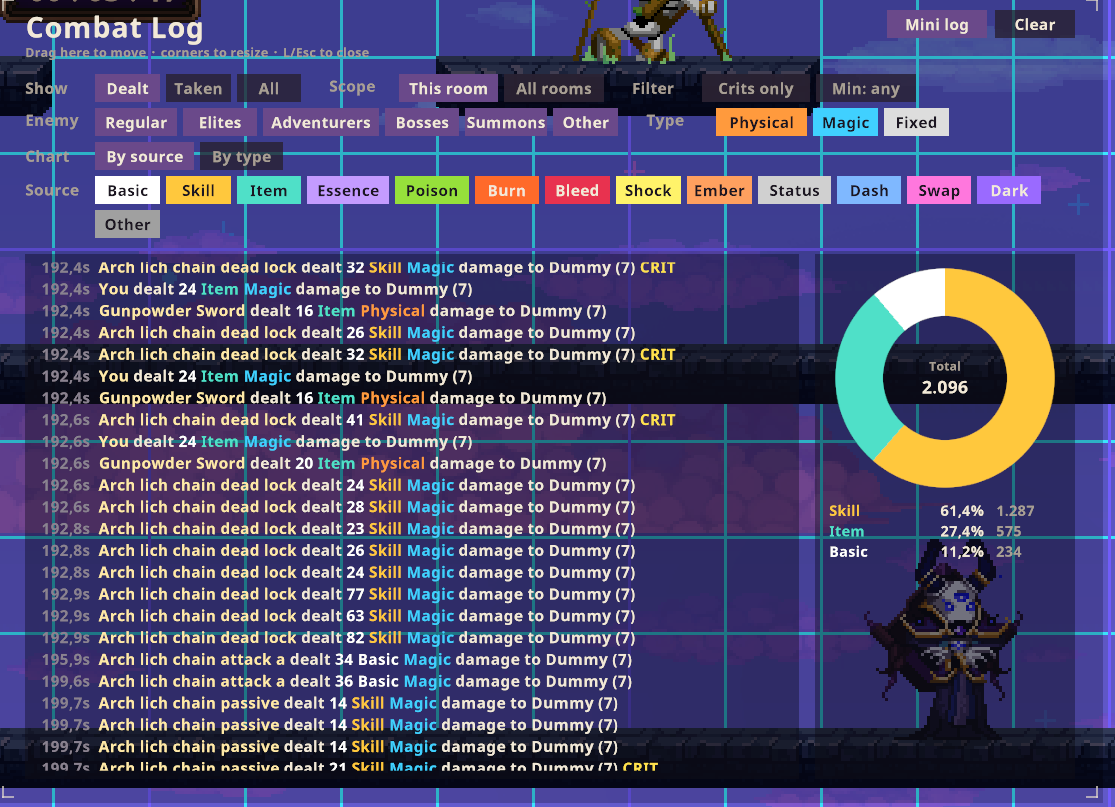
Combat log (press L)
- Every hit, grouped by room, updated live.
- Filters: dealt / taken, room / all rooms, enemy type, damage type, source, crits only, minimum damage.
- Pie chart of your damage by source or damage type.
- Damage table (new in 0.12): View → Damage table: your damage per piece of gear: each skull's basic attack, skills, dash and swap, every item, quintessence, inscription and dark ability, statuses and summons, with share, hits and biggest hit. See which item really carries your build.
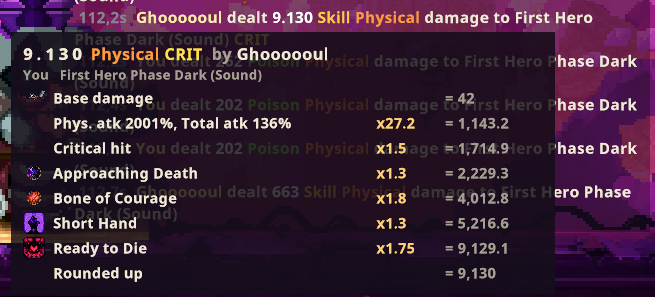
- Hover a line to see its full calculation. Click to pin it. Each step shows its icon, its multiplier and the
running total:
- base damage
- your attack stats
- crit
- every item, inscription and dark ability that changed the number
- effects on the enemy
- the final rounding
- Every hit is named after what dealt it, e.g. "Shadow Spirit Death dealt 14 ...".
- Every session is saved to
BepInEx/DamageInsight/CombatLogs/(JSON lines), so you can look at a run after closing the game. - Optional mini log: a few fading lines above the minimap.
Cooldown ticker
The skill icons of both skulls, the swap icon, the quintessence and the item and ability icons show their remaining
cooldown in real seconds, WoW style: 83s, 2m+, 10m. Your cooldown speed bonuses are included.

Codex (bestiary), new in 0.10
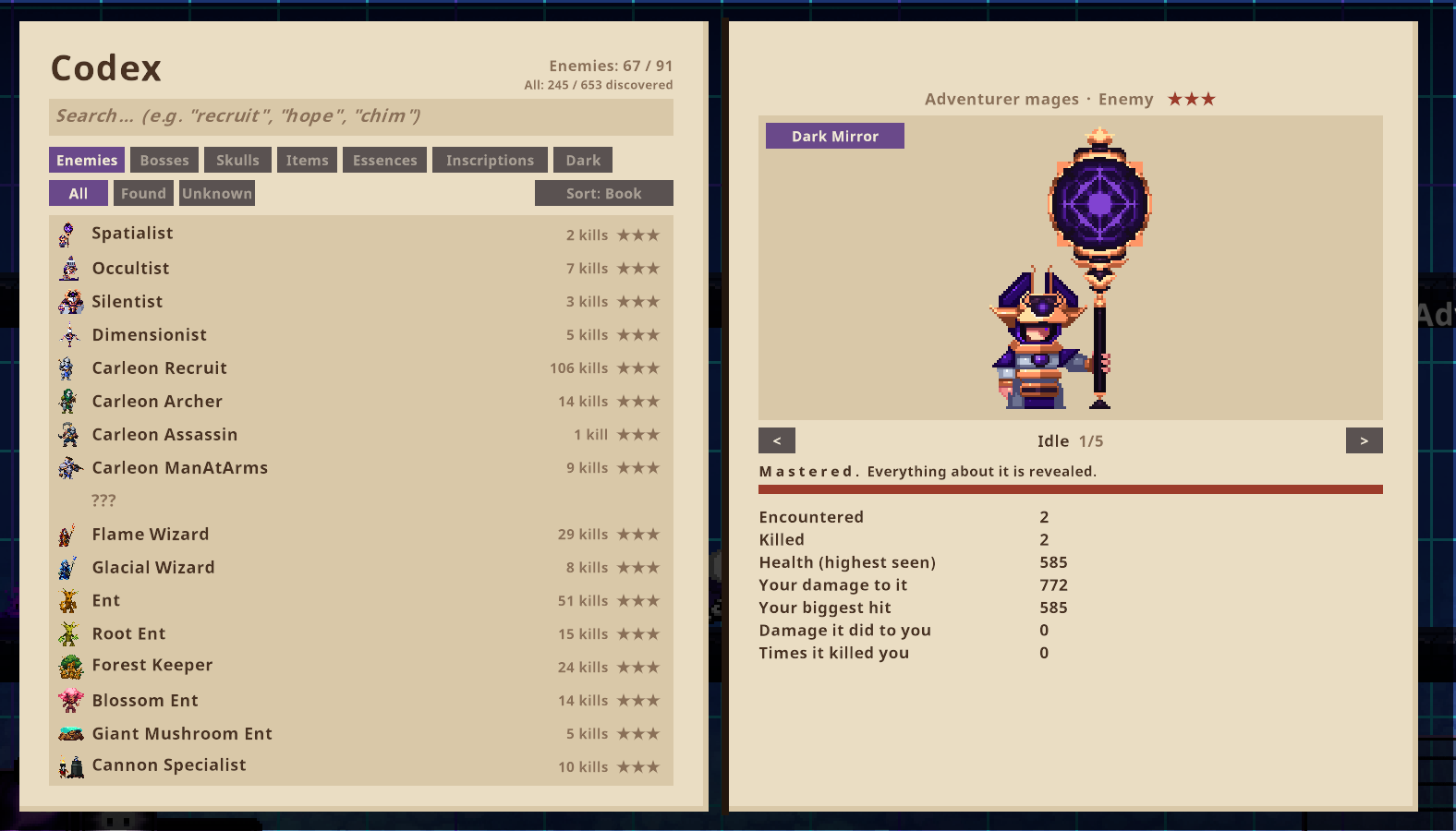
Press K for a book with every enemy, boss, adventurer, skull, item, essence and inscription you have met.
- Unlocked by playing: met = ink outline, then a black silhouette, then colour and animations. Common enemies need more kills than rare ones, so every entry takes about the same number of runs (★★ after about one run's worth of that enemy, ★★★ after about five). Bosses and adventurers: 1 and 3 wins.
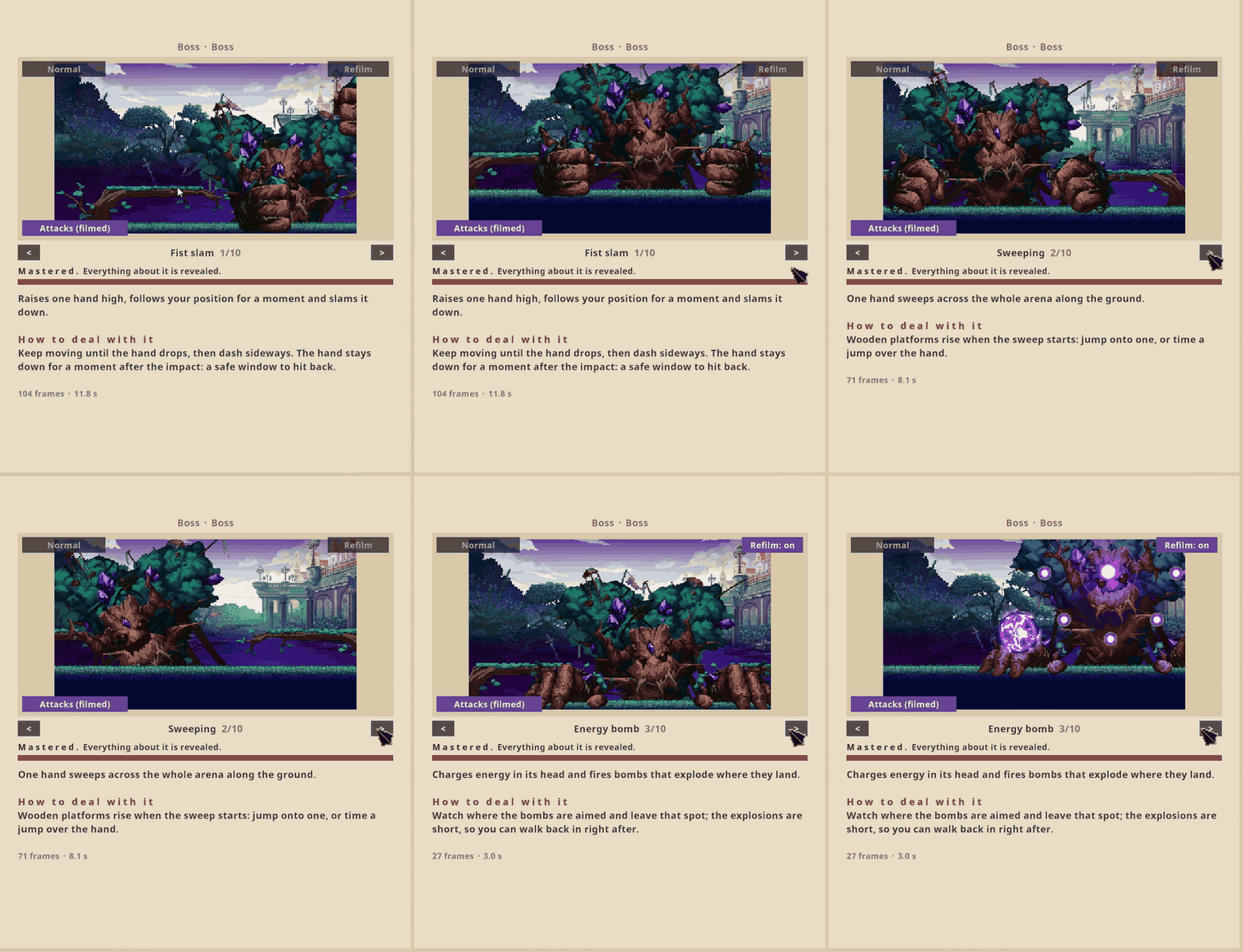
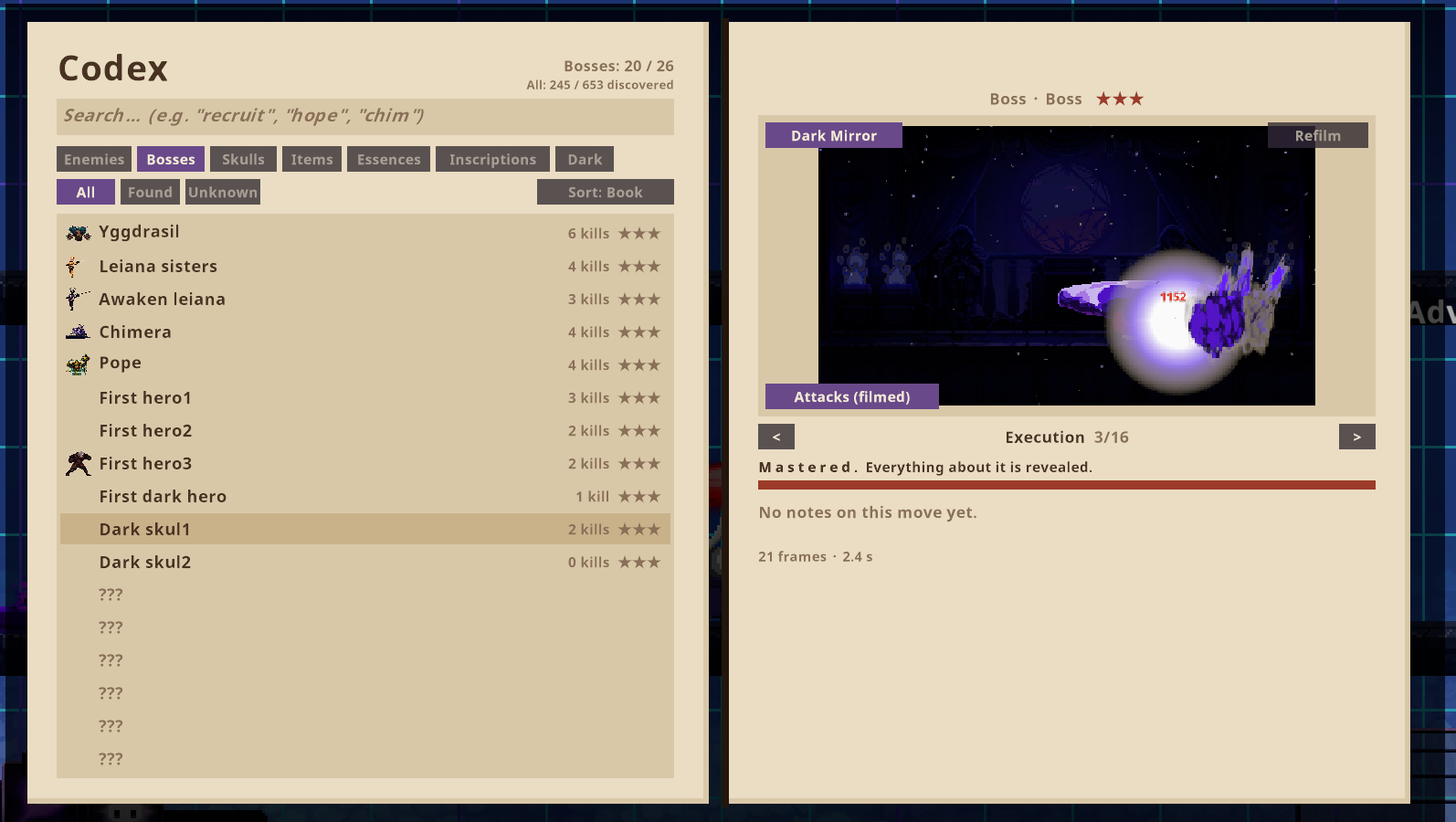
- Boss move lists read from the game's own AI: every boss and adventurer shows its complete list of moves, grouped by fight phase. Moves you haven't seen yet are shown as a black ???, so you know what is still missing.
- Fight films: the first time a boss does a move, the mod films it (small picture, 10 per second). Switch between posed Animations and Attacks (filmed) in the book; "Refilm" replaces a take you don't like.
- Move notes (new in 0.11): every boss move has a short note: what it does and how to deal with it, with numbers from the game (cooldowns, health thresholds, Dark Mirror differences), in all game languages.
- Clean, compact films (new in 0.11): films show only the boss (no damage numbers, none of your own effects, summons or status effects) and take about a quarter of the space. Both can be switched off on the settings page.
- Reset Codex (new in 0.11): start the book over from the settings page; the move notes stay.
- Dark Mirror versions of bosses are kept separately (switch in the book).
- Sections (new in 0.12): You, Bestiary (enemies, bosses, dark enemies) and Arsenal (skulls, items, quintessences, inscriptions, dark abilities). Names in the texts are links; "< Back", Backspace or the mouse's back button go to the page before.
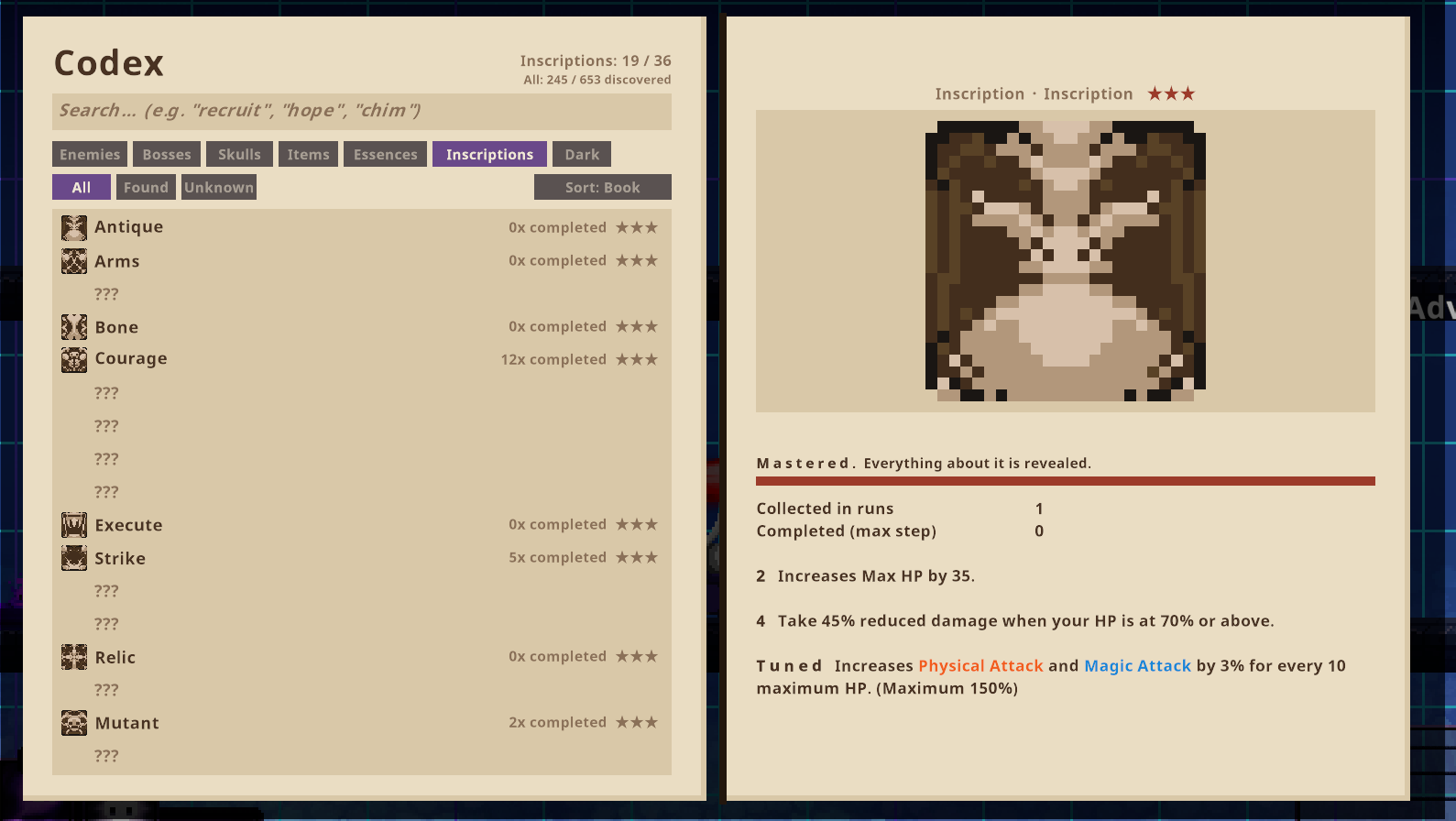
- Arsenal pages (new in 0.12): every skull, item, quintessence, inscription and Dark Mirror ability with its full text and real numbers: a skull's awakening path, attacks and skills, an item's inscriptions and transformation, an inscription's steps and the items that carry it.
- You page (new in 0.12): your run as a Codex inventory: skulls, quintessence, items, dark abilities, inscriptions with what the next step needs, and a stats sheet with the hidden damage stats explained. Click anything to read it in full with your current numbers.
- Dark enemies (new in 0.12): what each of the 15 dark elite abilities does, with its numbers.
- Boxed pages and skill boxes (new in 0.12): every section is a framed box with an icon. Each skull shows its skills as boxes (icon, name, numbers) that stay a ? until you win a run with them: beat a boss of chapter 5 or later while the skill is on one of your skulls.
- Every number with its formula (new in 0.12): base x hit % x attack %. Arsenal pages compare gear at 100 % attack; hold Shift to see the numbers with your run's stats. Dark abilities show their damage per level.
- Everything is created on your own PC while you play; the mod ships no game art.
Save slots
Keep up to 5 games side by side, like profiles: pause (Esc) → SkulInsight QoL → Save slots.
- Each slot is a whole game: story, NPCs, the witch's upgrades, the Dark Mirror, currencies and the run in progress, with its own Codex.
- Play switches to a slot: the game you were playing goes into its slot (a run in progress waits at the room you entered last) and the other game comes in through the title screen. An empty slot starts a new game.
- Copy my game here copies your current game (with its Codex) into a slot; Clear empties one.
- Each slot shows a summary: run, story, NPCs, witch levels, dark quartz, Dark Mirror, deaths, last played.
- Your keys, sound and language stay the same in every slot. The game's save is backed up before every switch.
- Number of slots: 3 to 5 (setting).
Run history and records (new in 0.13)
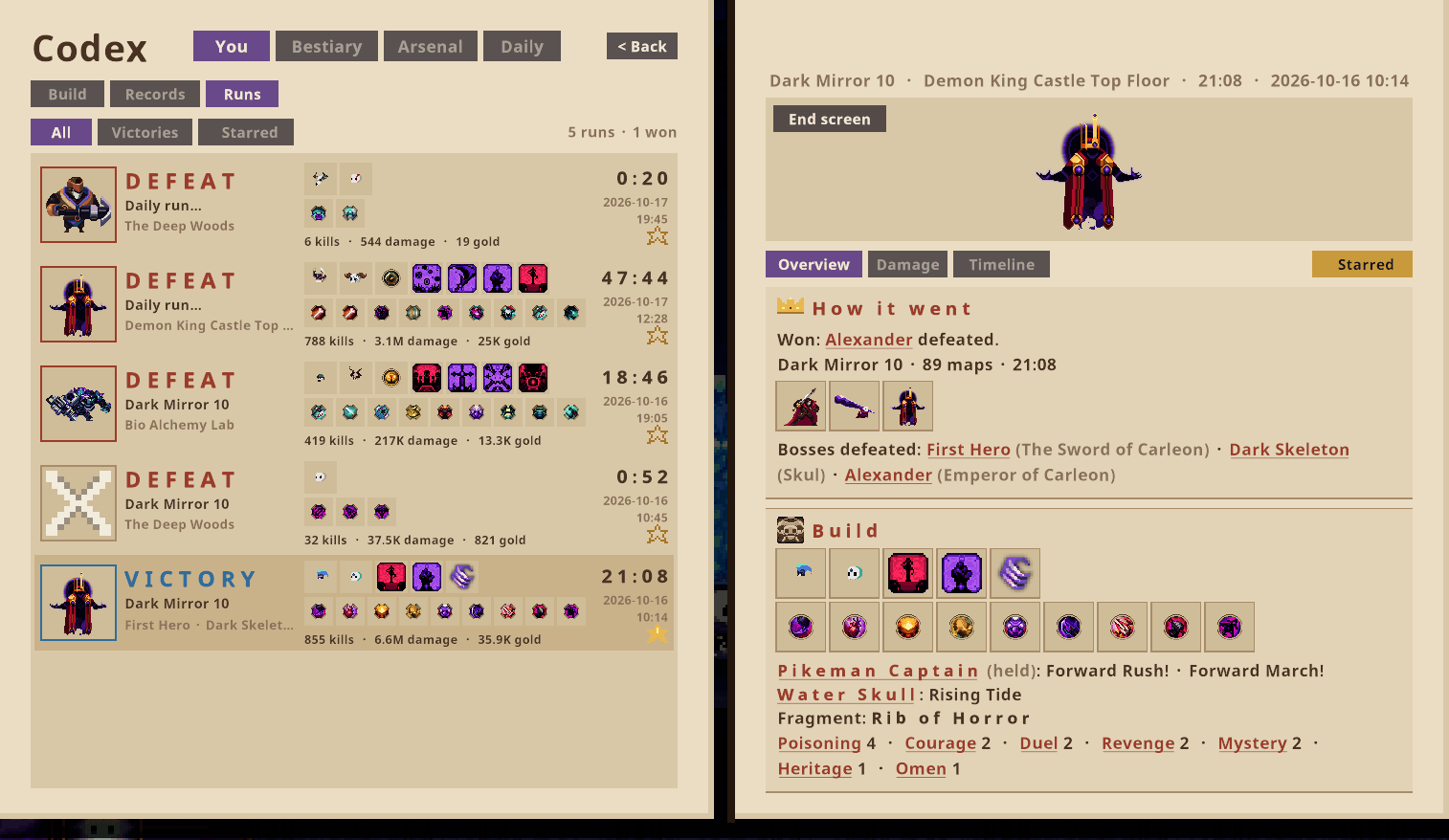
Codex (K) → You → Runs: every run you play, like a match history.
- Each row: how the run ended (the boss or the killer in a frame), Normal / Dark Mirror level / Rookie mode, your skulls and items, kills, damage, gold, time and date.
- A run's page: Overview (how it went, the bosses defeated, the build with every inscription, the numbers, your stats at the end), Damage (each piece of gear's share) and Timeline (skulls, items and inscriptions as they came, map by map). Every name links to its Codex page.
- End screen shows the game's own result panel again with the run's numbers.
- Star a run to keep it whole forever; older runs without a star keep only their summary (setting).
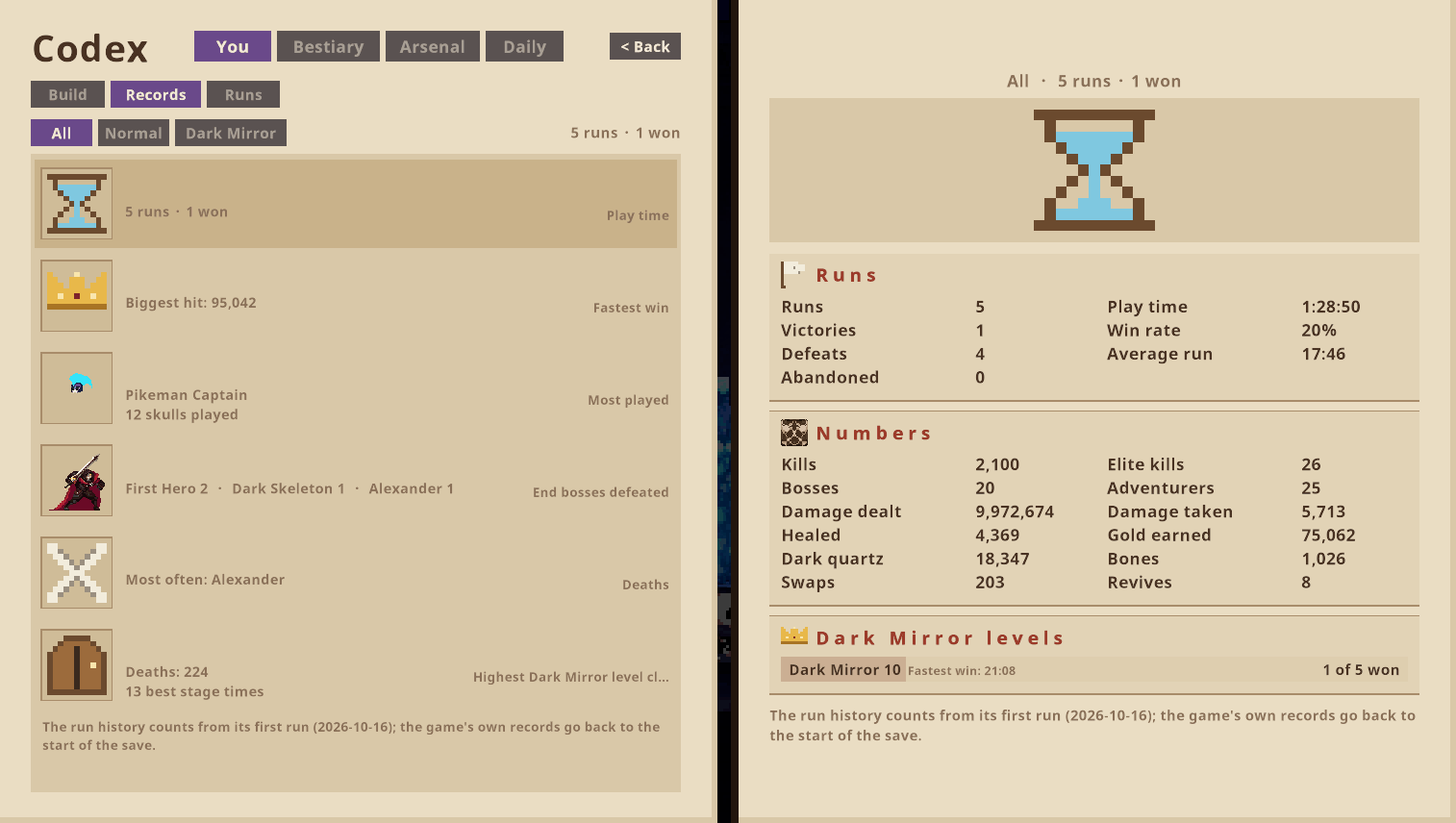
- Records (You → Records): totals, best runs, per skull, against bosses, deaths and the game's own counters.
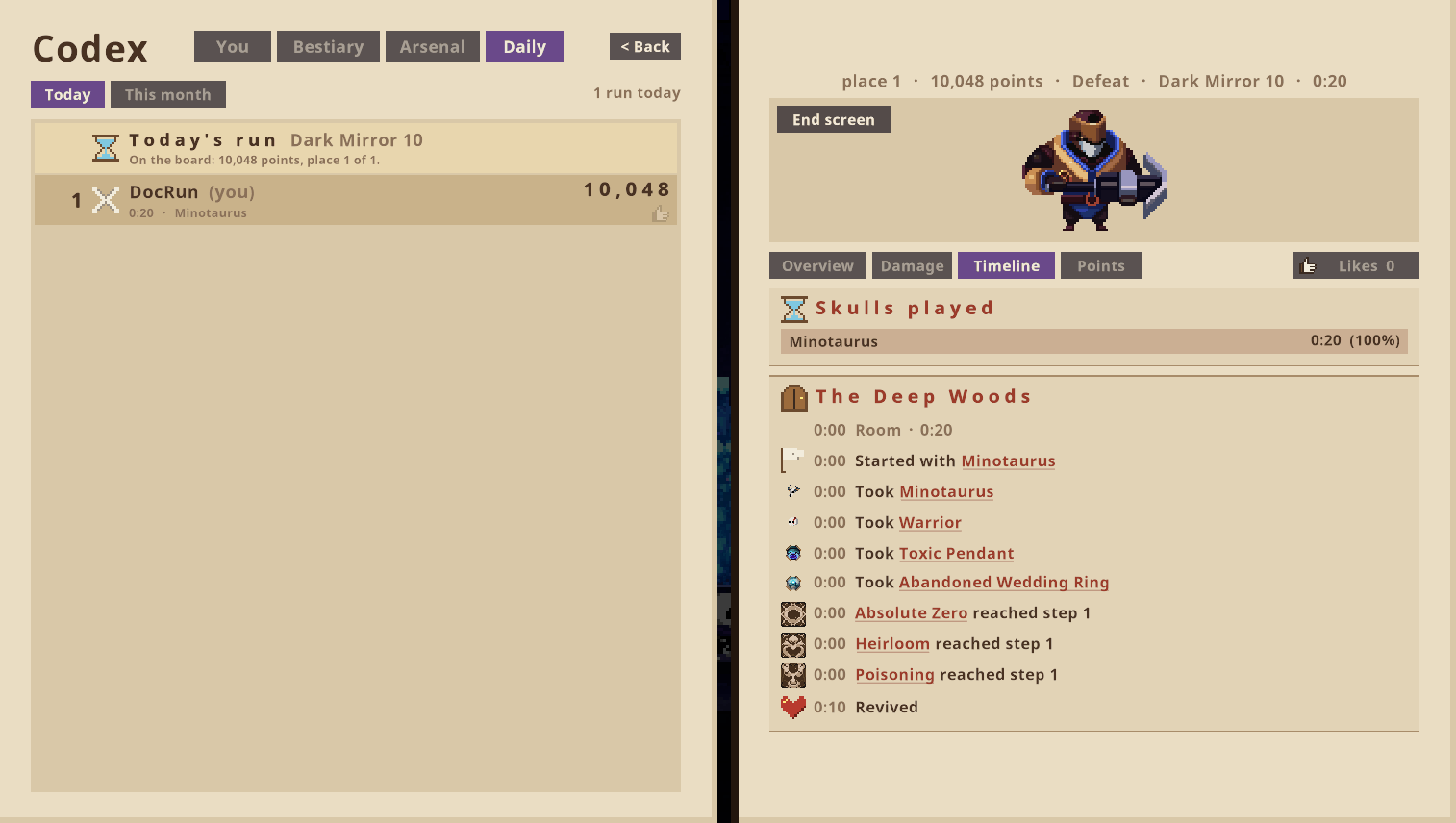
Daily run (new in 0.13; online, off until you turn it on)
Codex (K) → Daily: every day one run for everyone, one try.
- The same seed and the same difficulty for everyone (a weekday schedule from Normal to Dark Mirror 10).
- Played in a separate daily save slot made from your game: every gear unlocked, the Witch at her top, every Dark Mirror level open, 15,000 dark quartz, no DLC gear. Your own game waits as it is; Back to my game returns.
- After the run: a name (12 characters) for the daily and monthly boards. Points for the result, stages, bosses, kills, damage, little damage taken, gold left and a fast win, times the difficulty, plus bonuses for the day's records (first win, fastest win, most damage, ...) and a daily streak.
- Click a run on the board: its build, damage and timeline like your own run history, its points part by part, and a thumbs up.
- Fair play: one try (a daily run can't be continued), runs with other mods loaded don't count, no Steam achievements from the daily slot.
- It talks to the daily run server (skul.umut-aslan.dev) only after you turn it on, and sends a random player id made by the mod, the name you enter and your daily run (numbers, build, damage, timeline). Nothing else.
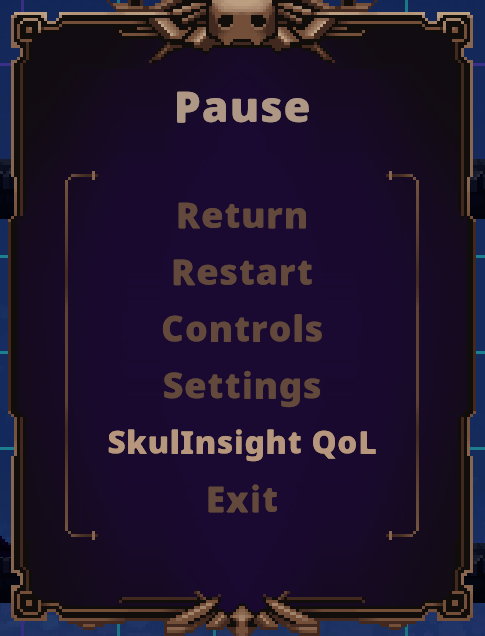
Settings in the game
Pause (Esc) → SkulInsight QoL, right under the game's own Settings: every setting of the mod in one list, styled like the game's options, with keyboard, mouse and controller. The right side explains the selected setting and its default. Changes apply at once and are saved right away.
Crash reports
Every game session leaves a report in BepInEx/DamageInsight/CrashReports (the newest 20): what happened (chapters,
maps, your build), every error with whose code it was in (the game's, SkulInsight's, a game method SkulInsight
hooks into, or another mod) and a verdict. A screen that stays black for 20 seconds and a game that closed
unexpectedly are noticed and said on screen. Settings page: Crash reports folder → Open. Please attach the newest
report to bug reports.
All game languages
The mod's texts follow the game's language (English, 한국어, 日本語, 简体中文, 繁體中文, Deutsch, Español, Português (Brasil), Русский, Polski, Français) and switch live when you change it.
The settings page has a Language row to pick a different one. To fix a translation without waiting for an
update, put a file BepInEx/DamageInsight/Lang/<code>.json with only your changes
({"strings": {"English text": "your text"}}; codes: en, ko, ja, zh-Hans, zh-Hant, de, es, pt-BR, ru, pl, fr), and
please send it in so everyone gets it.
Installation
With a mod manager (recommended)
- Install r2modman or Gale.
- Select Skul: The Hero Slayer, create a profile and install SkulInsight QoL. The required BepInExPack Skul is installed automatically.
- Start the game with Start modded.
Manual installation
- Install BepInExPack Skul into
the Skul folder (the folder containing
Skul.exe). - Start the game once and close it (BepInEx creates its folders).
- Copy
DamageInsight.dllintoSkul/BepInEx/plugins/SkulInsight_QoL/. - Start the game.
Linux and Steam Deck
The mod runs through Proton. Skul's native Linux version can't load it.
- Steam → right-click Skul → Properties → Compatibility: force Proton (for example Proton 9.0).
- Start Skul once from Steam without mods, then quit (this creates Skul's Proton prefix).
- Leave Skul's launch options empty (the Flatpak version of r2modman is the exception).
- Install the mod in r2modman or Gale and press Start modded.
Errors, Steam Deck, manual installation and a check script: Linux and Steam Deck guide.
Configuration
In the game: pause (Esc) → SkulInsight QoL (right under the game's Settings). Every setting below is there, with an explanation and its default; changes apply at once and are saved right away. Keyboard, mouse and controller work like in the game's own menus.
The same settings are in the settings file (created on the first start):
BepInEx/config/docrun.skulinsight_qol.cfg- in r2modman / Gale: Config editor
| Section | Setting | Default | What it does |
|---|---|---|---|
| Damage Numbers | ShowSourceTag / UseIcons | on / on | Source icon or tag on damage numbers |
| Damage Numbers | HoldSeconds / FadeSeconds | 0.8 / 0.7 | How long numbers stay and fade |
| Damage Icons | (per source) | Which icon each damage source uses | |
| Boss Health Bar | ShowNumbers | on | HP numbers on big health bars |
| Descriptions | ShowDamageNumbers | on | Real numbers in all descriptions |
| Descriptions | PreviewPickup | on | Pickup / swap preview |
| Descriptions | HoldToShow / HoldKey | on / Shift | Numbers in the game's boxes only while the key is held |
| Descriptions | Compact | on | One line per attack in the game's boxes (off: every hit with its formula) |
| General | WhatsNew | on | Show what's new once after an update |
| General | MenuSounds | on | The mod's buttons play the game's menu sounds (hover, click) |
| General | CrashReports | on | A report per game session in BepInEx/DamageInsight/CrashReports (newest 20 kept) |
| Combat Log | ToggleKey | L | Opens the combat log |
| Combat Log | RecordCalculations | on | Per-hit calculation (hover a line) |
| Combat Log | SaveToFile | on | Log files in BepInEx/DamageInsight/CombatLogs (newest 30 kept) |
| Combat Log | UseDialogueBackground / BackgroundOpacity | on / 0.85 | Look of the log window |
| Mini Log | Enabled, Lines, HideAfterSeconds, ShowPie, GapAboveMinimap | off, 4, 5, on, 40 | Small log above the minimap |
| Cooldown Ticker | Enabled / Opacity | on / 0.55 | Seconds on HUD icons |
| Codex | Enabled / ToggleKey | on / K | The Codex book |
| Codex | ShowMoveHints | on | Under a beaten boss's moves: when it uses them |
| Codex | FilmBossAttacks | on | Film each boss move once for the Codex |
| Codex | CleanFilms | on | Films show only the boss (no damage numbers, own effects, summons, status effects) |
| Codex | CompactFilms | on | Save films as compact pictures (about a quarter of the size) |
| Codex | ProjectilePictures | on | Add an enemy's projectile to its pictures the first time it fires one |
| Codex | OpenOnYou | on | During a run the book opens on the You page |
| Codex balance | (unlock numbers) | Runs / wins / pickups it takes to unlock ★★ and ★★★ in the Codex |
Compatibility
- Made for Skul: The Hero Slayer 1.9.x (Steam: Windows, or Linux and Steam Deck through Proton) with BepInExPack Skul (BepInEx 5.4.21+).
- Doesn't change balance or content. Your save is only touched when you switch save slots (a backup of the game's save is made before every switch). Safe to add or remove at any time.
- Should work next to content mods. Items the mod doesn't understand simply show no extra numbers. Please report anything odd.
- After a game update the mod checks all of its hooks at startup and switches off only what broke. The results
are in
BepInEx/LogOutput.logas[SelfTest]lines.
Known limitations
- A few item effects that aren't direct damage (buffs, heals, chances) show no extra numbers yet.
- The pickup preview covers item stats and plain stat inscriptions. Conditional buffs and bonus-inscription items are not included yet. Skulls and essences on the ground have no preview yet.
- Shock and ember damage from some sources may be labelled with a generic tag.
- Codex:
- King Alexander's hands, First Hero's later forms, the bomb phase and the Dark Mirror helpers (Supporting Thief/Warrior) have no notes yet. King Alexander's heart fights with several attacks at once, so some of its films show two attacks.
- Films made before 0.11 may still show your own effects or end early; "Refilm" or "Reset Codex" takes them again.
- Arsenal pages show what you have met; a skill's numbers appear after you used it once.
- Daily run: a crash during a daily run ends that day's try (a daily run can't be continued). Only today's board opens runs; past days and the monthly board don't yet.
- Translations were made with the help of the game's own terms but not checked by native speakers yet; corrections are very welcome (see All game languages). The config file and the developer tools stay English.
Roadmap
- 0.13 (this version): run history, records, daily run with online boards
- 0.14: Skul's achievements per save slot (a trophy page; hidden ones revealed by holding the mouse button) and the mod's own achievements for daily runs (streaks, thumbs up received)
- 0.15: Dark Mirror page (levels 0–10 with the game's values, Darktech machines, fragments, the hidden boss)
- 0.16: optional Codex rewards (tokens for skipped gear, adventurer coins, Omen coins)
- Later: knowledge pages: drop chances, run layout, shops and prices, NPCs, game mechanics
Feedback / bug reports
Please open an issue on GitHub: https://github.com/Umut-Aslan99/SkulInsight_QoL/issues. Attach the newest file
from BepInEx/DamageInsight/CrashReports (settings page: Crash reports folder → Open) and BepInEx/LogOutput.log,
and tell us the mod version and what you did. After a crash, start the game once more before you send it: the
report of the crashed session is completed at the next start. Screenshots help a lot. On Linux, please
also attach the report of the check script.
Credits
- DocRun: idea, design and testing
- Built with BepInEx and Harmony
- Thanks to MrBacanudo's Skul mods (SkulHardModeMods) for showing how Skul modding works, and to the Skul modding community on Thunderstore.
Skul: The Hero Slayer is made by SouthPAW Games and published by NEOWIZ. This is an unofficial fan mod and not affiliated with them.
License
GPL-3.0. You may use, change and share this mod. If you publish a changed version or a mod built on this code, it must also be GPL-3.0 with its source available, and keep the original credits.