ShotSpeedometer
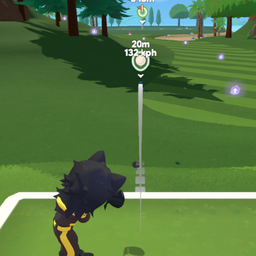
Adds a live MPH/KPH speed readout to the ball's worldspace icon while the ball is in motion.ShotSpeedometer
A small BepInEx mod for Super Battle Golf that adds a live speed readout to the ball's existing worldspace icon. Whenever your ball is moving, the icon now shows both the vanilla distance-from-player number and a second line with the ball's current speed in MPH or KPH. The label hides itself once the ball comes to rest.
The unit follows the game's own Speed Unit setting in Options → General
(KilometersPerHour / MilesPerHour). Toggling the menu setting updates the label live.
Speed is the full 3D rigidbody velocity magnitude, so it matches what real-world golf radars quote (ball speed, not just horizontal speed).
Installation
Install via r2modman / Thunderstore Mod Manager. The mod is purely visual and only renders for your own ball (or the ball of the player you're spectating), matching the vanilla worldspace-icon behavior.
Configuration
BepInEx/config/sbg.shotspeedometer.cfg is generated on first run. Available settings:
Display.HideAtRest(defaulttrue) — hide the speed line when the ball is stationary.Display.MinSpeedToShow(default0.3) — speed threshold (in m/s) below which the label hides whenHideAtRestis true. Lower values keep it visible longer at low rolls.
Build / deploy / release
Standard SBG-mod workflow:
dotnet build -c Release              # auto-deploys to r2modman Default profile
pwsh tools/package.ps1               # artifacts/Cray-ShotSpeedometer-<ver>.zip
gh release create vX.Y.Z artifacts/Cray-ShotSpeedometer-<ver>.zip --notes-file CHANGELOG.md