
NightWolfHawk
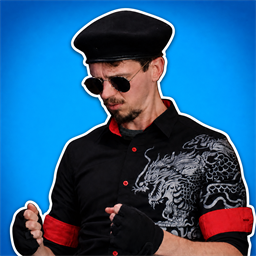
Adds Night Wolf Hawk, a synchronized distraction item that slides onto every opponent's screen with a random sound.Night Wolf Hawk
A standalone BepInEx 5 mod for Super Battle Golf. Night Wolf Hawk appears in normal item boxes with the supplied image as its inventory icon. Using it asks the server to slide the outlined character in from a randomly selected screen edge and play a server-selected random MP3 on every other modded player's client. Every recipient hears the same selected clip. Top, bottom, left, and right each have a 25% chance. The character faces inward; it is upside down when entering from the top. The user does not receive their own distraction.
No item is added to starting inventory by default. For testing, set
Testing.GrantStartingItem = true in
BepInEx/config/com.shadowforce.sbg.nightwolfhawk.cfg. The user is also
excluded from the distraction by default, including when alone. Set
Testing.SelfTargetWhenAlone = true only when testing the effect solo.
For an automated end-to-end solo test, also set
Testing.AutoUseWhenAlone = true; both options default to false.
Testing.InfiniteUsesWhenAlone defaults to true, so solo uses leave the item
in its slot for repeated edge testing. Multiplayer uses still consume it.
The image and every .mp3 in the deployed assets folder are loaded at runtime;
one sound is chosen by the server for each use. MP3s play through the FMOD runtime
already included with Super Battle Golf and follow the game's master and SFX
volume settings. The image gently bounces and jiggles while visible.
Night Wolf Hawk also appears in regular item boxes with a baked relative weight of 15 in every regular pool, matching the common tier used by main items. It does not appear in mobility-only boxes. There is no dependency on IssaPlugin. All players in a multiplayer test should install the same DLL and assets.
Install
Install with Thunderstore Mod Manager or r2modman. Every player in the lobby must install the mod because the server sends the selected sound and distraction event to the other clients.
For a manual install, copy the contents of plugins/NightWolfHawk from the
release ZIP into BepInEx/plugins/NightWolfHawk in the game or mod-manager
profile.
Build and deploy
Close the game, set paths for your installation and r2modman profile, then run:
$env:SBG_GAME_PATH = "C:\path\to\Super Battle Golf"
$env:SBG_PROFILE_PATH = "C:\path\to\r2modman\profile"
dotnet build
The project deploys NightWolfHawk.dll and its assets to the selected r2modman
profile. Launch that profile modded, start or join a private lobby, equip Night
Wolf Hawk, and use it like a normal item.
Use dotnet build /p:Deploy=false to compile without deploying. You can also
provide paths per build with /p:GamePath="..." and /p:ProfilePath="...".
Tests and CI
Run the portable behavior tests and formatting check without launching the game:
dotnet test tests/NightWolfHawk.Tests/NightWolfHawk.Tests.csproj
dotnet format whitespace tests/NightWolfHawk.Tests/NightWolfHawk.Tests.csproj --verify-no-changes
GitHub Actions automatically runs these test, lint, and Thunderstore metadata
checks. The full mod build requires a self-hosted Windows runner labelled
Windows, X64, and super-battle-golf, with SBG_GAME_PATH and
SBG_PROFILE_PATH configured as repository variables.
Package for Thunderstore
From the repository root, build and validate the uploadable ZIP with:
pwsh ./NightWolfHawk/tools/package.ps1
The package is written to artifacts/NightWolfHawk-0.7.3.zip. Select the
Mods, Items, Audio, and All Clients Required categories when uploading
it to the Super Battle Golf community.