TheShadowRealm-Raphael icon

Raphael

Unified client UI for V Rising server mods — Bloodcraft, Beelzebub, Uriel, Faust, KindredCommands, KindredLogistics — plus a standalone chat window. Surfaces their commands, stats & reporting as buttons, forms & overlays. (Formerly BloodCraftHub.)

Last updated 20 hours ago
Total downloads 157
Total rating 3 
Categories Client Mods Oakveil Update
Dependency string TheShadowRealm-Raphael-0.46.2
Dependants 0 other packages depend on this package

This mod requires the following mods to function

BepInEx-BepInExPack_V_Rising-1.733.2 icon
BepInEx-BepInExPack_V_Rising

BepInEx pack for V Rising. Preconfigured and includes Unity Base DLLs.

Preferred version: 1.733.2

README

Raphael, Lord of Wisdom

Formerly BloodCraftHub — Raphael is its direct continuation and replacement.

Unified client-side V Rising UI mod that turns the chat commands of its companion server mods into buttons, forms, and on-screen overlays — first-class support for Bloodcraft, Beelzebub (ability capture / transforms), Uriel (shared storage / public prisons / stair restyling / object spawning), Faust (server investigation & analytics: castle/plot/player intel, playtime & population reporting, clan composition), KindredCommands, and KindredLogistics — with more server-side mods to come. Each mod's tab group appears only when that mod is detected on your server, so it works whether your server runs one, several, or none.


📢 Renamed from BloodCraftHub — this is the replacement

Raphael, Lord of Wisdom is the same mod you knew as BloodCraftHub, rebranded — and it's the version to use going forward. It started as a companion UI for the Bloodcraft server mod but grew well beyond that: it now also provides UI for Beelzebub, Uriel, and Faust, a full standalone chat interface, and it will support more server-side mods over time. The broader name reflects that wider scope — and ends the frequent mix-up between this client UI mod and the separate Bloodcraft server-side mod (people kept opening the wrong support tickets). It joins the named family alongside Uriel, Beelzebub, and Faust. All features carry over unchanged from the final BloodCraftHub build.

⚠ Switching from BloodCraftHub — please read (do NOT run both)

Raphael replaces BloodCraftHub; it is not meant to run alongside it. Raphael has a new plugin ID (kdpen.Raphael) that is separate from BloodCraftHub's (kdpen.BloodCraftHub), so if you install Raphael without removing BloodCraftHub, V Rising loads BOTH at once — you'll get two floating launcher buttons, two main panels, and duplicated overlays.

To switch cleanly:

  1. In your mod manager (Thunderstore Mod Manager / r2modman), uninstall or disable BloodCraftHub (kdpen/BloodCraftHub).
  2. Install Raphael (kdpen/Raphael).
  3. Fully quit and relaunch V Rising.

Your settings don't transfer automatically. Raphael writes a new config file (kdpen.Raphael.cfg), so overlay positions, chat colors, and hotkeys start at defaults — just re-set them in Settings. Your old kdpen.BloodCraftHub.cfg is left untouched in case you ever roll back. The legacy kdpen/BloodCraftHub package is retired and points here. Questions? The The Shadow Realm Discord.


⚠ Pre-1.0 public beta — please read

Raphael is pre-1.0 and still in active testing. It's daily-driven on a live server, but it's a client-side UI mod that hooks the game and runs alongside other mods — so you may run into mod incompatibilities or other issues, especially right after a version update or when combining it with other client-side mods.

If you hit anything — a crash, a conflict, weird UI/input behavior — please tell us. The fastest way is the The Shadow Realm Discord; written-up GitHub issues also work. A crash log (from BepInEx/LogOutput.log) or a clear repro helps enormously and usually gets a fix into the next release quickly.

Rolling back if a version update causes problems

You can always drop back to an earlier version:

  • In your mod manager (Thunderstore Mod Manager / r2modman): select Raphael in your profile, open its version dropdown, pick the previous version, and let it download + swap automatically. Fully quit V Rising first.
  • Manually: download an older build from the Thunderstore page or GitHub releases, then in your profile's BepInEx/plugins folder delete the Raphael folder and replace it with the older one (game closed).
  • If the client crashes on load after any version change: close the game and delete the BepInEx/interop and BepInEx/cache folders in your profile — they rebuild automatically on the next launch and clear any stale/corrupted interop state.

⚠ Heads-up before you install

1 — Running alongside Eclipse? Raphael auto-switches to "command-console mode." Historically, Raphael + Eclipse crashed the client on load. The fault is inside Eclipse's own HUD code (Eclipse.Services.CanvasService reads a Unity BufferLookup<ModifyUnitStatBuff_DOTS> from a background coroutine — an access violation that Raphael's normal startup activity tips over; Raphael isn't in the crash stack and can't fix it directly). So as of 0.17.1, when Raphael detects Eclipse it stands down from its own passive Bloodcraft layer: it doesn't register for or read the Bloodcraft data stream, which avoids the crash. In that mode Eclipse provides the live HUD (XP / legacy / expertise / familiar / professions / quests), and Raphael still gives you its command buttons (Bloodcraft + KindredCommands + KindredLogistics) and the tabbed chat window — the affected tabs show an in-app notice explaining this. If you'd rather have Raphael's own live overlays, disable Eclipse (Raphael covers the same readouts on its own). The proper fix for true side-by-side passive overlays is on Eclipse's end (guarding that coroutine lookup).

2 — Pre-1.0 testing. v0.x is still public-beta. The major feature set is in place and the mod is daily-driven on a live PvE server, but APIs and UI may still shift before 1.0. If you spot a bug, please reach out on the The Shadow Realm Discord — that's the fastest way to get a fix in the next release. GitHub issues also work for written-up reports.

3 — Controller / gamepad input (under investigation). There are known interaction edge cases when V Rising's controller input pipeline intersects with the Raphael UI — for example, after using a teleport waypoint the controller's A button can re-open the Raphael main panel because Unity's UI navigation system retains focus on the floating Raphael button. v0.15.0 ships a first-pass fix that excludes the floating Raphael / OV buttons from gamepad UI navigation, but more thorough controller testing is in progress. If you play with a controller and hit something unexpected — UI opening / closing on the wrong button, focus getting stuck, hotkeys not firing under controller input, etc. — please report it on the Discord with as much repro detail as you can. We're actively working on coverage here.

4 — Server-side Bloodcraft compatibility (read this if Raphael looks empty). The live HUD overlays + tab readouts in Raphael are driven by Bloodcraft's signed broadcast protocol, which the Bloodcraft server-side mod only emits when at least one of these systems is enabled on the server:

  • LevelingSystem — XP / levels / class
  • LegacySystem — blood legacy
  • ExpertiseSystem — weapon expertise
  • ClassSystem — Bloodcraft classes
  • FamiliarSystem — familiars

A server that runs only QuestSystem or ProfessionSystem (with all five above disabled) will not engage the protocol at all, and Raphael will mark the BLOODCRAFT tab group as unavailable. In that situation, click the BLOODCRAFT header in the left rail — Raphael shows an in-panel diagnostic with a one-click "Force-enable tabs" button. After force-enabling, the chat-regex pipeline still works (.fam boxes, .quest p, .bl get, .wep get, etc.) and replies surface in the Last server response panel, but live HUD overlays will remain empty because the server isn't broadcasting.

If you want full Raphael functionality on a Quests-only / Professions-only server, ask the admin to enable at least one of the five systems above. The Eclipsed Bloodcraft config value is a separate broadcast-frequency knob (true = 0.1 s updates, false = 2.5 s updates) — both values work, but Eclipsed=true gives the smoothest experience on modern Bloodcraft. On older Bloodcraft builds, Eclipsed=false may suppress broadcasts entirely; if your server is stuck on an older release, set it to true.


Repo: https://github.com/KDavidP1987/Raphael-Lord-of-Wisdom Status: v0.46.2 — pre-1.0 public beta, actively developed (APIs and UI may still shift before 1.0). Beelzebub integration target: v0.131.0 (ApiVersion 28). Uriel integration target: v0.19.0 (ApiVersion 1 + admin spawn conditions). Faust integration target: v0.13.0 (ApiVersion 12).

At a glance: a "Game UI" group (works on any server, no server mods needed) + BLOODCRAFT / KINDRED / BEELZEBUB / URIEL / FAUST / SETTINGS-AND-HELP tab groups · a standalone tabbed chat window · secondary info overlays + a Beelzebub ability action-bar + a Uriel nearby-public-storage overlay · every chat command from the backing server mods surfaced as forms + buttons. Each tab group only appears when the matching server mod is detected.

New in v0.42–v0.46 — Faust reporting depth, Uriel admin config & a batch of tester fixes:

  • Faust through ApiVersion 12 — a Clans tab (clanned-vs-solo split + rosters); Server-Stats health dashboards (DAU/WAU/MAU + D1/D7/D30 retention, player recency, peak concurrency, population by region); a Player roster with active-today ✓ / active-this-week ✓ checkmarks; and richer per-player charts (by-weekday, daily/weekly trend, days-idle). Server Stats gained a Days-window filter, a Refresh button, per-chart titles + hover tooltips explaining each metric, and "Show players on map" (admin, experimental — server-side native map markers via .faust admin showpositions).
  • Uriel admin configSpawn conditions (per-object / global max-per-plot, item cost, and permit-indestructible / permit-respawn), a server-wide orphan purge, and an object-spacing reference for the overlap config.
  • Quality-of-life — a left-rail accordion (opening one tab group collapses the others, for small screens; toggle to override), a large-font layout fix (no more text overlapping buttons), a secondary-chat "Notes to self" filter (+ an "exclude from All" option on the main chat), and the secondary chat now hides with the OV "hide all" button.

New in v0.31–v0.41 — Faust integration (sibling server mod: server investigation & analytics):

  • FAUST tab group, handshake-gated like Beelzebub/Uriel, that turns Faust's investigation commands into read-only intel screens: Castle Info / Open Plots / All Plots / Decay Watch (castle ownership, region, size, decay timers, abandoned-base housekeeping), Castle Resources (container totals — raid intel), Player Info (playtime, login frequency, busiest hour, days-idle), Player Positions (online-player coordinates + region), Nearby Objects (client-side scan + in-world labels + a draggable Look-at HUD), a Clans tab (clanned-vs-solo split + per-clan rosters), plus admin control/access tabs and Quick Start + Help.
  • Server Stats + analytics dashboards — playtime leaderboard, concurrency graph, and activity charts: by hour of day, day of week, daily/weekly trend, new players, session lengths, plus server-health rollups (DAU/WAU/MAU + retention, player recency, peak concurrency, population by region).
  • Per-player reporting — individual playtime-by-hour / by-weekday histograms, a daily/weekly activity trend, session-length habits, and an at-risk "days idle" cue, so admins can see who's active and who's drifting away.
  • All Faust screens are ApiVersion-gated and show a "needs newer Faust" note on older servers; client-side queries respect an anti-spam cooldown so a busy server isn't hammered. (Tracks Faust through v0.12.0 / ApiVersion 11.)

Earlier — v0.28–v0.29 — overlay controls, a Uriel object-spawner overlay, server-switch fixes & a whisper UX overhaul:

  • Whisper overhaul (tabbed chat → Whispers tab) — whisper anyone connected to the server (the old "must be nearby / have spoken" limit is gone), including a note to yourself; a whisper you send now shows who you sent it to (toggle: in the channel column "[→Name]" or the name column "→Name"); self-whispers read as "Note to self" (toggle). The Whispers tab was restructured — the conversation sub-tabs sit on top, and a single bottom line composes everything: a recipient quick-switch (reply to anyone while staying on the All-Whispers view) + a "+ Whisper…" picker to start a new conversation + the message box. Privacy fix: a whisper with no resolvable recipient can no longer fall through into Local chat.
  • Uriel object-spawner overlay — a draggable spawn palette (category cycler + page selector + name/ID search, per-row Spawn / Despawn / Rotate), plus building hotkeys moved to the top of the Object Spawning tab and a "Despawn Nearest" control.
  • Overlay visibility controls (0.28) — the OV button / hide-all hotkey can auto-reappear on a timer, optionally hide the Raphael/OV launcher buttons too, and keep native chat hidden while overlays are hidden.
  • Overlays-behind-menus now also drops Raphael overlays behind the Social / Spellbook / Map (and other fullscreen) menus, not just inventory/crafting — while the coffin spawn screen still keeps them on top.
  • Server-switch fixes — switching between servers running different mods now correctly re-detects them: the BLOODCRAFT / BEELZEBUB / URIEL tab groups (and the Beelzebub tab content) light up properly instead of staying greyed/"connecting."
  • Fixes — closing the main panel no longer leaves your character stuck auto-attacking; combined-overlay stat-name abbreviation; the Shift overlay's recast/charge cooldown.

New in v0.26.0 — Uriel integration (sibling server mod: storage sharing / public prisons / stair restyling / object spawning):

  • URIEL tab group, handshake-gated like Beelzebub, with Quick Start + Help guides, a Settings tab, admin tabs (Sharing / Objects / Config), a Connection → Re-detect Uriel card, and an inline "not detected" diagnostic.
  • Storage Sharing — quick-share the nearest chest or build a custom share (permission + withdrawal limits + cost), pay-chest, and my-shares management.
  • Nearby Public Storage — Raphael detects Uriel-shared containers/cells around you client-side (no server query) and lists them in the Storage tab + a new draggable overlay.
  • Object Spawning — spawn your unlocked prefabs, collection progress, category filter, and an optional full-catalog browse cached per Uriel version.
  • Prisons & Stairs — share cells + Take-prisoner relay; live stair restyling across six styles.
  • 0.26.1–0.27.1 follow-ups — temporary build-mode hotkeys (move / rotate / remove the nearest spawned object); a dedicated Object Catalog tab with aligned Name · Category · ID columns and pagination (50/page) for the full ~2,000-item list; spawn durability (Indestructible / Breakable / Smashable) + Respawn options; fully built-out Uriel admin tabs (player/prefab-targeted grant/revoke/block/share/plot tools with two-click confirms); and fixes for spawn placement, empty-list diagnostics, and the main-panel close no longer leaving your character stuck auto-attacking.

New in v0.24.x — chat, loadout & admin polish + Beelzebub v0.120→v0.131 catch-up:

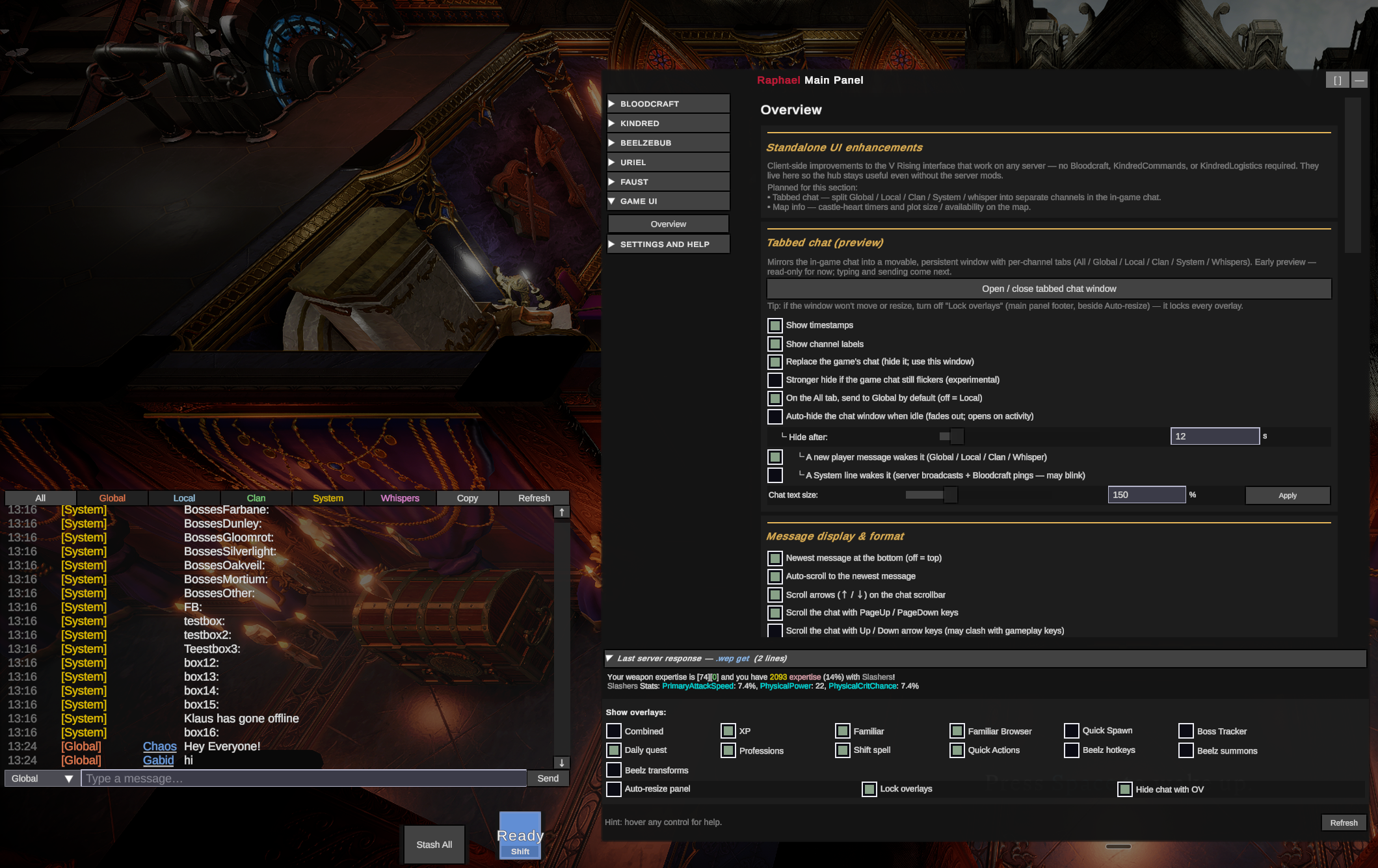
  • Secondary view-only chat window — a second draggable, display-only overlay that mirrors only the channels you pick, so you can watch two chat streams at once (enable + choose channels in Game UI → chat settings).
  • First-run welcome + opens to the active mod — a one-time Quick Start on first launch, and the left rail now opens to whichever mod your server runs (Bloodcraft wins when both are present) instead of always Bloodcraft.
  • Loadout fixes — the new Mounted form (slots 3/6/7) updates its slot buttons instantly on set-switch; slot buttons default to key labels (LM/Q/Sp/Sh/E/R/C/T); and an Unstick bar button recovers a bar stuck on a transformation's abilities.
  • Admin recovery toolkit (Beelzebub → Admin: Players → Recovery) — Rebuild bar, Purge bar (last-resort engine-leak fix), and Cleanse stuck buffs (invisible/phased player states), plus the existing Respawn / Rebuild slots, with an in-panel escalation-ladder guide.
  • Admin: Abilities — saved config changes now apply (admin reload) and refresh in the table reliably; new Power window + Leap height tuning fields; editable form/weapon allow/!-block lists.
  • Tidier forms — dropdowns and numeric fields across the panel no longer stretch edge-to-edge; the Bestiary and Loadout tabs were de-cluttered.
  • Dual-mod (Bloodcraft) coexistence — the Admin: Config tab spells out which spell slots can contest and how to resolve them (Interop_SlotInjectionPriority, or Bloodcraft's ShiftSlot/UnarmedSlots).

New in v0.20.0 — Beelzebub v0.100 catch-up (ApiVersion 22):

  • Admin: Abilities table now lists every ability (enabled + disabled) via Beelzebub's new admin catalog scope; uncaptured abilities show their unit + numeric ID. The Bestiary keeps the player-collectible set.
  • Custom transform loadouts — a new Transforms-tab editor: pick a form + phase to see each slot's current bind (with per-slot Clear), bind from that form's kit, or reset to defaults.
  • New Transforms overlay — a draggable on-screen list of your forms; double-click to transform, with Phase 1 / Phase 2 / Revert buttons.
  • More transforms — Werewolf, Golem, Gargoyle (+ a basic werewolf) join Dracula & Morgana, each multi-phase; per-transformation duration/cooldown tuning + a Transform_Enabled master switch and Transform_CooldownScope in the config tab.
  • Rebuilt announcement editor — manage the broadcast message pools one message at a time (add/edit/remove via broadcast-msg, list read from the server); a Reset loadouts admin button; and single primary/ultimate slot clears.
  • "Show overlays" footer reflowed — label on its own line, and the 10+ overlay toggles now wrap onto as many rows as the window width allows (no more squish / border overlap when narrow).

New in v0.19.1 — testing & polish over 0.19.0:

  • Summon management moved to the Hotkeys tab, plus a new draggable Summons overlay with a one-click Stash ⟷ Restore toggle (+ Recall / Clear).
  • Admin tabs gate to admins — non-admins see the controls grayed-out (not hidden) with a Re-check admin button. The Admin: Abilities table is slimmer with aligned ID / Unit / Enabled columns, a Cancel/revert, per-field tooltips, and export-to-clipboard.
  • Input fields show the text caret reliably (even when pre-filled) and no longer error on selection; overlay transparency is a live slider that now reaches fully-invisible; overlays stay properly behind game menus.

New in v0.19.0 — Beelzebub catch-up (now current with Beelzebub v0.94.0 / ApiVersion 20):

  • Per-form ability sets. Build a distinct loadout per shapeshift form (Wolf, Bear, Rat, Spider, Toad, Werewolf, Gargoyle) alongside the universal + per-weapon sets — pick the form in the Loadout "Editing" dropdown.
  • Primary + ultimate slots. Bind abilities to the left-click (primary) and T-key (ultimate) slots in addition to the six spell slots.
  • Correct tooltips + catalog. Reassembles Beelzebub's now-chunked ability/catalog replies, so tooltips and the Bestiary are complete again; active-bar abilities resolve full tooltips by GUID (no more "No name").
  • Clear-bar fixed to the per-bucket .beelz clearbar; leaderboard / drop-odds / mute-duplicate-devour buttons; a 100%-collection hook.
  • Admin: a per-ability shaping editor (cooldown, range, charges, AoE, projectile speed, duration, healing, summon caps, cast modifiers, …), per-unit transform tuning, capture-filter management, and server-announcement controls.
  • Server loadout presets (save/load/list/delete) + a Transforms panel showing each form's mode / duration / live cooldown.

Earlier — v0.18.x — Beelzebub integration + a big stability pass:

  • 0.18.0 — Beelzebub support. A full client UI for Beelzebub ("Lord of Gluttony", the ability-capture / transform mod): a new BEELZEBUB tab group — Bestiary collection tracker, Loadout (per-weapon ability sets), Hotkeys, Transforms, plus admin Config/Players — and a Beelz action-bar overlay with on-screen ability buttons, client-side cooldown rings, and optional per-ability keyboard shortcuts. Auto-detects whether the server runs Beelzebub.
  • 0.18.1–0.18.3 — stability + detection. Fixed a logout-to-desktop crash; overlays no longer linger over the main menu after leaving a game; reliable mod re-detection when you switch servers without fully quitting; other mods' chat messages no longer get swallowed; overlays auto-hide on a server that doesn't run the matching mod.
  • 0.18.4 — server-switch stability + polish. Fixed crashes when opening Raphael after a server switch and when renaming a chest with the chat window open; the Shift overlay is now a compact, resizable ability-button tile; the Beelz action-bar shows real ability icons; new button color and launcher button size options. Full list in the changelog.

Earlier — v0.17.x (a big client-side release):

  • 0.17.3 — chat overhaul + new-player hints. Whisper anyone on the server: right-click → Whisper on the social page (P) now opens in Raphael's chat, double-click a name in chat to whisper, and the "+ Whisper…" picker / \whisper <name> read the full online roster (not just people you've seen talk). Cleaner tabbed chat: optional separate channel/name columns with auto-fit so the message column grows first when you widen the window, an All-tab channel filter, and Alt + 1–6 tab hotkeys. Inline \g / \local / \whisper chat commands. New "you're leaving power on the table" hints on the Class / Weapon Expertise / Blood Legacy pages + overlays (toggleable, and only for systems your server has enabled). Fixes: "Putrid Rat" V-Blood capture, a stuck basic-attack when clicking chat tabs/input, and Eclipse command-console chat spam. Known issue: Stash All must be clicked with your inventory/menu closed (with "Overlays behind game menus" on, Raphael overlays sit behind the menu) — fix planned.
  • 0.17.2 — fixed the load / V-Blood-tracking / waypoint-teleport crash. Some 0.16.x players crashed on login, on starting to track a V-Blood/boss, or on a waypoint teleport (and then on every load after). The cause was Raphael's "don't open menus while typing" feature detouring three of the game's menu-input systems, which tipped a BepInEx IL2CPP interop bug during HUD rebuilds. Those three patches are removed — menu suppression while typing now uses a safe approach instead — while the "don't move / cast while typing" suppression stays. Overlays also now build on a quiet frame a few seconds after login. Minor known gap: menu keys can still open a menu while typing into a main-panel form (press Escape); a safe fix is planned. (A form-typing experiment was reverted for stability — see the changelog.)
  • Standalone "Game UI" group + tabbed chat window — a movable, persistent, per-channel chat window (All / Global / Local / Clan / System / Whispers) with sender names, whisper conversations, an optional native-chat takeover, an All-tab "send to" dropdown + Tab-to-cycle, per-channel colored tabs, configurable colors, chat-only text size, word-wrap input, and its own transparency + theme. Works on any server.
  • Runs alongside Eclipse (command-console mode) — install both and Raphael auto-detects Eclipse, stands down from its own live readouts (Eclipse shows those), and keeps its command buttons, chat window, Familiar Browser, and V-Bloods scanning working. No more load crash.
  • Folds in the 0.16.1 stability hardening (custom recipes default-off + deferred; gated SHIFT-icon read).

Full per-version history lives in CHANGELOG.md.

Screenshots

All captures below are from v0.13.0 — every UI piece shown still applies in v0.17.3. Newer work (v0.16's input-suppression + Quick Actions overlay, and v0.17's Game UI group + tabbed chat window + Eclipse command-console mode) is largely invisible until triggered; the screenshots below still represent the day-to-day look of the panel.

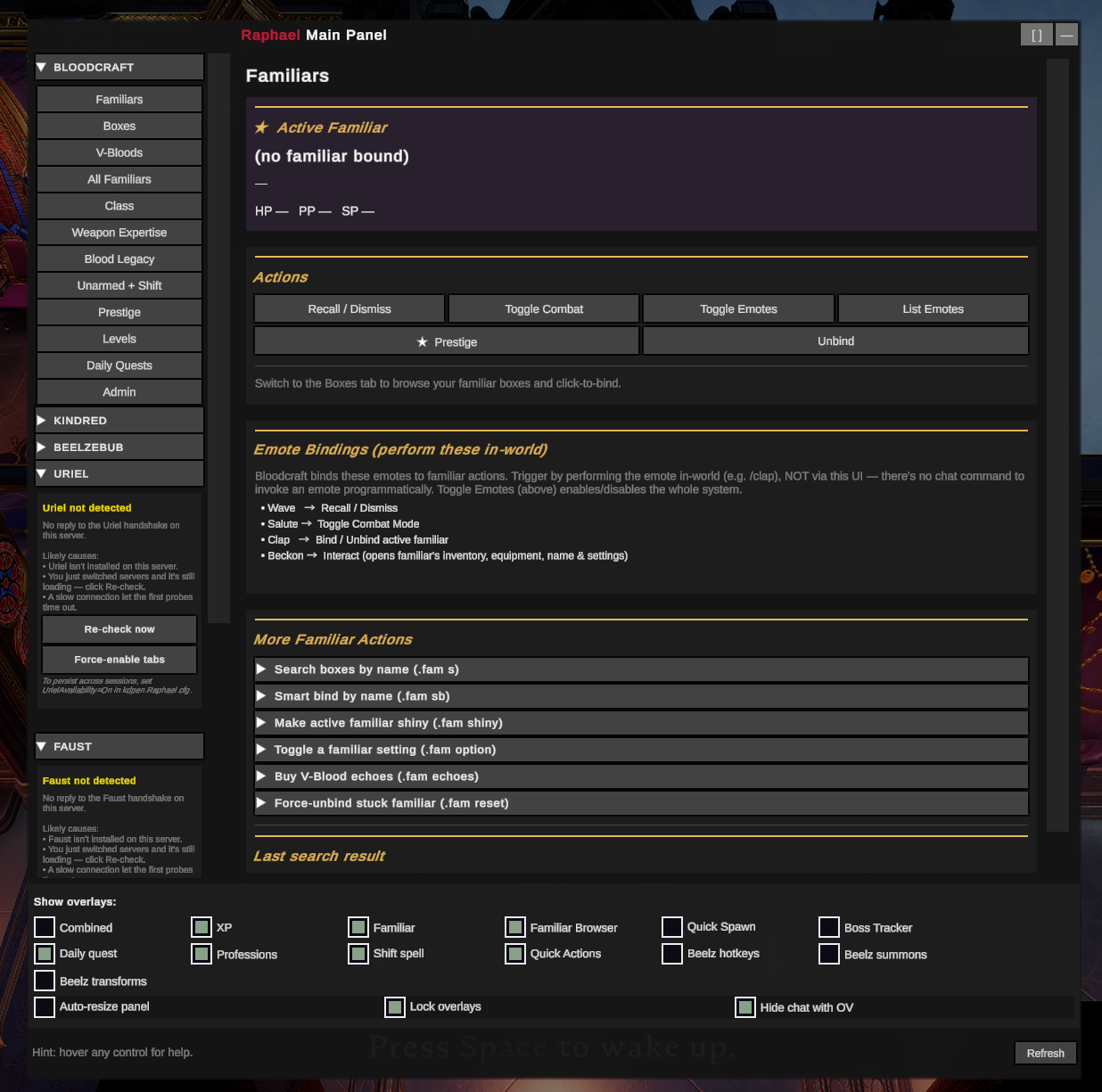
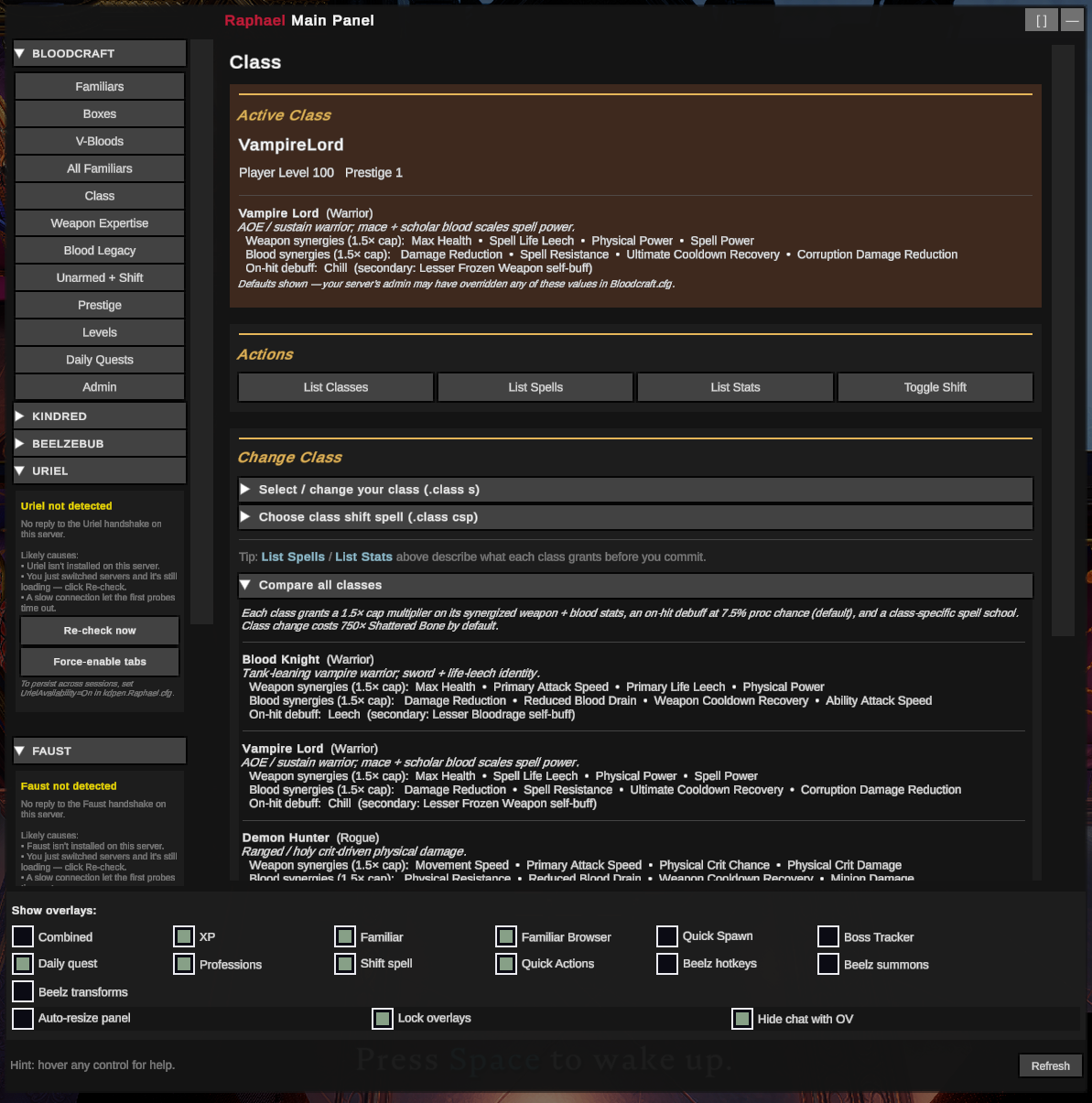
Class tab — class-synergy card (v0.13.0) Class tab — Active Class card now includes the live class-details block (Death Mage shown here, with archetype + tagline + weapon/blood synergies + on-hit debuff). The Last server response strip at the bottom shows the same data the Bloodcraft .class lst reply carries, with stat synergies color-coded by Weapon / Blood. Settings → Display → Combined overlay carries the same data into the combined HUD overlay's Weapon and Blood sections.

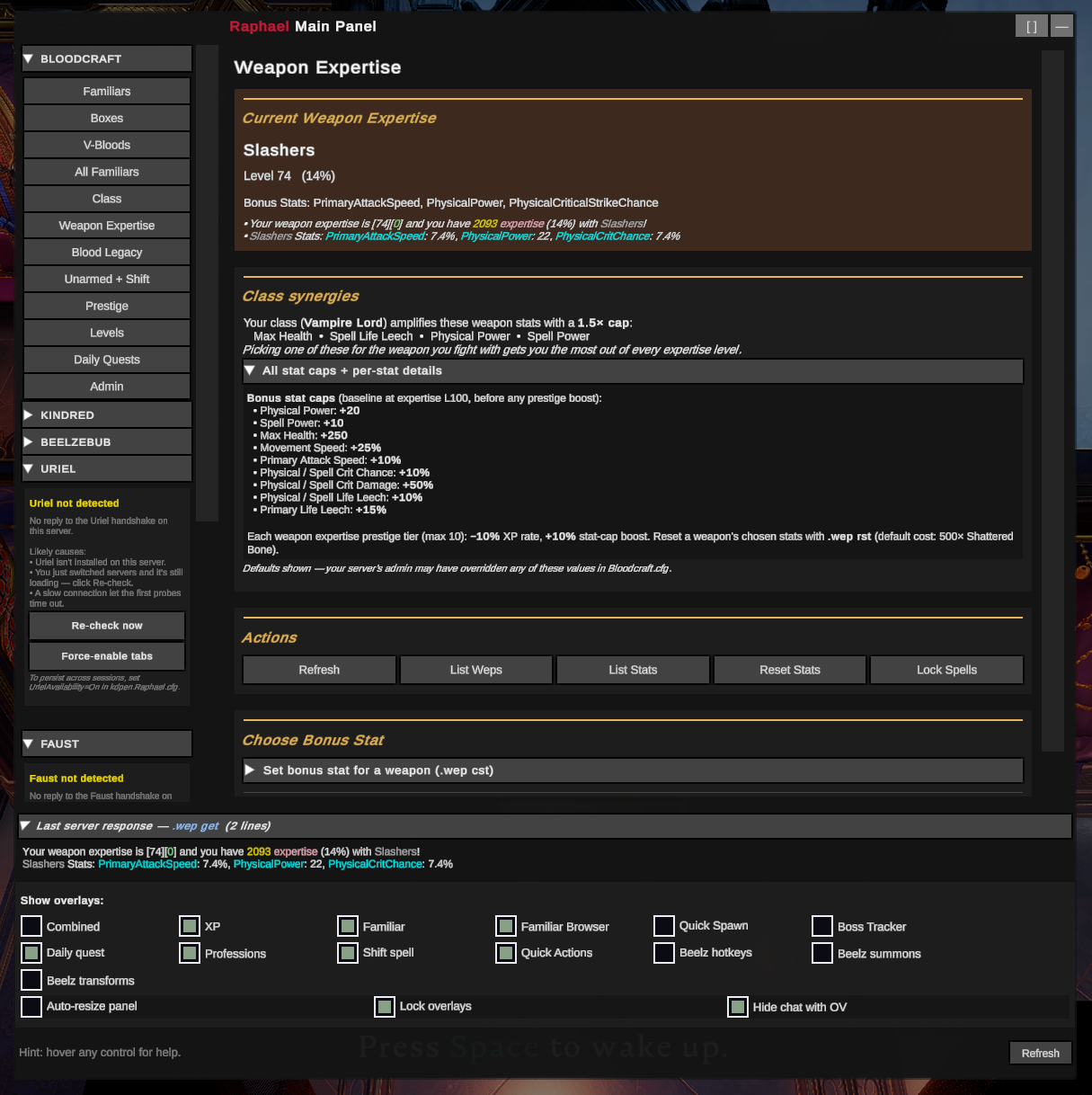
Weapon Expertise tab — synergies + bonus-stat picker (v0.13.0) Weapon Expertise — Current Weapon Expertise card (level + chosen bonus-stat names + live numeric values), the v0.13 Class synergies card explaining which weapon stats your current class amplifies with a 1.5× cap, and the Set bonus stat for a weapon form. The collapsible reference below lists every baseline stat cap (Physical Power +20, Spell Power +10, etc.).

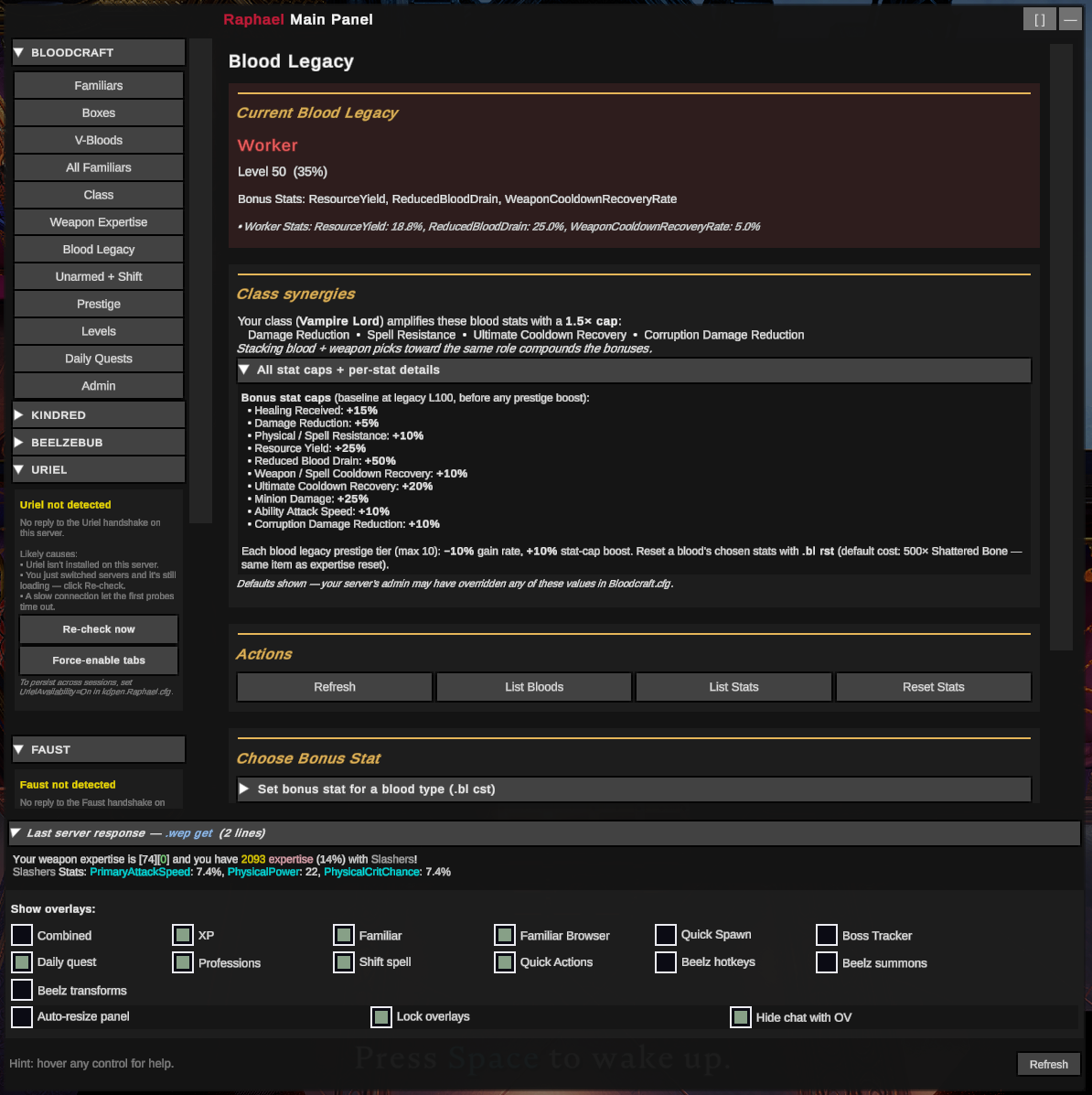
Blood Legacy tab — class synergies (v0.13.0) Blood Legacy — mirror treatment for the blood side. Current legacy state, class synergies card (which blood stats your class amplifies), action row, and the .bl cst set-bonus-stat form. Bottom collapsible has the full baseline-cap reference for every blood stat.

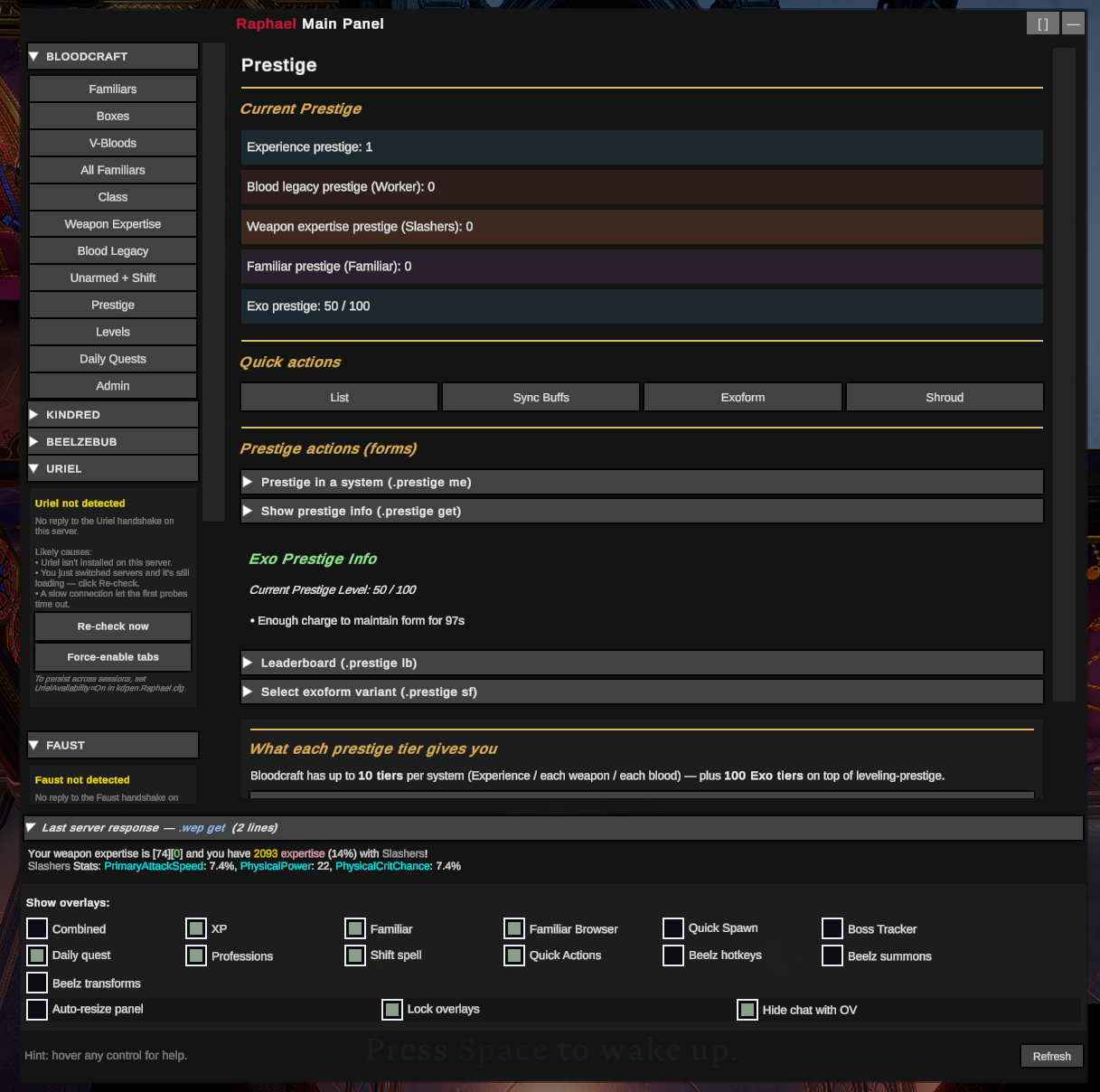
Prestige tab — progression reference (v0.13.0) Prestige — current prestige rows for each system (XP / Blood Legacy / Weapon Expertise / Familiar), the Prestige info display with current-tier breakdown, plus the "What each prestige tier gives you" reference card so you can see what every additional tier of leveling / weapon / blood / Exo prestige actually grants.

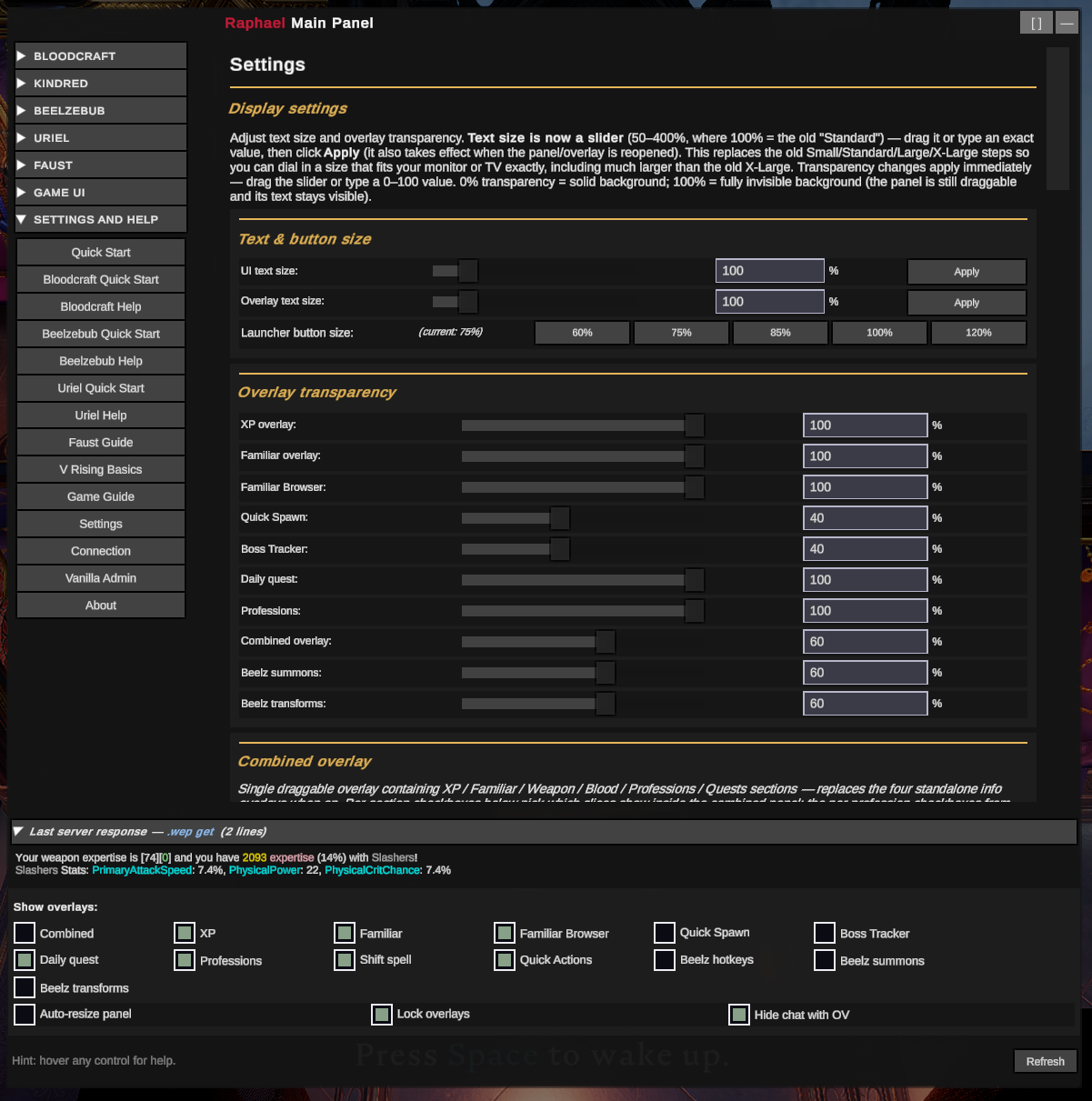
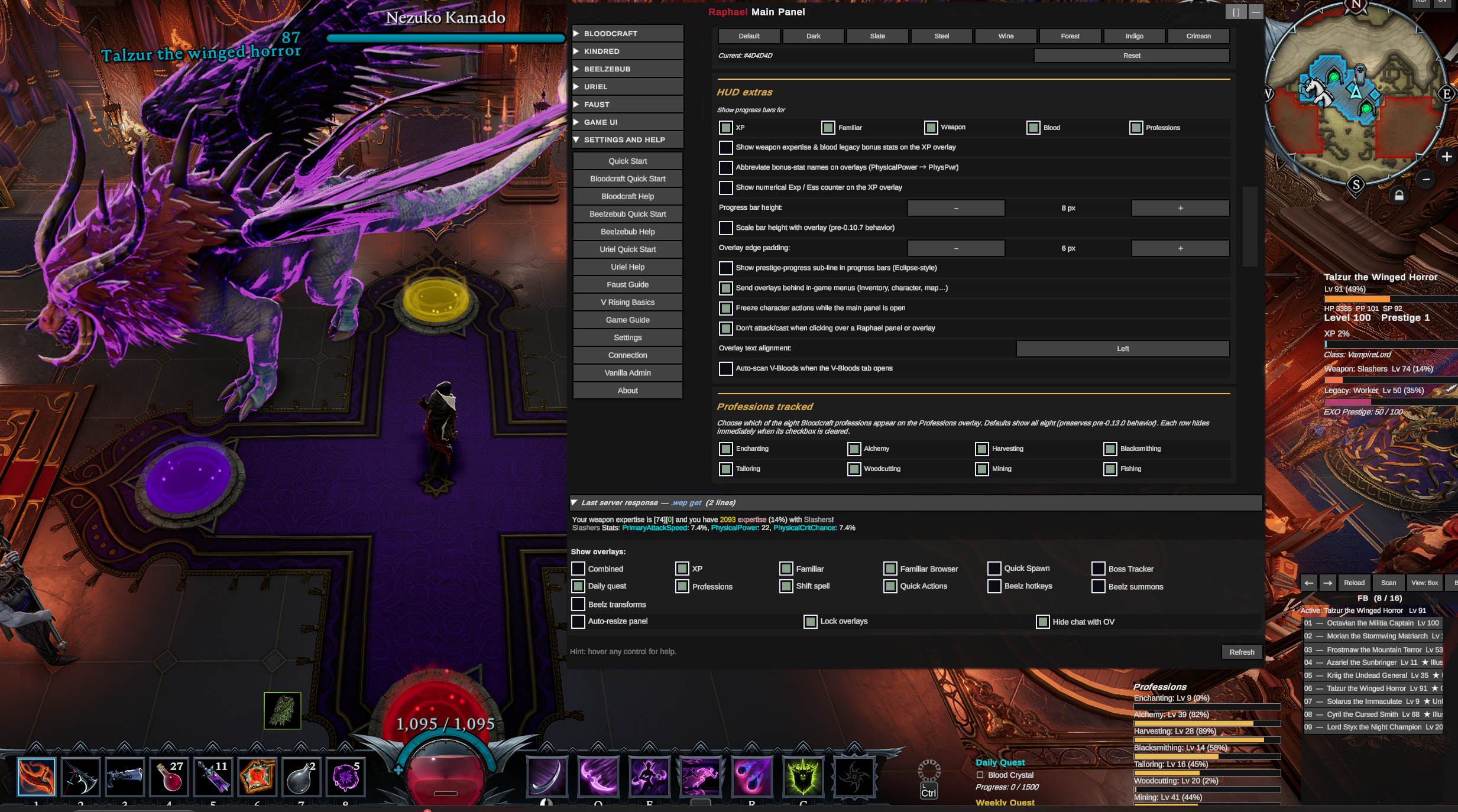
Settings — dual-zone color picker + scroll-position (v0.13.0) Settings & Help → Settings — the v0.12 two-zone panel color theme (outer chrome + interior scroll surfaces, with seven dark + seven bright presets for the interior), per-overlay transparency sliders, panel-background color, and HUD extras toggles. v0.13.0's gold-band section markers make long Settings / Mod Help pages scannable.

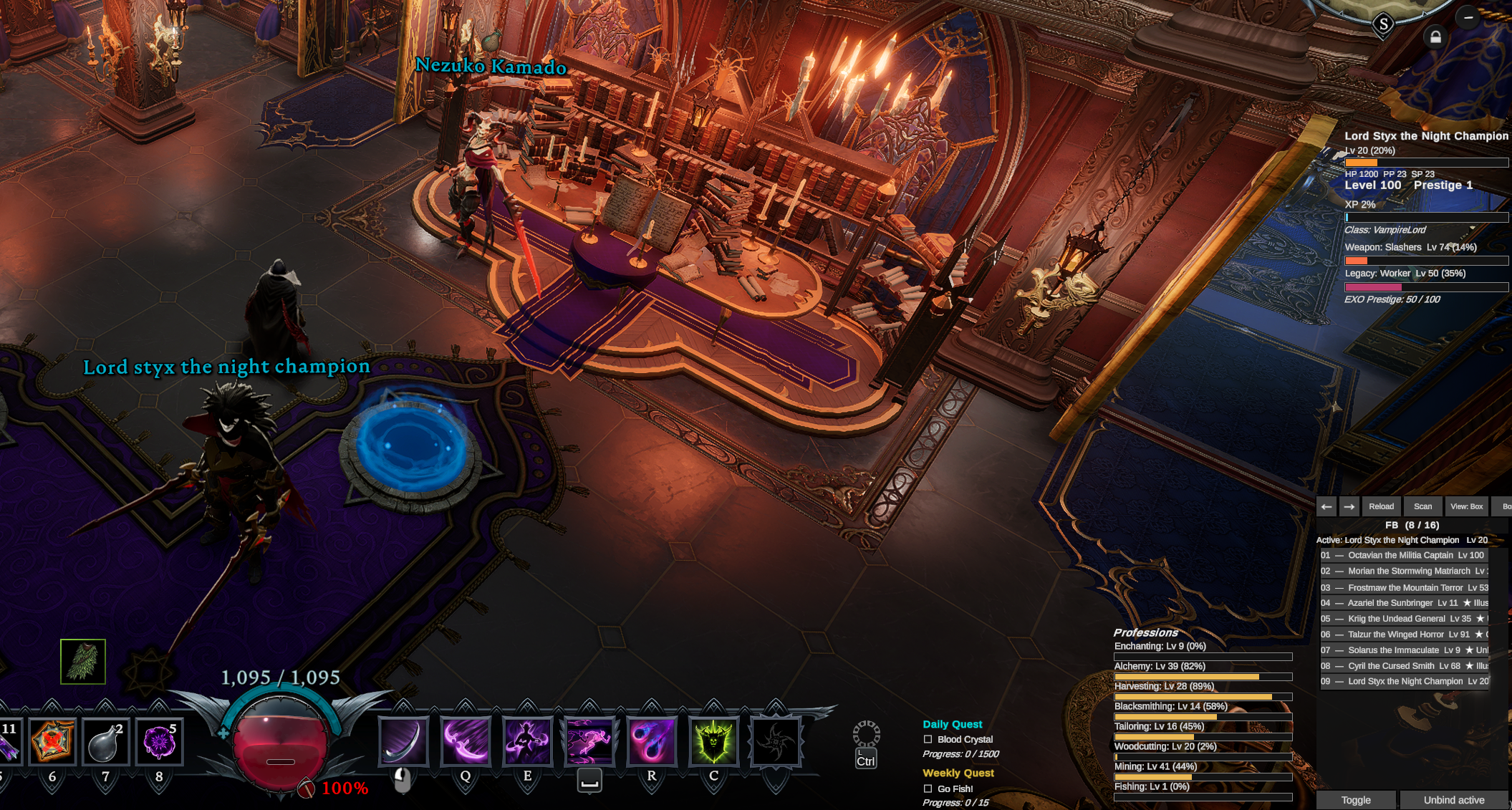
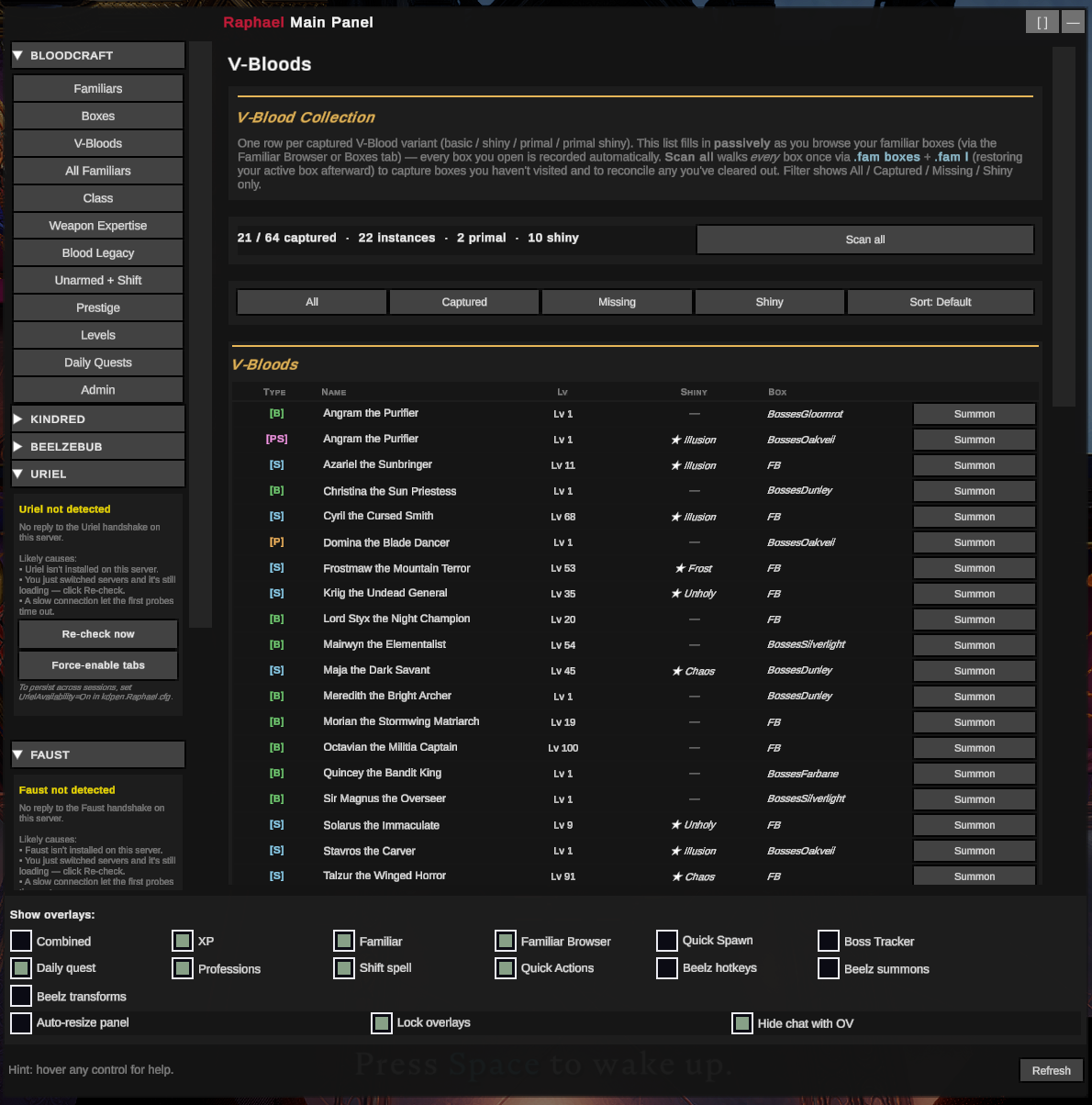
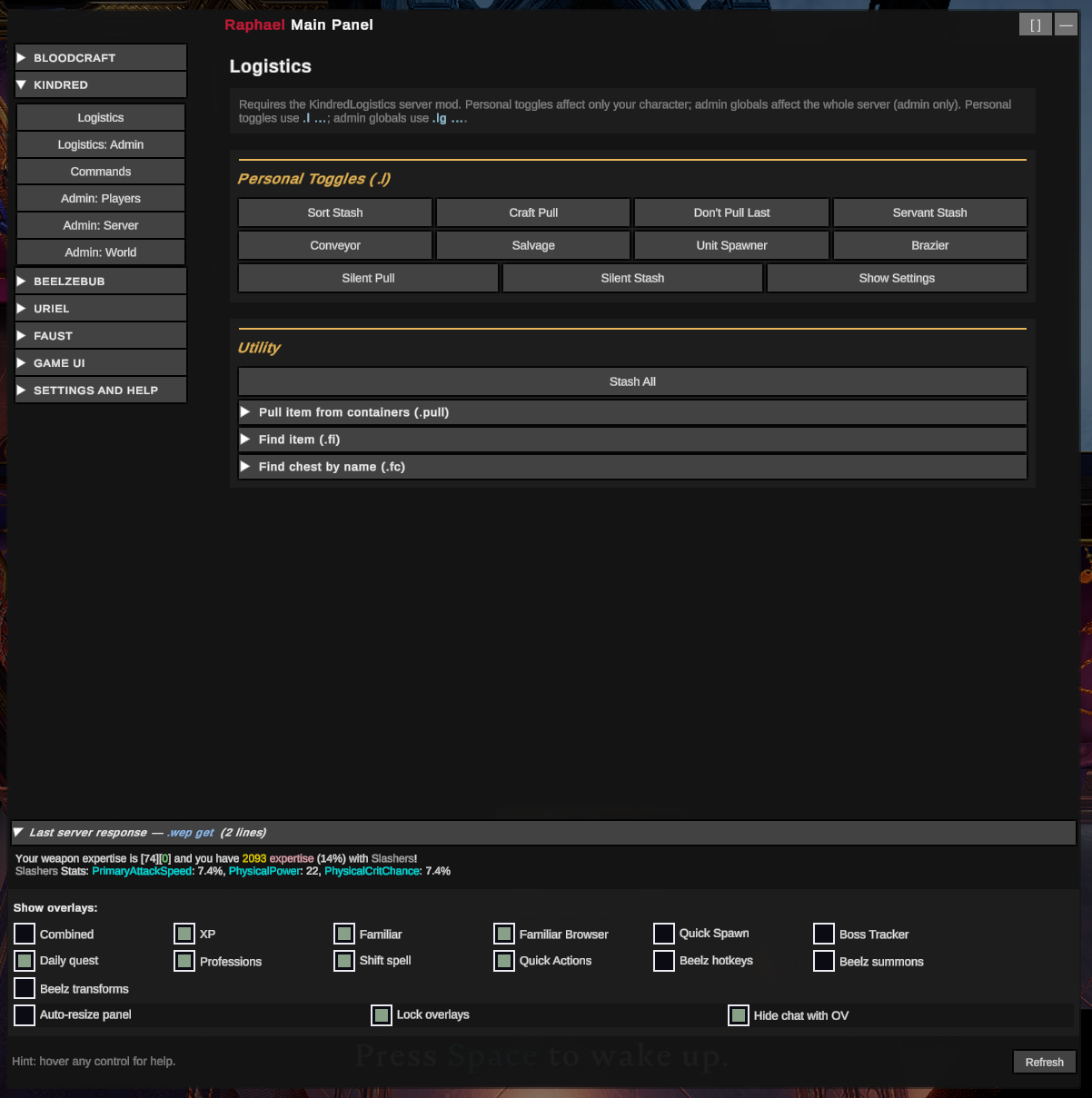
In-game capture — combined HUD elements (v0.13.0) Main panel open in-world to the V-Bloods collection tab, with the bound-familiar indicator at the right of the screen and the floating Raphael button strip at the top-right. The footer overlay-toggle row (visible at the bottom of the main panel) is where the v0.14 Combined toggle lives, sitting alongside XP / Familiar / Familiar Browser / Daily Quest / Professions / Shift Spell.

In-castle capture — overlay readouts during play In-castle shot showing Raphael's overlays running unobtrusively alongside the V Rising HUD, with the player's familiar and servants in view. The right-side stack shows the XP / weapon / blood / familiar progress readouts streaming live data via Bloodcraft's signed broadcast protocol; the per-overlay transparency settings keep them legible without competing for visual attention.

What it does

  • Floating Raphael + OV button strip top-right of the screen → Raphael opens the main panel; OV is a master overlay show/hide that respects each overlay's individual setting. Overlay Visibility options (v0.28, Settings → Display) let OV/its hotkey act as a timed hide that auto-reappears after a countdown, optionally hide the launcher buttons too for a fully clean screen (safety-gated so you always have a way back), and keep the game's native chat hidden during a hide instead of letting it pop back.
  • Tabbed primary UI with collapsible groups in the left rail (each appears only when its server mod is detected):
    • BLOODCRAFT (12 tabs): Familiars, Boxes, V-Bloods, All Familiars, Class, Weapon Expertise, Blood Legacy, Unarmed + Shift, Prestige, Levels, Daily Quests, Admin
    • KINDRED (6 tabs): Logistics, Logistics: Admin, Commands, Admin: Players, Admin: Server, Admin: World
    • BEELZEBUB (v0.19): Bestiary collection tracker, Loadout (universal + per-weapon + per-form ability sets, incl. primary/ultimate slots), Hotkeys, Transforms, Settings, + admin Config / Players (with a per-ability shaping editor)
    • FAUST (v0.31+): Castle Info, Open Plots, All Plots, Decay Watch, Castle Resources, Player Info, Clans, Player Positions, Nearby Objects, Server Stats (playtime/concurrency/activity charts + population-health dashboards), Settings, + admin Control / Access — all read-only server investigation & analytics, ApiVersion-gated
    • SETTINGS AND HELP: Quick Start, Mod Help, Beelzebub Quick Start + Help, Game Guide, Settings, Vanilla Admin, About
  • Eight secondary overlays (toggle from footer): XP tracker (with EXO prestige), Familiar quick-glance, Familiar Browser, Daily Quest tracker, Professions (all eight Bloodcraft profession levels), Shift Spell cooldown (now showing the slotted spell's icon, v0.16), the v0.14 Combined info overlay (one panel with XP + Familiar + Weapon + Blood + Professions + Quests in configurable sections), and the v0.16 Quick Actions overlay (one-click command buttons, shipping with Stash All). Each is independently draggable + resizable, with its own background transparency setting. Visibility persists across sessions; the OV button hides/shows all currently-enabled overlays at once. Combined mode is mutually exclusive with the four standalone info overlays it replaces (XP / Familiar / Daily Quest / Professions).
  • Freeze character actions while the UI is open (v0.16, opt-in) — with the main panel open, optionally stop your character from moving, attacking, and casting, and block game-menu hotkeys (build, map, inventory, etc.) so nothing happens in the background while you click around the UI. Especially handy for admins who keep commands or abilities on hotkeys. Toggle in Settings → Display; off by default. Only the gameplay-input systems are suppressed — the panel, cursor, and form typing stay fully responsive.
  • In-rail Bloodcraft diagnostic + Force-enable (v0.15.0) — when the Bloodcraft handshake fails (server doesn't run Bloodcraft, runs only Quests/Professions, or has the older hard-Eclipsed config), the BLOODCRAFT group expands to a diagnostic explaining the cause + a one-click button to force-enable tabs so the chat-regex pipeline (.fam boxes, .quest p, .bl get, etc.) remains usable.
  • Opt-in keyboard hotkeys (v0.15.0) — bind one key to "open main panel" and another to "toggle all overlays" via Settings → Display → Hotkeys. Unbound by default; mouse clicks on the floating button strip work unchanged.
  • Three-state diagnostic mode (v0.15.0) — Off / Session / Always. Session-only logging never persists across game restarts, so a one-off bug repro can't leave verbose logging on forever.
  • Dual text-size toggle (Small / Standard / Large / X-Large, separate for the UI and for the overlays) on the Settings tab.
  • "Last server response" docked panel at the bottom of the main panel — replies to read-data chat commands (.wep get, .class l, .misc userstats, .clan list, etc.) appear in-UI as well as in chat, so you don't have to chase the chat box for the answer.
  • Forms-driven commands — every chat command with arguments has a real form (player picker + enum dropdowns + numeric inputs + Submit). No more typing .lvl set <Player> <Level> in chat.
  • Live data via Bloodcraft's structured MAC-signed protocol (the same channel Eclipse uses). Falls back to regex parsing for .fam boxes / .fam l / .bl get / .wep get and other read-data replies that the structured protocol doesn't cover.
  • Bloodcraft custom recipes (v0.16) — when the server has Bloodcraft's extra recipes enabled, Raphael surfaces them in the vanilla crafting/refinement stations (vampiric dust, copper wires, charged battery, soul-shard extraction, primal jewel, blood crystal, primal stygian, plus new salvage outputs) — the same surface Eclipse provided. Client-side display only (the server still validates every craft); only appears when the server enables them; automatically skipped when the Eclipse mod is installed. Toggle via the EnableCustomRecipes config option.
  • Two-zone panel color theme (v0.12.x) — outer chrome and interior scroll surfaces are independently themed, with seven dark + seven bright presets for the interior and a free-form hex picker for either zone.
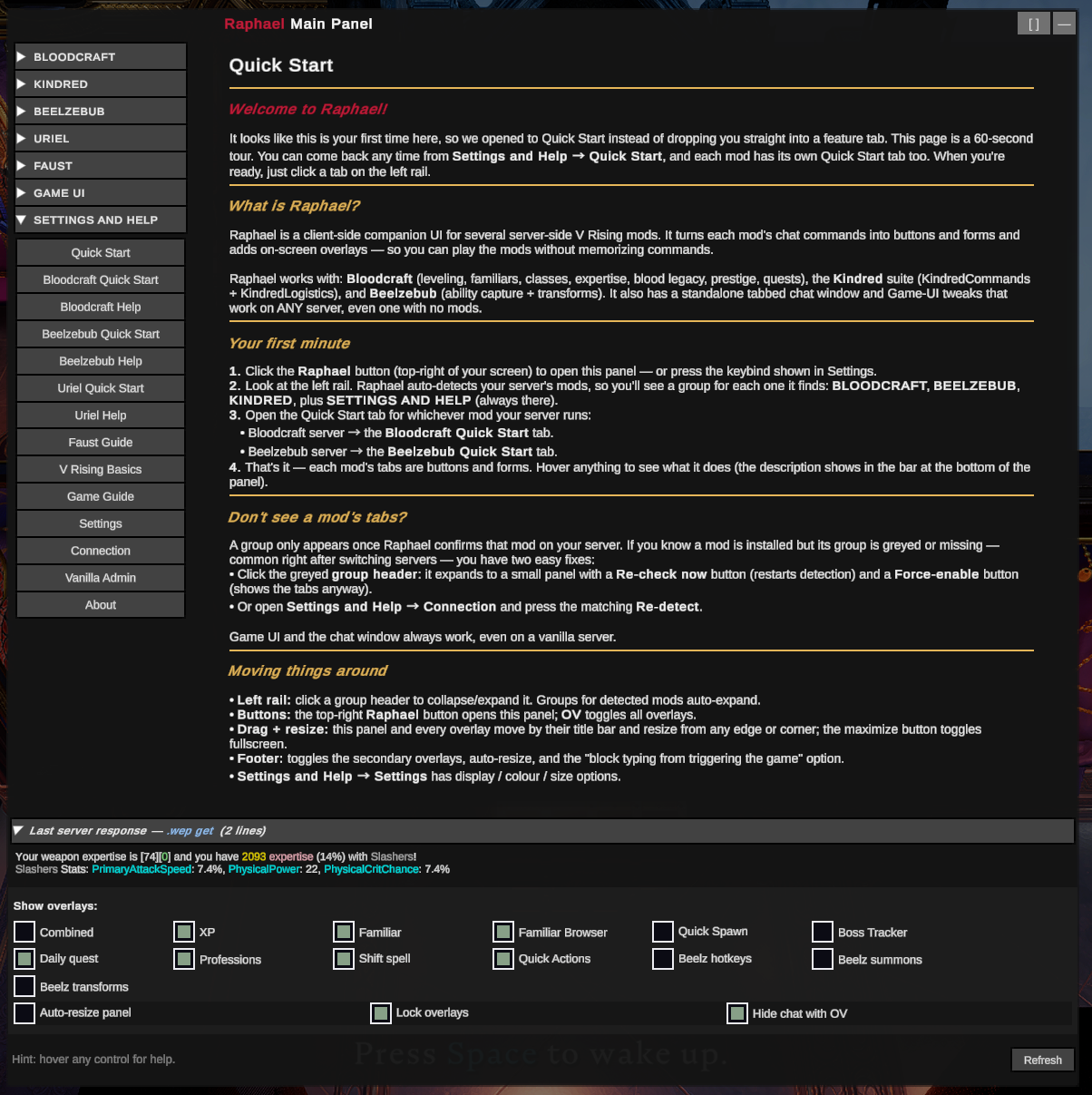
  • Hover tooltips for every control, surfaced in a single footer line at the bottom of the panel.
  • Scrollable tabs + scrollable left rail — long admin tabs scroll within the viewport instead of clipping; the tab strip itself scrolls when all groups are expanded so the BLOODCRAFT Admin button is always reachable.
  • Auto-resizing panel that grows/shrinks to fit the active tab content (capped at 90% of screen height; toggleable).
  • V-Blood collection scanner — walks every familiar box to catalog which V-Bloods you've captured, with summon-from-anywhere via the V-Bloods tab or the Familiar Browser overlay's V-Blood mode.
  • Passive player-name autocomplete cache that fills as the server prints names into chat.

Installation

Raphael is a client-side mod. It does nothing on the server; install only on the V Rising client of the player who wants the UI.

Via Thunderstore Mod Manager (recommended)

  1. Open Thunderstore Mod Manager.
  2. Select V Rising → your existing profile (or create a new one).
  3. Search for Raphael under the Mods tab → Install.
  4. Make sure BepInExPack_V_Rising (the dependency) is installed in the same profile.
  5. Launch V Rising via the mod manager (not Steam directly).

Via r2modman

Same flow — open r2modman, V Rising profile, search Raphael, install, launch.

Manual install

  1. Install BepInEx for V Rising (BepInExPack_V_Rising 1.733.2 or compatible).
  2. Drop Raphael.dll into <V Rising>/BepInEx/plugins/.
  3. Launch V Rising.

First launch

When you connect to a server running Bloodcraft, a small floating Raphael button appears top-right. Click to open the panel. Hover any control to see what it does — the description prints in the panel's bottom footer.

You don't need to be an admin to use Raphael — non-admin commands work for everyone. Admin tabs return permission errors gracefully if you're not authorized.

Compatibility

Raphael talks to the server through chat commands and Bloodcraft's signed Eclipse-protocol channel. It was tested against these versions:

Mod Tested version Role
BepInEx for V Rising BepInExPack_V_Rising 1.733.2 Loader (hard dependency)
Bloodcraft (server) v1.13.21 Primary integration target
KindredCommands (server) v2.5.8 Admin/player commands surfaced under KINDRED
KindredLogistics (server) v1.6.0 Personal/admin toggles surfaced under KINDRED
Beelzebub (server, optional) v0.100.0 (ApiVersion 22) Ability capture / transforms surfaced under BEELZEBUB (v0.20)
Faust (server, optional) v0.13.0 (ApiVersion 12) Server investigation & analytics surfaced under FAUST (v0.31+)
Uriel (server, optional) v0.19.0 (ApiVersion 1) Storage sharing / prisons / stairs / object spawning + admin config surfaced under URIEL (v0.26+)
Eclipse (client) v1.3.13 Source mod for the signed-protocol design. ⚠ Compatibility needs re-testing — was incompatible (client crash); Eclipse has since updated and we haven't re-verified. Disable Eclipse while running Raphael to be safe. See the Eclipse heads-up at the top of this README.
BloodCraftUI / OnlyFams (client, optional) v1.1.0 Source mod for the panel framework; coexists, doesn't conflict

If the server is running a newer Bloodcraft, most things should still work — the chat-command grammar is fairly stable. If a tab silently does nothing on click, the server probably renamed a command and MessageService_Processing.cs's BCCOM_* constants need a bump.

Known issues

  • Eclipse mod compatibility needs re-testing — see the top-of-README heads-up. Previously, Eclipse + Raphael installed together hard-crashed the V Rising client. Eclipse has since updated and we haven't re-verified; likely still incompatible. Disable Eclipse while running Raphael to be safe. Re-test + coexistence work is on the roadmap.
  • Controller / gamepad edge cases under investigation — see the controller heads-up at the top of this README. v0.15.0 ships a first-pass fix; more thorough testing is in progress. If you play with a controller and notice the UI opening, closing, or focusing on the wrong button after an in-game action, please report via Discord with repro steps.
  • Per-feature server detection is conservative — when a Bloodcraft server has the structured protocol enabled but individual systems (Familiars / Quests / Professions / etc.) disabled, Raphael currently still shows the corresponding tabs and overlays. A future release will add per-system chat-regex probes so the UI can hide / dim per-system surfaces that the server has turned off.
  • Tooltips occasionally don't render on some control rows — diagnostic logging is in. If you see "TooltipHover wired" in BepInEx's LogOutput.log but the footer never updates while hovering, please open a GitHub issue (or toggle Settings → Display → Hotkeys & diagnostics → Diagnostic mode to This session and share the relevant LogOutput.log snippet).
  • No autocomplete dropdown yet — the player-name cache fills passively from chat, but the form fields don't render a dropdown of known names. You still have to type the name. Planned for a follow-up release.
  • Pagination only on .clan list — the other paginated commands (.castle plotsowned, .search item, etc.) accept a page int but don't have prev/next widgets yet. Type the command in chat for now.
  • Quitting V Rising is required before redeploy if you're a developer iterating — the running game file-locks Raphael.dll and the post-build copy step errors.

For the full open-issue list, see the project's GitHub issues.

Roadmap

Where Raphael is headed next. This is direction, not a dated promise — priorities shift with player feedback, and the fastest way to influence them is the The Shadow Realm Discord.

  • Eclipse coexistence — re-test against the latest Eclipse and resolve the remaining client crash so Raphael and Eclipse can run side by side, instead of asking you to disable one.
  • Per-system server awareness — automatically hide or dim the tabs and overlays for Bloodcraft systems your server has turned off, so the UI shows only what's actually live (today it still shows them, just empty).
  • Name & item autocomplete in forms — dropdown suggestions in the command forms instead of typing player / item names by hand.
  • More Quick Actions — additional one-click command buttons in the new Quick Actions overlay.
  • Controller / gamepad polish — continued hardening of the UI under controller input.
  • Broader server-mod support — surface more server-side mods (additional Kindred mods and others) with auto-detection so only the relevant tabs show.
  • Buffs dashboard — an at-a-glance view of active buffs from leveling, professions, and potions.
  • Pagination controls — prev/next widgets for the remaining paginated commands (.castle plotsowned, .search item, etc.).

Acknowledgements

Raphael is a client UI for server-side mods built by other developers. The features it surfaces would not exist without their work. If you use Raphael, please also show the upstream mods some love:

Bloodcraft — by zfolmt

Leveling, expertise, legacies, professions, familiars, classes, quests! The bulk of what Raphael surfaces (every BLOODCRAFT-group tab) is wrapping zfolmt's chat-command surface.

KindredCommands & KindredLogistics — by odjit

Server administration utilities and personal/admin logistics toggles. The KINDRED admin tabs (Players / Server / World) and the Logistics section all call into odjit's mods.

About the UI

Raphael was built on the V Rising server The Shadow Realm (Brutal PvE), maintained by Chaos. If you want to support Raphael development directly:

Special thanks — testing & feedback

Raphael has been shaped almost entirely by hands-on playtesting and detailed reports from these friends, who have helped on and off across many releases. Every false-positive, every "this looks wrong" screenshot, and every controller / partial-server / disabled-system scenario in the release notes traces back to their patience and careful repro work:

  • Moonie
  • Bradley
  • Xavarie
  • Exotic Mystique
  • Shiyrva
  • Imperivm Draconis

Thank you all. The mod is meaningfully better because of you.

Raphael is open source (MIT). Bug reports, feature ideas, and pull requests welcome at https://github.com/KDavidP1987/Raphael-Lord-of-Wisdom.


For developers

Dev docs

Doc Purpose
CHANGELOG.md Full phase-by-phase history. Read this to catch up on what's been built.
CONTRIBUTING.md Daily workflow, commit-message format, release procedure.
docs/MOD_DESIGN.md User-facing feature/UX spec.
docs/ROADMAP.md Internal roadmap & backlog (localization plan, planned features).
docs/ARCHITECTURE.md Internal code structure and porting map from BloodCraftUI/Eclipse.
docs/VERSIONING.md Semver policy, single-source-of-truth rules, how to bump.
docs/PREFLIGHT.md Pre-commit / pre-release checklist. Enforced by tools/preflight.ps1.
docs/LOCAL_TESTING.md How to side-load the built DLL into your V Rising client and verify it loads.
docs/THUNDERSTORE.md Thunderstore packaging + publishing.

First-time setup

cd Raphael
.\tools\install-hooks.ps1   # wires up the pre-commit + commit-msg hooks

Build

cd Raphael
dotnet restore Raphael.sln
dotnet build Raphael.sln -c Release

Optional: deploy the built DLL directly to your client's BepInEx plugins folder:

# Default target is r2modman / Thunderstore Mod Manager "Default" profile.
dotnet build Raphael\Raphael.csproj -c Release -p:DeployToClient=true

# Override the r2modman profile name:
dotnet build Raphael\Raphael.csproj -c Release -p:DeployToClient=true -p:R2ModmanProfile=MyProfile

# Or target a non-r2modman install (vanilla Steam path):
dotnet build Raphael\Raphael.csproj -c Release `
    -p:DeployToClient=true `
    "-p:ClientPluginDirectory=C:\Program Files (x86)\Steam\steamapps\common\VRising\BepInEx\plugins"

Heads up: fully quit V Rising before redeploying. A running game file-locks the DLL and MSBuild's Copy step errors with MSB3021. The compile itself still succeeds — just the copy fails.

Layout

Raphael/
├── Raphael.sln
├── docs/                          ← read CHANGELOG + ARCHITECTURE first
├── tools/                         ← preflight.ps1, bump-version.ps1, install-hooks.ps1
├── .githooks/                     ← pre-commit + commit-msg
└── Raphael/                 ← plugin project
    ├── Raphael.csproj
    ├── Manifest.props             ← generates Thunderstore manifest.json
    ├── thunderstore.toml          ← package metadata for tcli
    ├── Plugin.cs                  ← BepInEx entry
    ├── Core.cs                    ← runtime singleton
    ├── icon.png                   ← 256×256 Raphael icon
    ├── Behaviors/
    │     CoreUpdateBehavior.cs    ← IL2CPP-registered MonoBehaviour, per-frame loop
    ├── Config/
    │     Settings.cs              ← BepInEx-bound, static accessors
    ├── Patches/                   ← Harmony patches
    │     ClientChatPatch          ← inbound: Eclipse protocol + regex fallback + name harvest
    │     InitializationPatch      ← UI bring-up + LocalCharacter/User capture
    │     GameManagerPatch / EscapeMenuPatch / UICanvasSystemPatch / VersionStringPatch
    ├── Services/
    │     MessageService           ← outbound chat injection (immediate send)
    │     MessageService_Processing ← BCCOM_* command constants + regex pipeline
    │     EclipseProtocolService   ← MAC-signed protocol decode + registration
    │     PlayerStateService       ← single source of truth for parsed state
    │     PlayerNameCacheService   ← passive name harvest + autocomplete cache
    │     RecipeService            ← client-side Bloodcraft custom-recipe injection (v0.16)
    ├── UI/
    │     BCHubUIManager           ← root, owns floating button + lazy panels
    │     TooltipHover             ← hover-tooltip polling service
    │     Framework/               ← UniverseLib + CustomLib + ModernLib (folded in)
    │     Forms/
    │         FormBuilder          ← builds form panels from FormField specs
    │         FormField            ← TextField/IntField/EnumField<T>/BoolField/PlayerNameField
    │         CollapsibleSection   ← accordion wrapper, fires Toggled event
    │     ModContent/
    │         FloatingButtonPanel       ← 40×40 Raphael button (top-right)
    │         MainPanel                 ← tabbed primary UI (Bloodcraft tabs + Quick Start)
    │         MainPanel.KindredAdmin    ← partial-class file: 3 KindredCommands admin sub-tabs
    │         ExperienceOverlayPanel / FamiliarOverlayPanel
    │     ModContent/Data/PanelType ← enum of every tab and overlay identity
    ├── Utils/                     ← LogUtils + Extensions (Entity.Read/Write/Has, color helpers)
    └── Resources/
        ├── PrefabGUIDs.cs              ← static prefab GUID lookup (stub)
        ├── PrefabNameResolver.cs       ← runtime PrefabCollectionSystem name lookup
        ├── SecretManager.cs            ← HMAC shared-key loader (regex-parses secrets.json)
        ├── secrets.json                ← embedded HMAC key (same default Bloodcraft+Eclipse ship)
        └── Localization/English.json

License

MIT — see LICENSE.txt for the full text plus third-party attribution for ported code from BloodCraftUI (panthernet), Eclipse (zfolmt), and the runtime peers we integrate with: Bloodcraft (zfolmt), KindredCommands (odjit), and KindredLogistics (odjit).