

DayTimeCountdown
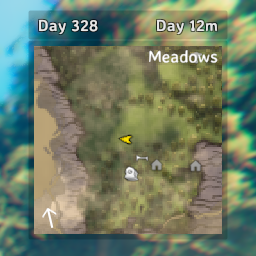
Display day count and a how much of the current day or night is left (in minutes/seconds)Valheim UI Mod - Display Day & Time Countdown
Simple UI mod that near the minimap, displays both the day count and a how much of the current day or night is left (in minutes/seconds). This is a modified version of the mod Display Day and Time in HUD, which displays an in-game clock rather than a countdown in IRL.
Prerequisites
- Install a mod manager like R2Modman.
- Install BepInExPack Valheim with mod manager.
Install from Thunderstore
Install DayTimeCountdown with mod manager.
Build from source
- Install .NET SDK (Core 3.1 or later) from Microsoft.
- Download source code from GitHub.
- Build release with .NET CLI command:
dotnet build -c Release - Import generated
ValheimDayTimeCountdown.zipas local mod using mod manager.
Configuration
The configuration file for this mod is automatically generated the first time you run the game with the mod installed. You can find it in your local
BepInEx config directory (BepInEx\config\ValheimDayTimeCountdown.cfg).
You can customize the following settings in the configuration file:
- Display under minimap: Default is
false. If set tofalse, the panel appears above the minimap; if set totrue, it appears below. - Display time: Default is
true. Enables or disables the time countdown display. - Display day: Default is
true. Enables or disables the day count display. - Display background: Default is
true. Shows or hides the background panel behind the text. - Font name: Default is
AveriaSansLibre-Bold. If this font is not available in resources, it will fall back to the default. - Font size: Default is
16. Sets the size of the displayed text. - Font color: Default is
RGBA(1, 1, 1, 0.791). Sets the color and transparency of the text. - Background color: Default is
RGBA(0, 0, 0, 0.3921569). Sets the color and transparency of the background panel. - Text outline color: Default is
black. Sets the color of the text outline. - Text outline enabled: Default is
true. Enables or disables the text outline. - Margin between minimap and panel: Default is
0. Sets the space between the minimap and the panel. - Padding (left and right): Default is
10. Sets the horizontal padding between the text and the panel border. - Reverse text position: Default is
false. If set totrue, the time is displayed on the left and the day on the right. - Panel width: Default is
200. Sets the width of the panel. - Panel height: Default is
30. Sets the height of the panel.