SargamAutoStore
Smart auto-sorting. Built for performance.SargamAutoStore
Automatically store dropped items in nearby chests. Quick-stack your inventory with one key, choose destinations for new loot, and see exactly where each transfer went.
Drop it. Sorted.
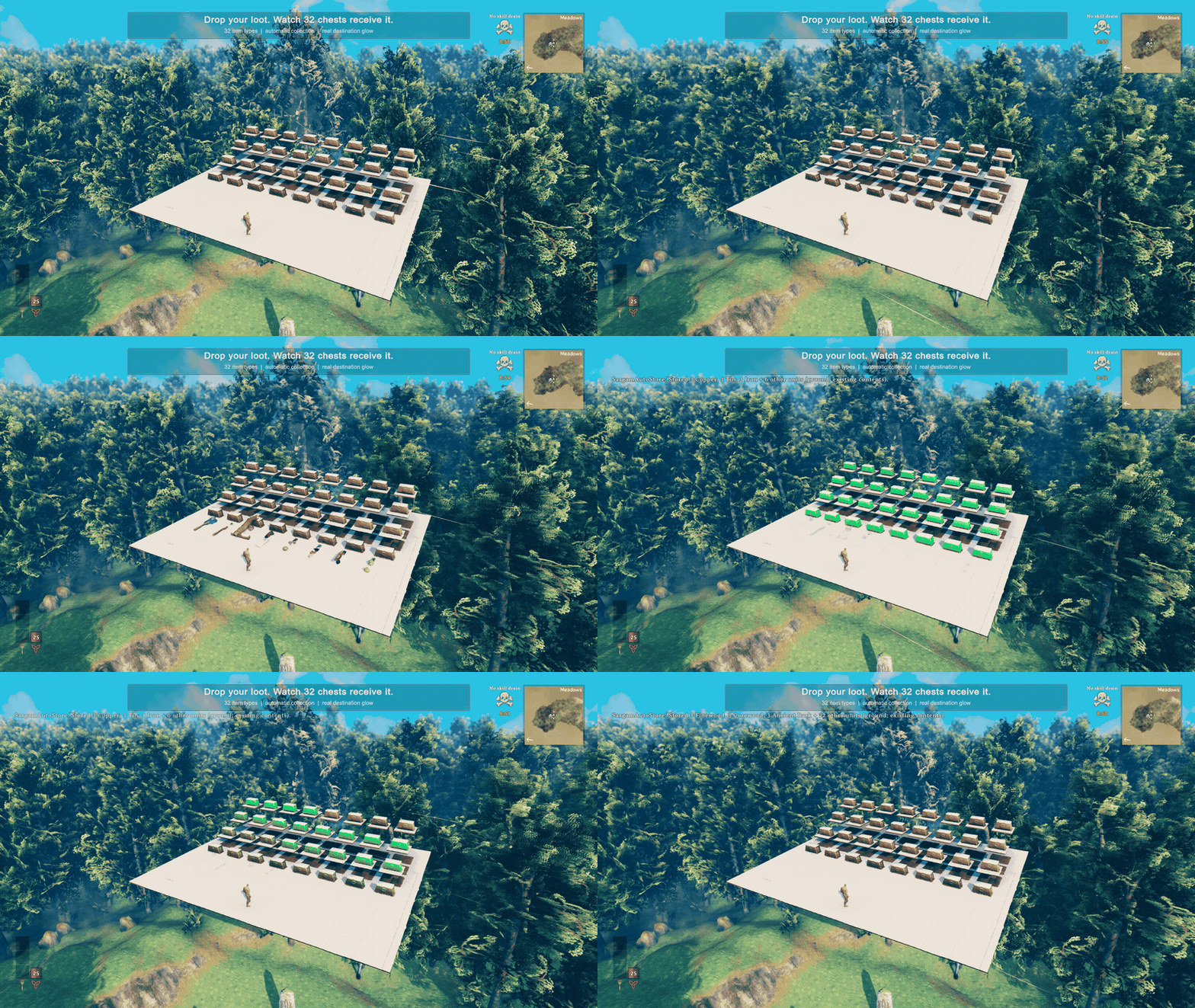
32 item types. 32 destinations. Dropped loot finds its home automatically, and receiving chests light up as it arrives.
Clear your inventory. Keep your essentials.
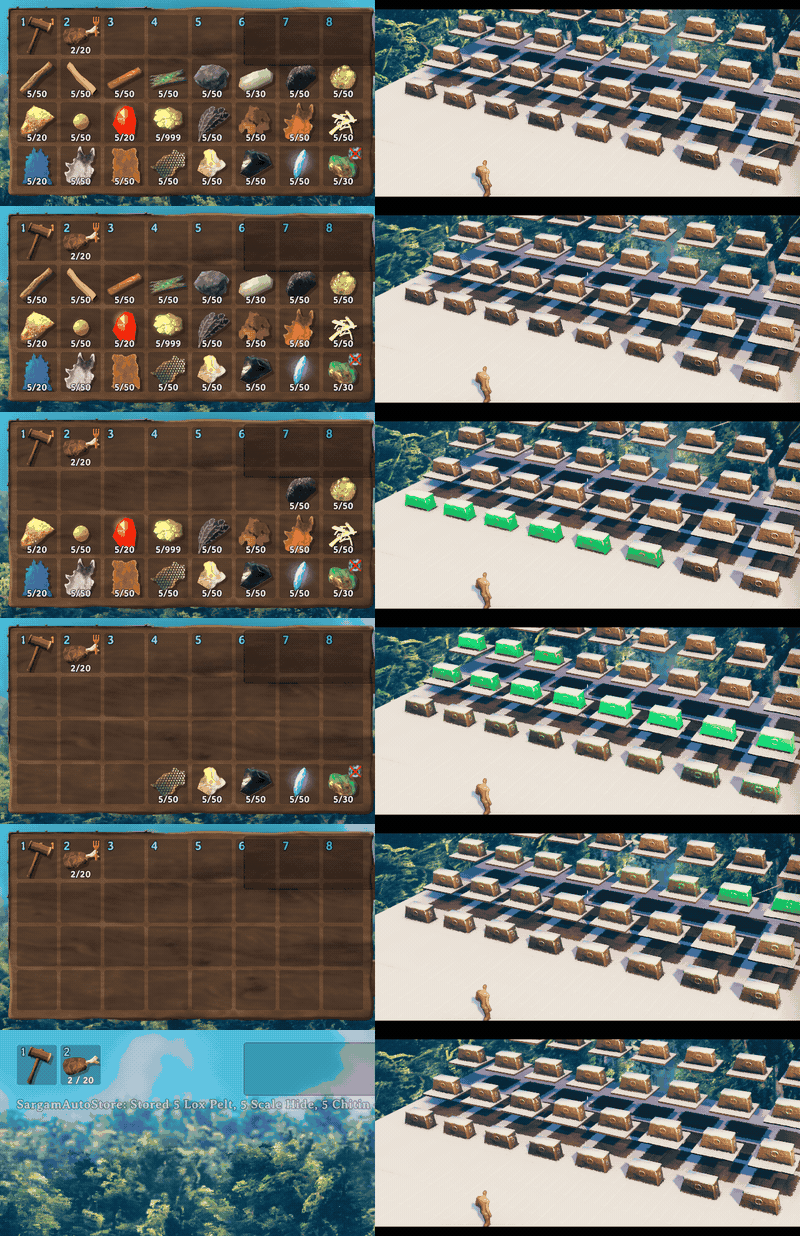
120 units stored across 24 item types. One inventory action sends eligible items to storage while the hammer and food remain protected. Left: inventory. Right: receiving chests, cropped from the same frames.
Real 1.0.0 gameplay in a staged local scene; normal transfer logic and receipt effects. The clips preserve elapsed time at reduced capture cadence; the inventory action is invoked through the same production entry point as F9. Videos and capture details.
Existing contents → matching signs → designated new-item chests.
- Keep your storage organized. Existing contents come first, then matching signs, then chests you designate for new item types.
- Keep essentials with you. Inventory deposits preserve food, potions, equipped items and your hotbar by default. Block any item type from all transfers.
- See it happen. Receiving chests glow; pickup-style messages show what was stored and where it came from.
- Handle busy storage. Automatic collection retries waiting items. F8 requests a ground sweep; F9 deposits eligible inventory items.
New in 1.0: up to 64 simultaneous destination highlights, a larger ground-and-inventory demonstration, and measured local workload results. The version-cache fix from 0.2.9 is included.
Built for busy storage
1,024 ground units sorted in 0.37–0.60 seconds across 32 chests in three local workloads on an Apple M3 Max. Counts and item types were checked against saved chest data after every run, with no additional production errors.
| Local workload | Mod Update mean per frame | Highest observed Update |
|---|---|---|
| Idle with 32 chests | 0.034 ms | 0.164 ms |
| Collecting 1,024 units, three runs | 1.71–1.91 ms | 5.714 ms |
Measured separately from recording, after drop creation and settling. Native drops may merge. These are plugin Update timings, not whole-game FPS; the default 1.5 ms work budget is cooperative. One Mac, local singleplayer, no other gameplay mods. Full results, settings, samples and limits.
Install and try it
Tested locally on macOS with Valheim 1.0.15 and BepInEx 5.4.23.5. Multiplayer and Windows/Linux runtime validation are still pending.
Install SargamAutoStore by Anatta_Labs with your Valheim mod manager, then launch the modded game. BepInEx is installed as a dependency. Restart Valheim after installing or updating.
Disable AzuAutoStore, aedenthorn's AutoStore and other automatic collectors first. SargamAutoStore declares the first two incompatible. Keep a backup of your world and character when changing your mod setup.
For your first transfer:
- Put some Wood in a player-built chest with free space, then close it.
- Stand beside that chest and drop more Wood. With default settings, automatic collection stores it; the receiving chest glows and a message confirms the transfer.
- For an item type with no existing destination, close an accessible chest, look at it within 8 m, and press Left Alt+N. That chest can now receive new types. Press again to remove the designation.
On Mac, Alt is Option. Close chat and menus before using the chest shortcut. If marking fails because another peer owns the chest, open and close it normally, then try again. For help, open normal chat with Enter and type /sas help. No F5 console needed.
Playing online: cooperative ownership requires the same SargamAutoStore version on the server and participating clients. Collection runs near players with the mod; a dedicated server only handles ownership requests. A missing remote component can leave items waiting. There is no global version handshake or automatic configuration sync. Coordinate any change with the server administrator; multiplayer validation remains pending.
Where does my loot go?
Among loaded, accessible chests with room:
- Existing contents. The exact item type is already there. Compatible partial stacks take priority over distance.
- Matching sign. The sign contains part of the item's name, such as
ore,helmorwood. - A designated new-item chest. The nearest eligible chest you marked with Alt+N.
Wood and FineWood are different types for existing-content matching. A wood sign can match both. Sign matching ignores case and accents; Wood, Stone provides alternative labels. By default, a chest uses the nearest valid sign above it within 3 m, so one sign can label a group below it. A nonmatching sign does not override existing contents or an explicit designation.
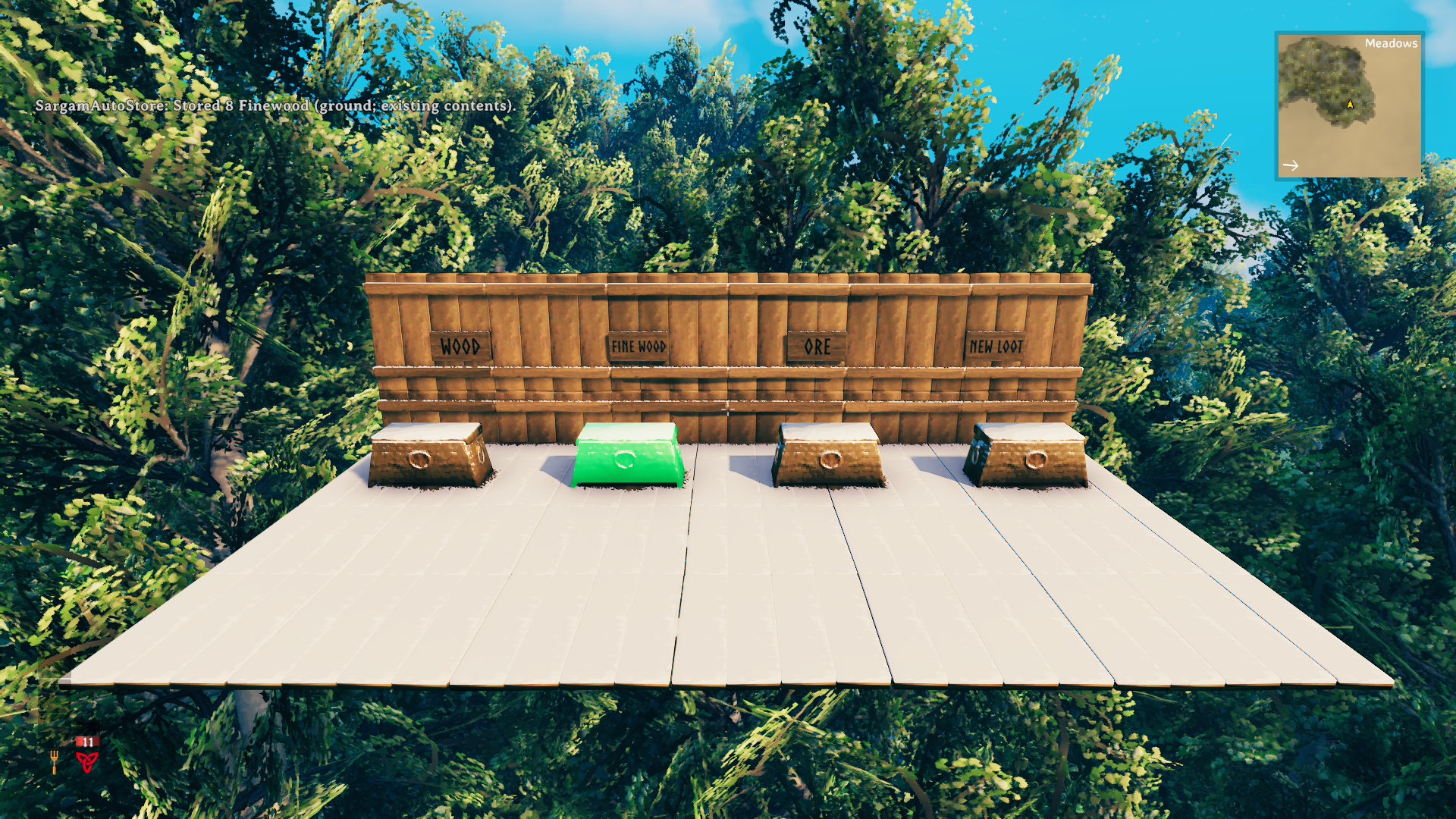
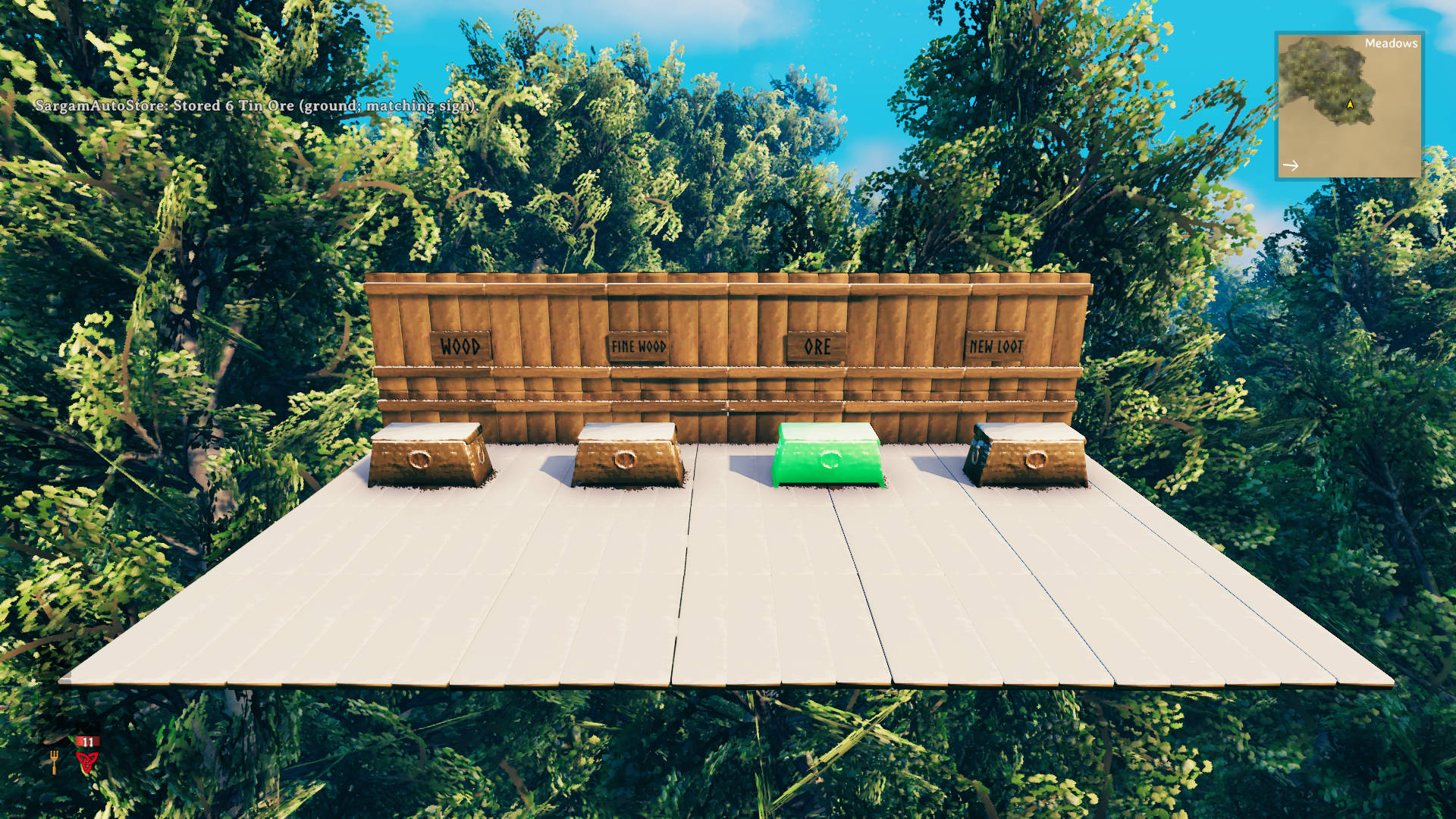
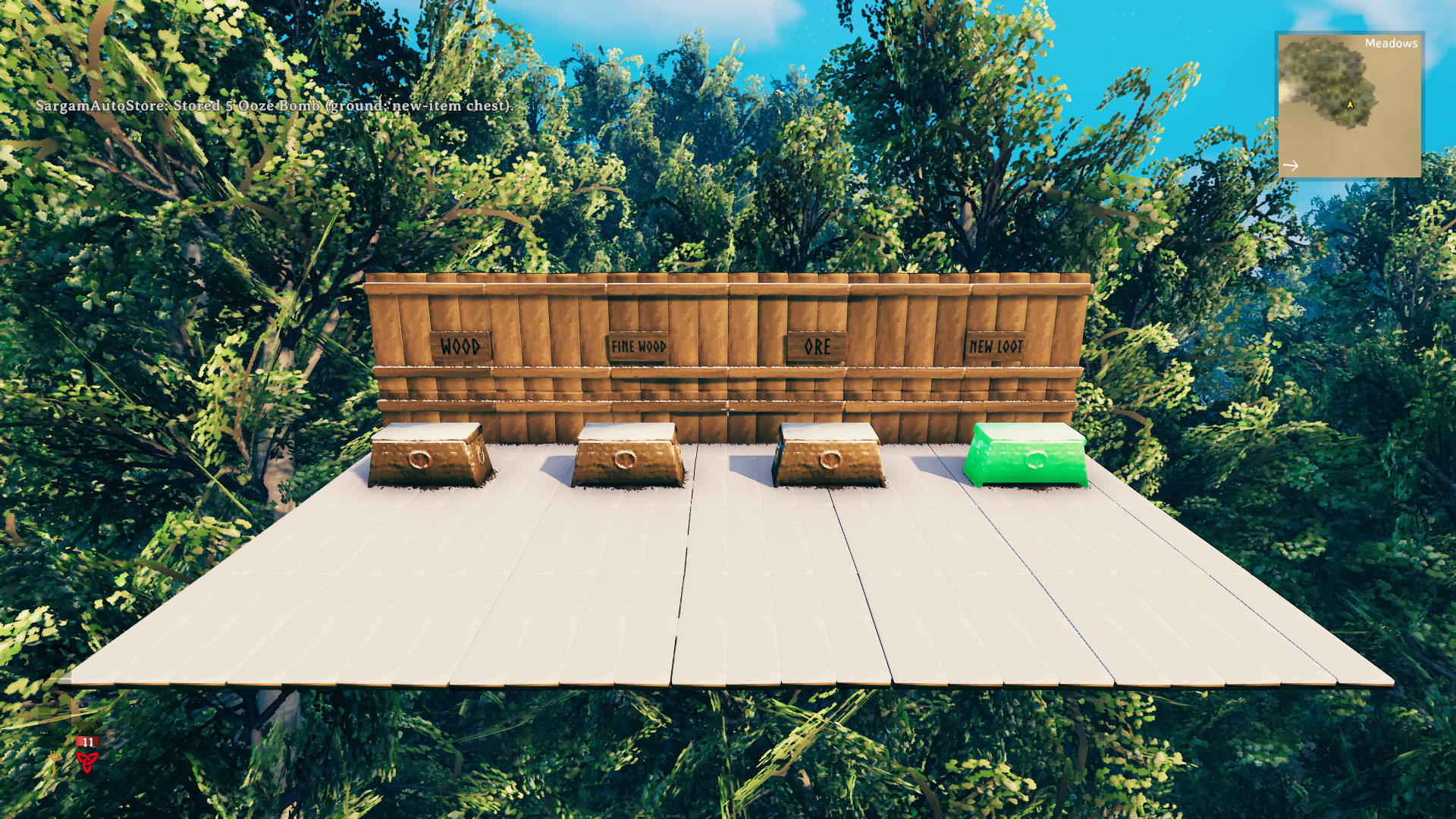
Earlier routing examples (0.2.8): FineWood stacking · Tin Ore following ORE · Ooze Bomb reaching a new-item chest. In this demo, Wood and FineWood used existing contents; the ORE sign handled Tin Ore, and the designated NEW LOOT chest handled Ooze Bomb.
Automatic collection is on by default. New types need a matching sign or a designated chest; arbitrary empty chests are not fallback destinations by default. Settings survive updates. Prefer content-based routing without signs? Use /sas mode content; designated chests still work.
Make your base work for you
Store with SargamAutoStore. Craft with NewtCraftHub.
Looking for more base quality-of-life features? Try NewtCraftHub by Newt / Anatta_Labs for crafting and building from nearby storage, station refilling, and /find chest search. Each feature has its own switch.
Optional recommendation, not a required dependency. Check its current requirements and configure the features you want; this demo measures SargamAutoStore on its own.
Controls
Press Enter to open normal chat. Commands below include /; the F5 console is not required.
| Action | Shortcut or chat command |
|---|---|
| Show all commands | /sas help |
| Force a ground-item sweep | F8 or /sas ground |
| Store inventory with default protections | F9 or /sas inventory |
| Include hotbar items; other protections still apply | /sas inventory all |
| Toggle a chest for new types | Left Alt+N |
| Designate or remove the looked-at chest | /sas newchest add or /sas newchest remove |
| List loaded, accessible designated chests | /sas newchest list |
| Block or unblock every stack of an item type | Ctrl+Alt+click the inventory item |
| Block or unblock by name or exact prefab | /sas block Wood or /sas unblock Wood |
| List item protections | /sas blocked |
| Pause or resume automatic collection | /sas pause or /sas resume |
| Use contents and designated chests, ignoring signs | /sas mode content |
| Restore contents → signs → designated chests | /sas mode hybrid |
| Show diagnostics and latest transfer | /sas status |
| Reload configuration | /sas reload |
F9 keeps the hotbar, equipped items, food, and potions by default. Quest items are always protected. Explicit type blocks apply to ground items, F8, F9, and inventory all. Food and potions deliberately dropped on the ground may be collected unless their type is blocked. Forced collection respects protections, access, range, and routing.
Ranges
Use /sas help range for instructions. Range changes save immediately and briefly display all three guides through walls and terrain.
| Chat command | Meaning and accepted range |
|---|---|
/sas_range items 32 |
Ground items around you: 1–256 m; default 32 m |
/sas_range chests 10 |
Chests around each item source, or you for F9: 1–256 m; default 10 m |
/sas_range signs 3 |
Sign association around a chest: 0.2–8 m; default 3 m |
/sas_range status |
Show saved distances and selected origin |
/sas_range debug on or /sas_range debug off |
Show guides for 90 seconds or hide them |
/sas_range origin item |
Aim at a ground item before opening chat to preview its chest-search radius |
/sas_range origin player |
Preview the player-centered F9 chest-search radius |
Cyan: ground-item range. Yellow: chest range for the selected source. Purple: sign range around the selected chest, or a labeled preview around you until a chest is selected. Guides illustrate distance; they do not grant access or promise available space. Larger ranges search only loaded objects and may increase work in dense areas.
If an item stays on the ground
- Run
/sas status; use/sas resumeif collection is paused. - Check
/sas blockedand whether the destination already contains the exact type. Wood and FineWood are distinct types. - For a new type, add a matching sign or designate a chest with Alt+N.
- Check both item and chest ranges, free capacity, and whether another player has the chest open. Ward/private access restrictions still apply.
- In multiplayer, verify the matching version on all participating peers and the server. Collection waits for authorized ownership; it does not steal control.
Only fixed, player-built chests are destinations. Tombstones, world loot, boats, carts, backpacks, and containers with an external root object are excluded. Decorations, live fish, and items stuck in tar are not collected. If initialization failed, check your mod manager's BepInEx log for incompatible mods or an unsupported game update.
Transfer feedback
The top-left pickup notification area and message history show transfers such as:
SargamAutoStore: Stored 7 Wood (ground; existing contents).
Messages identify the item, quantity, source and route. Rapid transfers are grouped at most once every two seconds, with up to three item names and an overflow total. Errors appear at most once every five seconds; full details stay in BepInEx/LogOutput.log.
Feedback.ShowHudTransfers and Feedback.ShowHudErrors are on by default and can be disabled independently. Feedback.LogTransfers controls detailed file logging separately.
Validation and limits
English is the official language; localized item names and your sign text are supported. Developed with AI assistance. Version 1.0.0 passed 385 local automated tests and 15 API checks against the installed game. Its staged native demo independently checked ground and inventory transfers against saved chest data, with protected inventory examples retained.
Earlier 0.2.5 native tests covered routing, retry, metadata, rollback, FineWood/LeatherScraps/BombOoze and 1,000 dropped items with 200 chests. Its inventory analysis matched the reference for all 1,519 loaded item types in six scenarios each; this was not a transfer test of every prefab. These historical checks are distinct from the current demo. Multiplayer and Windows/Linux runtime trials remain pending.
Work is spread across frames using an item limit and a cooperative time budget. A single game call may exceed that budget. Crashes between saves, disconnects, conflicting mods, and external save corruption are not guaranteed loss-free. Report the game/mod versions and reproduction steps when describing a problem; remove private session details from any shared diagnostic material.
Feedback helps shape the next release
Found a routing problem? Report it here with the game/mod versions, platform and a short reproduction. Include the item and intended chest; remove private server details from diagnostics.
If SargamAutoStore saves you a sorting trip, give it a thumbs-up on Thunderstore or share the package link with your group.