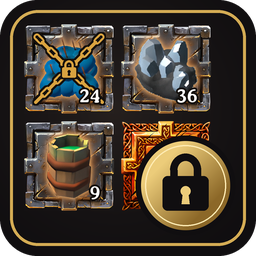
Slot modes for your inventory and every chest: keep an item in its slot, or reserve a slot for one item or a category (wood, ores, rocks, hides, trophies, idols...), or a whole chest. Shared by all players. Animated help with a simulator.
New category: Idols (lime green frame): the Battle and Protection idols found in chests and ruins. A slot, or a whole chest, can now wait for them. Like the other families, it is read from the game itself (what recipes ask for as a refining resource), so idols added by other mods join it too.
Each item still belongs to one family only; the idols come right after the trophies.
Help: the Categories tab now shows the thirteen families in two columns.
Tested and certified compatible with Valheim 1.0.21 (28 October 2026 update): nothing needed changing. Rebuilt against the new version of the game.
2.4.0
Three new categories: Rocks & minerals (slate grey frame: stone, flint and the other rocks you mine or pick up), Hides & leather (tan frame: deer hide, leather scraps and the other hides and pelts that beasts leave behind) and Trophies (turquoise frame). A slot, or a whole chest, can now wait for any of them. They are read from the game too (the rocks its stone pieces are built of, what creatures drop, the trophy item type), so the rocks, hides and trophies of other mods join them.
Each item still belongs to one family only: wood first, then ores, metal bars, rocks, hides, trophies, raw meat, dishes, mead bases, meals and vegetables.
Help: the Categories tab now shows the twelve families as tiles in two columns, with the rule of the chosen family next to its name.
2.3.0
Two new categories for wood, read from what chopped trunks give: Common wood (fir green frame: wood and core wood, which fill a chest in no time) and Rare wood (royal blue frame: every other kind). A slot, or a whole chest, can now wait for either. Seeds, cones and resin are not part of them. The wood of other mods' trees joins the rare kinds, and only the kinds you have already found are shown.
Help: the Categories tab now lists nine families, in tighter rows (same text size).
2.2.0
Help: a new Categories tab, in 35 languages. The seven families with their colours and what goes in each; what a family holds, limited to the items you have already discovered (the list grows as you progress, nothing from later in the game is revealed); how to give a slot or a whole chest to a family, which slots fill first, and what the K menu shows. A long family scrolls inside its own box (mouse wheel or scroll bar): nothing else on the page moves.
No more spoilers: hovering a category in the K menu now names only items you have already discovered, without the total count; an empty category slot only cycles through the items of its family you know (just its frame and chains if you know none yet).
2.1.1
Important fix, please update (items could be lost). When the game loaded a chest, or your bag, items lying in a slot whose rule asks for something else were left out, so they looked gone. The next change to that chest (a sort, an item taken or stored) then saved it without them, and they were lost for good. It happened above all with a chest reserved as a whole for one item or category while it still held other things. Nothing is left out any more: such items stay in their slot, visible, and can be taken out; the rule only keeps new ones out. Items that 2.1.0 hid but that were not saved over yet come back when the chest is opened again.
Dropping an item by hand onto a slot reserved for another item is still refused, and the item stays where it was.
2.1.0
Categories: a slot can wait for a whole family of items instead of one, in mode 1 or mode 2: raw meat & fish, dishes to bake, meals, vegetables, fruits & mushrooms, ores, metal bars, mead bases. The families are read from the game itself (cooking stations, oven, smelters, fermenter, harvests, recipes), so other mods' items join them too. Each family has its own frame colour, and an empty category slot shows its items in turn.
Whole chest: Shift+K on any slot of an open chest (or the « Whole chest » box of the menu) reserves the whole chest for one item or one category. Other items are refused, even by hand; slots with their own rule keep it. The rule is removed from the same menu. New setting WholeChestKey.
Items fill their own slots first (mode 2, then mode 1), then the slots of their category (mode 2, then mode 1), then free slots when allowed.
The menu of known items starts with the categories; its search ignores accents and ligatures (« oeuf » finds « Œuf ») and takes several words in any order.
An item's tooltip says the rule of its slot, in your language.
Fix: K on a chest slot could open the menu for a hidden slot of InventorySlots' larger inventory, lying under the chest. K now acts on the slot really under the mouse.
Fix: with InventorySlots' hotbar switch (key under Esc), slot rules now move with the rows; a lock no longer stays behind on an empty slot that refused everything.
Fix: the « ? Help » button could turn back into « Take all » after a language or keyboard/controller change. It keeps its label, and now sits just above the inventory's top-left corner, where it no longer covers InventorySlots' equipment panel.
OttoStash: its « Slot is favorited and will not be stored » tooltip line no longer shows on chest items; on a set slot of your bag, SlotLock's own line replaces it.
Now also available on Nexus Mods.
2.0.0
Two slot modes, in your inventory and in every chest: mode 1 (kept: the item stays in its slot, extra ones go to free slots) and mode 2 (reserved: only that item, and nothing more by automatic transfers once its mode 2 slots are full).
Chests: slot modes are saved in the world and shared by every player. Install the mod on the server too.
Items fill their mode 2 slots, then their mode 1 slots, then free slots when allowed, for auto pickup, Place stacks, OttoStash's middle click and vacuum, and InventorySlots' quick stack. A chest with a slot reserved for an item accepts it even when it holds none.
Menu of known items: K on an empty free slot, with search; left click for mode 1, right click for mode 2.
New look: cyan and gold frames, numbered locks, the expected item as a ghost in an empty reserved slot, and a new icon.
Your 1.x locked slots become mode 1 slots. Dropping another item into a reserved slot is now refused: use K or the menu to change it.
InventorySlots' chest sort keeps set slots in place too.
Animated help, from the glowing « ? Help » button of the inventory, in 35 languages: the modes, a simulator (a bag, two chests and loot on the ground, run by the mod's real rules without touching your items), six step-by-step situations and the keys. What only exists with OttoStash is marked.
New settings ContainerSlots, HelpButton, Mode1Color, Mode2Color and GhostOpacity (FrameColor is replaced); every setting is described in English and in French.
1.1.1
Tested with Valheim 1.0.20 (15 October 2026 update): nothing needed changing. Rebuilt against the new version of the game.
1.1.0
Messages in 35 languages: your game's own language, English otherwise (they were English or French).
Tested with Valheim 1.0.17.
1.0.1
InventorySlots: its sort button (S) no longer moves locked items nor puts other items in locked slots; it puts each reserved item back into its locked slot. Its quick stack, store all and take all skip locked slots too.
A locked slot only changes its reserved item when you drop another item into it by hand (a sort or another mod moving items no longer changes it).
1.0.0
First release: locked inventory slots (K on the hovered slot), skipped by Place stacks, transfers and OttoStash's store, reserved for their item when empty.
Thunderstore development is made possible with ads. Please consider making an exception to your adblock.