

CDEV PerfectUI
Crafting stations get search, category icons, folding groups, an amount field and recipe pins; a trophy hunt with kills left and map zones; a journal with effects, knowledge and stats; cleaner skills and trophies windows. Client-only.PerfectUI
A crafting window you can find things in. Every crafting station gets a search field, category icons, folding groups, an amount field and pinned recipes on screen; the skills, trophies and achievements windows get a cleaner look; a trophy hunt shows how many kills a trophy is away and where to find it on the map, and the journal becomes tabs with effects, knowledge and statistics. (Русское описание — ниже.)
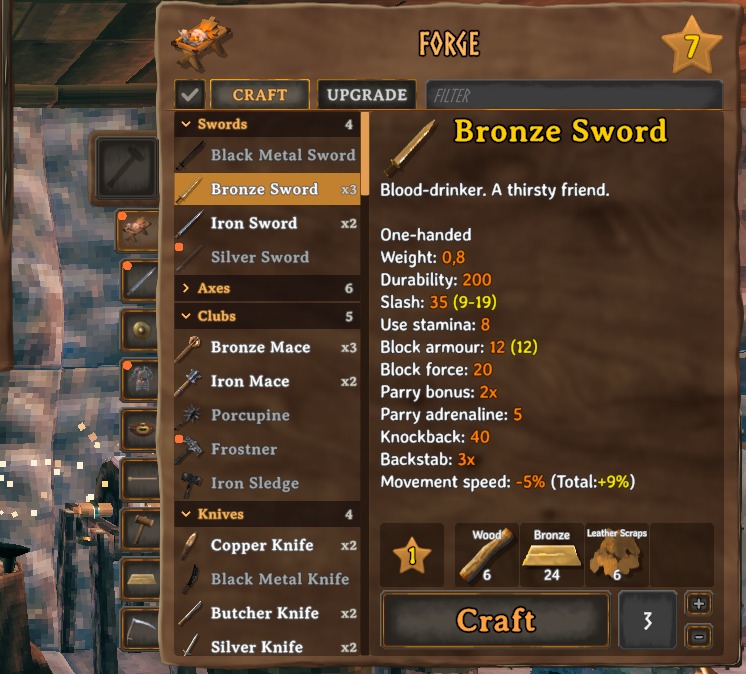
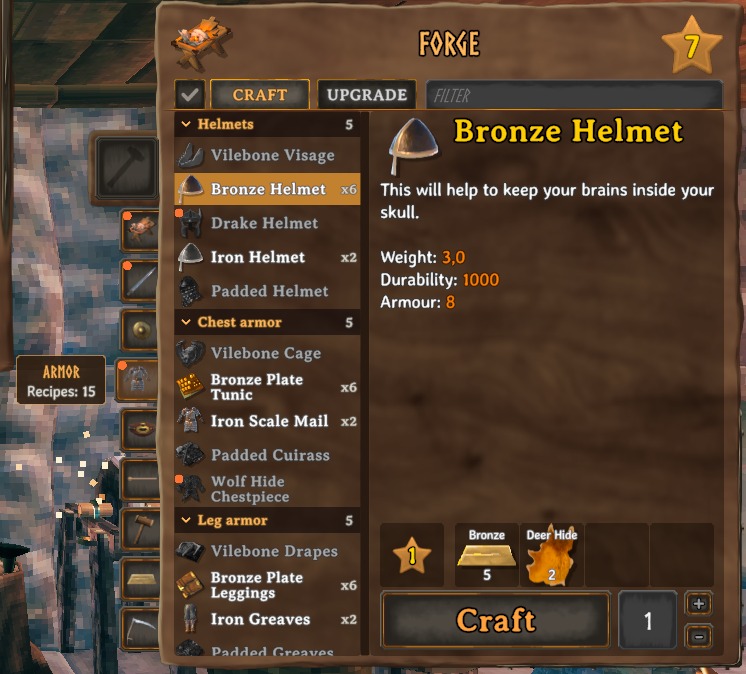
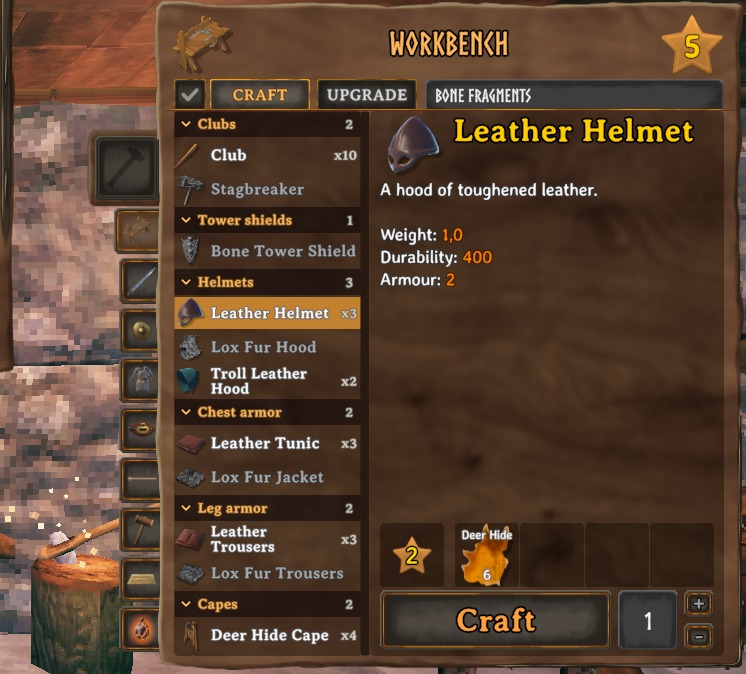
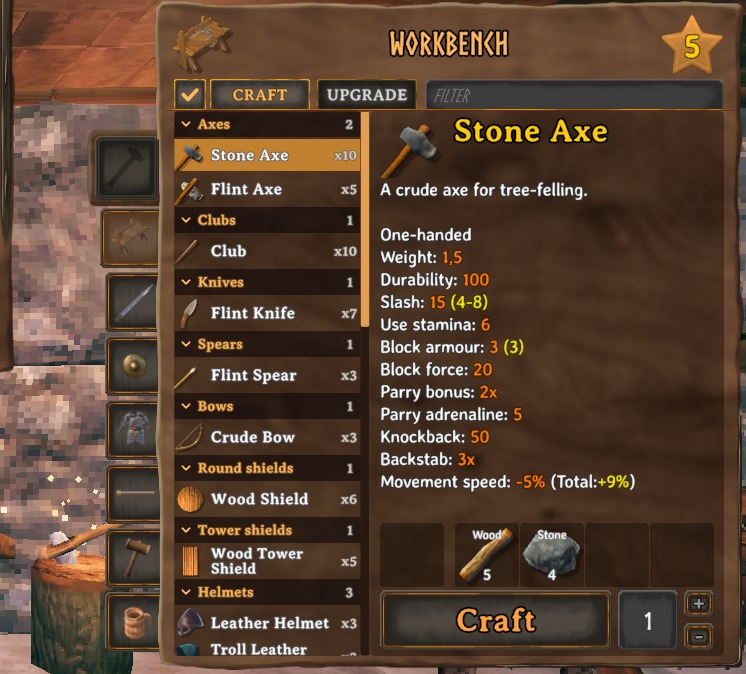
Crafting stations
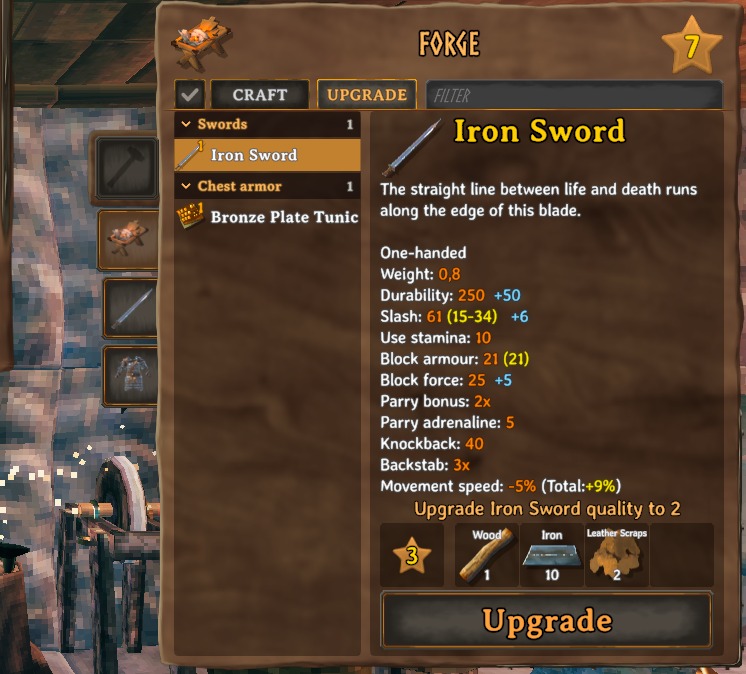
- Search next to the Craft / Upgrade tabs: type part of a name — or of a material, to see everything it goes into. The × at its right end clears it.
- Category icons beside the window: weapons, shields, armor, accessories, ammo, tools, food, meads and potions, materials, other. Only the categories the station has are shown; hover one for its name and how many recipes it holds.
- Groups — swords, axes, bows, helmets, arrows and so on — under headings you can fold; they stay folded next time. Inside a group the recipe you learnt last is at the bottom.
- How many you can make with what you carry, on every recipe (x3).
- Amount field right of the Craft button with + and − beside it. Right-click + for as many as you can make, right-click − for one. Holding Shift still crafts 5, as in the game.
- Only available: the check button before the tabs hides what you cannot make right now.
- New recipes carry a dot until you look at them; so does their category icon.
- The Upgrade tab shows what the next level adds (+50 durability, +6 slash).
- Gamepad: right stick left / right — category, up — search, down — only available; D-pad left / right — amount.
- Only at a station: the inventory opened on its own keeps the game's crafting window.
- Pin a recipe with the pin in the window's top right corner: its materials (have / need) and how many you can make stay on screen under the hotbar, and under the crafting window while the inventory or a chest is open. The newest pin is on top. It goes away by itself once you craft it; right-click it under the crafting window to unpin.
- Auto-repair (off by default,
AutoRepairin[Crafting]): opening a station repairs everything it can, and the repair hammer is hidden. - The group headings and their counts can each be switched off (
ShowGroups,ShowGroupCountsin[Crafting]). - The recipe order — as you learnt them, the game's own, or by name — is
RecipeOrderin[Crafting].
Skills, trophies, achievements
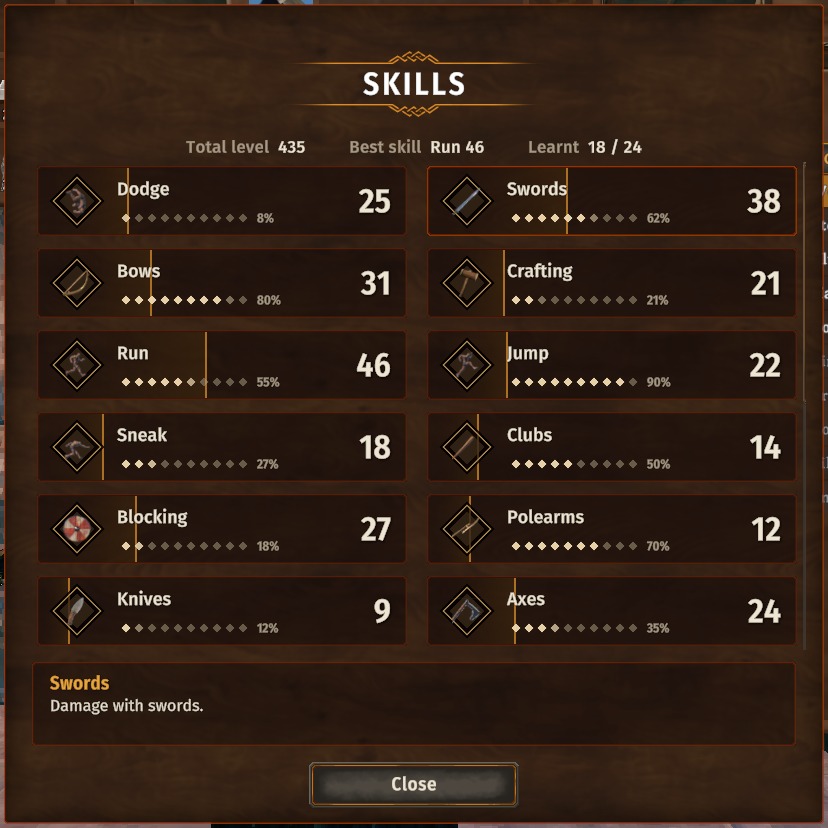
- Skills: cards with the level (gear bonus included) and the progress to the next one, a summary on top; click a skill to read what it does. Drag a card onto another to swap the two.
- Pin a skill ("Pin to screen", or right-click its card): its card sits above the forsaken power and fills as you level up. One skill at a time.
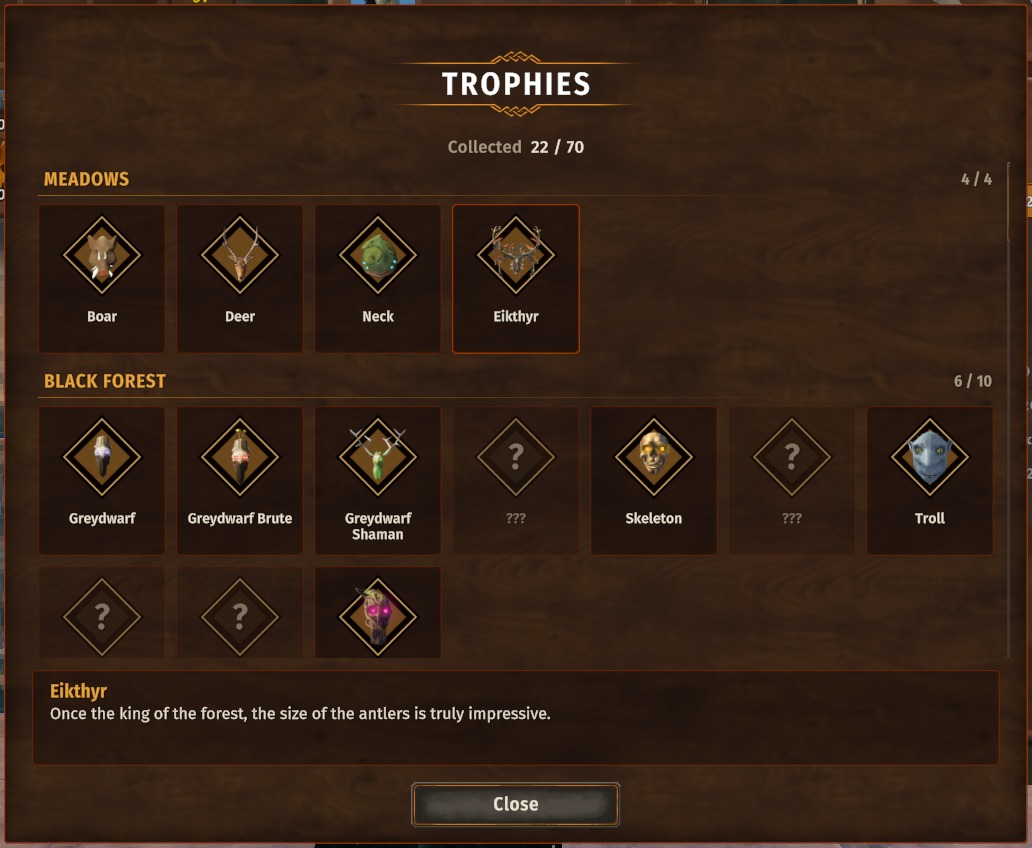
- Trophies: by biome, with how many of each biome you have; click one to read its lore.
- Trophy hunt (the button in the trophies window): every trophy you can hunt in one alphabetical list with a search — its picture, who drops it, and how many more kills it takes to drop (the game's own count) or its chance. Track one: its card with the kills left sits under the stamina bar, and where it drops is tinted on the map, in the area you have explored.
- Journal (the raven): tabs for the active effects (time left, what each does, the forsaken power's cooldown), the message log, what Huginn and the rune stones taught you (with a search), and statistics with pictures — kills, items, buildings, food, causes of death, time in each world.
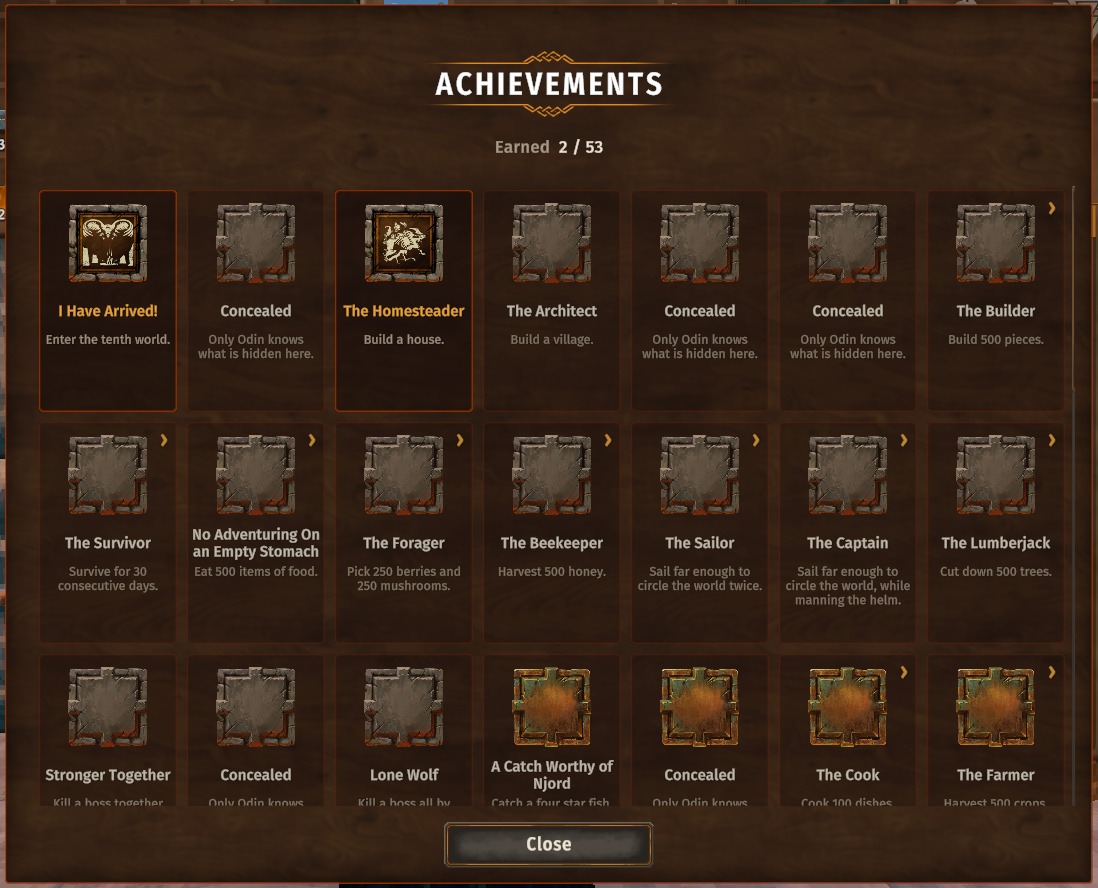
- Achievements: tiles with icon, name and what to do.
- Each window can be switched off in the config (
[Windows]).
Fix
- Switching the keyboard language (Alt+Shift, Win+Space) no longer throws you out of the text field you are typing in — portal and sign names, the F5 console, the chat. A bug of the game itself.
Installation
With a mod manager — install, done.
By hand:
- Install BepInExPack Valheim.
- Put the
CDEV.PerfectUIfolder fromplugins/intoValheim\BepInEx\plugins\.
Uninstalling: delete that folder. Nothing in your world or on your character depends on it.
Multiplayer: client-only. Servers and other players need nothing; players with and without it play together. No Jotunn needed.
The pins follow the hotbar and the forsaken power wherever Zenox BetterUI moves them.
Texts in 35 languages. Licence: MIT; the windows' font is Fira Sans (SIL Open Font License, included). By CDEV —
bug reports with BepInEx\LogOutput.log are welcome.
PerfectUI — по-русски
Окно крафта, в котором легко найти нужное. У каждой станции крафта появляются поиск, иконки категорий, сворачиваемые группы, поле количества и закреплённые рецепты на экране; окна навыков, трофеев и достижений становятся аккуратнее; погоня за трофеем показывает, сколько ещё убить и где искать на карте, а журнал становится вкладками с эффектами, знаниями и статистикой.
Станции крафта
- Поиск рядом с вкладками «Создать» / «Улучшить»: введите часть названия — или материала, чтобы увидеть всё, что из него делается. Крестик справа очищает поле.
- Иконки категорий рядом с окном: оружие, щиты, броня, аксессуары, боеприпасы, инструменты, еда, медовуха и зелья, материалы, прочее. Показаны только категории, которые есть у станции; при наведении — название и число рецептов.
- Группы — мечи, топоры, луки, шлемы, стрелы и так далее — под заголовками, которые сворачиваются и остаются свёрнутыми в следующий раз. Внутри группы последний изученный рецепт — внизу.
- Сколько можно сделать из того, что при себе, — у каждого рецепта (x3).
- Поле количества справа от кнопки «Создать», рядом + и −. ПКМ по + — максимум, ПКМ по − — один. Shift по-прежнему создаёт 5, как в игре.
- Только доступное: кнопка с галочкой перед вкладками прячет то, что сейчас не сделать.
- Новые рецепты отмечены точкой, пока вы их не посмотрите; их категория — тоже.
- Вкладка «Улучшить» показывает, что добавит следующий уровень (+50 прочности, +6 рубящего).
- Геймпад: правый стик влево / вправо — категория, вверх — поиск, вниз — только доступное; крестовина влево / вправо — количество.
- Только у станции: инвентарь, открытый сам по себе, показывает обычное окно крафта игры.
- Закрепите рецепт булавкой в правом верхнем углу окна: его материалы (есть / нужно) и сколько можно сделать видны под панелью быстрого доступа, а при открытом инвентаре или сундуке - под окном крафта. Новый закреп сверху. Скрафтили - он пропадает сам; под окном крафта ПКМ открепляет его.
- Автопочинка (по умолчанию выключена,
AutoRepairв[Crafting]): открытая станция сразу чинит всё, что может, а молоток починки скрыт. - Заголовки групп и цифры на них отключаются отдельно (
ShowGroups,ShowGroupCountsв[Crafting]). - Порядок рецептов — как изучены, как в игре или по имени —
RecipeOrderв[Crafting].
Навыки, трофеи, достижения
- Навыки: карточки с уровнем (с бонусом снаряжения) и прогрессом до следующего, сводка сверху; щелчок по навыку показывает его описание. Перетащите карточку на другую - они поменяются местами.
- Закрепите навык («Закрепить на экране» или ПКМ по карточке): его карточка висит над силой Отрёкшихся и заполняется по мере прокачки. Закрепить можно один навык.
- Трофеи: по биомам, со счётом собранных; щелчок по трофею — его история.
- Погоня за трофеем (кнопка в окне трофеев): все трофеи, за которыми можно охотиться, одним списком по алфавиту с поиском — картинка, кто роняет и сколько ещё убить до выпадения (счёт самой игры) или шанс. Отслеживайте один: его карточка с остатком висит под полоской выносливости, а где он выпадает — подсвечено на карте в открытой области.
- Журнал (ворон): вкладки с активными эффектами (сколько осталось, что дают, перезарядка силы Отрёкшихся), журналом сообщений, знаниями от Хугина и рунных камней (с поиском) и статистикой с картинками — убийства, предметы, постройки, еда, причины смерти, время в каждом мире.
- Достижения: плитки с иконкой, названием и условием.
- Каждое окно можно отключить в конфиге (
[Windows]).
Исправление
- Смена раскладки (Alt+Shift, Win+Space) больше не выкидывает из поля ввода — имя портала или таблички, консоль F5, чат. Это ошибка самой игры.
Установка
Через менеджер модов — установите, и всё.
Вручную:
- Установите BepInExPack Valheim.
- Положите папку
CDEV.PerfectUIизplugins/вValheim\BepInEx\plugins\.
Удаление: удалите эту папку. Ни мир, ни персонаж от неё не зависят.
Мультиплеер: только клиент. Серверу и другим игрокам ничего не нужно; игроки с модом и без него играют вместе. Jotunn не нужен.
Закрепы следуют за панелью быстрого доступа и силой Отрёкшихся, куда бы их ни передвинул Zenox BetterUI.
Тексты на 35 языках. Лицензия: MIT; шрифт окон — Fira Sans (SIL Open Font License, приложена). Автор CDEV — об
ошибках пишите с файлом BepInEx\LogOutput.log.