

SplitScrollMod
Scroll your mouse wheel to adjust the amount when splitting item stacks.# Split Scroll Mod
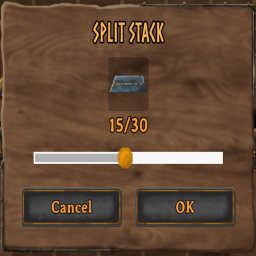
Scroll your mouse wheel to adjust the amount when splitting item stacks — no more clicking and dragging the slider one item at a time.
## Features
- Scroll up/down with the split-stack slider open to increase/decrease the amount by 1 per notch
- Works anywhere the vanilla split dialog appears
- Lightweight — no impact on performance or other systems
## Installation
1. Install [BepInExPack Valheim](https://thunderstore.io/c/valheim/p/denikson/BepInExPack_Valheim/) if you haven't already (handled automatically if installing via a mod manager)
2. Install this mod through r2modman, Thunderstore Mod Manager or manually drop the DLL into BepInEx/plugins/
## Usage
1. Open your inventory
2. Split a stack as normal (Shift+click)
3. With the split dialog open, scroll your mouse wheel to adjust the amount
## Compatibility
- Client-side only — does not affect server state or require other players to have it installed
- Should be compatible with other inventory/UI mods, since it only modifies the local split dialog's slider value
## Source
using BepInEx;
using UnityEngine;
namespace SplitScrollMod
{
  \[BepInPlugin("com.celticslayer.splitscroll", "Split Scroll Mod", "1.0.0")]
  public class Plugin : BaseUnityPlugin
  {
  private void Update()
  {
  if (InventoryGui.instance == null) return;
  var splitDialog = InventoryGui.instance.m\_splitDialog;
  if (splitDialog == null || !splitDialog.IsActive) return;
  float scroll = Input.GetAxis("Mouse ScrollWheel");
  if (scroll > 0f)
  splitDialog.SliderValue += 1f;
  else if (scroll < 0f)
  splitDialog.SliderValue -= 1f;
  }
  }
}
## Changelog
### 1.0.0
- Initial release


