
BuildMenu
The hammer's build menu rebuilt: category tree by use and type, names under icons, search, material filter, tooltip with a turning 3D model. Other mods' hammers in one menu.BuildMenu - a build menu with categories, search and 3D preview
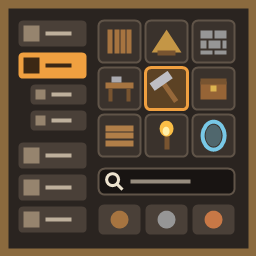
The hammer's build menu, rebuilt: a category tree on the left (Crafting, Building by type, Interior, Travel, Storage), a grid with names under every icon, a search and material filter on top and a tooltip with a turning 3D model of the piece right at your cursor.
Client-side BepInEx mod for Valheim 1.0.20 (the game's new build menu). Works on its own, no dependencies besides BepInEx.
Features
-
Category tree instead of the game's tabs:
- Crafting - workbenches and stations, station upgrades, smelters and production, kitchen;
- Building by type - floors, walls, roofs, stairs and ramps, beams and poles, doors and gates, windows, arches, fences, defense, other (the material is the top bar's filter);
- Interior - furniture, lighting, decoration;
- Travel - carts, ships and portals;
- Storage - everything with an inventory.
Groups fold open like an accordion (the game's own + / - buttons); a click on a group shows all its subcategories in one list, a click on a subcategory shows only it. Every row shows how many pieces it holds.
-
Sorted automatically from what each piece is (the game's tags, its components, its name, its shape), so pieces of other mods (Jotunn and similar) land in the right place too. Disagree? One line in a text file moves a piece (see Settings).
-
Grid with captions - the piece's name under its icon, a small subcategory badge in the corner, 4 cell sizes.
-
Tooltip at the cursor - a live, slowly turning 3D model lit by its own studio light (clear, not dark, not wet-looking), the resources, the comfort it gives with its group (only the best piece of a group counts near you) and the description. The game's bottom info panel and the placing key hints are hidden while the menu is open.
-
3D in the grid (optional, off by default) - snapshots of the models instead of icons. The game's icon shows until a snapshot is ready; snapshots are made within ~2 ms a frame and only for cells you can see; up to 512 are kept (about 32 MB), so scrolling back and reopening is instant.
-
Top bar:
- search (by name) and the repair hammer;
- Material filter - one click on wood, stone or metal; the ▼ opens a row with every main material (copper, bronze, iron, marble, black metal…) - the main material is the one the piece needs most of;
- Grid size, ticks for Captions, Category icon, 3D in grid;
- Recent and Favorites - the game's own lists, the material filter works there too.
-
Other mods' hammers in one menu (optional): OdinArchitect's Odin Hammer, BuildIt's hammer, Clutter's tool and the like. Each tool found gets its own switch in the config (off by default). When on, its pieces (the very same pieces, not copies - same station, cost and effects) are added to the hammer, sorted into the tree and also listed under "Other tools"; the tooltip names the mod they come from. The tool itself keeps working.
-
BuildExtend (mass building, by Chistix): its "?" help and x1 / xN / xF hammer mode buttons sit at the right end of the top bar.
-
Your own category icons: put
icons/<key>.pngnext to BuildMenu.dll; until then the menu uses the game's icon of a typical piece (the workbench for Crafting, a wall for Building…). -
English and Russian, following the game's language.
Installation
- Install BepInExPack for Valheim.
- Put
BuildMenu.dllintoValheim/BepInEx/plugins/(a mod manager does it for you). - Launch the game and open the hammer's build menu.
To go back to the game's menu: set Enabled = false in BepInEx/config/chistix.buildmenu.cfg and restart.
Compatibility
- Client only - only the player who builds needs it; the server and other players don't. No network messages of its own.
- Valheim 1.0.20 (the new build menu), BepInEx 5.4.23+.
- Pieces of other mods (Jotunn, ItemManager/PieceManager mods) are read and sorted like the game's own.
- Other hammers (OdinArchitect, BuildIt, Clutter…) - optional merge, see Features. Terrain tools such as MyDirtyHoe can be merged too, but are not meant for it.
- Auga - with Chistix Compat (optional) the window and the tooltip take Auga's look. Without it the menu keeps its own look.
- Other build menu mods (LegacyBuildMenu, build menu overhauls) - use one build menu at a time.
- BuildExtend 0.6.0+ - buttons on the top bar (see Features).
- Q / E no longer switch the game's tabs while the menu is open (the tabs are replaced by the tree).
Settings
BepInEx/config/chistix.buildmenu.cfg (most of them are also on the top bar of the menu):
[General] Enabled(true) - the new menu; false - the game's menu (after a restart)[General] WindowSize(1) - 0 smaller, 1 medium, 2 large (after a restart)[Grid] CellSize(2) - cell size 0-6 (the top bar's 4 buttons: 0, 2, 4, 6)[Grid] Captions(true),[Grid] CategoryIcon(true),[Grid] Models3D(false)[Tooltip] Preview3D(true) - the turning 3D model in the tooltip;[Tooltip] ShowPrefab(false) - shows the piece's prefab name, for the categories file[Grid] GroundModels3D(false),[Tooltip] GroundPreview3D(false) - the same for ground tools (hoe, cultivator and the like): the game's icons by default; the "3D in grid" tick follows the tool in hand[Merge tools] <tool>(false) - one line per other mod's hammer found in the game[Advanced] DebugLog(false)
Your own categories: BepInEx/config/chistix.buildmenu.categories.txt (made on the first start, with the list of keys). A line prefab = subcategory[, subcategory…] moves a piece; * works (piece_banner* = decor); Group/Name makes a new subcategory (piece_mymod_* = Misc/My mod). The file is re-read when it changes.
Troubleshooting: BepInEx/LogOutput.log, look for "BuildMenu".
Credits
- Made by Chistix: idea, design, direction and testing. Code written with Claude Code (Anthropic) as an AI coding assistant, under Chistix's direction.
- Uses BepInEx and Harmony. The 3D previews are the game's own models drawn at runtime; no game files are included. The icon is drawn by code; no generated art or audio.
- Valheim is © Iron Gate AB; this is an unofficial mod.
All rights reserved. You may use the mod, show it in videos and streams and list it as a dependency; re-uploading or changed versions need the author's permission.
Links


