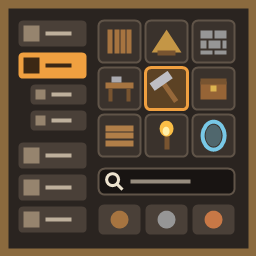
The hammer's build menu rebuilt: category tree by use and type, names under icons, search, material filter, tooltip with a turning 3D model. Other mods' hammers in one menu.
Opening the window no longer holds the game: the captions, badges and 3D stills of the cells are filled in after the layout, the cells in view first and the rest a little each frame (the game sets up every cell of "Show all" at once, and a text under each of hundreds of cells took a second or two). The log gets one line with the opening's time when it took long.
0.3.12
The 3D preview's studio lights lit the whole world: the game renders deferred, where a light's culling mask is not honoured, so the two directional lights of the preview stayed on and brightened nights, made the sky flicker and kept doing so until a restart even with the 3D turned off. They are on only for the picture's own frame now.
0.3.11
Lighter on frames: the grid of pieces clips the cells out of view instead of drawing all of them under a stencil mask, and has a canvas of its own; the tooltip's 3D model is drawn 24 times a second at 320 px with lighter multisampling.
0.3.10 - first public release
The top bar follows the game's language when it is changed during the game (it kept the language it was made in).
The window keeps clear of the map in the top right corner (PlanetMap3D's round one too): moved left, narrowed if there is no room.
0.3.9
Ground tools (hoe, cultivator and the like) show the game's icons by default, in the grid and in the tooltip: their own settings GroundModels3D and GroundPreview3D (off), and the "3D in grid" tick follows the tool in hand. The hammer and other tools as before.
0.3.8
No more "The Object you want to instantiate is null" errors in the log when hovering the material buttons and BuildExtend's mode button: their tooltips use the game's tooltip.
0.3.7
The menu is drawn over the rest of the HUD: status effects and the minimap no longer show through the window.
0.3.6
Beams and roof crosses whose prefab names say "wall" (Log Beam 2 m, Ashwood Beam 26°, Wood Roof Cross…) are sorted into Beams and poles, not Walls.
Long names in the category tree ("Workbenches and stations") get a smaller font instead of being cut off.
A piece the game has no name for (Darkwood Beam 67°) shows a name instead of "[piece_darkwoodbeam67]".
0.3.5
The tooltip shows comfort for pieces that give it: the points and the comfort group ("Comfort +2 (seats: only the best of the group counts)"), for other mods' pieces too.
0.3.4
Settings in the config file are described in English and Russian.
Building is sorted by type: floors, walls, roofs, stairs and ramps, beams and poles, doors and gates, windows, arches, fences, defense, other (the material is the top bar's filter). Other mods' pieces are sorted by the game's tags, their names (English and Russian) and their shape.
The top bar's right end keeps clear of round minimaps of other mods too.
While the menu is open the key hints for placing (alternative placing, snap points, copy, rotate) are hidden, so the hint row fits the screen.
0.3.3
3D in the grid without frame drops: the game's icon shows until a snapshot is ready, snapshots are made within ~2 ms a frame and only for cells in view, up to 512 are kept (about 32 MB) for instant scrolling back and reopening.
0.3.2
The collapsed material filter shows the icons of wood, stone and metal from the first opening.
The right end of the top bar keeps clear of the minimap.
0.3.1
The top bar always fits the window: Recent, Favorites and BuildExtend's buttons are held to the right edge, the rest shrinks as a whole if needed.
0.3.0
Other mods' hammers in one menu (OdinArchitect, BuildIt, Clutter…): a switch per tool found, off by default; their pieces are sorted into the tree and listed under "Other tools".
0.2.2
BuildExtend's "?" help and x1 / xN / xF mode buttons on the top bar.
0.2.1
Faster: the tooltip has its own canvas, its 3D model is drawn 30 times a second, the grid is scanned a few times a second.
0.2.0
Top bar instead of the game's tabs: search, material filter (wood / stone / metal, ▼ for every main material), grid size, Captions / Category icon / 3D in grid, Recent and Favorites.
Optional restyling by a compatibility pack (Chistix Compat with Auga).
0.1.0
Category tree (Crafting, Building by material, Interior, Travel, Storage) with accordion groups and counts; grid with captions and subcategory badges; tooltip at the cursor with a turning 3D model in its own studio light; the game's bottom info panel hidden while the menu is open; your own categories file and icons.
Thunderstore development is made possible with ads. Please consider making an exception to your adblock.