


Hearthwoven Stats Book
All-in-one stats in an in-game book: every deed from cooking to mining, damage and DPS by weapon, type and foe, what hurt you and what your armor stopped. For you and your whole group, to show each player's own playstyle.
Hearthwoven Stats Book
One book for everything you did. Press H and it opens on what you did: the trees you felled, the dishes you cooked, the damage you dealt by weapon, type and foe, and what hurt you. Choose a friend's name and see their stats. Choose Everyone and see the whole group: the builder, the cook, the one who is always first into a fight. Everyone plays their own part, and the book shows each part.
New name. Hearthwoven Stats Book is the new name of Hearthwoven. If you have the old Hearthwoven package, remove it in your mod manager and install this one. Keep only one of them enabled. Your settings and your saved book stay. The mod itself is still called Hearthwoven in the game and in the text below. (What to do, step by step)
- Deeds and Skills: cooking, meals, building, crafting, woodcutting, mining, farming, fishing and taming, and where your practice went.
- Battle: damage by weapon, type and foe, with damage per second (DPS) for each weapon, and how much got through the foe's armor; Defense, with what hurt you and what your armor stopped; a feed of your fights, yours and your friends', up to 30 days back; the fight of the whole group, foe by foe; boss fights and dungeon runs.
- Company: who cooked for whom, whose gear went to good use, each player's share in any time period, and what your friends did while you were away.
- Feats: moments worth telling, earned alone or together, like steering a ship 2 km home with a heavy load of ore.
- Voyages: distance sailed and on foot, who sailed with you, and the cargo you carried.
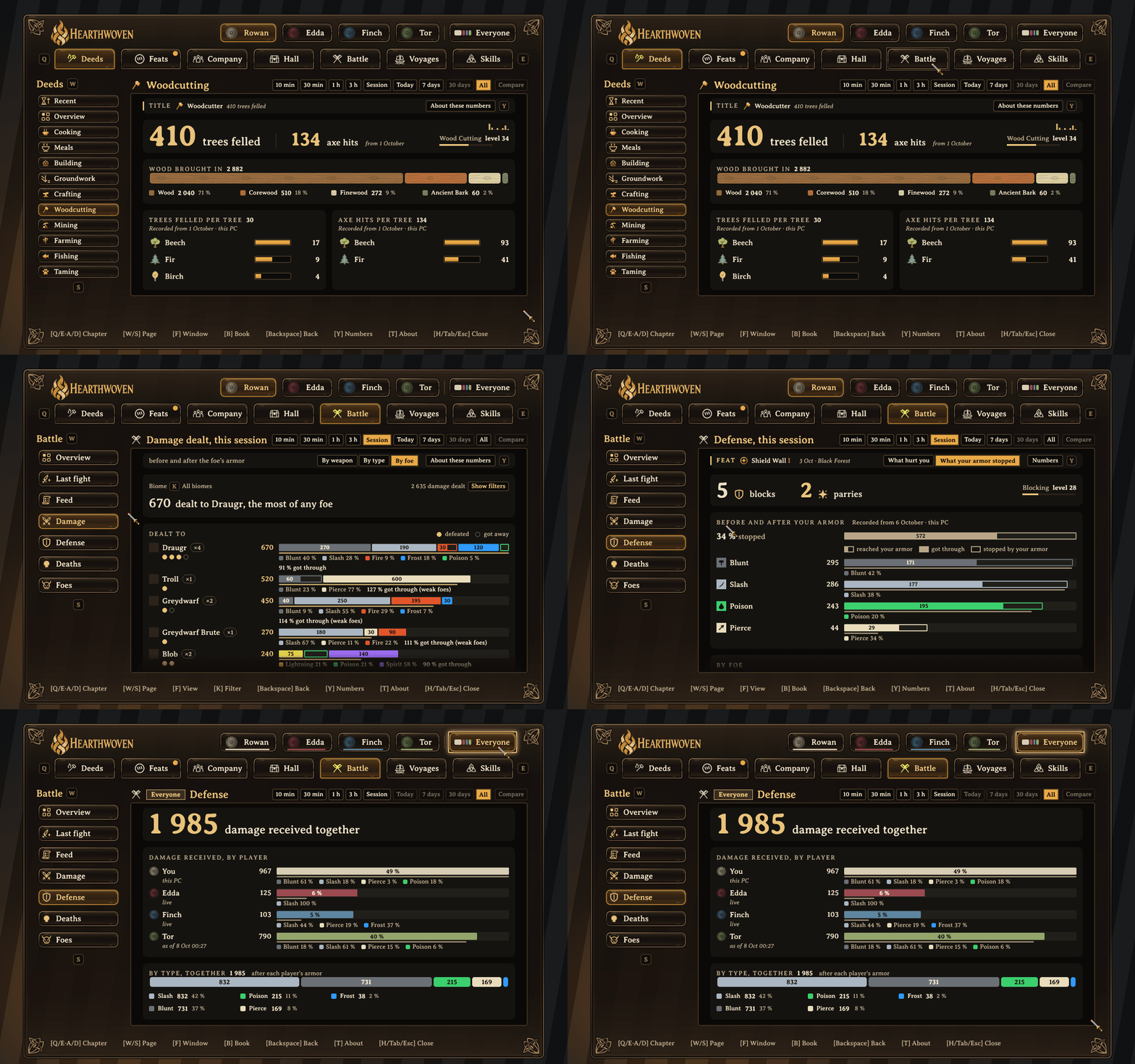
A tour of the book: your woodcutting, your damage to each foe, what your armor stopped, and the damage the group received. Sample data: Rowan, Edda, Finch and Tor are fictional players. Select any image to open it at full size.
Why · How it works · What is in the book · Installation · Reference
Why
In a group, everyone finds their own part. One player mines iron. Another sails it home. Someone else cooks for the next trip, and someone keeps the smelters fed. Valheim shows none of this. Once the trip is over, the quiet work is gone, and only the boss kills are remembered.
Hearthwoven keeps the record, so every way of playing is seen. There is no ranking and no winner: just who did what, and who it helped.
How it works
- It counts as you play. Trees felled, ore carried home, dishes cooked, pieces built, damage dealt, distance sailed. Valheim's own counters for your character are shown too, so the book also covers your play from before you installed it.
- It shares through the server. On a server with Hearthwoven, players who have it can open each other's books. Players without it can still join and play.
- It only reads. Hearthwoven does not change the world or other mods. Items and pieces from other mods appear with their own names and icons.
In single player, the book shows your own deeds.
What is in the book
Battle, foe by foe
Every fight since you installed Hearthwoven, counted: the damage you dealt by weapon, damage type and foe, in each biome. By foe shows how many foes of each kind you fought and which ones you defeated. Each bar also shows how much got through the foe's armor and resistances: the filled piece got through, and the outlined piece is what the armor stopped. The Foes page shows what each foe takes more, less or no damage from, and which arrows, bolts and weapons hit it hardest, with whether you have them, so you know what to bring next time. Choose a time period, from the last 10 minutes to All, to look at one fight or a whole trip. (Battle > Damage)
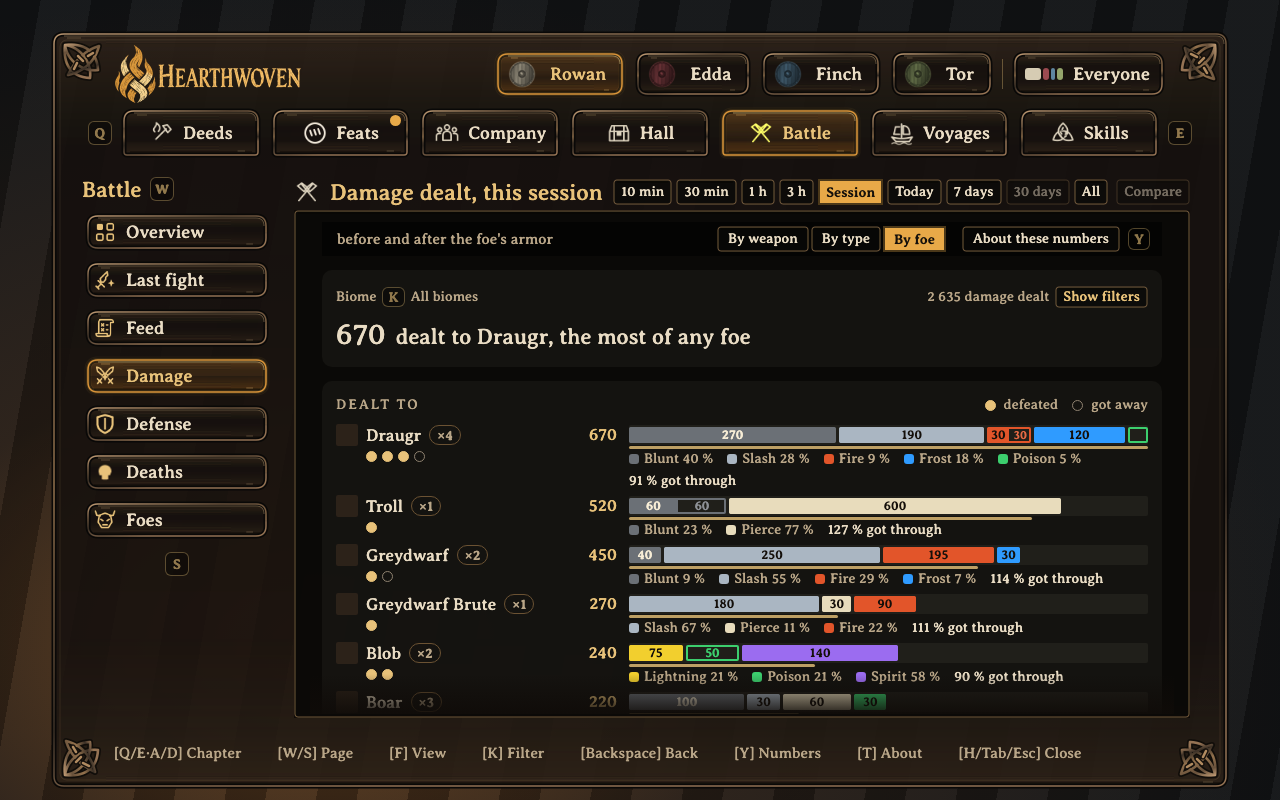
By foe: how many of each kind you fought, which ones you defeated, and your damage by type, with the share that got through the foe's armor.
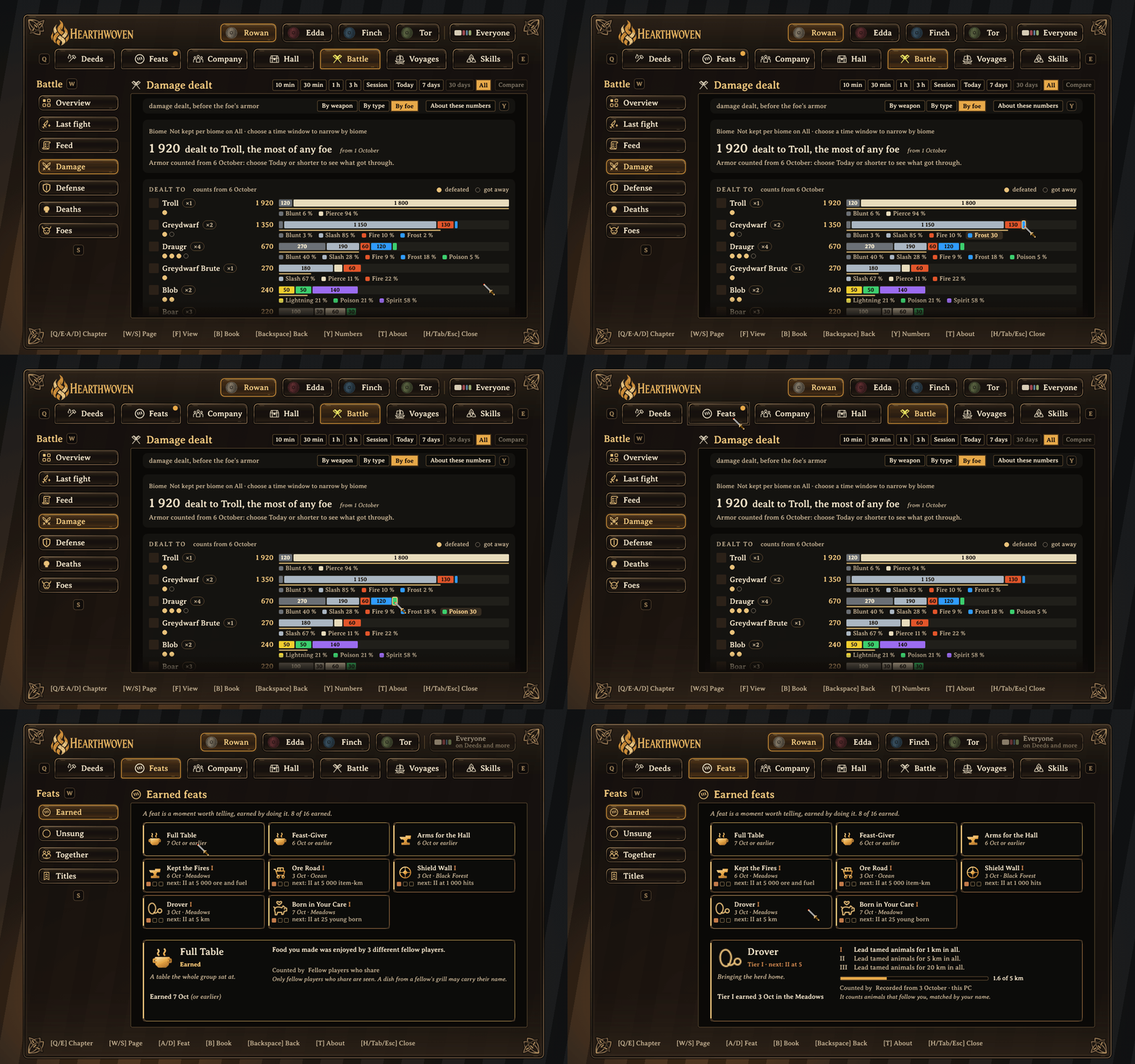
Point at any part of a damage bar to see its damage type and number. Click a feat card to see its tiers and your progress.
Damage per second, weapon by weapon
Under Melee, Bow and Magic, By weapon lists every weapon you swung, with its damage per second (DPS): your damage divided by the seconds you fought, not by the seconds on the clock. A pause of more than 4 seconds between your hits does not count. A weapon you used at more than one upgrade level is one line that opens: press it to see each upgrade level, and each skill level, with its DPS and a small arrow for how much it went up or down. The weapon lines add up to the row, with a last line, Not by weapon, for hits from before weapons were counted. A friend's weapons show on their book the same way. DPS never shows in a ranking of players: not on Everyone, and not in Compare. (Battle > Damage > By weapon)
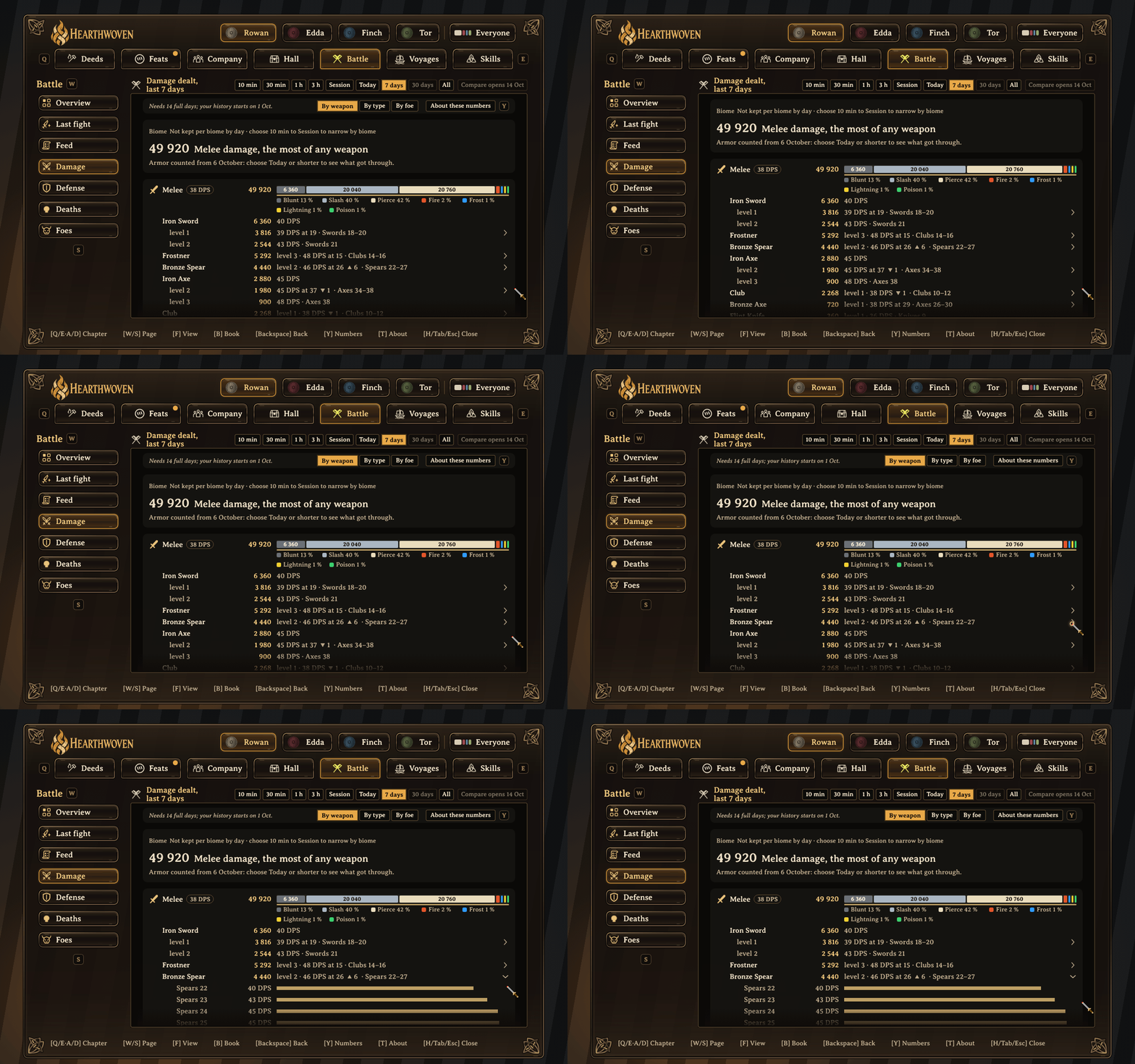
Battle, Damage, By weapon. The weapon lines add up, together with a "Not by weapon" line, to the melee total. Open a weapon line to see its rows per skill level, each with its DPS (damage per second) and how much it went up (▲).
Who helped whom
Who enjoyed whose cooking, and who put whose gear to good use. Each thread runs from the player who gave to the player who received. A feast one player made and another set out credits both, marked as teamwork. (Company > Fireside)
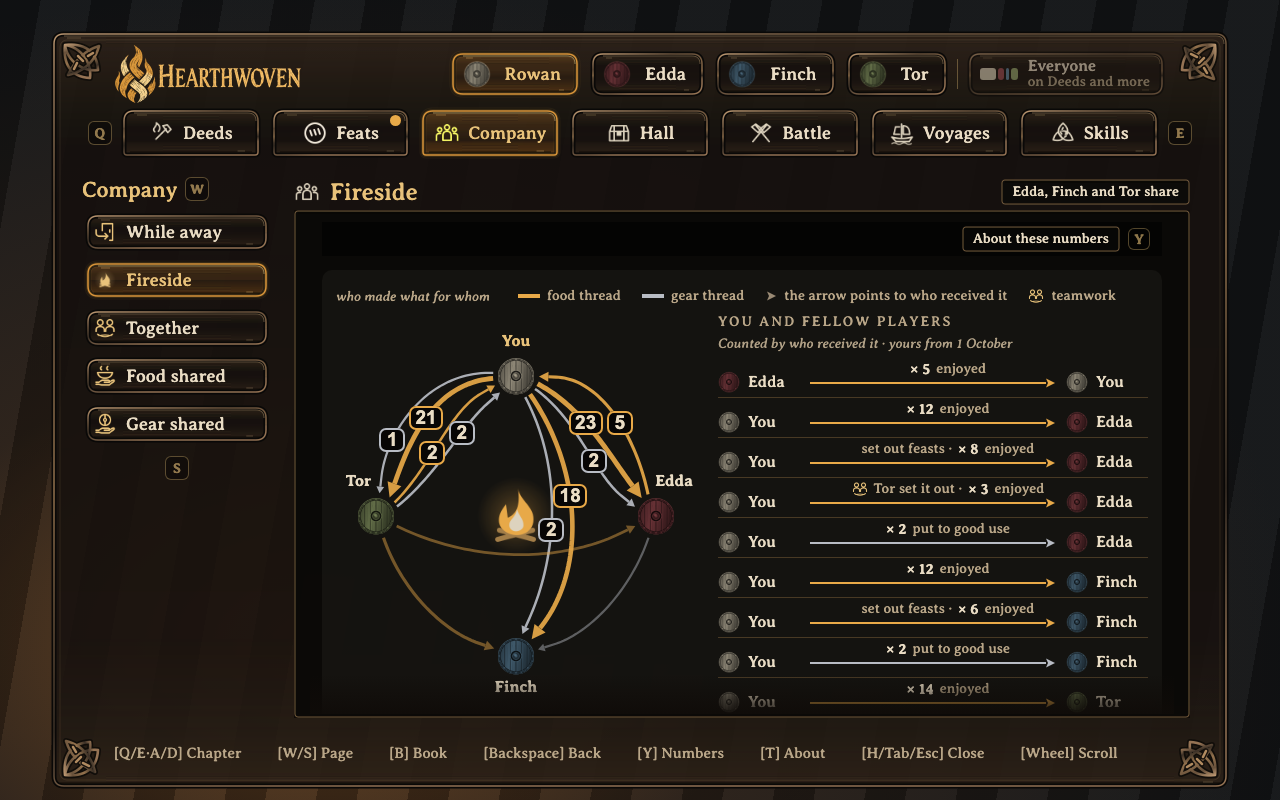
Fireside: who cooked for whom, and whose gear went to good use.
What hurt you
Defense uses the same rows as the damage you dealt: what hurt you after your armor, by foe and by damage type, and the blows you blocked or parried. Switch to What your armor stopped to see, in the same rows, what reached your armor per damage type and per foe: the filled part got through and the outlined part is what your armor stopped. The line under each bar gives the share it stopped. Deaths keeps up to the last 30 seconds before each death. (Battle > Defense)
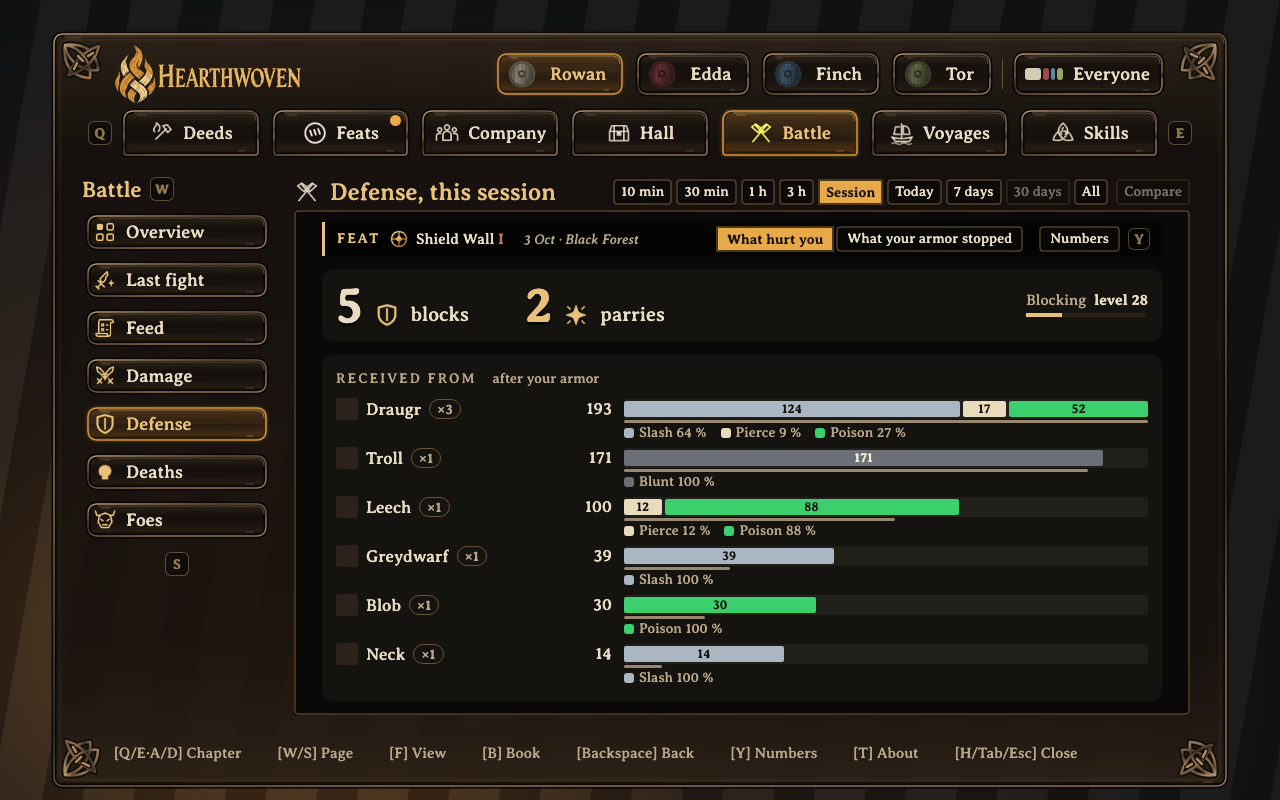
Defense: what hurt you after your armor, in the same rows as the damage you dealt.
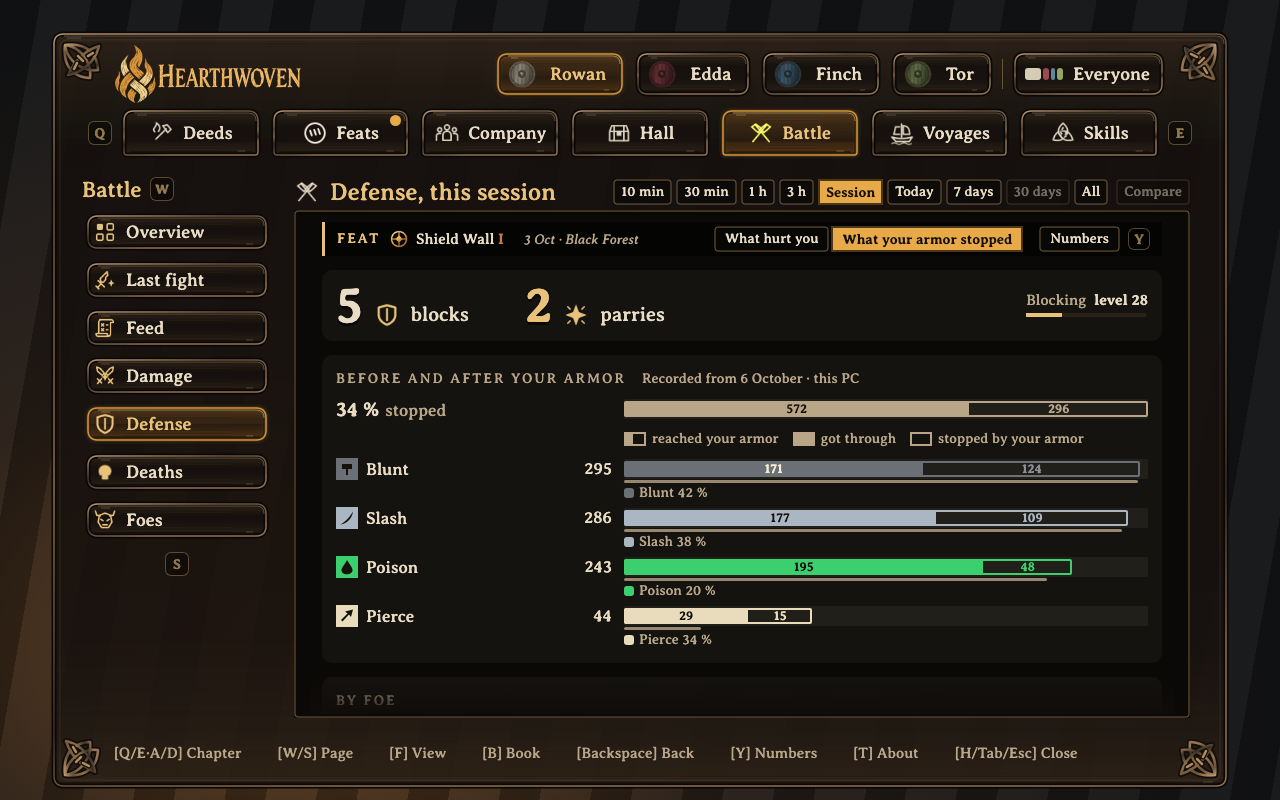
What your armor stopped, per damage type.
Each player's share
The group side by side: wood and ore brought in, pieces built, dishes cooked, damage dealt, distance sailed and cargo carried, in any time period from the last 10 minutes to All. (Company > Together)
The same works on almost every page: the Everyone chip at the end of the player row turns the page you are on into the group's page, with the group's total first and then a bar for each player with their share. Each player's numbers are as they last shared them, and each row says how fresh they are. A friend's Deeds, Sailing and Cargo pages open Today, 7 days and 30 days from the days they share, and the last 10 minutes to 3 hours while they play.
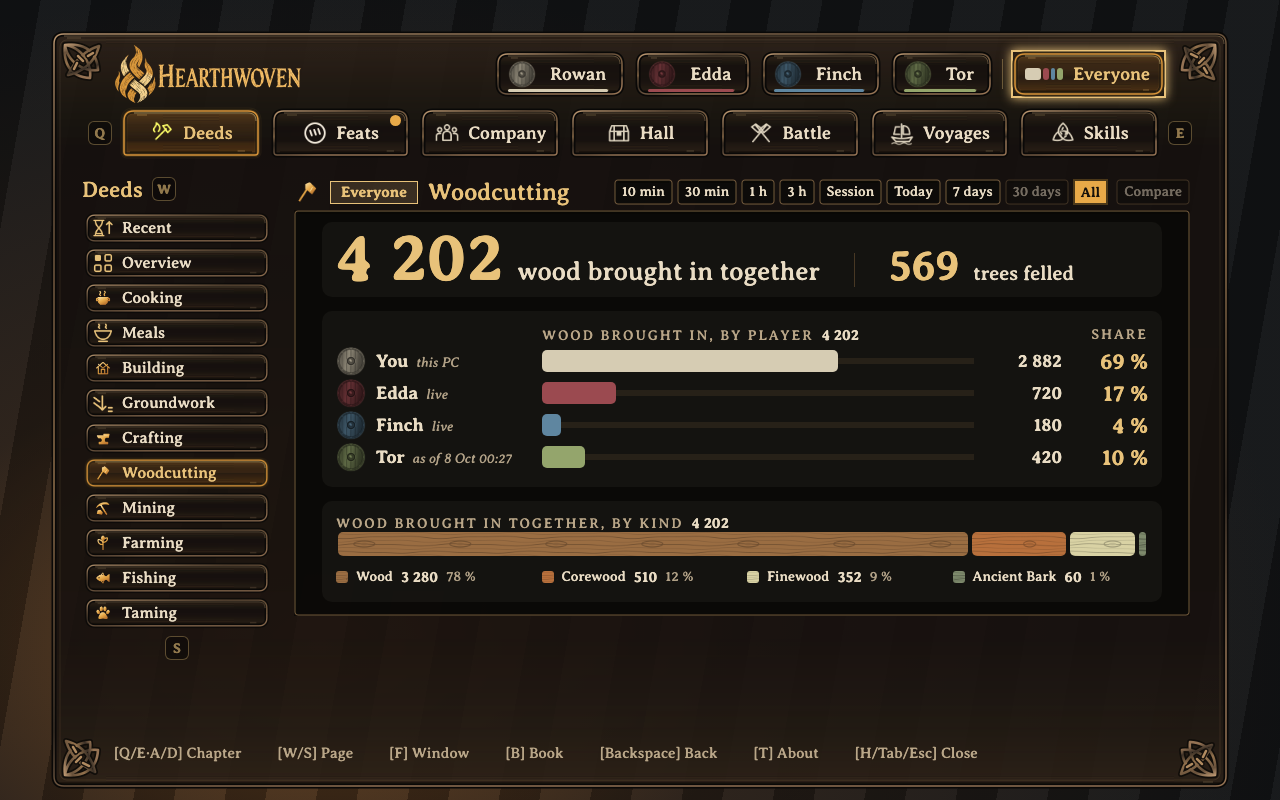
Everyone on Woodcutting: the wood the group brought in, and each player's share.
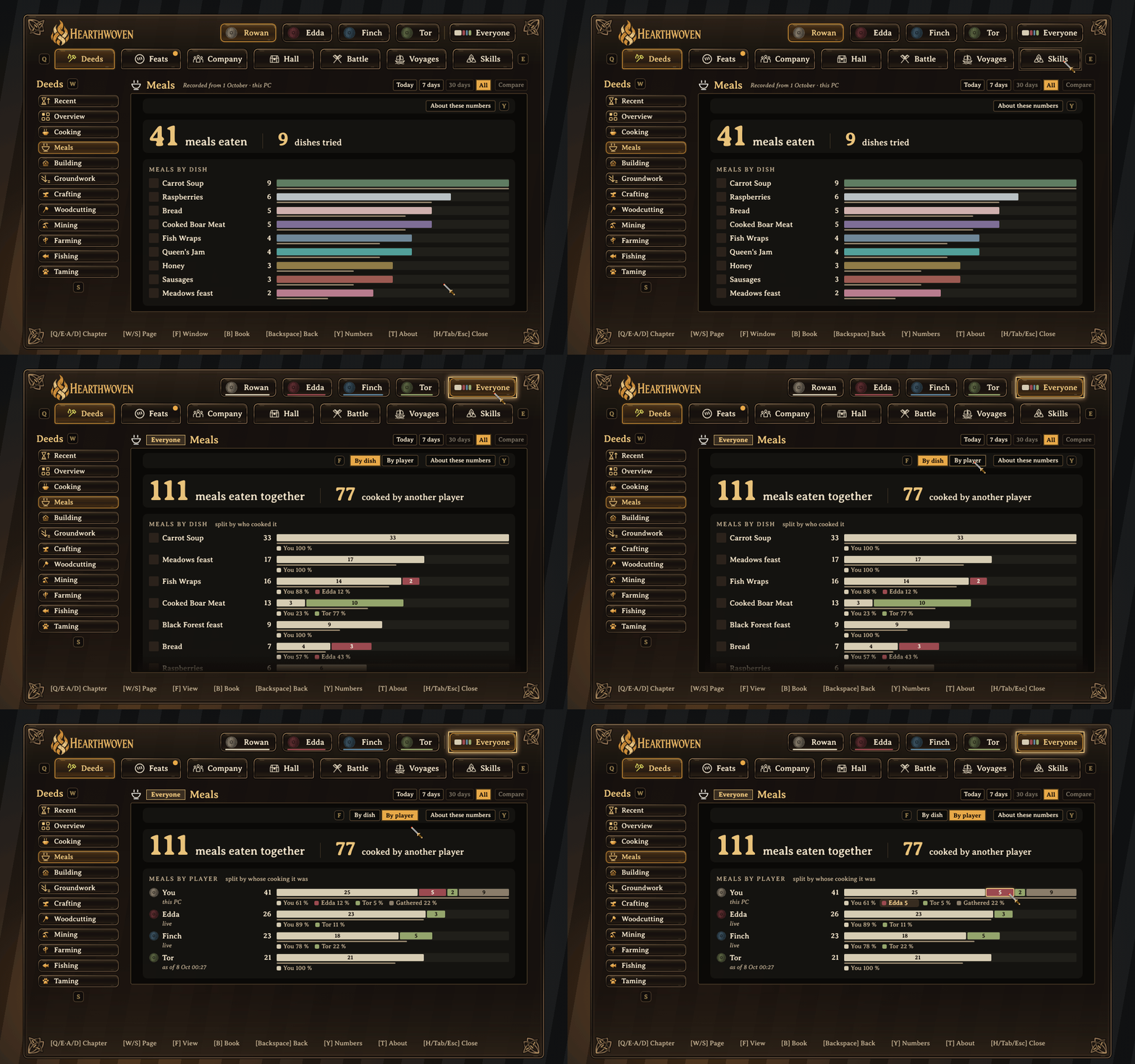
Everyone shows the meals of the whole group, by dish and by player: who cooked the food that each player ate.
Your own deeds
Your deeds are grouped under titles such as Hearth Cook, Hallwright and Woodcutter, one for each way of playing. Open one to see what went into it. Each Deeds page goes deep: Cooking shows every dish you cooked, by type and by kind, and where you cooked it. Meals shows the meals you ate, and with Everyone on, who cooked for whom.
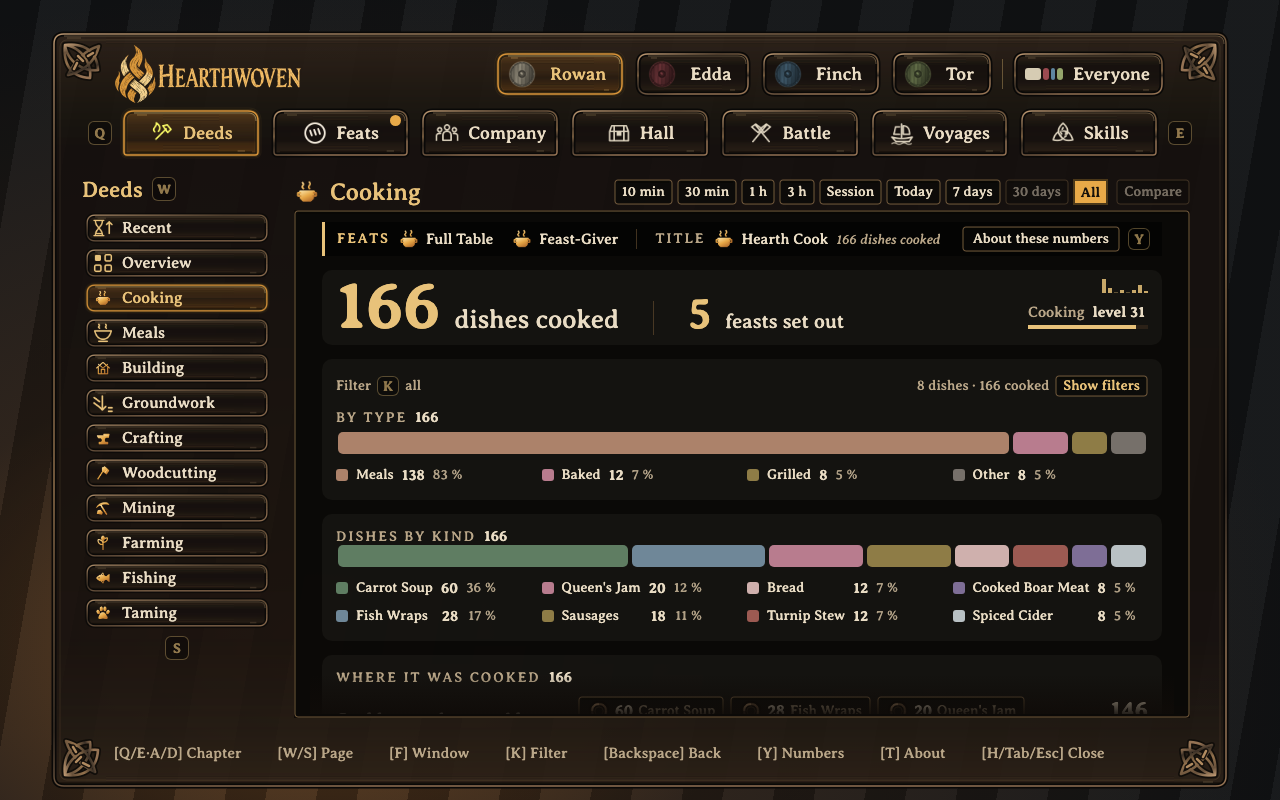
Cooking: every dish you cooked, by type and by kind.
Your fights, one by one
The Feed tells your fights, newest first, also those of earlier sessions up to 30 days back: each foe "defeated by you", "defeated with Edda", "survived" or "got away", with the damage both ways. Each fight says which day it was. Show it as Log, Cards or Timeline, and filter it by time, biome and foe. At the end of the Feed, Show older foes draws the next fights. Fellow players who share see it on your book, and you see theirs, also their earlier sessions: their PC sends each finished session to the server once, and your PC gets it from there when you press Show older foes (this needs 0.8.6 on the server). (Battle > Feed)
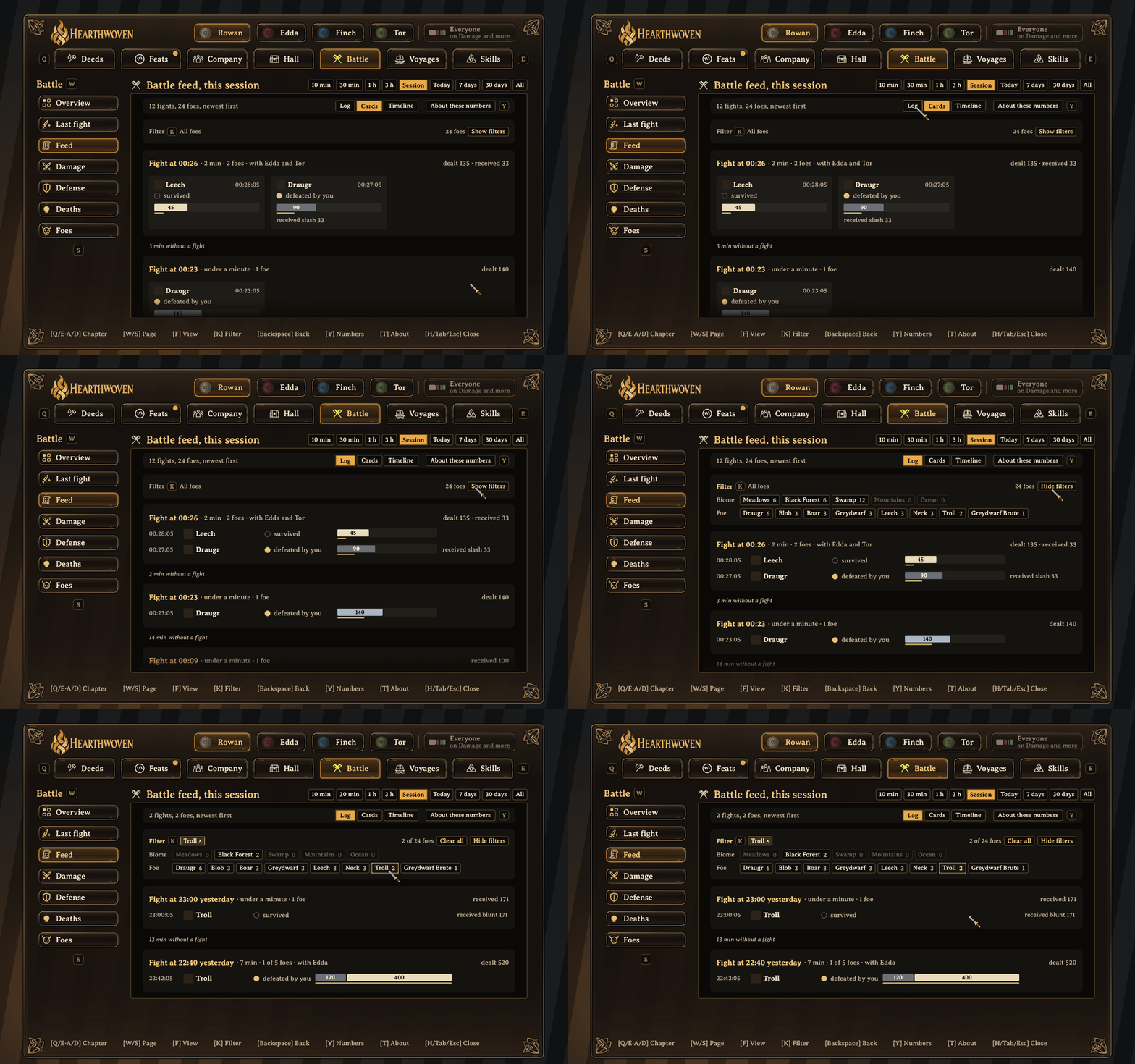
The battle feed shows each fight as cards or as a log. Use the foe filter to show only the fights with one foe.
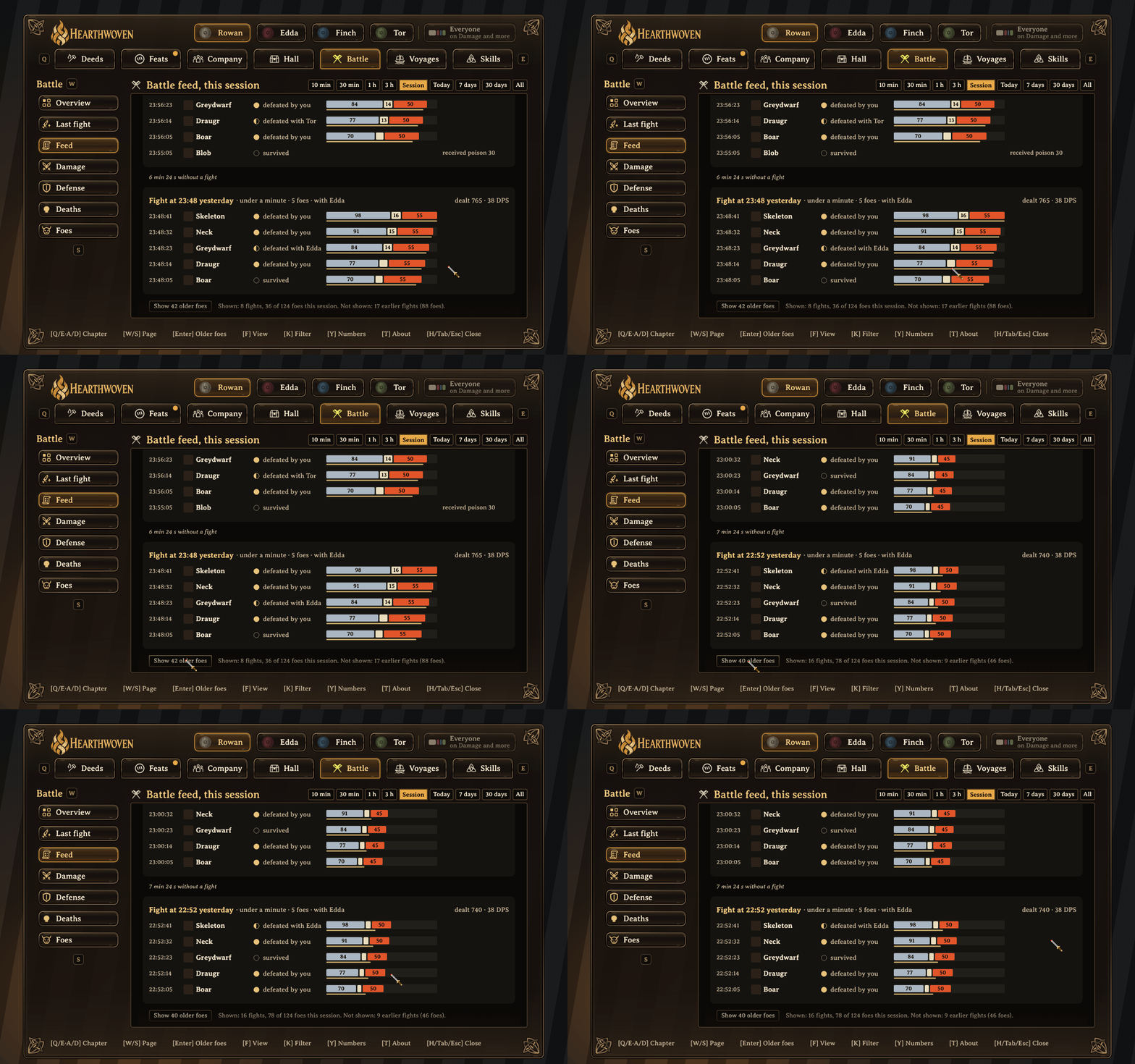
At the end of the Battle feed, each fight says which day it was ("Fight at 23:48 yesterday"). Press "Show older foes" and older fights appear.
Feats
A feat is a moment worth telling, earned by doing it: steering a ship 2 km with a heavy load of ore, holding blows on your shield beside a friend, having your food enjoyed by three fellow players. Some feats have bronze, silver and gold levels. Unsung shows the ones still ahead and why. Together has feats the whole group earns, such as The Hall Well Fed and Clad for the Road, with who helped and each one's share.
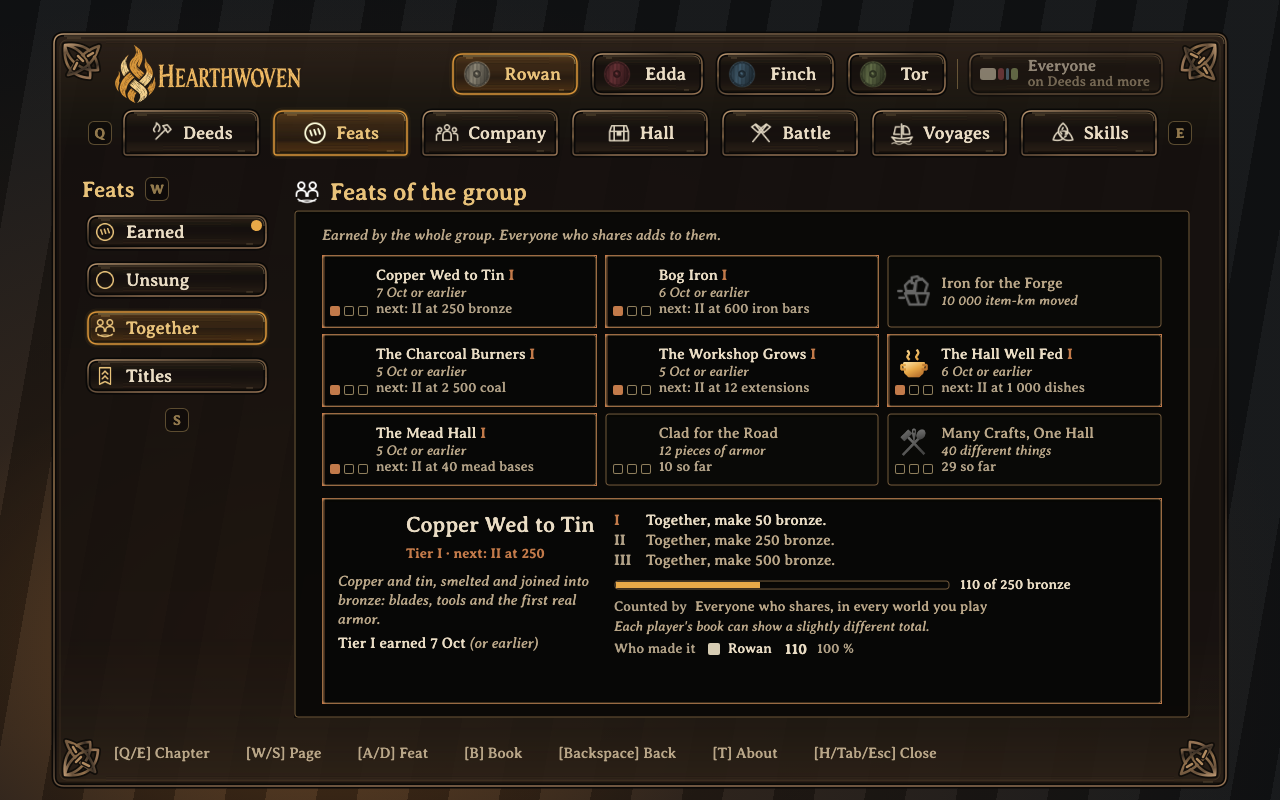
Feats the whole group earns, with who helped.
Fights and boss fights
After a fight, Last fight shows it for the whole group, also after a restart, with how long ago it was: what you dealt together and what you received together, then one row per foe. Each row has two bars: what the group dealt to that foe, one part per player, and what that foe dealt back, one part per damage type. Under the rows, each player has one line: damage dealt, damage received by type, blocks, parries and falls. One quiet line names what to bring next time, such as "Poison was 62 % of what hit you: bring Poison Resistance Mead." Beside dealt and received, the page shows your own DPS in that fight. Last fight is the newest fight you were in: when a fight of a friend is newer, one quiet line says so, and a click opens it. On a friend's book, Last fight is the same page as yours, built from the same fights. (Battle > Last fight)
During a fight with a boss, Last fight becomes Boss fight, with the boss's health and the foes around it, such as The Queen's Seekers. It also shows the DPS of the group on the boss and, while the fight is on, how long is left at the pace of the last minute. Hildir's minibosses count as boss fights too. A fall and the run back from your bed stay in the same attempt. Runs and bosses lists your dungeon runs and boss fights, newest first: a run goes from the moment you go into a dungeon to the moment you come out, and a boss fight in a dungeon shows under its run. A run has the name of its dungeon, such as Burial Chamber or Infested Mine. Like the other Battle pages, it has time windows, from 10 min to All. A page that you open from another page has a Back button. Your book keeps them for each world. Every player in the fight needs Hearthwoven 0.8.3 or newer to be counted in it. (Battle > Runs and bosses)
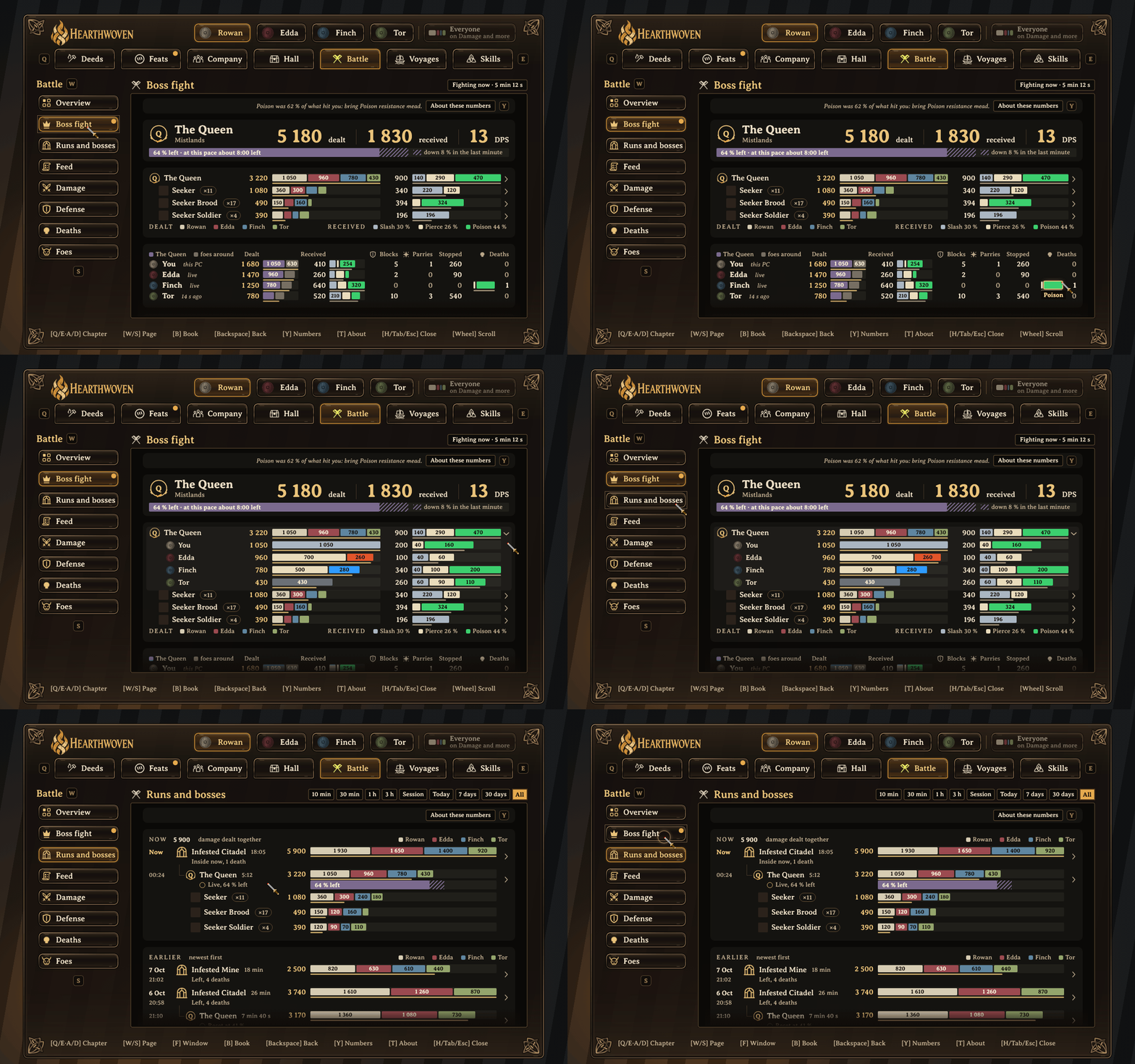
A boss fight as it happens: the damage that the group dealt to the boss and received from it, and the group's pace. Open the boss row to see the two bars of each player. Runs and bosses shows the fight inside its run.
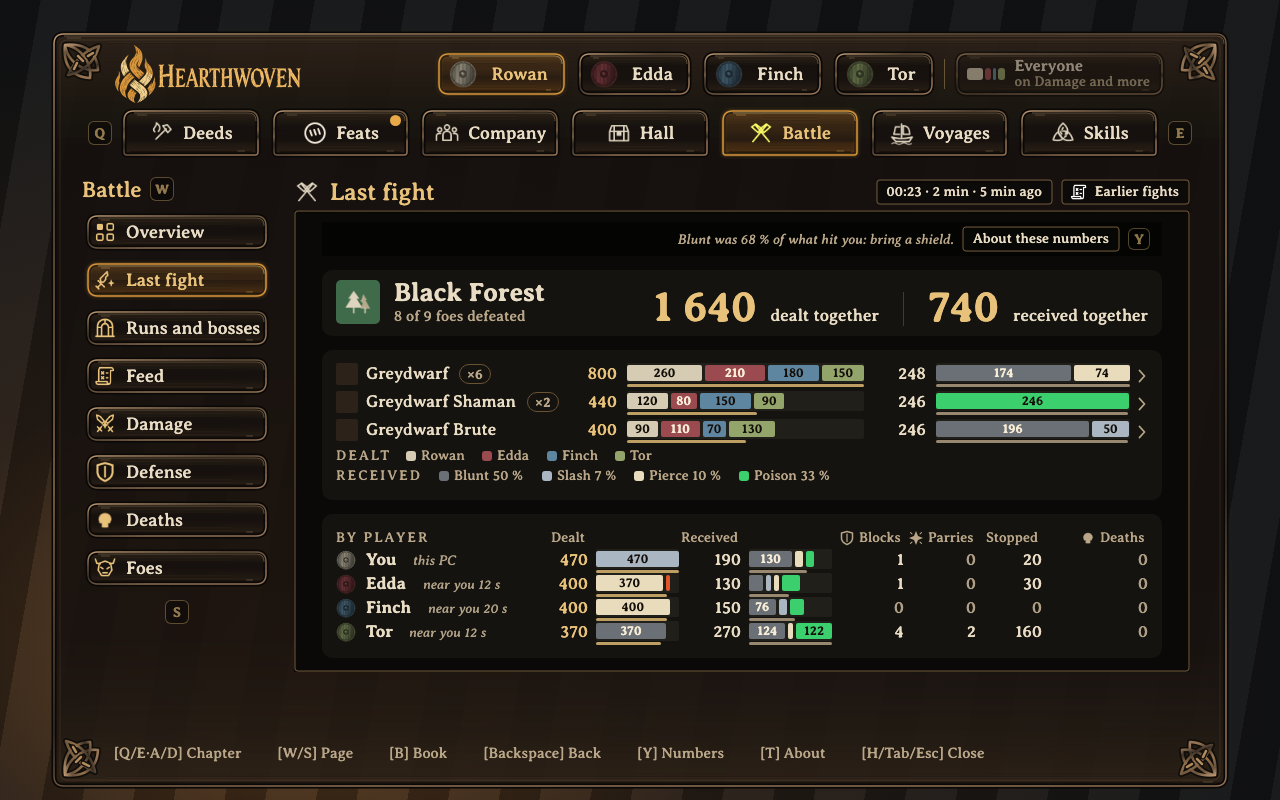
Last fight: what you dealt together, and each player's part.
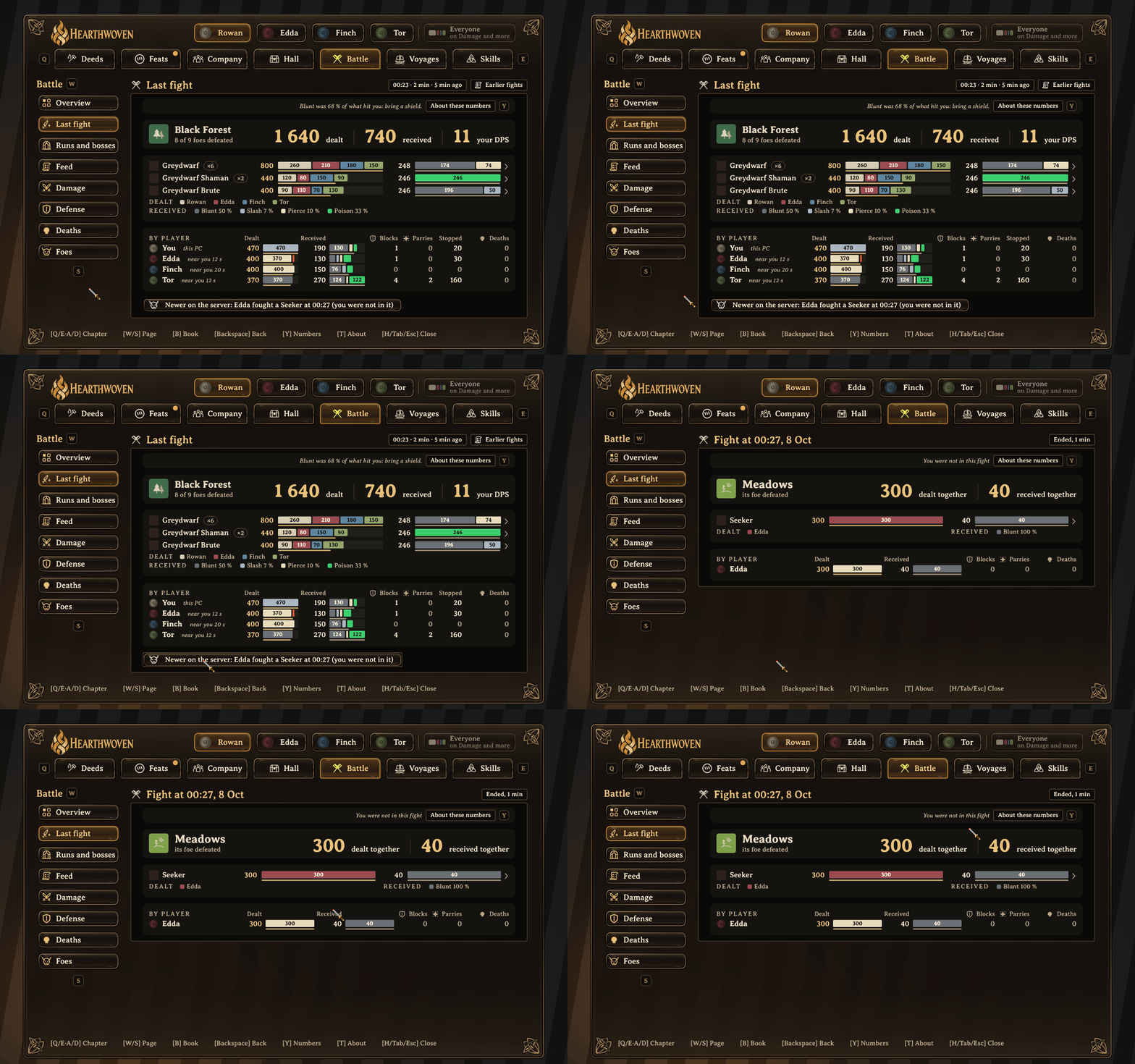
Last fight is the newest fight that you were in. A quiet line says when a newer fight happened on the server. Click it to open that fight; the page says "You were not in this fight".
And more
- Crafting and building: every piece of gear you crafted and every piece you built, by kind and material. Choose a material or a kind, and the bars and counts follow.
- Woodcutting and mining: trees felled, axe and pickaxe hits, and the wood, stone and ore you brought in.
- Taming: young born in your care, young born near you and the animals you led.
- Voyages: distance sailed and on foot, who sailed with you and the cargo you carried.
- Hall: the shared household, including trader purchases and items put into smelters, by hand or by a Stoker's Chest.
- Recent: what grew lately, yours and the group's: choose 10 minutes, an hour, this session or 7 days.
- While away: after a day or more away, the book opens on what your fellow players did meanwhile.
- Compare: set Today beside yesterday, the same day last week or your best day, or the last 7 days beside the 7 before or your best 7 days, part by part. Choose what to compare against in its menu (J).
- Growth lines: a small column for each of the last 14 days beside the big number on most Deeds pages, and with your damage dealt on Battle.
- Show all: a long list of tiles shows up to 32, in your sort order, and ends on Show all, which opens the rest in place.
- Point at a bar part and its row in the list lights up, and the other way round. Anything else you can press shows a thin gold line when you point at it.
Choose a biome or a time period to see more detail. Time periods run from the last 10 minutes to All. Turn on Everyone to see the page for the whole group.
All feats, explained
A feat recognizes a specific achievement: a rule, a number and a day. Open it to see the rule, your progress and when it was first recorded.
- Heavy Keel: steer a ship 2 km with a heavy load of metal or ore aboard.
- Shield Wall: hold blows on your shield with a fellow player nearby.
- Drover: lead tamed animals over a distance.
- Kept the Fires: put ore and fuel into smelters, kilns and furnaces.
- Full Table: have your food enjoyed by three fellow players who share their books.
Each level has its own target. The targets may change after the first weeks of play.
Earned shows the feats you have. Unsung shows the feats still ahead, and says why each one is not earned yet. Together shows the feats the whole group earns: everyone who shares adds to one number, and each character's own record counts. A feat that belongs to a land shows once someone who shares has found that land. Iron for the Forge, the ore and metal the whole group brings home, needs Hearthwoven 0.6.0 or newer on the server. Titles lists every title you hold and what earns the others.
Your playstyle
The book tries to show every part a player can play. If your playstyle is missing, tell us on GitHub. Open an issue, describe how you play, and say what you want to see in the book. We use these to choose what to build next.
Installation
Install Hearthwoven with your mod manager, such as Gale or r2modman. Start the game, then press H to open your book.
Your own book works on any server. Hearthwoven is optional. Players without it can still join and play.
See Tested with other mods under Reference for the mods we use in testing.
Moving from Hearthwoven
Until 0.8.5 this mod was the package Hearthwoven. If you have it, switch in your mod manager: install Hearthwoven Stats Book, then remove Hearthwoven. Do not keep both enabled. They hold the same plugin (the same ID), so you do not want it twice. Your settings and your saved book stay, because they are not part of the package: the book is in BepInEx/Hearthwoven/, and the settings are in BepInEx/config/com.joostliebregts.hearthwoven.cfg. The key to open the book is still H. A server owner switches the same way; the file is still Hearthwoven.dll. The old package gets 0.8.6 once more, with a note that points here, and is then deprecated.
Play with friends
Install Hearthwoven on the server to share books. Players who install it share their book by default.
- ShareWithGroup controls sharing with other players. Turn it off to see only your own book and stop sharing it with them.
- SendStats controls statistics updates to the server, even when ShareWithGroup is off. Turn both settings off to stop new updates and sharing.
- Shared copies leave out death locations and your history of worlds played.
- From 0.8, your shared copy also says how many foes of each kind you fought and defeated, which feasts you ate from and who set them out, and who made the feasts you set out. From 0.8.2 it also carries your battle feed and who was near you in a fight. From 0.8.3 it also carries the boss fights and dungeon runs you were in, and your damage per day by weapon kind and type. From 0.8.5 it also carries, for each day of the last 30 days, the top numbers of each Deeds page, your km sailed and at the helm, and your cargo per item. From 0.8.6 it also carries the weapons you swung (which weapon, its upgrade level, your skill level, the damage and the seconds of fighting), for each minute and for each day of the last 30 days. Nothing in it names a place. A player who does not share is never named there: they show as "another player".
- From 0.8.6, your PC also sends each session that has ended to the server once, so friends can open your older Feed. It holds your fights as your PC kept them: no hits and no places, and a name only for players who share. The server keeps the newest 60 sessions of each player in each world, up to 30 days back, and deletes them when you stop sharing. A friend's older Feed needs 0.8.6 on the server and on their PC.
- Your PC keeps each fellow player's last shared copy for that world, so their pages show at once after you log in. These are plain files on your PC, kept for up to 14 days. Turning off ShareWithGroup deletes them.
- A server that still runs Hearthwoven 0.6 works with this version: books are shared as before, and fellow players' numbers refresh every 2 minutes.
- With Hearthwoven 0.8 or newer on the server, players who share send small live updates every 10 seconds, so fellow players see what you do, including the land you fight in, about every 10 seconds.
- With Hearthwoven 0.8 on the server, a world made again under the same name starts its own record of cargo and births, and two players whose characters share one id are kept apart.
- The server also records who adds or removes items from chests and carts. This includes players without Hearthwoven.
- Cargo loaded and unloaded, young born near you and Iron for the Forge need Hearthwoven 0.6.0 or newer on the server. An older server works for everything else.
- What a Stoker's Chest (from the SmelterUpgrades mod) feeds into smelters is counted by the server, one time for the whole group. This needs Hearthwoven 0.8.5 on the server. On its first start with 0.8.5, the server also counts the feeding in its earlier chest logs.
Server setup, saved data and removal
Server setup
Put Hearthwoven.dll in the server's BepInEx/plugins folder. Use the same file as the client.
The server keeps shared statistics and chest and cart records in BepInEx/Hearthwoven/.
A world you host from the game works the same way: your own copy of Hearthwoven is then the server.
Saved data
Your local totals are in BepInEx/Hearthwoven/local/ on your PC: one file for each character, with a backup copy. Your filter choices and what your PC last saw of fellow players have a backup copy too. If a file is damaged, Hearthwoven reads the backup and says so in the log. A character renamed with a save editor keeps its numbers.
Remove Hearthwoven
Remove it in your mod manager. Hearthwoven does not change the world. To remove everything, also delete the BepInEx/Hearthwoven folder and the BepInEx/config/com.joostliebregts.hearthwoven.cfg file. An update keeps both.
Reference
Open a section for controls, settings or more detail about the numbers.
All seven chapters
- Deeds: Recent, your titles and what you are known for, with pages for cooking, meals, building, groundwork, crafting, woodcutting, mining, farming, fishing and taming.
- Feats: Earned, Unsung, Together and Titles. The feats you have, the feats still ahead, the group's feats and your titles.
- Company: While away, Fireside, Together, Food shared and Gear shared. What your fellow players did while you were away, who enjoyed your cooking, who put your gear to good use and the cargo each of you carried.
- Hall: Overview, Trader and Smelters. The shared household: trader purchases, and items put into smelters by hand or by a Stoker's Chest.
- Battle: Overview, Last fight, Runs and bosses, Feed, Damage, Defense, Deaths and Foes. Damage dealt and received, the foes you fought and what became of them, your fights, boss fights and dungeon runs, blocks, parries and deaths. Filter by biome and choose a time period.
- Voyages: Sailing, Cargo, On foot and Maps. Distance on foot and at sea, time at the helm, cargo, your heaviest load and maps shared.
- Skills: a ladder for each skill. A glow marks skills you practiced since you installed Hearthwoven. Woodcutting, Mining, Cooking, Crafting, Farming, Fishing, On foot and Battle > Damage also show the skills that belong to them.
Keys
| Key | Action |
|---|---|
| H | Open or close the book. |
| Q/E | Go to the previous or next chapter. |
| A/D, or Left/Right arrow | Go to the previous or next chapter. On the Feats page, select a feat. On Battle > Foes, move between foes. |
| W/S, or Up/Down arrow | Move through the page list. |
| F | Change the view, or the time period on pages that have one. |
| K | Open or leave the filters on pages that have them. On Company > Together, change the time period under Damage dealt. |
| T | Open the About page. |
| Y | Show or hide About these numbers on the page: what the numbers hold and from when. |
| J, or X on a controller | Open the Compare menu. W/S choose and Enter picks. |
| Backspace | Return to the previous page. |
| Enter or Space | On Battle > Foes, open or close the chosen foe's ranking of arrows, bolts and weapons. |
| Page Up/Page Down | Scroll the page. On a controller, the right stick scrolls too. |
| B, or Y on a controller | Show the next book in the player row: you, each fellow player, then Everyone. Where Everyone is grayed, open the nearest page where it works. |
| Tab | Close the book, as you close the inventory with Tab. An open filter closes first, as with Esc. |
| Esc | Leave filters or About first; otherwise close the book. |
Inside filters, use A/D and W/S to move, Enter or Space to choose, and Delete to clear the filters. The book remembers your filters for each page and each character. It also remembers the Everyone chip, Compare, what each page compares against, and the Feed's view. While the book is open, Tab closes it and does not open the inventory.
Settings
Use the config editor in your mod manager, such as Gale or r2modman. Changes apply while the game runs.
| Section | Setting | Default | Action |
|---|---|---|---|
| Client | SendStats | On | Send new statistics updates to the server, even when ShareWithGroup is off. |
| Client | IntervalMinutes | 2 | Set the time between full updates, in minutes. Updates also occur on spawn, logout and quit. A config still on the old default of 5 moves to 2 once. |
| Client | ShareWithGroup | On | Share books with fellow players. When off, you see only your own book and they cannot see yours. |
| Panel | Enabled | On | Allow the hotkey to show the book. |
| Panel | Hotkey | H | Set the key to open and close the book. |
| Panel | InfoKey | T | Set the key for the About page. |
| Panel | ViewKey | F | Set the key to change the view. |
| Panel | FilterKey | K | Set the key to open and leave filters. Set it to Tab to keep Tab for filters; then Tab does not close the book. |
| Panel | NumbersKey | Y | Set the key that shows and hides About these numbers. |
| Panel | CompareKey | J | Set the key that opens the Compare menu. In the menu, W/S choose and Enter picks. The controller's X also opens it. |
| Panel | BookKey | B | Set the key that shows the next book in the player row: you, each fellow player, then Everyone. The controller's Y does the same. |
| Panel | ShowWhileAway | On | After a long break, open the book on Company > While away the first time. |
| Panel | WhileAwayHours | 24 | How many hours away count as a long break. |
| Panel | Scale | 1.0 | Set the book's size, from 0.8 to 1.3. Use 1.0 for 1920 × 1080. |
| Battle | DealtAfterArmour | Off | A developer check, not a feature. It compares the damage after the foe's armor that the book shows with the game's own numbers, and writes the result to the log. Leave it off. It takes effect at the next game start. |
| Server | LogRoutedDamage | Off | On the server only: write hits between two players' PCs to a daily log, for players without Hearthwoven. |
| Server | CompressLogsAfterDays | 30 | On the server only: compress daily logs older than this many days. Nothing is deleted. |
The Dev section holds developer tools for testing and screenshots, such as SampleData, PanelSnapshots, Bench, SelfCheck and UiReuse. They are not for play. Leave them as they are. IntervalLayout and KeyLayout are markers that Hearthwoven sets itself. Do not change them.
Sharing and server history
Players who install Hearthwoven can share their books through the server. You can see other players' books only while you share yours.
The ShareWithGroup setting is on by default. Turn it off to see only your own book and stop sharing it with other players.
SendStats controls new statistics updates to the server. ShareWithGroup controls whether fellow players can see your book. These settings work separately.
To stop new updates and sharing, turn both settings off. Turning off SendStats alone does not withdraw an earlier shared copy. An update already being sent can still finish.
When the server runs Hearthwoven, it saves the statistics sent to it. Turning these settings off does not delete its saved history. A server without Hearthwoven does not save this history.
What is shared: your counts and the feats you earned, with the day and biome, never a place. Shared copies leave out death locations and your history of worlds played. They still include the name of the current world.
From 0.8, your shared copy also carries how many foes of each kind you fought, defeated (alone or with fellow players, as a number, without names), that hit you and that are still in a fight with you, this session and since 0.8 began counting; the name of whoever made a feast you set out, and which feasts you ate from. It also carries the materials you recovered from pieces that came down.
From 0.8.2, your shared copy also carries your battle feed: the newest 100 foes of your session, each with its biome, times, damage and outcome, and who was near you in each fight. It also carries your blocks and parries per minute of the session. A name is in the feed only for a player who shares too. Anyone else shows as "another player". The feed never carries a place.
From 0.8.3, each foe in your feed also carries the game's network id for that creature. This id is the same on every PC, so the book can put one fight together from the copies of everyone who was in it. Your copy also says which boss fight or dungeon run a foe belongs to, with the kind of boss or dungeon, never a place. It also carries your damage dealt per day of the last 30 days, split by weapon kind and damage type, and the last 3 hours of your battle log from before a restart. To decide which foes belong to a boss fight, your PC uses where the boss and the foes were. Those places stay on your PC and are never saved or shared.
From 0.8.5, your shared copy also carries, for each day of the last 30 days, the numbers at the top of each Deeds page and its first bar, such as trees felled, pieces built, dishes cooked and the meals you ate with who cooked them. It also carries your km sailed, the km of it at the helm, and your cargo per item for each day, and your damage after the foe's armor with your minutes. None of it names a place.
From 0.8.6, your shared copy also carries the weapons you swung: for each minute and for each day of the last 30 days, the game's name for each weapon (such as SwordIron), its upgrade level and your skill level, the damage, and the seconds you spent fighting. It also carries the seconds of fighting in each fight and in each boss fight, for DPS. No hit has a time, a foe or a place in it. Your PC also sends each session that has ended to the server once, as a small file (about 5 KB for a busy evening): the fights as your PC kept them, with no hits and no places, and a name only for players who share. The server keeps the newest 60 sessions of each player in each world, up to 30 days back and no more than 2000 foes. Only players who share can ask for them, one at a time. When you stop sharing, the server deletes your sessions, and your friends' PCs delete their copy of them.
Fireside names a feast's maker with the name the game writes on the item ("Crafted by"), also when that player does not use Hearthwoven. They get no numbers: only their name on the line. With Everyone on, Meals names a cook the same way: a cook who does not share shows by name, in gray, with the meals the group ate from their cooking.
Last fight works out who was near you on your PC. Every 2 seconds while hits are coming in a fight, it looks at the players the game has loaded within 40 m of you. It is never saved. From 0.8.2 your shared copy carries it with your feed, naming only players who share.
Your PC keeps each fellow player's last shared copy for the world you play in, so their pages show at once after you log in: plain files under BepInEx/Hearthwoven/local/fellows/, kept for up to 14 days, and a small file of their running totals next to your own. Turning off ShareWithGroup deletes them, and a fellow player who no longer shares is deleted when the server's next list arrives.
With Hearthwoven 0.8 or newer on the server, players who share also send small live updates every 10 seconds. Fellow players then see what you do, including the land you fight in, about every 10 seconds: the same numbers as before, sooner.
Fellow players are told apart by their Steam or Xbox ID, so two players with the same name both appear. With Hearthwoven 0.8 on the server, two players whose characters share one id (a character file given to a friend) are kept apart too. On a world you host from the game, you share and see fellow players the same way. In single player, you see only your own book.
The server records who puts items into chests or carts and who takes them out. It also records these actions for players without the mod. The Discord companion (coming later) will use these records to tell the story of your sessions.
Where the numbers come from
Your character
Valheim keeps counters for trees felled, pieces built, dishes cooked, foes defeated and skill levels. These cover the character's history across worlds, subject to the gaps described below.
A page shows one number for each question: where the game keeps a count, the total is your character's whole count, with its parts under it.
Recorded on this PC
Hearthwoven records details that Valheim does not. These include damage by biome and foe, the foes of each kind you fought and defeated, items brought in, axe and pickaxe hits, trader activity, smelter activity, cargo, animals led and shared food.
These counters start at zero when you install Hearthwoven and add up across sessions for each character. The book says from which day, in your own date: "Recorded from 8 October · this PC". A number nobody recorded says "Not recorded", never 0. Press Y on a page for what its numbers hold before and from that day.
Time periods
All Battle and Deeds pages, Sailing, Cargo and Company > Together have time periods: the last 10 minutes, 30 minutes, hour and 3 hours, this session, today, the last 7 days, the last 30 days and All. The day periods use a day history on your PC. A period without history yet shows grayed. The book does not guess. Foes are counted from the day you first play 0.8, and the Battle pages say "counts from" that day. Compare sets Today beside yesterday, or 7 days beside the 7 days before, once your history reaches that far. The page title says the two periods, and a line at the top of the page shows which bar is which. The Compare chip opens a menu where you choose what to compare against: the same day last week, or your best day (the day with the most of the page's main number in your history). On 7 days you choose the same 7 days 4 weeks back, or your best 7 days. It works on those two periods only: 30 days stays grayed, because your PC keeps single days for 35 days and cannot cut out the 30 days before exactly. A fellow player's book has no Compare; on Company > Together, Damage dealt compares every player from the days they share. With Everyone on, only Battle > Damage compares, player by player.
Fellow players and the server
Other players' data comes from their own copy of Hearthwoven, shared through the server. On a fellow player's book, the time periods they do not share show grayed, with the reason. From 0.8.2, their Battle pages also have the last 10 minutes to 3 hours while they play: their numbers then come every 10 seconds, so these periods count back from now. When they are not playing, or their Hearthwoven sends no live updates, these periods stay grayed and say so. Today, 7 days and 30 days come from the days they share: their damage from 0.8.3, and their Deeds, Sailing and Cargo from 0.8.5. When a fellow player's Hearthwoven is older than a page needs, the page says so in one line, such as "Tor's Hearthwoven is 0.6.5: this page fills in once they update." This session means your session: a fellow player's numbers in it count only what they did while you were playing. With Everyone on, each player's numbers are as they last shared them; someone whose numbers cannot fill the chosen period is named and left out of the total. On Last fight, fellow players' parts come from the minutes their shared copies hold, so up to a minute at each end of the fight can fall in or out.
With Hearthwoven 0.6.0 or newer, the server also counts what only it can see in full: cargo loaded and unloaded, young born near you and the group's Iron for the Forge. "Born near you" means near, not bred: the game does not record who fed the animals.
Cargo
Cargo is measured in item-km: items aboard × km, on a straight line. It counts what is in the ship's or cart's own hold, only while you steer or pull it. The distance is measured in straight sections, so winding routes can be undercounted. Under the Cargo carried bar, a small sum such as 100 × 4.1 km = 410 item-km shows how your own numbers make each part. With Hearthwoven 0.6.0 or newer on the server, Voyages > Cargo also shows what you loaded into a ship or cart and what you unloaded somewhere else. Chests do not count.
Damage per second (DPS)
DPS is your damage divided by the seconds you fought. Hearthwoven counts the time between your own hits: a pause of more than 4 seconds does not count, and the first hit after a pause starts the clock. A weapon, a fight or a window with less than 5 seconds of fighting shows a dash. Your skill rises while you play, so a weapon line shows the DPS at your highest skill level that has at least 5 seconds of fighting in the window, and an arrow shows the change against your lowest such level. Hearthwoven counts the fighting time from 0.8.6, so older damage has no seconds: a window that reaches back before then counts only from the day it began, and All says that day. DPS shows for you and for a fellow player's weapons, never on Everyone, in a table of players or in Compare.
Gaps in Valheim's counters
Hearthwoven adds its own counts for these cases, starting when you install it:
- Work near a friend. One player's PC runs each area of the world. Trees you fell and animals you tame in an area run by a friend's PC can be missing from your character's counters.
- Item stacks. Valheim does not count an item when you pick it up and add it to a stack you already carry.
Where this can affect a number, the book says so in one short line: "Earlier counts may be incomplete." The About page explains why.
Performance
Hearthwoven records extra data on top of what the game already counts, so it can affect performance. It reads and counts game activity. It does not change the world.
To keep the cost small, Hearthwoven does the following.
On your PC
- It counts actions the game already performs, such as hits, pickups and crafting. Each count works on its own. If a game update or another mod breaks one, only that count stops.
- It checks the biome at most once a second. It checks ships, carts and the animals you lead every 10 seconds.
- It keeps one running total for each kind of count. The battle log combines fights older than about 3 hours into 10-minute steps.
- During a fight, it checks every 2 seconds which players are within 40 m of you, for Last fight. It does this only while hits are coming. It is never saved. Your shared copy carries it with your feed, naming only players who share.
- The battle feed keeps your newest 200 foes of the session in memory. Your shared copy carries the newest 100. For Last fight and the Feed after a restart, a small file keeps your newest 2000 foes of earlier sessions for each world, up to 30 days back.
- It keeps your last 50 boss fights and your last 50 dungeon runs with your local totals, and the last 3 hours of your battle log in a small file next to them, so the short periods still work after a restart.
- After you spawn, it gets the book ready while the book is still closed. It builds the book the first time you open it. When you turn a page, it keeps the tabs, the page list and the player row, and reuses its text and pictures.
- A long list of tiles shows up to 32 tiles, and a page up to 40, until you press Show all.
- While the book is open, it updates the page every 2 seconds. When nothing changed, it does not draw the page again. While the book is closed, it only checks for the key.
- It sends a full statistics update every 2 minutes, and on spawn, logout and quit. For our test character, an update is about 25 KB, or about 8 KB compressed. A real character with a few weeks of play sends about 30 KB. Updates are sent in small parts.
- With Hearthwoven 0.8 or newer on the server, it also sends what changed every 10 seconds while you share: a few hundred bytes.
- It reads fellow players' 10-second updates on a background thread, so the game itself does not wait for them.
On the server
- It checks chests and carts only when they change.
- It packs each fellow player's book once and sends it again only when it changes. With 8 players and the book open, this cut the traffic by 81%.
- It refuses an update over 600 KB and accepts at most one regular update per player every 20 seconds.
Testing
We test on a dedicated server with the mods listed under Tested with other mods. Automated checks cover the counters, sharing and interface logic. A self-test runs inside Valheim on a copy of that server. It checks startup and the time spent on server operations. We also read the server's logs after a group evening.
Measured in the game
We measured 0.8.1 inside Valheim on one player's PC, at 4K, with a real character and Everyone off. Your PC may differ.
- With the book open and nothing changing, the book costs about 0.03 ms and 200 bytes of memory per frame. A game frame there takes about 8 ms, so this is close to nothing.
- The update every 2 seconds takes about 2 ms on a typical page.
- Switching to another page takes about 11 ms for a typical page, a frame or two.
- The first time you open the book after the game starts takes about 60 ms.
- Pages with long lists took longer. In 0.8.1, Deeds > Building drew every kind of piece you built: on that character, 365 kinds, it took up to about 0.2 seconds. Cooking and Crafting took up to about 75 ms. From 0.8.2, a long list shows up to 32 tiles and ends on Show all. We have not measured 0.8.2 or newer in the game yet.
Tested with other mods
We play with these mods on our server. We test new Hearthwoven versions with them on a copy of the server first.
Jotunn, AzuWearNTearPatches, Drop That!, ValheimArmory, OdinArchitect, MultiUserChest, AdventureBackpacks, BetterArchery, BottleShips, ClayBuildPieces, CoreWoodPieces, FineWoodFurnitures, RefinedStonePieces, SeedBed, SmelterUpgrades, XPortal, AdvancedTerrainModifiers, SailingModer, Instant Monster Drop, NetworkPerformanceSystem and Server Devcommands.
For MultiUserChest, Hearthwoven reads that mod's messages to find who moved an item. It does not change the mod.
One question, one form: how to read the book
Each question gets one form, the same on every page. A number shows the total. A bar shows its parts. A strip of biomes shows where. A ladder shows each skill. A connection shows who helped whom. Items, foes and skills carry the game's own icons.
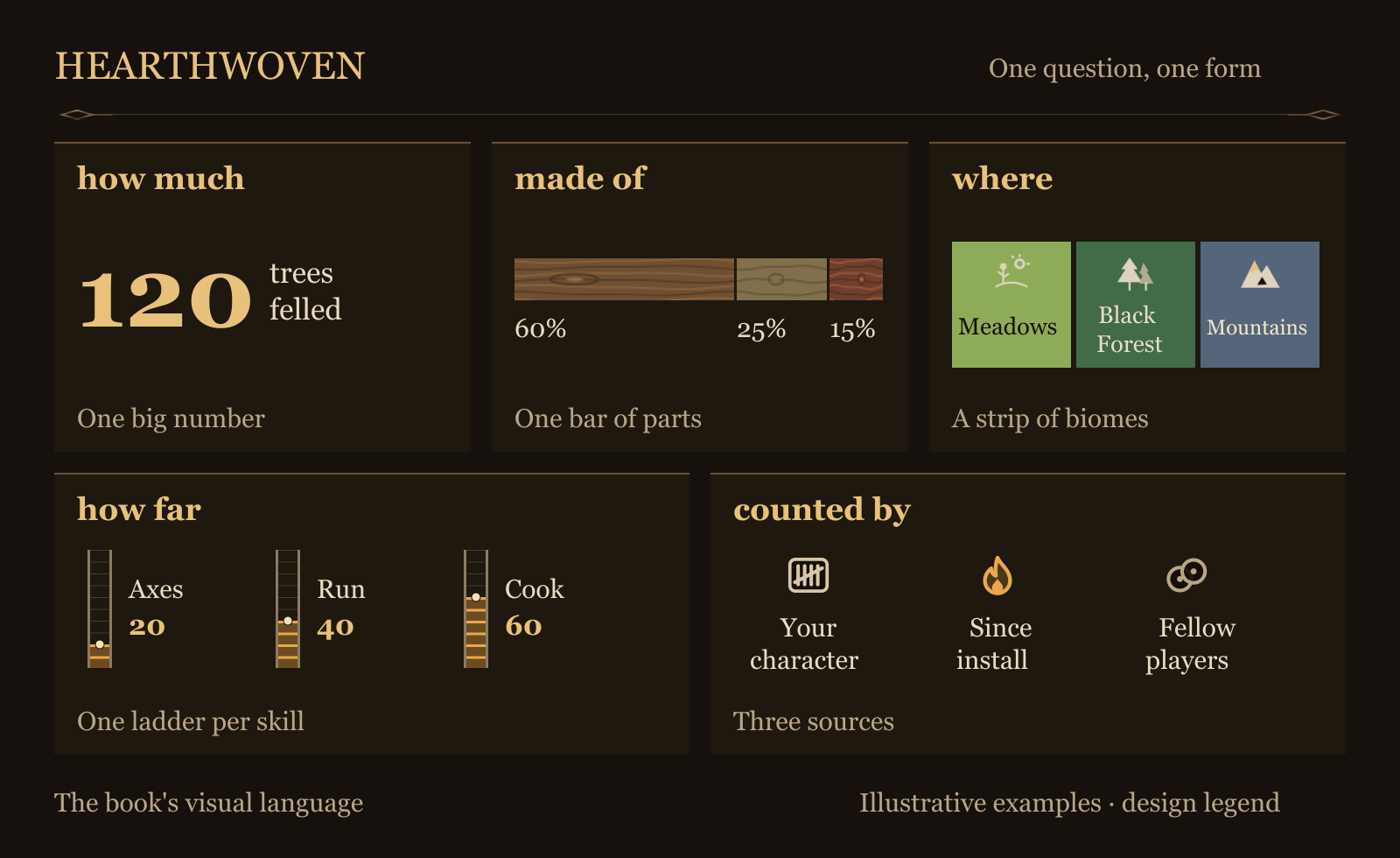
Design examples, not a game screenshot.
Credits and inspiration
Thank you to these projects. Their ideas and lessons shaped Hearthwoven:
- CrewStats and DamageMeter (Bagr): damage per type for the whole crew; per-discipline awards.
- DudeWhatAreMyStats (DeathMonger): read only stat slot 0 (other slots overlap and double-count); scoreboard incl. offline players.
- ValheimSagas (Pendulum): small fragments with spacing instead of bursts that stall multiplayer.
- CombatStats (Muindor): register the RPC on every new session.
- GsValheimStatsClient (Proudlock Technology): damage is only real on the owner; sum per reporter.
- StatCreditFix (Qua8ion) and Almanac (RustyMods): owner-only counters undercount in co-op.
- VikingStoryteller (JacobsValheim): contribution as a story of the group.
- Skald (casmith, MIT) and valheim-save-research (Erhuangjing, MIT): reading the 1.0 world save and map from outside the game.
Art: the book's frame, tabs, chapter icons and title emblems are original Hearthwoven art, made with AI. Items, skills and status effects use the game's own icons at runtime; no game art is shipped.
Coming later
A Discord companion that shows what happened on the server while you were away.
Feedback
Something odd, a number that looks wrong, or an idea? Tell us on the GitHub issues page. Screenshots help.
Thanks
Hearthwoven learned from other statistics mods. See Credits and inspiration under Reference. The source code is on GitHub.
AIL-4: idea, design and every decision by me; code, text and art made with AI.