


HP Barheim
Enemy and boss HP bars with stars, weakness and modifier icons, damage numbers, stagger bar and saveable layouts. Supports Star Level System, Creature Level & Loot Control and Path of Valheiman.HP Barheim
Health bars for enemies and bosses, with the extras you want while fighting: stars, weakness icons, modifier icons, floating damage numbers, a stagger bar and ailment bars. Everything can be turned on or off and restyled, you can save your own looks and share them, and a live preview lets you try every setting without an enemy around.

✨ New in 1.4
⭐ Star Level System support
HP Barheim now works with Star Level System, and it is optional. If you have it:
- Its resistances and weaknesses show in the weakness icons. SLS gives creatures their own resistances and weaknesses, which Valheim's data does not know about. HP Barheim adds them to the icons, combined with the creature's own.
- Creature modifiers become icons. Fast, Big, Brutal, Fire, Frost, Poison, Lifelink, Soul Eater and the rest (30 in total) each have their own hand-painted icon, drawn in the same row as the other modifier icons.
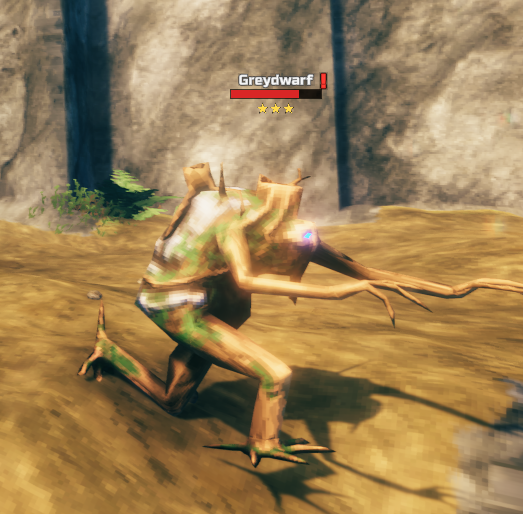
- Clean names. By default the modifiers show only as icons, so the name is just the creature's own ("Greydwarf" instead of a long list of words). You choose: icons only, words in the name like SLS does, both, or neither (
StarLevelSystemModifiersin 98. Compatibility). - Bosses too. Bosses can get modifiers in SLS (Boss Summoner, Soul Eater, Lifelink, Pierce Resistant, Brutal...), and they now show under the boss bar, with their own section: 19. Boss Modifier Icons.
↕️ Modifier icons in a column
The modifier icons (Star Level System's and Path of Valheiman's) can now be laid out top to bottom (ModifierIconOrientation in 08. Modifier Icons). Put them bigger on the left or right side of the enemy's health bar for a clean look.
👀 A tidier Preview
- 00. Preview now only lists what you are using: the sample enemy's options while the sample enemy is on, the boss's while the sample boss is on, and each mod's options only if that mod is installed.
- New samples for Star Level System: write the modifiers you want on the sample enemy and the sample boss (for example
Fire, Brutal, Fast) and see them as icons or in the name.
🎨 New Default layouts
Fresh Default looks for the enemy HUD and the boss bar, with the new modifier icons. Every ready-made layout now includes the modifier icons too. Existing configs keep what they have; load a layout in 00. Layouts to switch.
🔢 Only want the damage numbers?
If you prefer Valheim's own bars, or another mod's (like SeneaL UI), and only want HP Barheim's damage numbers with their custom font and colors: set Enabled = false in 01. General and keep EnableDamageNumbers = true in 13. Damage Numbers.
And also
- Names and levels update while the bar is on screen, so a mod that renames a creature or raises its level after it appears (Star Level System, Creature Level & Loot Control) is shown right away.
- The "immune" mark on weakness icons is thinner, and the drawn icons are sharper at small sizes.
- The Creature Level & Loot Control section is now 20 (it was 19). Your settings move with it automatically.
Features
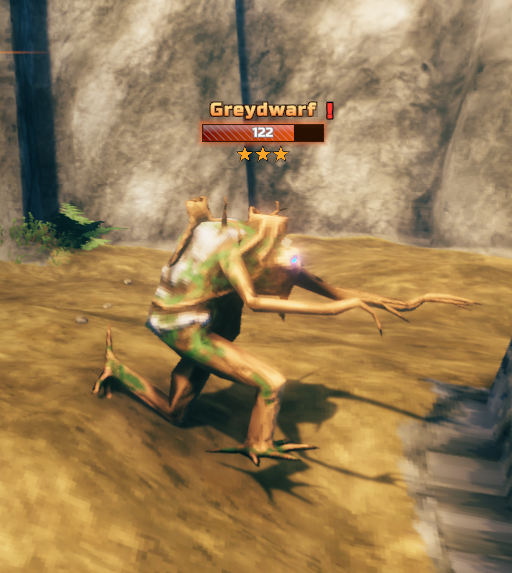
- Enemy health bars with name, level, stars and health text. Long names wrap onto two lines.
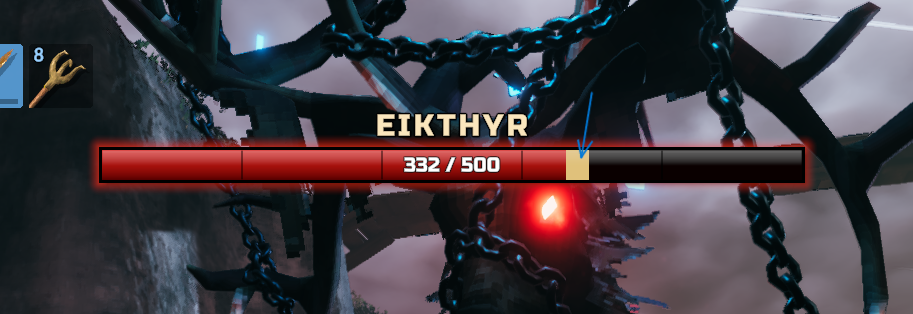
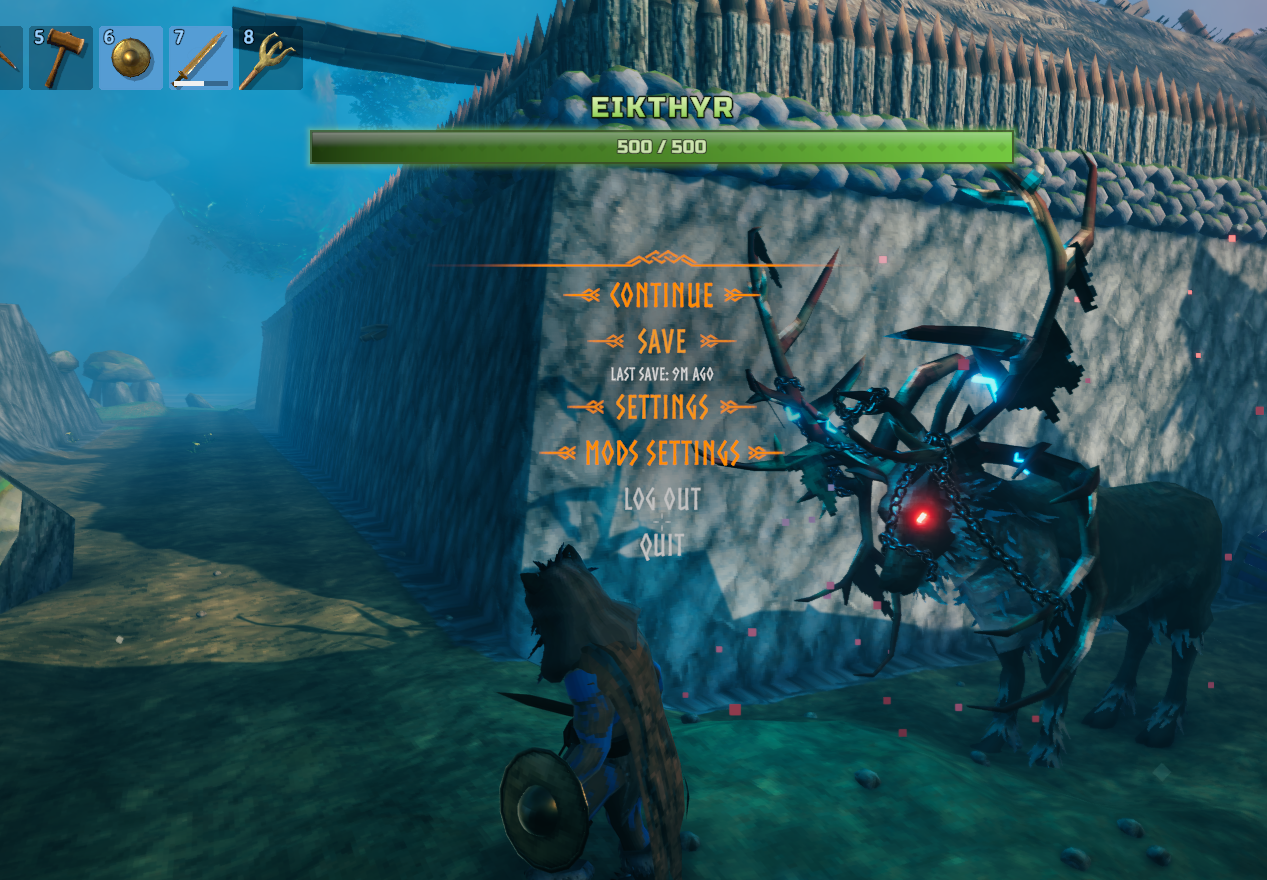
- Boss bar at the top of the screen with its own name, health text, stars, modifier icons and style.
- Weakness icons that show what an enemy is weak to or immune to, with hand-drawn pictures and an edge in any color.
- Floating damage numbers with their own font, size and colors for normal, heavy, weak, resistant, healing and blocked hits. With Path of Valheiman they can also take that mod's color for each damage type.
- Stagger bar that shows how close an enemy is to being staggered.
- Alerted (!) and aware (?) indicators next to or above the name. They hide while the health bar is visible (can be changed).
- Modifier icons for Star Level System and Path of Valheiman, in a row or a column, with a "+N" when a creature has more than the limit.
- Ailment bars for Path of Valheiman (fire, poison, frost, lightning, bleeding), for enemies and, separately, for bosses.
- Creature Level & Loot Control effects, infusions and boss affixes, and stars on bosses when their level is raised.
- Look settings for the health, stagger and ailment bars: glow, gradient, textures and shine.
- Layouts to start from a ready-made look, save your own and share them.
- Preview to try every setting without an enemy around.
Everything that depends on another mod only appears if that mod is installed.
Layouts
- Open the Configuration Manager (F1) and look at 00. Layouts. Click a layout to load it.
- Save, Save as, Revert and Delete work on your own layouts. The ready-made ones can never be overwritten, so you can always go back to them.
- Your layouts are
.jsonfiles inBepInEx/config/HPBarheim/layouts(one folder for enemies, one for bosses). To share one, send the file; to use a friend's, drop it in the folder. There is an Open layouts folder button. - The enemy HUD and the boss bar have separate layouts, so you can mix and match.
- Ready-made looks for enemies: Default, Ember, Valkyrie, Iron, Tidal, Minimalist, Royal, Tactical, Brutal, Arcane and Small Bar. For bosses: Default, Obsidian, Wraith, Glacial and Verdant.
- Things that are about behavior and not looks (damage numbers on or off, boss bar on or off, distances...) are never changed by a layout. Their description says so.
Creature Level & Loot Control
If you have Creature Level & Loot Control, the extras it adds to creatures show up on HP Barheim's bars:
- Creature effects (Aggressive, Quick, Regenerating, Curious, Splitting, Armored) as a star color, as a word in the name, or both. By default HP Barheim follows what CLLC's own settings say.
- Elemental infusions in the name (for example "Fire-Infused Greydwarf") and, if you like, in the weakness icons.
- Boss affixes (Reflective, Shielded, Twin...) in the boss name, and Twin bosses share one boss bar.
- If you hide Valheim's own enemy bars, CLLC no longer fills your log with errors.
Screenshots
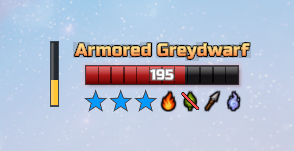
An enemy with a CLLC effect: blue stars for Armored, plus weakness icons
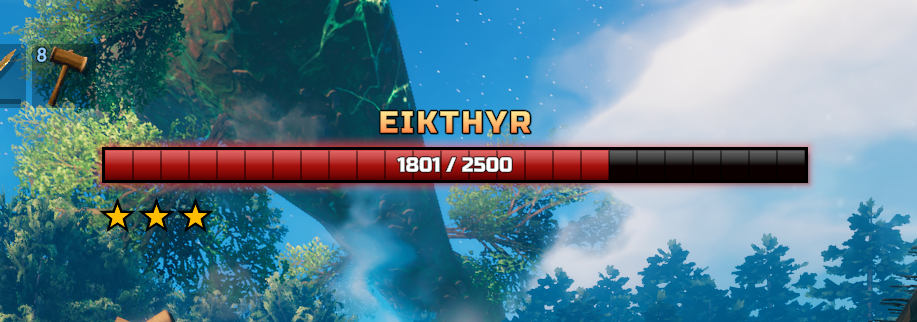
A boss with its stars under the bar
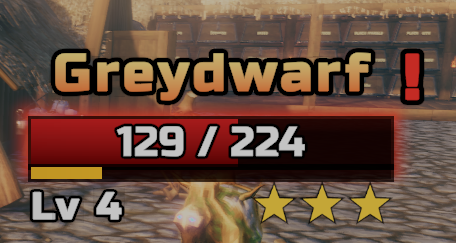
Enemy bar with health text, stagger bar, level and stars
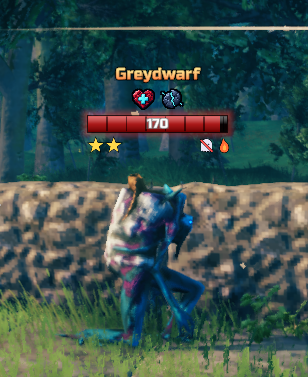
Path of Valheiman modifier icons
A minimalist style and a diagonal bar texture
Boss bar: damage trail (phantom) and the green Verdant style
Settings
Every option has a description. Edit them in game with Configuration Manager (F1), or in BepInEx/config/DarthVladi.HPBarheim.cfg with the game closed. The sections are:
- 00 Layouts and Preview, 01 General
- 02-13 the enemy HUD: Health Bar, Name, Health Text, Level, Stars, Weakness Icons, Modifier Icons, Stagger Bar, Ailment Bars, Alerted Indicator, Aware Indicator, Damage Numbers
- 14-19 the boss bar: Boss Bar, Name, Health Text, Ailment Bars, Stars, Modifier Icons
- 20 Creature Level & Loot Control
- 98 Compatibility (Path of Valheiman, Creature Level & Loot Control, Star Level System), 99 Advanced
Updating from 1.2 or older? Your old config is converted automatically the first time you start the game, and a copy of the old file is kept as DarthVladi.HPBarheim.cfg.before-1.3.bak.
Compatibility
- Client side only. It does nothing on a dedicated server, but every player who wants the bars needs it installed.
- Star Level System, Path of Valheiman and Creature Level & Loot Control are all optional. Without them HP Barheim works as always and the parts that depend on them stay off.
- If you use Zen Targeting or SeneaL UI, HP Barheim tells you once which of their options to turn off so information does not show twice. It never changes their settings.
- Works with Windows display scaling above 100%, render scaling and upscalers (fixed in 1.4.1). If another mod's UI ever hides the bars, raise
CanvasSortingOrderin 99. Advanced.
Install
Use a mod manager (r2modman, Gale or Thunderstore Mod Manager), or put the HPBarheim folder in BepInEx/plugins. Requires BepInExPack Valheim.