

ValHUD
Fully customizable HUD: health, stamina, eitr and adrenaline bars or orbs, Rune Shield and Endurance, carry weight, food and Forsaken power slots, glows, custom icons and fonts, and shareable layouts.⚔️ ValHUD — Build the HUD you want
New in 1.6: an XP bar for SkillsReworked, with icons that pulse while you have unspent attribute or talent points; TalentTree's buffs in a column of their own, with their time left; an early weight warning; and a new default layout, ValHUD.
In 1.5: support for the Endurance of Path of Valheiman 5, pointed fronts for the Endurance and Shield layers, and a settings window that shows only the options that apply.
ValHUD isn't just another HUD replacement.
It's a customizable HUD toolkit for Valheim, built to give you the tools to create your own interface instead of forcing you to use another author's design.
Move elements wherever you want. Resize them. Change their colors, shapes, gradients, icons, fonts and visual effects. Create a layout from scratch, combine different styles, or start with one of the included layouts and make it your own.
Think of ValHUD less as a HUD and more as a toolkit for creating HUDs. Of course, I included a few presets. The included layouts are simply examples of what you can do with it.
Everything is configurable in-game, and you can see your changes immediately. Move things around with your mouse in edit mode.
- Want a clean minimalist HUD? Go for it.
- Want something inspired by another game? Sure.
- Want to spend three hours moving a health bar two pixels to the left because it just looks better? We've all been there. 😏
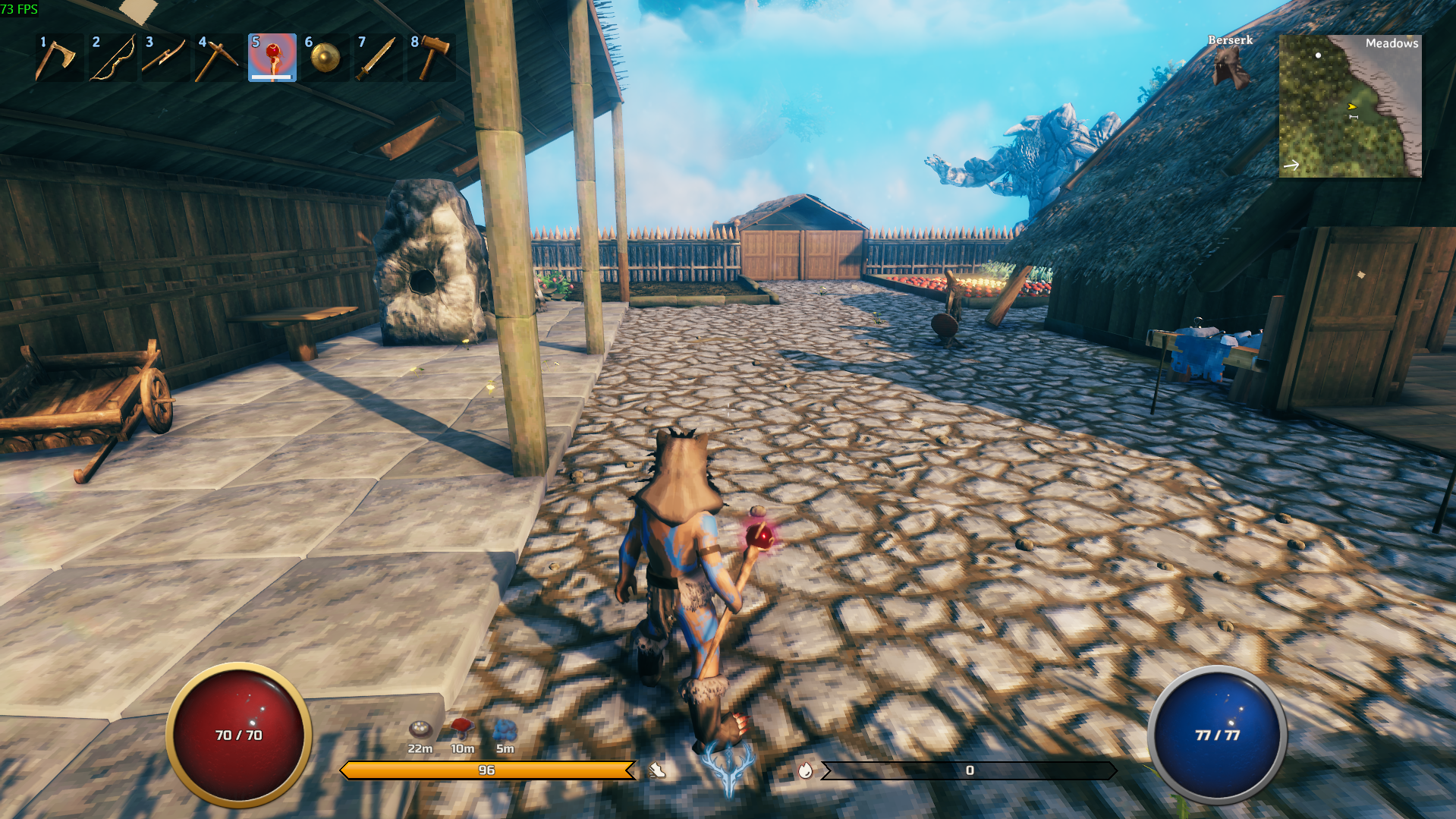
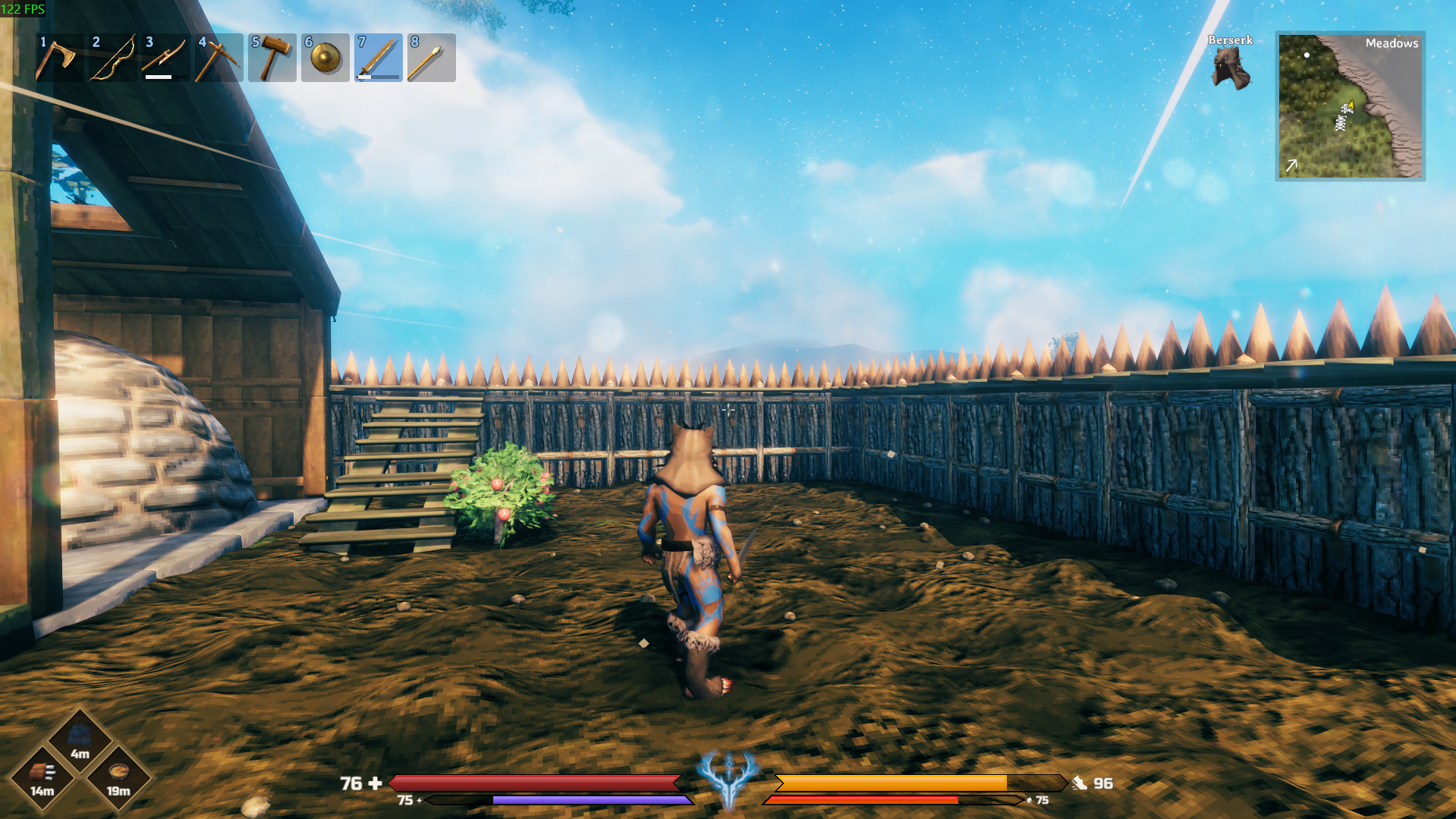
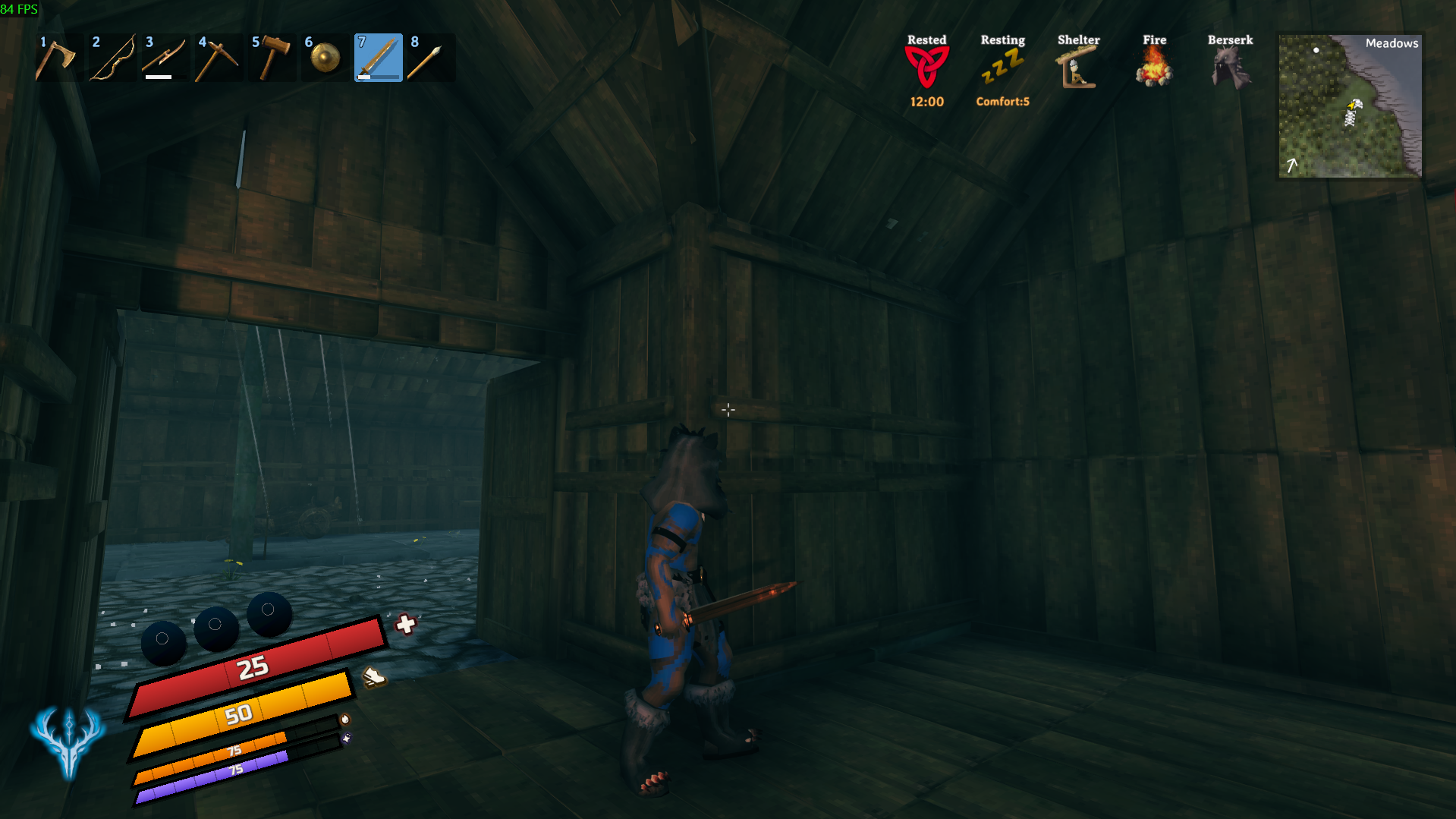
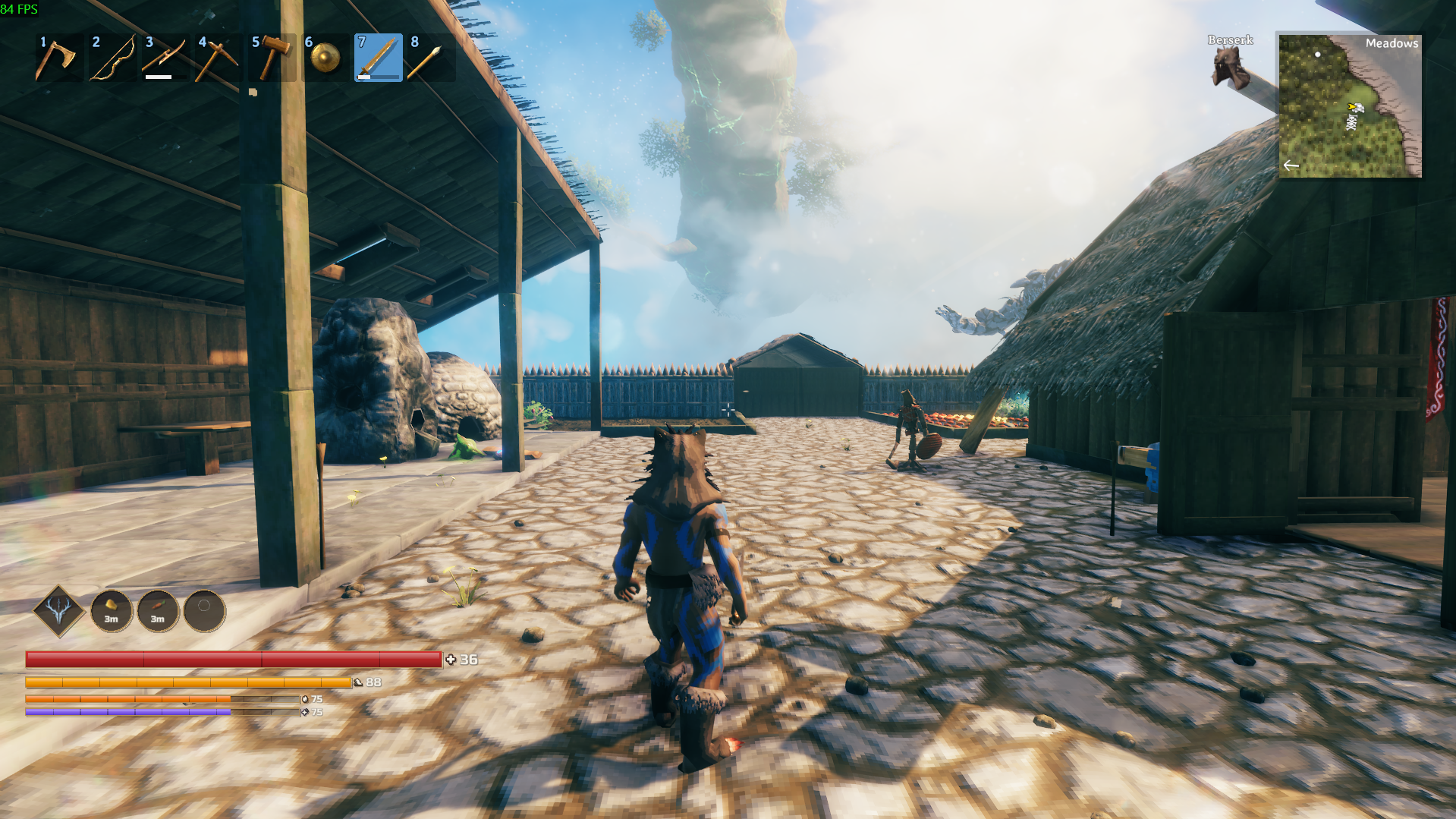
📸 Screenshots

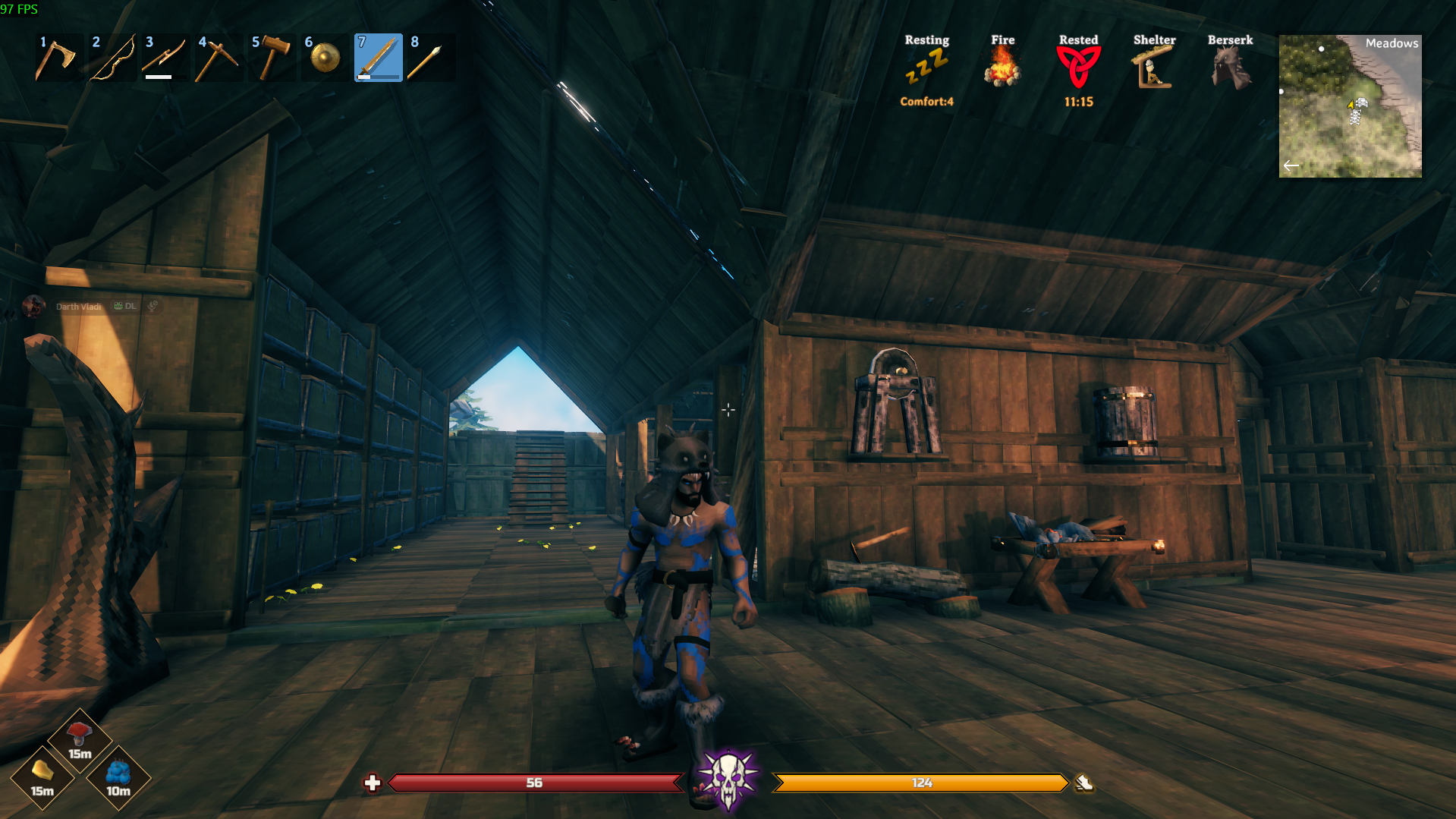
✨ Features
💾 Layouts
The most important one: create, save, switch between and share your own HUD layouts.
Once you've built something you like, save it as a layout and switch between different configurations whenever you want. You can also share your layouts with other players.
ValHUD includes several ready-to-use layouts:
- ValHUD — the default (author's layout)
- ValHUD Green — the same, with a green stamina bar
- Tilted
- Orbs PNG — round orbs, skinned with the included PNG images
These are examples of what can be built with the toolkit, not limits on what you can create.
❤️ Fully customizable bars
Health, Stamina, Eitr and Adrenaline each have their own configuration:
- Position and size
- Length and thickness
- Colors and gradients
- Transparency
- Slanted or pointed ends
- Dividing marks
- Current / maximum values (like
23 / 140) - Icons
- Rotation
- Glow, shadows and outlines
Each bar can be configured independently, so you are not locked into one visual style.
🛡️ Rune Shield, 🔶 Endurance & ⚖️ Weight
- Rune Shield: ValHUD can show the Rune Shield from Path of Valheiman on your Health bar or orb, with its own gradient and value. Not using that mod? Nothing changes for you.
- Endurance (new): the threshold of Path of Valheiman 5 under which part of every hit is prevented, drawn as a layer on your Health bar or orb. It has an idle and an active look (opacity and gradient for each), an edge line, a shimmer and a flash when a hit lands, a pointed or slanted front (the Shield has one too), and on orbs it can swap the frame while it acts.
- Weight: shows how much you're carrying and your maximum, like
123 / 300, with 8 icons to choose from. The text turns yellow from 75% of your max (adjustable) and red once you reach it.
See the changelog for all the details.
📊 XP bar (SkillsReworked)
With SkillsReworked installed, ValHUD draws your Level and the progress to the next one with its own look, and hides SkillsReworked's own bar.
- The same look options as the other bars: shape, ends, colors, gradient, outline, trail, shine, shadow and glow.
- The text and the icon are attached to the bar (left, right, top, bottom or inside), so they move with it in edit mode.
- Write the text the way you like:
{0}= Level,{1}= XP in this level,{2}= XP the next level needs,{3}= percent. For exampleLv {0} {3}%. - Level-up icon: a gold arrow that pulses while you have unspent attribute points, and hides when you have none.
- Talent icon: with TalentTree, a green tree next to it pulses while you have unspent talent points.
✨ Talent Effects (TalentTree)
The buffs your TalentTree talents give you get a column of icons of their own, bigger and easier to read than the game's status list, with the time left and, if you want, the buff's name.
- They are taken out of the game's status list (vanilla and SeneaL UI), so they don't show twice. Turn Hide From The Game's Status List off to see them in both places.
- The icons are the buffs' own, so with TalentTree Tweaks they are its new hand-painted ones.
Not using SkillsReworked or TalentTree? Nothing is created and their settings are not listed.
✨ Bars that hide when you don't need them
Don't want four bars on screen all the time? Turn on AutoHide and each bar disappears when it has nothing to tell you, just like the vanilla stamina bar, and fades back the moment it matters.
- Health, Stamina and Eitr hide while they're full and return as soon as they drop.
- Adrenaline stays hidden at zero and shows up when you start gaining it.
- The value text, icon and effects fade together with the bar, so nothing is left behind.
Each bar has its own settings: AutoHide to turn it on, AutoHideDelay to choose how many seconds it waits before fading (3 for Health, 1 for the rest by default) and FadeTime for how smooth the fade is. It's off by default, so nothing changes until you want it.
Tip: turn it off while you place and style a bar. These settings aren't saved in layouts, so loading or sharing a layout never changes how your bars behave.
🔮 Orbs
Any of the four resource bars can be an orb instead of a bar (set Bar: Style to Orb, or load an Orbs PNG layout). The liquid fills from the bottom up and always stays level, even if you rotate the orb. Choose to fill by height (like Diablo) or by area (the orb's volume, like Path of Exile).
- Drawn by ValHUD (no images needed): colors, gradient, trail, glow, outline, shadow and a glassy shine, all adjustable
- Optional PNG skins: a Back, Liquid, Glass and Frame image, each one optional. Leave one empty and ValHUD draws that layer for you. Tint Liquid Image colors the liquid with the bar color
- Pick images from the settings: press Choose next to an image to list the PNGs in the
icons/orbsfolder, or type any file name. Put your own PNGs in that folder: no need to overwrite the included ones - Included images: a ValHUD set and "Health Orb 1.1" by itsmars (CC0), plus two frames by DarthVladi
🖱️ Edit mode: move things with your mouse
Press F8 (changeable) in game and drag any element where you want it. A grid helps you line things up, and snap pulls elements to it.
- Drag to move, mouse wheel to rotate (Shift for fine steps), arrow keys to nudge (Shift for bigger steps)
- G shows/hides the grid, S turns snap on/off, hold Ctrl to move freely, H hides the on-screen help
- R resets the selected element, F8 saves and exits, Esc cancels your changes
- While it's open, the game ignores your keyboard and mouse, so you can't open the inventory, the map or the chat by accident
To change size, colors and everything else, keep using the settings (F1).
⚡ Forsaken Power
Give your Forsaken Power its own dedicated place on the HUD. Customize how and where you want to display it, including:
- A glow when the power is ready
- Custom icons for all seven Forsaken Powers
- Individual glow colors and outlines for each Forsaken Power
Each Forsaken Power has its own visual identity, so you can instantly recognize what is active.
🍖 Food slots
Your three food slots get their own customizable display:
- Position and size
- Icons and timers
- Colors
- Glow, shadows and outlines
You can modify only one and, with a click, apply the changes to the others (except positioning). Make them match the rest of your HUD instead of looking like they came from a completely different interface. When you can eat a food again, its icon can blink (as vanilla, or 2x or 3x slower so it isn't distracting), dim, or stay as it is.
🔤 Your own fonts and icons
Swap any icon for your own PNG and add your own fonts, then pick them straight from the settings. Numbers and names can each be bold or regular. Your HUD doesn't have to look like everyone else's.
🪟 A tidy settings window
The settings window (F1) lists only what applies: turn Shine, Glow, Shield, Endurance or the value off and their details disappear, and an orb doesn't show bar settings (nor a bar, orb settings). Nothing is deleted: turn it back on and your values are there.
🧹 A cleaner screen
Hide the vanilla elements ValHUD replaces. You choose exactly what stays. (For the control hints, use the game's own "Key hints" option.) The game's status icons (wet, rested, comfort...) are untouched.
🧪 Configure Eitr & Adrenaline before you have them
Need to set up your Eitr or Adrenaline bar but your character doesn't have those resources right now? Turn on Preview (Fake Value) on that bar. It stays on screen while you set its position and appearance.
This is visual only. It does not give you Eitr or Adrenaline and does not modify your actual stats. Configure it, turn the option off, and the bar returns to its normal behavior. Show When Empty keeps the bar on screen when you have no Eitr or Adrenaline at all.
🛠️ Installation
- Install BepInExPack Valheim.
- Install ValHUD with your mod manager, or copy the ValHUD folder into
BepInEx/plugins. - Launch Valheim.
- Press F1 to open the configuration menu. ValHUD needs a configuration manager to open its settings in game; we recommend Configuration Manager by shudnal.
- Go to 00. General, choose a layout, and start customizing.
Changes are applied immediately, so you can see the result while configuring your HUD without constantly restarting the game.
🔧 Compatibility
ValHUD changes your own HUD only. It does not modify gameplay, combat, player stats or server-side mechanics. Because of this, ValHUD does not need to be installed on the server, and other players do not need to have it installed.
- Other HUD mods: ValHUD replaces the vanilla health, stamina, food and Forsaken Power displays. If another HUD mod also modifies or moves these elements, the two mods may overlap, resulting in duplicate or misplaced UI elements. If this happens, disable the corresponding element in the other HUD mod, or hide the matching element in ValHUD using its Visible option (sections 01 to 05).
- Mods that add info to the vanilla bars: since ValHUD hides those bars, that extra info may not show. To keep a vanilla element, choose what to hide in 92. Vanilla HUD.
- Food HUD mods: ValHUD replaces the vanilla food display, so mods that decorate those icons may have nothing left to change.
- Path of Valheiman: its Rune Shield and Endurance are shown on your ValHUD Health bar or orb.
- SkillsReworked: its XP bar is replaced by ValHUD's own (section 10). Turn Hide SkillsReworked's Own Bar off to keep both.
- TalentTree: its buffs show in ValHUD's own column (section 11), and the unspent-points icon sits next to the XP bar.
Found a mod that doesn't play nice? Tell me which one and I'll look into it.
📜 Credits
- Icons: Phosphor Icons — MIT License
- Gold, steel and iron weight icons: based on the "weight" icon from Tabler Icons — MIT License
- Backpack icons: generated with ChatGPT
- Orb images: Health Orb 1.1 by itsmars — CC0 (OpenGameArt). Thank you!
- Orb frames: DarthVladi
- Forsaken Power icons: redesigned versions inspired by Valheim's original artwork
- Font: Russo One, © 2011-2012 Jovanny Lemonad — SIL Open Font License 1.1 (license file included)
- ValHUD by DarthVladi, built together with Claude, Anthropic's AI assistant.
☕ Support ValHUD
ValHUD is free and I build it in my spare time. If you enjoy it and want to support its development, you can buy me a coffee on Ko-fi. Thank you! ❤️
❤️ Final note
ValHUD is meant to be a toolkit, not a single "perfect" HUD. The included layouts are simply examples of what you can do with it.
If you create something better, stranger, cleaner, or completely ridiculous, that's exactly the point.