

MoveBuildPieces
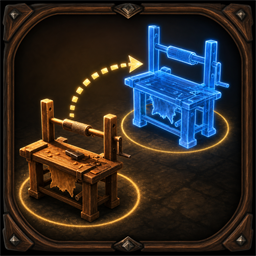
Move player-built Valheim pieces in World mode by default, or optionally from the build menu. Uses U hotkeys, a blue placement ghost, multiplayer owner confirmation, and configurable recipe-knowledge checks.MoveBuildPieces
Move player-built Valheim build pieces without destroying and rebuilding them. By default the mod works in World mode, so you can walk up to a placed object and press U without opening the hammer build menu.
Usage
Worldmode: default. Without active build mode, hover a removable player-built piece and pressUby default to start or cancel moving it.BuildMenumode: optional. Equip the hammer, enter build mode, hover a removable player-built piece, and pressUby default to start or cancel moving it.- Place the blue ghost to move the original object to that position.
- Press
Ewhile moving to interact with doors without cancelling move mode.
Choose one active mode with the Move mode config dropdown. Each mode has its own hotkey.
Config Defaults
Move mode = World: moving works outside the hammer build menu.World mode move hotkey = UBuild mode move hotkey = URequire known piece = false: player-built pieces can be moved even if the player has not learned their recipe yet.Block terrain modifiers = true: terrain-changing pieces stay blocked.Block dynamic objects = true: ships, carts, characters, and non-kinematic rigidbodies stay blocked.Move lock timeout seconds = 45: multiplayer move locks expire automatically after a disconnect or crash.
Existing BepInEx config files keep their saved values. Delete or edit the existing config if you want these defaults to apply after updating.
Safety
The object keeps its original ZDO, so container inventories and production state stay on the same network object. In multiplayer the ZDO owner applies and confirms the final move, while the local player only requests it. Moves are limited to the original player-base area that covered the object when move mode started, and the ghost must remain inside the required build-station range.
World objects, terrain modifiers, ships, carts, characters, and active containers are blocked by default. Unknown pieces are allowed by default, but can be blocked with Require known piece = true.
Move mode is cancelled automatically when the player dies, starts teleporting, switches from World move mode into normal build mode, or the moved object disappears.
In multiplayer, the moved object is locked while a player is moving it. If the moving player disconnects or crashes, the lock expires after Move lock timeout seconds.
The mod only performs focused work for the local player while move mode is active. It does not scan all placed objects.