

ImmersiveFirstPerson
A body-aware first-person camera for Valheim with first-person rendering optimization options.Immersive First Person
A body-aware first-person camera for Valheim.
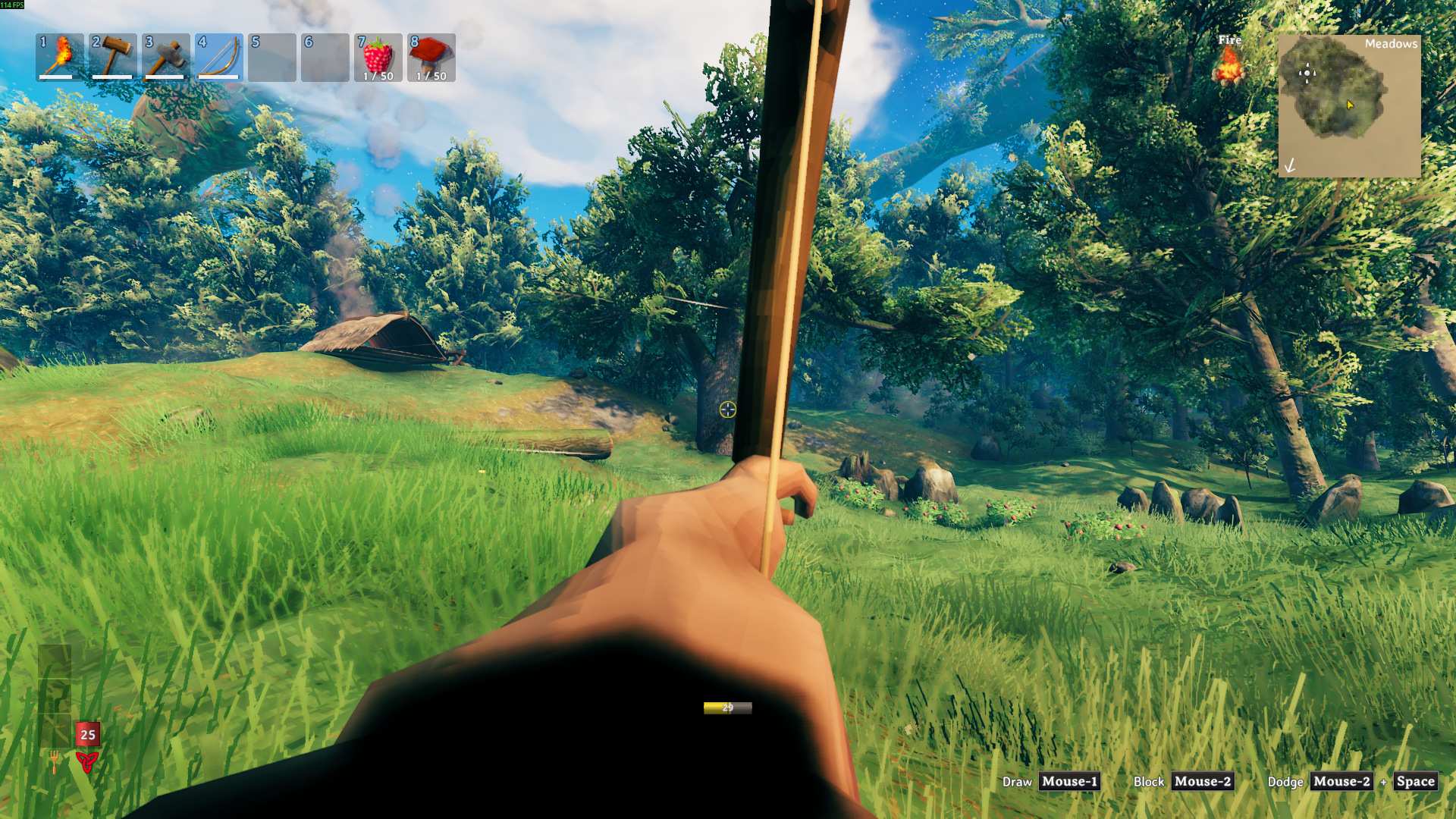
Step into your character's boots and keep Valheim feeling like Valheim. Immersive First Person tracks your animated head, keeps your local body visible, and handles the awkward moments where the game normally pulls the camera back out.
Highlights
- Toggle first person with
F6. - Keep your body, hands, and held items visible.
- Stay first person while crafting, sailing, sitting, holding fast, or opening inventory.
- Smooth out intense head movement with the head bob slider.
- Hide head and helmet-slot gear when camera clipping gets in the way.
- Keep
HideHeadlocal-only for multiplayer. - Tune shadows, occlusion culling, camera effects, and visibility refresh cost.
Quick Start
Install the mod, launch Valheim once, then press F6.
If your head or helmet gets in the camera, enable:
[Visibility]
HideHead = true
Recommended settings
For the intended first-person feel, start here:
[Camera Overrides]
OverrideForcedThirdPerson = true
LockCameraWhileAttached = true
AttachedCameraExtraVerticalOffset = 0
AttachedCameraExtraForwardOffset = 0.08
AttachedCameraMaxYaw = 80
AttachedCameraMaxPitch = 55

[Camera Motion]
HeadBobAmount = 0.5

[Graphics]
FirstPersonShadowDistance = 30
FirstPersonShadowCascades = 0
UseOcclusionCulling = true
DisableCameraEffects = false

[Visibility]
HideHead = false
ForceBodyVisible = true
VisibilityRefreshInterval = 1
Performance
Version 1.3.0 keeps view distance and LOD unchanged for immersion. The optimization settings focus on shadows, occlusion culling, optional camera effects, and head-hiding scan cost.
To keep the game's current shadow settings:
[Graphics]
FirstPersonShadowDistance = -1
FirstPersonShadowCascades = -1
DisableCameraEffects = false
Notable config options
| Section | Option | Default | What it does |
|---|---|---|---|
Camera Overrides |
OverrideForcedThirdPerson |
true |
Keeps first person active during gameplay interactions. |
Camera Overrides |
LockCameraWhileAttached |
true |
Locks the camera to a stable body offset while seated, sailing, or attached. |
Camera Overrides |
AttachedCameraExtraVerticalOffset |
0 |
Adds height to the attached camera position. |
Camera Overrides |
AttachedCameraExtraForwardOffset |
0.08 |
Moves the attached camera forward slightly. |
Camera Overrides |
AttachedCameraMaxYaw |
80 |
Limits left and right looking while attached. |
Camera Overrides |
AttachedCameraMaxPitch |
55 |
Limits up and down looking while attached. |
Graphics |
FirstPersonShadowDistance |
30 |
Caps first-person shadow distance. Use -1 to keep the current value. |
Graphics |
FirstPersonShadowCascades |
0 |
Caps first-person shadow cascades. Use -1 to keep the current value. |
Graphics |
UseOcclusionCulling |
true |
Enables camera occlusion culling in first person. |
Graphics |
DisableCameraEffects |
false |
Temporarily disables known camera post-processing components. |
Camera Motion |
HeadBobAmount |
0.5 |
Controls how much animated head movement affects the camera. |
Visibility |
HideHead |
false |
Hides the local head and matched head-slot gear from the camera. |
Visibility |
VisibilityRefreshInterval |
1 |
Controls how often head-slot renderers and head bones are refreshed. |
Installation
Use your preferred Valheim mod manager, or place ImmersiveFirstPerson.dll here:
Valheim/BepInEx/plugins/ImmersiveFirstPerson/
Launch the game once to generate the config file.
Updating
If the mod acts oddly after an update, back up and delete the old config file, then launch the game once to regenerate it.
Compatibility
This mod touches the camera, local player visibility, the character skeleton, and attached camera states. Mods that heavily change those systems may overlap.
HideHead only mutates the local player's renderers and bones. Remote player characters are ignored for multiplayer compatibility.
Credits
Inspired by Azumatt's First Person Mode.
Support
If you enjoy the mod and want to support future updates, you can buy me a coffee on Ko-fi.
