


ImmersiveFirstPerson
A body-aware first-person camera for Valheim with shoulder peek and first-person rendering optimization options.Immersive First Person
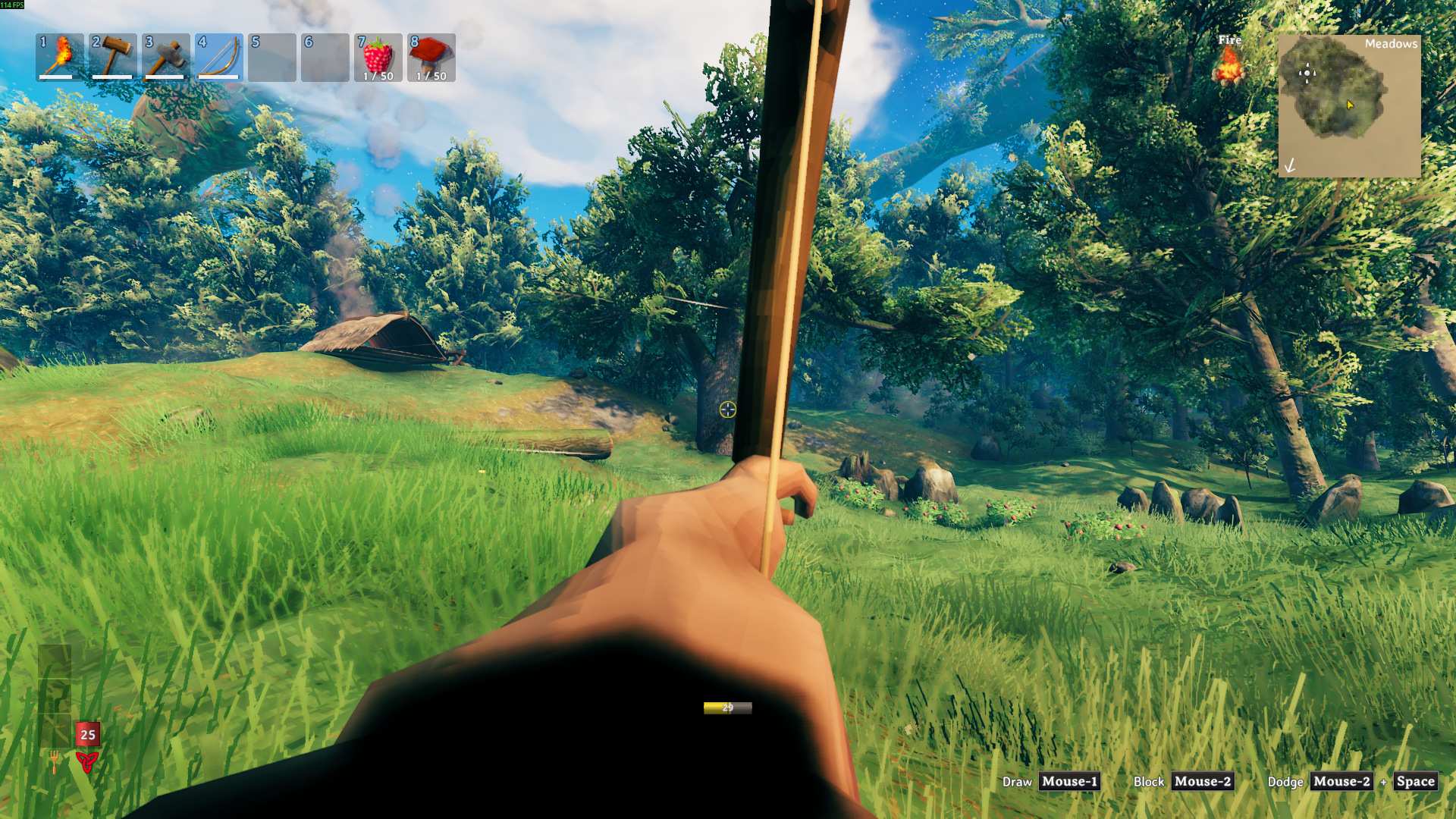
A first-person Valheim camera that lets you look through your character's eyes while your body stays in the world.
Walk the Black Forest, sail into storms, build by the fire, and fight up close without losing sight of your hands, gear, and footing. Immersive First Person follows your character's animated head, keeps your local body visible, and smooths over the moments where Valheim usually pulls the camera back out.
Highlights
- Press
F6to step in and out of first person. - See your body, hands, weapons, shields, and tools.
- Stay first person while crafting, sailing, sitting, holding fast, or opening inventory.
- Dodge with normal Valheim movement by default, so
Sdodges backward andAorDdodges sideways. - Turn on
Dodge Where You Lookif you prefer dodging toward the camera direction. - Peek left or right with simple shoulder peek controls.
- Calm down heavy head movement with the head bob slider.
- Hide head and helmet-slot gear when it gets in the camera.
- Keep foliage, berry bushes, trees, and world props visible up close.
- Keep visibility changes local to your own player in multiplayer.
Quick Start
Install the mod, launch Valheim once, then press F6.
If your head or helmet blocks the view, turn this on:
[Visibility]
HideHead = true
Recommended settings
These settings are a good first run:
[Input]
Dodge Where You Look = false

[Camera Overrides]
OverrideForcedThirdPerson = true
LockCameraWhileAttached = true
AttachedCameraExtraVerticalOffset = 0
AttachedCameraExtraForwardOffset = 0.08
AttachedCameraMaxYaw = 80
AttachedCameraMaxPitch = 55

[Camera Motion]
HeadBobAmount = 0.5

[Shoulder Peek]
EnableShoulderPeek = true
ShoulderPeekMode = Hold
PeekLeftKey = Mouse3
PeekRightKey = Mouse4
ShoulderPeekOffset = 0.28
ShoulderPeekSpeed = 12

[Graphics]
FirstPersonShadowDistance = 30
FirstPersonShadowCascades = 0
UseOcclusionCulling = false
DisableCameraEffects = false

[Visibility]
HideHead = false
ForceBodyVisible = true
VisibilityRefreshInterval = 1
Performance
Version 1.4.1 leaves world draw distance and LOD alone, so forests, berry bushes, and nearby props stay visible when you walk up to them. The performance settings focus on shadows, optional camera effects, and how often head or helmet visibility is refreshed.
To keep Valheim's current shadow settings:
[Graphics]
FirstPersonShadowDistance = -1
FirstPersonShadowCascades = -1
DisableCameraEffects = false
Notable config options
| Section | Option | Default | What it does |
|---|---|---|---|
Input |
Dodge Where You Look |
false |
Keeps normal Valheim dodge controls. Enable it to dodge toward the camera direction instead. |
Camera Overrides |
OverrideForcedThirdPerson |
true |
Keeps first person active during common gameplay screens and interactions. |
Camera Overrides |
LockCameraWhileAttached |
true |
Keeps the view steady while seated, sailing, or attached to something. |
Camera Overrides |
AttachedCameraExtraVerticalOffset |
0 |
Raises or lowers the attached camera position. |
Camera Overrides |
AttachedCameraExtraForwardOffset |
0.08 |
Nudges the attached camera slightly forward. |
Camera Overrides |
AttachedCameraMaxYaw |
80 |
Sets how far you can look left or right while attached. |
Camera Overrides |
AttachedCameraMaxPitch |
55 |
Sets how far you can look up or down while attached. |
Shoulder Peek |
EnableShoulderPeek |
true |
Lets you peek left or right in first person. |
Shoulder Peek |
ShoulderPeekMode |
Hold |
Uses hold or toggle behavior for shoulder peek. |
Shoulder Peek |
PeekLeftKey |
Mouse3 |
Peeks left. |
Shoulder Peek |
PeekRightKey |
Mouse4 |
Peeks right. |
Shoulder Peek |
ShoulderPeekOffset |
0.28 |
Sets how far the camera leans sideways. |
Shoulder Peek |
ShoulderPeekSpeed |
12 |
Sets how quickly the lean moves in and out. |
Graphics |
FirstPersonShadowDistance |
30 |
Caps shadow distance in first person. Use -1 to keep the current value. |
Graphics |
FirstPersonShadowCascades |
0 |
Caps shadow cascades in first person. Use -1 to keep the current value. |
Graphics |
UseOcclusionCulling |
false |
Kept off in first person so nearby foliage and props stay visible. The setting remains for old configs. |
Graphics |
DisableCameraEffects |
false |
Temporarily turns off known camera effects, then restores them when you leave first person. |
Camera Motion |
HeadBobAmount |
0.5 |
Controls how much animated head movement reaches the camera. |
Visibility |
HideHead |
false |
Hides your local head and matched head-slot gear from the camera. |
Visibility |
VisibilityRefreshInterval |
1 |
Sets how often head, helmet, and head-slot visibility checks refresh. |
Installation
Use your preferred Valheim mod manager, or place ImmersiveFirstPerson.dll here:
Valheim/BepInEx/plugins/ImmersiveFirstPerson/
Launch the game once to generate the config file.
Updating
If things feel odd after an update, back up and delete the old config file, then launch the game once to regenerate it.
Compatibility
This mod touches the camera, local player visibility, the character skeleton, and attached camera states. Mods that heavily change those systems may overlap.
HideHead only changes your local player's renderers and bones. Remote players, bushes, trees, plants, pickables, destructibles, and terrain props are left alone.
Credits
Inspired by Azumatt's First Person Mode.
Support
If you enjoy the mod and want to support future updates, you can buy me a coffee on Ko-fi.
