
You are viewing a potentially older version of this package. View Latest Version
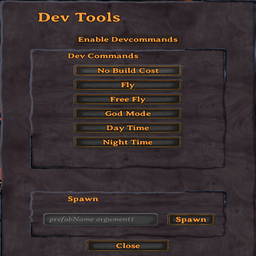
HexDevTools adds an in-game dev tools panel for Valheim.
The panel lets you enable dev commands and quickly run common debug/dev commands from a simple UI.
devcommands and debugmodeF8
The hotkey can be changed in the config file.
Config file:
BepInEx/config/hex.devtools.cfg
Example:
[General]

## Toggle Dev Tools UI
# Setting type: KeyboardShortcut
# Default value: F8
ToggleKey = F8
You can also use modifier keys, for example:
ToggleKey = LeftControl + F8
F8 to open the HexDevTools panelEnable DevcommandsExample spawn input:
LoxPie 10
This runs:
spawn LoxPie 10
Close or press F8 again to hide the panelThis is intended for local testing, debugging, and mod development.
Dev commands may require appropriate permissions depending on your world/server setup.
Devcommands stay enabled for the current Valheim game process once enabled.
Install with a mod manager or manually place the DLL into:
BepInEx/plugins/
Hex
