


Skeleton Selector
Choose your next Dead Raiser skeleton with an illustrated radial menu. Hold, aim, release. English and Russian UI with customizable controls.Skeleton Selector
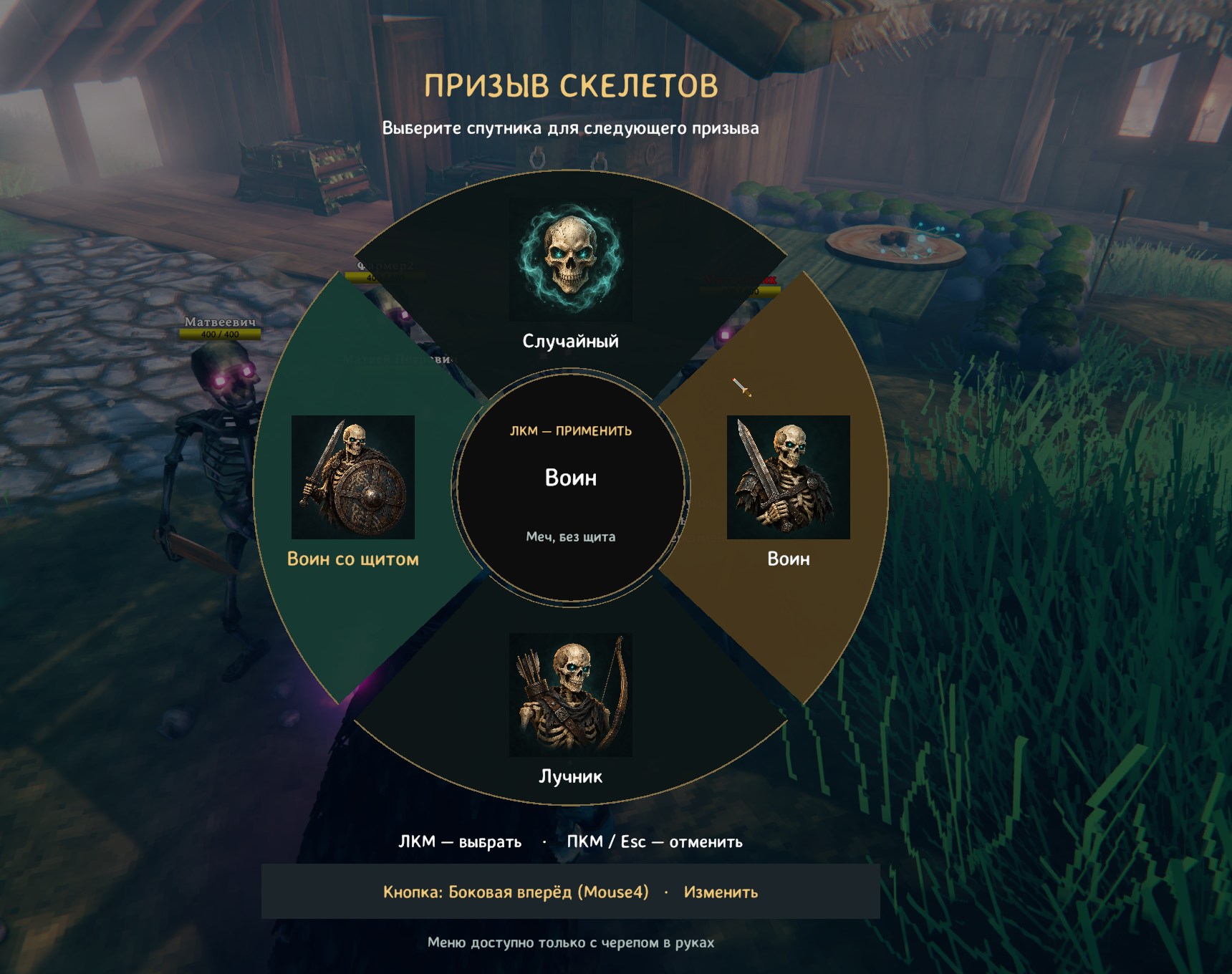
Screenshot from an earlier version. Current controls: hold the menu key, aim, release to select.
Скриншот ранней версии. Сейчас для выбора нужно удерживать кнопку меню, навести курсор и отпустить кнопку.
English
Short description
Choose your next Dead Raiser skeleton with an illustrated radial menu. Hold, aim, release. English and Russian UI with customizable controls.
Choose who answers your call
Skeleton Selector adds an illustrated selection wheel to Valheim's Dead Raiser. Equip the skull, hold your menu key, point at the skeleton you want, and release to confirm. Your next summon uses that choice.
Four choices
- Random — keep the game's normal random selection.
- Warrior — a sword-wielding skeleton without a shield.
- Archer — a skeleton equipped with a bow.
- Shield Warrior — a sword-wielding skeleton with a shield.
Each option has its own portrait. Hover highlighting previews your choice, while a separate highlight marks the currently selected type.
Features
- Hold-to-open, release-to-select radial menu.
- Menu available only while the Dead Raiser is equipped.
- Customizable keyboard or mouse binding, changed directly in the menu.
- English and Russian interface, with automatic language selection.
- Settings persist between sessions.
- Optional equipped-weapon hint showing your selection and menu key.
- Built-in portraits: no separate image installation required.
The mod selects equipment for future summons. It does not replace existing skeletons or change the game's resource costs, summon limit, health, damage, or skill scaling. You still cast with the Dead Raiser normally after making your selection.
Controls
- Equip the Dead Raiser.
- Hold Mouse4 — usually the forward side button on a mouse.
- Hover over a sector.
- Release the menu button to select it.
Release in the center, outside the wheel, or in a gap to keep your previous selection. Right-click or Esc cancels. The world continues running while the wheel is open.
To change the binding, hold the menu button and left-click Key: … · Change. Release the old button and press the new key or mouse button. Left-click, right-click, and Esc are reserved.
To change the interface language, hold the menu button and click Language to cycle through Auto → English → Русский. Auto uses Russian when Valheim is set to Russian, and English for other game languages.
Installation
Requires Valheim and a working BepInEx 5 installation.
- Close Valheim.
- Copy the archive's
BepInExfolder into your Valheim folder, preserving the folder structure. The DLL belongs atValheim/BepInEx/plugins/SkeletonSelector/SkeletonSelector.dll. - Start the game and equip the Dead Raiser.
Alternatively, install the package with a Thunderstore-compatible mod manager and launch Valheim through that manager. The declared BepInEx dependency is installed by the manager.
The mod uses its own menu; Jotunn and Configuration Manager are not dependencies.
Configuration file: BepInEx/config/local.valheim.skeletonselector.cfg.
Compatibility and current status
Version 1.2.1 is built against Valheim 1.0.15 and BepInEx 5.4.23.5. Compilation, radial hit detection, and translation checks have been completed. In-game testing of this release and multiplayer verification remain pending; compatibility with other game versions is not yet established.
Other mods that change skeleton spawning or equipment may affect the result. If the requested equipment cannot be selected, the mod falls back to the game's normal selection and displays a warning. Dedicated gamepad navigation is not included.
Uninstall
Close the game and remove SkeletonSelector.dll from its plugin folder. The optional configuration file can also be removed. Do not delete your world or character saves.
Artwork
The four menu portraits were generated with AI and are included in the mod.
Русский
Короткое описание
Выбирайте тип скелета для черепа призыва через круговое меню с портретами. Зажмите кнопку, наведите курсор и отпустите. Русский и английский интерфейс.
Выберите, кто ответит на ваш призыв
Skeleton Selector добавляет в Valheim круговое меню выбора скелетов для Dead Raiser — черепа призыва. Экипируйте череп, удерживайте кнопку меню, наведите курсор на нужный тип и отпустите кнопку. Следующий призыв использует сохранённый выбор.
Четыре варианта
- Случайный — обычный случайный выбор игры.
- Воин — скелет с мечом без щита.
- Лучник — скелет с луком.
- Воин со щитом — скелет с мечом и щитом.
У каждого варианта свой портрет. Подсветка наведения показывает возможный выбор, а отдельная подсветка отмечает уже выбранный тип.
Возможности
- Открытие круга удержанием кнопки и выбор при её отпускании.
- Меню доступно только с экипированным черепом.
- Назначение клавиши или кнопки мыши прямо в меню.
- Русский и английский интерфейс с автоматическим определением языка.
- Сохранение настроек между запусками.
- Отключаемая подсказка с выбранным типом и кнопкой меню.
- Встроенные портреты: отдельно устанавливать картинки не нужно.
Мод выбирает снаряжение будущих призывов. Уже созданные скелеты не изменяются; расход ресурсов, лимит призыва, здоровье, урон и зависимость от навыков остаются под управлением игры. После выбора используйте череп обычным способом.
Управление
- Экипируйте череп / Dead Raiser.
- Зажмите Mouse4 — обычно переднюю боковую кнопку мыши.
- Наведите курсор на нужный сектор.
- Отпустите кнопку меню, чтобы подтвердить выбор.
Отпускание в центре, вне круга или в зазоре сохраняет прежний выбор. ПКМ или Esc отменяет выбор. Пока меню открыто, мир не ставится на паузу.
Для переназначения удерживайте кнопку меню и нажмите ЛКМ на «Кнопка: … · Изменить». Отпустите старую кнопку и нажмите новую. ЛКМ, ПКМ и Esc зарезервированы.
Переключатель «Язык» меняет режимы Авто → English → Русский. В режиме Авто русский используется при русском языке Valheim, английский — при остальных языках игры.
Установка
Требуются Valheim и установленный BepInEx 5.
- Закройте Valheim.
- Скопируйте папку
BepInExиз архива в папку Valheim с сохранением структуры. DLL должна находиться вValheim/BepInEx/plugins/SkeletonSelector/SkeletonSelector.dll. - Запустите игру и экипируйте череп.
Также можно установить пакет через совместимый с Thunderstore менеджер модов и запускать игру через него. Указанная в манифесте зависимость BepInEx устанавливается менеджером.
У мода собственное меню. Jotunn и Configuration Manager не требуются.
Файл настроек: BepInEx/config/local.valheim.skeletonselector.cfg.
Совместимость и состояние версии
Версия 1.2.1 собрана под Valheim 1.0.15 и BepInEx 5.4.23.5. Выполнены сборка, проверки областей выбора и переводов. Проверка этой версии в игровом мире и мультиплеере ещё предстоит; совместимость с другими версиями игры пока не подтверждена.
Моды, меняющие призыв или снаряжение скелетов, могут влиять на результат. Если подобрать нужное снаряжение невозможно, остаётся штатный случайный выбор и появляется предупреждение. Отдельная навигация геймпадом не реализована.
Удаление
Закройте игру и удалите SkeletonSelector.dll из папки плагина. При желании можно удалить файл настроек. Миры и персонажей удалять не нужно.
Изображения
Четыре портрета для меню созданы с помощью генерации изображений ИИ и включены в мод.