

ValheimPasswordManager
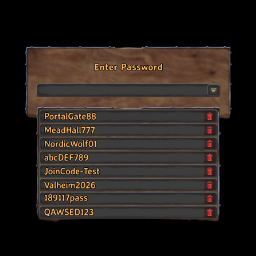
A client-side BepInEx mod that adds saved password selection and management to Valheim's vanilla server password dialog while keeping the original UI style.Valheim Password Manager
English
A BepInEx 5 + Harmony client-side mod for Valheim that enhances the vanilla password dialog shown when joining password-protected servers.
Source code repository
https://github.com/JipZeonGit/ValheimPasswordManager
Features
- Keeps the original Valheim password dialog and submit flow intact
- Injects a dropdown button on the right side of the existing input field
- Shows a local password list in a drawer below the input field
- Clicking a saved password fills the original input field automatically
- Each saved password can be deleted individually
- Prompts the player with “Save this password?” when submitting a new password for the first time
- Stores passwords in a local JSON file and recreates the file safely if it becomes corrupted
- Requires no server-side installation
Localization
- The confirmation prompt follows the game's currently selected language.
- The current implementation covers the built-in language names visible in
assembly_guiutils.dll. - To avoid missing-glyph issues, the delete button no longer relies on an emoji and is instead drawn with plain UI shapes.
- Character compatibility risk should be low for languages already supported by the base game, because the prompt still uses Valheim's own fonts and localization pipeline.
- Password rows reuse the same font settings as the original input field. If a character cannot be displayed correctly in the vanilla input box, it may also be limited in the saved-password list. That would be a base-game font coverage issue rather than a mod-specific one.
Build
Option 1: build with the script
Run this from the repository root:
.\build.ps1
Option 2: build manually with dotnet
$env:APPDATA = (Resolve-Path '.appdata').Path
$env:DOTNET_CLI_HOME = (Resolve-Path '.').Path
$env:DOTNET_SKIP_FIRST_TIME_EXPERIENCE = '1'
$env:NUGET_PACKAGES = Join-Path (Resolve-Path '.').Path '.nuget\packages'
dotnet build .\src\ValheimPasswordManager\ValheimPasswordManager.csproj -c Debug --configfile .\.appdata\NuGet\NuGet.Config
Output DLL:
src\ValheimPasswordManager\bin\Debug\ValheimPasswordManager.dll
Installation
Copy the compiled DLL into the Valheim client:
<Valheim Folder>\BepInEx\plugins\ValheimPasswordManager\ValheimPasswordManager.dll
A dedicated subfolder is recommended:
<Valheim Folder>\BepInEx\plugins\ValheimPasswordManager\
JSON storage path
After running the mod, the saved password list is stored at:
<Valheim Folder>\BepInEx\config\JipZeonGit.Valheim.PasswordManager.json
If the file is corrupted, it is backed up automatically as:
JipZeonGit.Valheim.PasswordManager.json.corrupt-timestamp.bak
Configuration file
After the mod runs once, it generates a BepInEx config file:
<Valheim Folder>\BepInEx\config\JipZeonGit.Valheim.PasswordManager.ScrollSpeed.cfg
Current UI option:
UI.PasswordListScrollSpeed
Notes:
- default value:
160 - allowed range:
20to400 - larger values make the password list scroll faster with the mouse wheel
Development references
This repository does not commit the game/framework DLL payloads by default, but local compilation still depends on these reference folders:
references\\BepInEx\\corereferences\\Valheim\\Managed
If you clone this repository on a new machine, prepare those DLLs in the local references folder first, following references/README.md, and then build the project.
GitHub repository guidance
Treat the GitHub repository as a source repository, not as a mirror of a local game installation.
Recommended to commit:
src/docs/README.md.gitignorebuild.ps1NuGet.Config
Not recommended to commit:
- local game/framework reference copies under
references/ - local upstream source mirrors under
third_party/ - build outputs and caches such as
bin/,obj/,.appdata/,.dotnet/, and.nuget/ - local JSON files, backup files, and log files created during testing
Why:
references/Valheim/Managedcontains assemblies copied from a local game installation and is not ideal to keep in a public source repository.third_party/is reference material only and is not required for players to run the mod.- build outputs and caches make the repository noisy and harder to maintain.
Should the compiled DLL be pushed to GitHub?
Usually, no. It is better not to commit the built DLL to the source branch.
Recommended workflow:
- keep source code in the repository
- upload
ValheimPasswordManager.dllas a GitHub Releases asset when you want to publish to players - optionally package a zip such as
ValheimPasswordManager-1.0.1.zipfor releases
When committing the DLL can still make sense:
- you intentionally want a
release/folder inside the repository - you want the repository to act as both source repo and manual distribution repo
For normal development and collaboration, the better default is:
- source code in Git
- DLL in Releases
Known limitations
- The first version injects UI into the vanilla dialog at runtime. It aims to match the original style, but the final look still depends on the current in-game UI hierarchy.
- The saved-password list is global and is not bound to specific servers.
- The main target is the PlayFab / Join Code / normal online password handshake dialog. This mod does not implement a server bookmark system.
- The UI has not yet been visually verified in every language with live in-game screenshots. If you later share screenshots from a specific language, the layout can be tuned further.
中文说明
一个基于 BepInEx 5 + Harmony 的 Valheim 纯客户端 Mod,用来增强“进入有密码的服务器时”的原版密码输入界面。
源码仓库
https://github.com/JipZeonGit/ValheimPasswordManager
功能
- 保留 Valheim 原版密码输入窗口和原始提交逻辑
- 在原始输入框右侧注入下拉按钮
- 展开后显示本地保存的密码列表
- 点击密码可自动填入原始输入框
- 每条密码可单独删除
- 新密码首次提交时,弹出“是否保存该密码?”确认框
- 密码本地 JSON 保存,损坏时自动备份并重建空文件
- 不依赖服务器端安装
语言适配
- Mod 的确认弹窗文案会跟随当前游戏语言显示。
- 当前已覆盖 Valheim 原版支持语言中在
assembly_guiutils.dll可见的语言名称。 - 为了避免字体缺字,删除按钮不再使用 emoji,而是改成纯 UI 图形绘制。
- 对于游戏原版已支持的语言,字符兼容性风险较低,因为弹窗仍使用游戏原生字体和本地化系统。
- 密码列表里的内容会复用原始输入框的字体设置;如果某些字符连原版输入框都无法正确显示,那么列表里也可能同样受限。这属于游戏基础字体覆盖范围,而不是本 Mod 单独引入的问题。
构建
方式 1:直接用脚本
在仓库根目录运行:
.\build.ps1
方式 2:手动用 dotnet
$env:APPDATA = (Resolve-Path '.appdata').Path
$env:DOTNET_CLI_HOME = (Resolve-Path '.').Path
$env:DOTNET_SKIP_FIRST_TIME_EXPERIENCE = '1'
$env:NUGET_PACKAGES = Join-Path (Resolve-Path '.').Path '.nuget\packages'
dotnet build .\src\ValheimPasswordManager\ValheimPasswordManager.csproj -c Debug --configfile .\.appdata\NuGet\NuGet.Config
输出 DLL:
src\ValheimPasswordManager\bin\Debug\ValheimPasswordManager.dll
安装
把编译出的 DLL 放到 Valheim 客户端:
<Valheim目录>\BepInEx\plugins\ValheimPasswordManager\ValheimPasswordManager.dll
建议建一个独立子目录:
<Valheim目录>\BepInEx\plugins\ValheimPasswordManager\
JSON 保存位置
运行后,密码列表会保存到:
<Valheim目录>\BepInEx\config\JipZeonGit.Valheim.PasswordManager.json
如果文件损坏,会自动备份成:
JipZeonGit.Valheim.PasswordManager.json.corrupt-时间戳.bak
配置文件
运行一次 Mod 后,会生成 BepInEx 配置文件:
<Valheim目录>\BepInEx\config\JipZeonGit.Valheim.PasswordManager.ScrollSpeed.cfg
当前可调的 UI 项:
UI.PasswordListScrollSpeed
说明:
- 默认值是
160 - 可调范围是
20到400 - 数值越大,密码列表滚动越快
开发依赖引用
这个仓库默认不提交游戏和框架 DLL 本体,但源码编译仍然依赖本地引用目录:
references\BepInEx\corereferences\Valheim\Managed
如果你是在一台新的机器上克隆这个仓库,需要先按 references/README.md 的说明,把对应 DLL 从本地 Valheim / BepInEx 环境准备到 references 目录,再执行构建。
GitHub 仓库建议
建议把 GitHub 仓库当作“源码仓库”,而不是“游戏安装目录镜像”。
推荐提交:
src/docs/README.md.gitignorebuild.ps1NuGet.Config
不建议提交:
references/下的游戏和框架引用副本third_party/下的本地参考源码仓库bin/、obj/、.appdata/、.dotnet/、.nuget/等构建缓存- 本地测试时生成的 JSON、备份文件、日志文件
原因:
references/Valheim/Managed包含来自游戏安装目录的程序集,不适合直接作为公开仓库内容长期维护。third_party/只是本地参考资料,不是这个 mod 运行所必需的发布内容。- 构建输出和缓存会让仓库变脏,也不利于协作。
是否要把项目 DLL 推送到 GitHub
通常不建议把编译产物 DLL 直接提交到源码分支。
更推荐的做法:
- 源码分支只提交源代码
- 需要发布给玩家时,把
ValheimPasswordManager.dll作为 GitHub Releases 的附件上传 - 如果以后你想做整包发布,可以额外打一个 zip,例如
ValheimPasswordManager-1.0.1.zip
什么时候可以提交 DLL:
- 你明确想在仓库里保留一个
release/目录做手工分发 - 你不介意源码仓库同时承担发布仓库的角色
如果只是正常开发协作,我建议:
- GitHub 提交源码
- DLL 走 Releases
已知限制
- 第一版 UI 是运行时注入到原版对话框上的,风格会尽量贴近原版,但细节仍取决于游戏当前 UI 结构。
- 当前密码列表是“全局列表”,不按服务器单独绑定。
- 主要针对 PlayFab / Join Code / 常规联机时的密码握手弹窗,不做服务器收藏夹功能。
- 目前还没有在每一种语言环境下逐个做实机截图验证;如果你后面提供某个语言下的实际界面截图,我可以继续针对布局做细调。