

ValheimPasswordManager
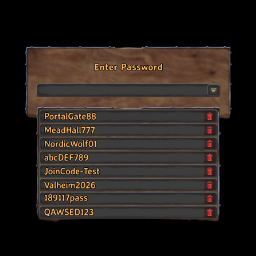
A client-side BepInEx mod that adds saved password selection and management to Valheim's vanilla server password dialog while keeping the original UI style.Valheim Password Manager v1.0.1
English
This is the first public release of Valheim Password Manager.
Features
- Adds a password dropdown button to the right side of Valheim's vanilla server password dialog
- Lets you view, select, and delete saved passwords
- Prompts to save new passwords locally before continuing to connect
- Stores password data in a local JSON file
- Supports configurable mouse wheel scroll speed through a
.cfgfile - Preserves the original Valheim visual style without replacing the vanilla password flow
Scope
- Client-side mod
- Requires BepInEx 5
- Does not need to be installed on the server
- Primarily intended for PlayFab / Join Code connection flows
Installation
Extract the included BepInEx folder into your Valheim game root directory.
Config and data files
- Password data:
BepInEx/config/JipZeonGit.Valheim.PasswordManager.json - Scroll config:
BepInEx/config/JipZeonGit.Valheim.PasswordManager.ScrollSpeed.cfg
Release packages
ValheimPasswordManager_RELEASE.zipStandard package for normal players. Contains only the files required to run the mod.ValheimPasswordManager_DEBUG.zipDebug package that also includes.pdbsymbol files for troubleshooting and development testing.
Notes
- Passwords are currently stored as plain text in a local JSON file
- The
RELEASEpackage is recommended for normal use - The
DEBUGpackage is only recommended when troubleshooting is needed
中文
这是 Valheim Password Manager 的首个公开版本。
主要功能
- 在英灵神殿原版服务器密码窗口右侧添加密码下拉按钮
- 支持查看、选择和删除已保存密码
- 输入新密码并连接服务器时,可选择是否保存到本地
- 使用本地 JSON 文件保存密码数据
- 支持通过
.cfg调整密码列表滚轮速度 - 尽量保持 Valheim 原版界面风格,不替换原始密码输入逻辑
适用范围
- 客户端 Mod
- 需要 BepInEx 5
- 不需要服务器安装
- 主要适配 PlayFab / Join Code 连接场景
安装
将压缩包中的 BepInEx 文件夹解压到 Valheim 游戏根目录即可。
配置与数据文件
- 密码数据:
BepInEx/config/JipZeonGit.Valheim.PasswordManager.json - 滚轮配置:
BepInEx/config/JipZeonGit.Valheim.PasswordManager.ScrollSpeed.cfg
发布包说明
ValheimPasswordManager_RELEASE.zip普通玩家使用的正式版本,只包含运行所需文件。ValheimPasswordManager_DEBUG.zip调试版本,额外包含.pdb符号文件,主要用于排错和开发测试。
注意事项
- 当前密码以明文形式保存在本地 JSON 中
- 正式使用推荐下载
RELEASE包 - 只有在需要协助排错时,才建议使用
DEBUG包