

ProtectSpawnerFarms
Protect the spawners your farms are built around: no damage while you're near, raised health, a shield bubble, and a Compendium list shared with your friends.ProtectSpawnerFarms
Keep the spawners your farms are built around safe!
You spent hours building a farm around a Greydwarf nest or an evil bone pile, and one stray swing (yours, a friend's or a troll's) destroys it.
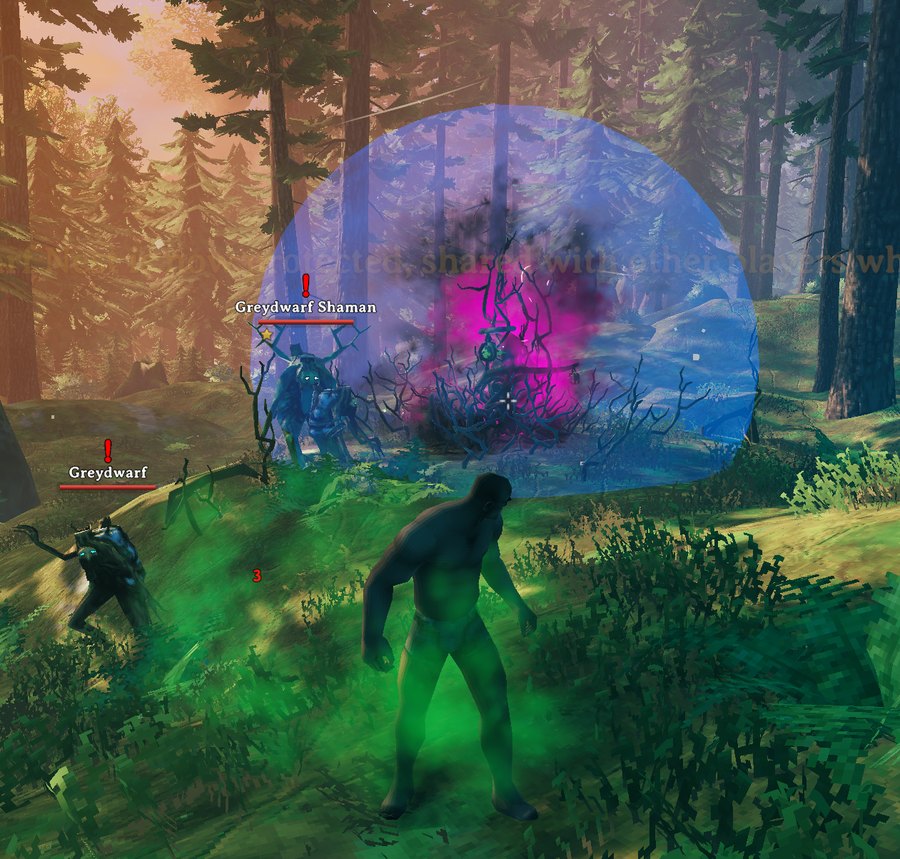
Open your inventory next to a spawner and click the shield. From then on it can't be damaged while anyone with the mod is near, its health is raised so players without the mod don't break it by accident, and a blue shield bubble shows everyone with the mod that it's protected.
📸 Screenshots
Protected spawners sit inside a shield bubble. Color and opacity are up to you.
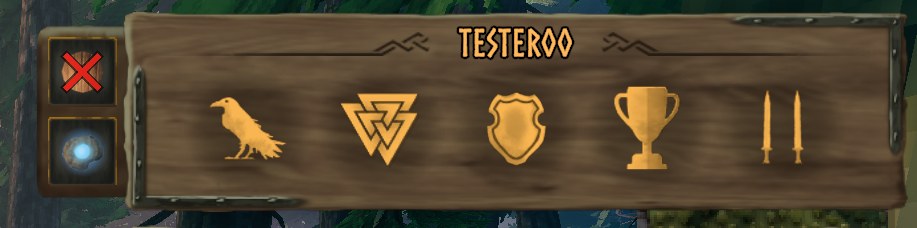
Two buttons next to your inventory slide out when a spawner is near: protect it, and highlight it. A red cross means a click turns that thing off.
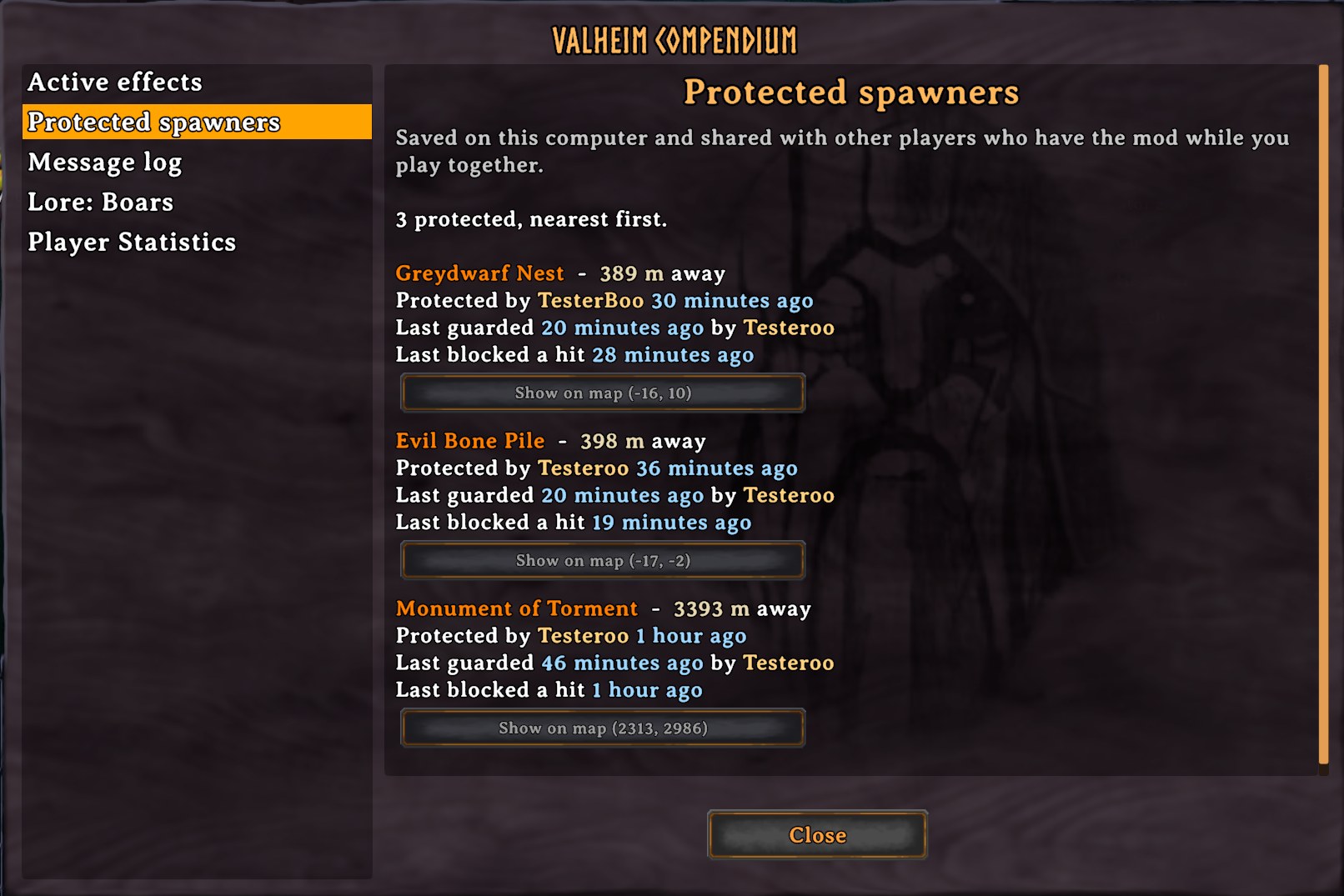
Every protected spawner in the Compendium, with who protected it, when it was last guarded, and a button that shows it on the map.
🧭 Features
- 🛡️ No damage while you're near: within 20 m of a protected spawner, every hit on it is blocked: yours, other players' and creatures'. Blocked hits show Immune.
- 🏰 Server protection: when the server has the mod, it keeps protected spawners at full health by itself, so nobody can destroy them, with or without the mod, and whether or not anyone with the mod is around.
- ❤️ Raised health: a protected spawner's health goes up to 10,000, so even on a server without the mod, players without it can't destroy one by accident when nobody with the mod is around. Unprotecting puts its health back to normal.
- 🫧 Shield bubble: protected spawners sit inside a shield bubble like the Staff of Protection's. You choose its color and how solid it looks.
- 🔦 Highlight: paint the nearest spawner in a pulsing color you can see through walls, so you always know which one the buttons act on. It follows whichever spawner is nearest and turns off when you walk away.
- 🧿 Status: near a protected spawner you get Protecting spawner (your presence keeps it safe) or, when the server protects it, Protected spawner nearby.
- 👁️ Hover info: looking at a protected spawner shows who protected it.
- 🔐 Who can change it: anyone, only admins, or only the player who protected a spawner (and admins) can remove its protection.
- 📖 Compendium page: every protected spawner in the world, nearest first, with its distance, who protected it and when, when it was last guarded and last blocked a hit. Show on map (x, z) pins it and opens the map there, like a boss stone.
- 🤝 Shared with your friends: players with the mod share their protected spawners, with or without the mod on the server.
- 🪺 Every spawner: destructible spawners are found automatically, including new ones from game updates.
🎮 How to use it
- Walk up to a spawner and open your inventory (Tab).
- A small wooden flap slides out left of your player panel, with two buttons:
- Shield: protect the closest spawner. Click again to remove protection.
- Eye: highlight the nearest spawner. Click again to stop.
- Hover a button to see which spawner it acts on and how far away it is.
The buttons show while a spawner is within 20 m, and slide away when you walk off.
🪺 Spawners
| Spawner | Prefab |
|---|---|
| Greydwarf Nest | Spawner_GreydwarfNest |
| Evil Bone Pile | BonePileSpawner, BonePileSpawner_swamp |
| Body Pile | Spawner_DraugrPile |
| Monument of Torment | Spawner_CharredStone, Spawner_CharredStone_Elite, Spawner_CharredStone_event |
| Effigy of Malice | Spawner_CharredCross |
| Wardrobe Shaft (Deep North) | Spawner_Hole, Spawner_Hole_double |
| Malicious Ice (Deep North) | BlackIce_Core |
| Hexahedric Pulp | BlobMorkBig |
| Evil hearts | EvilHeart_Forest, EvilHeart_Swamp |
Any other destructible object that spawns creatures, including modded ones, works too.
⚙️ Installation
Install with a mod manager (r2modman, Thunderstore App), or manually:
- Install BepInExPack Valheim.
- Extract ProtectSpawnerFarms into
BepInEx/plugins. - Launch the game. Settings are in
BepInEx/config/JoksterCube.ProtectSpawnerFarms.cfg, or in game with Configuration Manager (F1).
Installing on the server is optional. It keeps one protected list for everyone, protects those spawners itself, and syncs the protection settings.
🧩 Multiplayer & Compatibility
- ✅ Works in single-player, on servers with the mod and on servers without it.
- ✅ Players without the mod can join. They don't see the bubble, but the raised health keeps them from destroying a protected spawner by accident.
- 🤝 Server without the mod: players with the mod share their protected spawners with each other while they play together, and each keeps the merged list for that world. When two players changed the same spawner, the newest change wins.
- 🖥️ Server with the mod: the server keeps one list for everyone and keeps those spawners at full health itself. Who Can Change Protection decides who may protect and unprotect.
- ⚠️ When both the server and a player have the mod, they need the same version. Players also only share with players on the same version.
Protected lists are saved in BepInEx/config/JoksterCube.ProtectSpawnerFarms/, one file per world.
🔧 Configuration
Synced settings come from the server when it runs the mod, and can't be changed in game.
| Setting | Default | Synced | What it does |
|---|---|---|---|
| Boosted Health | 10,000 | ✔ | Health of a protected spawner. 0 keeps normal health. |
| Protection Range | 20 m | ✔ | While you are this close, all damage to a protected spawner is blocked and you get the status (5–100 m). Raise it if you play on servers without the mod and want to guard from farther away. |
| Server Protection | On | ✔ | On a server with the mod, the server keeps protected spawners at full health itself. |
| Who Can Change Protection | Anyone | ✔ | Anyone, AdminsOnly, or ProtectorOrAdmin (anyone can protect, only the protector or an admin can unprotect). |
| Share With Players | On | On a server without the mod, share protected spawners with other players who have it. | |
| Action Distance | 20 m | The buttons show when a spawner is this close (1–50 m). | |
| Show Shield Bubble | On | The bubble around protected spawners. | |
| Shield Bubble Color | Blue | Color of the bubble. | |
| Shield Bubble Opacity | 0.1 | How solid the bubble looks, from 0.01 to 1. | |
| Highlight Color | Amber | Color a highlighted spawner is painted in. | |
| Show Protecting Status | On | The Protecting spawner / Protected spawner nearby status. | |
| Show Messages | On | A message when you protect, unprotect or highlight. |
⬆️ Upgrading from 1.x
Version 2.0 is a rebuild. The keyboard shortcuts and old settings are gone, replaced by the inventory buttons. Spawners protected with 1.x need to be protected again.
💬 Feedback & Support
Report bugs or suggest improvements on GitHub.
Author: JoksterCube
Version: 2.0.0
License: MIT